Tag Archives: it manager

Teamwork is difficult for IT employees

Teamwork is essential for your IT organization to succeed. None of us would question it.

But did you ever consider that teamwork is not a basic trait in your IT staff. In fact, working on and within a team is a challenge for most of your IT people.

Here is why.

90% are independent, self starters who are goal oriented. Did you hear me say, “independent“?

Also, more than 90% are high detail people who like to do things their way. They are control oriented people who like to do the work themselves and have things done “their way”.

These two issues are not exactly made for teamwork. In fact, they can work against good teamwork.

Does this mean IT employees can’t be good team players? Certainly not, , , but it is important for IT managers to understand that it’s not a natural thing for 90% of your staff who have these two traits  —  independent and high detail.

What this means is that the IT manager must work hard to ensure teamwork is created in your organization and people know how to become good team players. As an IT manager, you want to reinforce teamwork and client service  all the time.

Help your IT staff understand that “we will all be successful together”. If the IT organization (the team) is not successful, there won’t be any successful individuals. It’s about the team, , , not about the individual. When the team is successful, we can all achieve success.

In a functional team, people have very specific assignments and responsibilities. They know how to do their jobs and when everyone succeeds in their work, the team succeeds. Failure in any area can cause the team to fail so people need the tools and knowledge to do their job and you as manager must be certain all things necessary for success are addressed.

People need to look out for one another, , , and help one another. It’s very difficult for someone who is highly independent and goal oriented to want others to succeed or to be the hero. We want those accolades for ourselves.

Learning how to become cooperative and eager to help others succeed is a key strategy you want to reinforce with your team, , , even reward this behavior when you see someone exhibit it.

You have to teach your IT staff fundamentals, , , like a football coach teaches blocking and tackling. Fundamental skills like teamwork, project management, communication, and client service are essential for your success.

Don’t forget to look at yourself when you think about this, , , 90% of all IT managers are also independent and high detail people.

Time to assess where you are

OK, five months of the year are complete, , , only seven months to go. Now is a great time to assess a few things:

1.  Are you completing your IT strategy?
Hopefully you are making great progress in completing the big items planned for this year. If not, you need to step up the pace, , , five months has passed very quickly and the end of the year will be here before you know it.

2.  How is your budget looking?
Better check where you stand with your budget and forecast out the trends of your major expense categories. If you are already behind in achieving your budget for the year, you need to make corrective action quickly, , , waiting until September or October will be too late. If you see certain expenses trending higher than what they need to be to make your plan, , , anticipate the result and make corrections as needed to achieve your plan.

3.  Are you taking care of your people?
Have you done anything nice for your staff this year? The next few months is a good time to do something. Take care of your people and they will be motivated and encouraged to take care of you. It doesn’t require lots of money, , , just pay attention to them and do something fun from time to time and show them you appreciate their efforts. Telling them you appreciate them is also very helpful.

4.  Does senior management know what you are doing?
Are you communicating with senior management and department managers so they know what your IT organization is getting accomplished, , , and are you translating these successes into business value components where they will “get it”. If you don’t know what I mean by “business value”, read the post titled, Business value is key.

5.  How are your clients feeling about IT support?
Are your clients happy with what you are doing or do you know? If you aren’t sure, now is a good time to check with them to insure your team is on course for a successful year.

Mid-year inspections are valuable to help ensure you achieve what you want to achieve this year. The freshness of a new year has worn off by now and we are now into the drudgery of the work, , , it’s time to highlight some things and create renewed focus on what you and your team are trying to get accomplished this year.

Your staff and you may be getting a bit tired or a bit down so make it a point to do something that shows you appreciate them. Have some fun.

Staff will begin taking vacations, , , be sure they do so they can come back fresh and ready to go. Be certain you do this for yourself, , , and when you take vacation, try to actually take a true leave of absence and get completely away from the work. It will help you and make you more productive when you return.

Assess where you are, make adjustments as needed, and push forward to make the progress you need to make this year.

Are you a leader or follower?

Do you prefer to take the lead and put yourself out front and willing to take a risk if what you do does not succeed?

Or do you prefer to avoid taking risks and follow someone else’s lead?

It is OK to be either type, you know, , , even in a management position. Some managers are better executioners of project initiatives than being able to develop strategy and getting senior managers to buy in.

It can be due to a lack of salesmanship, , , lack of confidence, , , or just not knowing how to go about it. A follower can become a leader if he wants to.

Becoming a leader is simply a matter of learning what to do, how to go about it, , , and having tools that help you lead.

Confidence comes with knowledge, , , and knowledge comes either from gaining experience or by investing in learning from others who have the experience.

Leadership traits are not something you just flip a switch and “turn on”. We wish it could be so easy.

What I believe happens is that you start investing in your knowledge and learn about leadership techniques and traits of leaders, , , and as you begin using this new-found knowledge in your work, , , you wake up one day and you are leading instead of following.

It’s not magic, , , it just happens as you begin doing things that leaders do.

Others are following your lead, , , and no one knows when the change took place in you although everyone realizes you went from following to leading.

Some people make the transition faster than others. I don’t know that there is a time line that matters.

The key here is that to become a leader, you make a decision to become a leader, , , you invest in learning how to take the lead and start doing things a leader would do and begin using tools that helps you lead.

It is always your decision in the long run, and like I said earlier, , , it is OK to be a follower, even in a manager role. If you decide to become a leader, , , invest in a mentor who can assist you in your transition.

Should you care about employees browsing the Internet?

Technology developments make us more productive than ever before – right?

Well, let’s consider a few things and think about this from a management point of view:

Pros
–  Information about virtually anything is much more accessible via the Internet.
–  Ability to communicate with one another is much better via e-mail and cell phones.
–  Every company can afford computer equipment and more productive processes.
–  Work is completed faster and easier with innovative software and equipment.

Cons
–  People productivity is reduced by so many distractions.
–  With greater communication accessibility comes more interruption.
–  Many people are not disciplined to avoid non-productive distractions of the Internet.

Great technology can be a double-edged sword, , , advantages that also come with many disadvantages. So, what this means is that it all comes down to how you manage technology in your company.

Do you have an Internet Usage Policy in your company?

Should you have one, , , or do you really want to manage the use of the Internet in your company in that way, , , by telling your people what they can and cannot do with the Internet at work?

This can be a delicate issue.

My sense is that you want people to be focused to do their jobs when at work. How they get the work done, I’m not so sure I really care about  as long as they accomplish our organization’s goals and objectives.

Well, here is the rub. Maybe your team is great in supporting your client but if they are seen playing solitaire or browsing the Internet on their PC much of the time, , , it sends the wrong signal to the client.

Even if the client does this as well, when they see an IT person “goofing off”, it’s a bigger deal to them.

One of the earmarks of a successful IT organization is professional conduct. Playing games and simply browsing the Internet is not professional conduct. No matter how good your IT organization is in supporting your client, , , there are positive things you can do in supporting your business if your people have lots of spare time on their hands.

Lots of spare time would at a minimum suggest you are probably spending too much money in IT staff, , , and that’s a negative.

As a manager, I don’t care that people browse the Internet as long as it is work related and something that benefits their efforts to support our client. The Internet in this regard is a tool to help us succeed.

What I do mind is when people are distracted from our support work and browse the Internet or play games that don’t benefit our company.

This again is a double-edged sword. IT professionals do things in their non-work hours that benefit the company and often use the Internet to help them in these efforts. It is difficult for me to be bothered if they are not 100% productive at work and expect them to do things outside of work to improve their skills and support our client.

What would be great would be if we could create very objective measurements as to whether IT people are successful in doing their jobs like you can for a salesman.

In sales, it is cut and dry. The salesman makes his monthly sales quota and we are happy, , , he doesn’t  and he fails in his job, , , it is that simple.

We don’t care how the salesman spends his time as long as he achieves his quota. In fact, management might even look at such a situation that if a salesman can make his quota and work only 10% of a normal week, , , we would be happy.

The key with sales  is that we can create a specific quota objective and hold the salesman accountable. What makes him more accountable is that he doesn’t get paid unless he sells. He either succeeds or the sales management process and how we pay a salesman weeds out the losers.

It’s more difficult in IT to develop such clear cut objectives, , , but what this says is that we need to develop very objective performance plans that include specific goals and objectives and hold our people accountable.

In reality , you don’t really care how an employee spends the day as long as he is successful. The problem develops if your client perceives members of your team are “goofing off”. This really is an issue to be concerned about.

Coach your employees on the “proper use” of the Internet, phones and other technologies that help their productivity but are quick to take them out of productive work mode.

Remember, client perception is a big deal when you are a support organization, , , no matter if you are the IT Organization or Human Resources.

Another “industry average” to be careful with

Many CEO’s monitor IT spending by taking a look at a calculation called the IT Expense as a Percentage of Revenue. A good CEO knows about what his IT organization should spend, , , he may even have an industry average he uses to compare your spending with the rest of the industry.

Using this calculation is a good thing if used in the right context, , , but you need to be careful.

Let’s say your industry average is 2.5%. In other words, an average company in your industry spends 2.5% of revenue on IT. If your company has $500 million in annual revenue, that means your IT organization spends about $12.5 million a year if you are at the “industry average”.

What if you are spending $17.5 million (3.5% of revenue), , , or maybe 5% of revenue, twice the industry average? Does this mean you are doing a poor job in managing your IT organization?

No, , , definitely not. It certainly could mean you are doing a poor job, but the IT spending percentage of revenue alone does not tell the whole story.

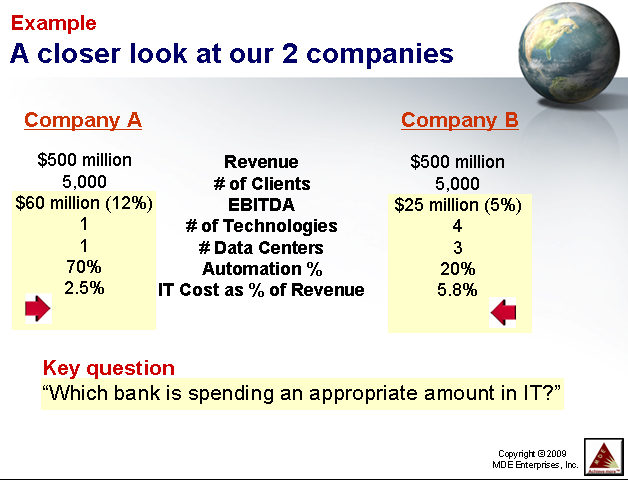
Take a look at this example I use in my IT Manager Institute class.

In this example we have two companies with about the same revenue and the same number of clients, , , but that’s where the similarities end. EBITDA (earnings before interest, taxes, depreciation and amortization) is quite different. Some call this operating income.

Company A is much more profitable than Company B. Why is that?

Well, there could be many reasons, but two reasons show up on the slide. First, Company A is much more automated. Automation tends to indicate the company is much more productive and has fewer clerical functions and processes less paper, , ,  which reduces cost.

The second reason is because Company B is spending a lot more in IT. In fact, they are spending over twice as much money in IT than Company A spends.

Why?

The slide tells you the reason. Company B has many more technology platforms and multiple data centers. The background you don’t see that’s provided in the class is that Company A grew by simply adding new business. Company B grew by acquisition and has not consolidated the technologies.

Both companies are the same revenue size but have very different situations.

In class, I ask a key question, , , “Which IT organization is doing the best job?”

Take a look at the graphic below again and answer the question before moving on. Which company is doing the best job, , , Company A who is spending 2.5% of revenue for IT (let’s also say this is the industry average), , , or Company B who is spending 5.8% of revenue for IT (over twice the industry average)?

In every class, most will say that the CIO in Company A is doing a better job. This is the answer I get almost every time.

The answer is, “I can’t tell who is doing a better job in managing their IT organization, , , until I conduct an IT assessment and determine what’s going on and what the issues are.”

Certainly Company B is spending a lot more money than Company A, , , but even on the slide with very little information I can see that this IT manager has more to deal with.

Once you conduct an IT assessment on both companies, you might determine that Company B should be spending 7% of revenue to attack the issues it has. Company B’s CIO might actually be doing a much better job than Company A’s CIO, even though he is spending over twice the money for the same size business.

The point
The message here is that you have to be careful with industry averages. They tell you what the average is for all companies in the industry, , , but your company’s situation determines at what level you should be performing. You have to understand the variables that exist before coming to any meaningful conclusion.

Company B will need to spend more in IT than Company A for some amount of time until more of the opportunities are achieved and Company B begins to catch up with Company A.

Over time, Company B becomes more profitable as IT spending decreases and more automation is developed.

IT Project Management: a practical approach

In my last post, I discussed the importance of project management in creating IT credibility. You won’t be credible unless you deliver projects successfully. Period, , , end of story !!!!

My company mission is to “help IT managers of the world achieve more success”. The very first thing I did in this effort was to write a few books (10 actually) to provide insights and tips on things that actually help you achieve more success as an IT manager.

One of the keys is to deliver projects successfully, , , so naturally, there is a book on project management.

Delivering projects successfully is so important. The book is based upon my experiences in delivering projects successfully, , , both as a young IBMer and later as an IT manager and CIO.

IT Project Management: a practical approach is straightforward and includes the simple process I use and the tools to help you deliver projects successfully. It also includes insights and tips from my experiences that will give you an advantage or edge, , , something we all need.

Short, straightforward, practical, , , and to the point. That’s what we want so that’s how I wrote this one. It is one of my best sellers.

Buy the e-book for $29.95.

Buy the whole series of 10 e-books plus BONUS IT Manager ToolKit (a $175.00 value on its own) for $279.00

$279.00 — Full series + IT Manager ToolKit

Beware the “industry average” trap

I love it when my CEO returns from a trip and discovers something from the airline magazine to question me about. Let me give you an example:

In Delta Magazine, he reads an article that suggests the average number of users to Desktop Technician ratio is 150 to 1 in most companies. (I just made this number up to illustrate a point)

When he gets back to the office, he calls me in and asks me, “Mike, what is our User to Desktop Technician support ratio?”

I do a quick mental math calculation of total users divided by my number of desktop support resources and say, “It is around 100 to 1.”

My CEO looks puzzled and concerned, , , then he asks the magic question, “Why is our IT organization not as good as most?”

Upon finding out what he is talking about and where he is coming from, I have to explain why our number is not as good as what he read in Delta Magazine.

When you see an industry average of anything, you have to remember, , , it is an industry average. What this means is there are many companies who will have much better numbers and there are many companies who will have worse numbers.

Having a worse number than an industry average does not necessarily mean your IT organization is doing a poor job.

There are a lot of variables that affect this particular type of measurement such as:

  • Age of the equipment being supported
  • Distribution of the equipment in the company
  • Complexity of what you have installed on the desktops
  • Amount of change your company is going through
  • Special projects underway
  • Capabilities of the support staff
  • Responsibilities of the support staff
  • Capabilities of the users
  • , , , even how you define a “Desktop Technician” and what he does

Lots and lots of variables.

You can have a worse number than the industry average and actually be doing a better job than someone who has a much better number. You have to understand the situation before coming to any meaningful conclusion.

Escalation procedures

In my last post, I discussed the need to have a “downtime plan”. Part of your downtime plan should include an Escalation Procedure.

As I mentioned in my previous post, I like to assign responsibility of key technology support components to an “Expert”, , , the person I want to empower to own that particular area of support. In the post, we identified e-mail as one of these areas.

Another key area is telecommunications or your Wide Area Network (WAN). When a remote office loses connectivity, your team needs to resolve this issue as quickly as possible, , , your company loses thousands of dollars in lost productivity every hour the remote office is down.

To minimize your downtime and the impact it has, you need an escalation procedure that kicks in as soon as we know an office loses connectivity.

Below is a sample Loss of Connectivity Escalation Procedure:

Problem ownership is clearly defined and specific communications to managers and vendors are spelled out. We have a point person in IT and also in the remote office that has lost connectivity. The point people identify themselves to their manager and make them aware of the problem and advise as to what the status update procedures will be.

In this escalation procedure, we have time limits set up so additional steps are put in motion at 30 minutes, 1 hour, 2 hours, and every hour after until the problem is resolved. 

A big part of your escalation procedure is keeping management informed. When you have a formalized escalation procedure, everyone knows who will be providing status updates and when. Keeping your client in the loop and out of the dark is key.

It is simple and easy to develop an escalation procedure for dozens of support issues you might have and that will need some level of escalation if they occur.  Here are the steps I would use:

1.  Assign “Expert” responsibilities for the technical support areas you deem important.

2.  Have your Experts identify possible situations that need an escalation procedure.

3.  Review and agree on the set of issues needing escalation procedures.

4.  Have your Experts develop a first cut draft of the troubleshooting and escalation steps that should take place.

5.  Review the procedures and fine tune them with your Expert.

6.  Create an Escalation Procedure Binder and add completed procedures as you develop them.

Your escalation procedures do not need to be lengthy or complex, , , in fact, your goal should be to keep them to 1-2 pages and simple.   

If you focus on this and distribute the work to several Experts, you can create a binder of a dozen or more escalation procedures in a week. You may want to distribute them to affected managers of the company and communicate what they are and how to use them; I would certainly share them myself, but it is your call as to whether you want to. 

The key is that you are providing managers with information so they know what will be taking place in the event of a problem, , , i.e., what you are doing to resolve the issue. IT still retains responsibility to resolve the problem.

Escalation procedures worth considering include: 

  • Loss of connectivity
  • Natural disaster situations (snow day, flood, hurricane, etc.)
  • E-mail
  • Mission critical business applications
  • Mission critical servers
  • Internet and Intranet access
  • Phone system outage

Putting escalation procedures in place demonstrates to others that you are organized and thinking proactively, , , strong images for your clients and senior managers to see in their IT organization.

Lead by example

In a manager role, you set the tone for the type of organization you want to be. Your employees are watching you and they will emulate what they see from your actions.

Say one thing and do another, , , you lose credibility, and your employees will follow your actions, , , not your words.

Let me give you a few examples:

“I expect you to be at work on time.”
Expecting employees to be at work on time doesn’t have much meaning if you are coming in late two or three days a week. When your employees see your actions, they follow the example you set.

“Have a sense of urgency.”
When something is broken and the clients can’t access systems to do their work, there needs to be a high sense of urgency to resolve the problem. If the manager’s demeanor and attitude is lackadaisical and without urgency, your employees will not have an urgency in resolving the issue.

There is a fine line in this one. You want to display a sense of urgency but not be running around like Chicken Little yelling, “The sky is falling.” Managers need to create a calming effect while placing importance and urgency in resolving issues.

“The client is always right.”
This does not mean there will not be differences, even heated discussions with some of your clients from time to time, , , but you don’t want a feeling of animosity to grow toward a difficult client. We always want to be professional and supportive in helping our clients  use technology effectively to conduct their business.

If you complain about one of your clients and an employee hears you do this, he or she will think it’s ok to complain about clients. That’s not good, especially if it becomes commonplace. Clients and their need for technology in their work is why we have good careers in IT. The client is why our IT organization exists, , , and you don’t want to forget this.

Before we leave this point, I need to emphasize something. Having the thought, “the client is always right”, does not mean the client is always factually correct. They may be completely wrong about something, , , but their perspective has to be managed. When their perspective is incorrect, your IT organization has to do the things that will correct their perpective.

You set the tone
An IT manager’s action sets the tone for what you want the organization to be and how you want to operate as a support team in areas like:

  • responsiveness
  • professionalism
  • ethics
  • attitude
  • competence

Be sure your actions exhibit what you want in your team , , ,

Want your employees to communicate well? You must do this and teach them how and what to communicate.

Want your employees to follow-up well? Then you must follow-up consistently and quickly, , , and explain to them how important follow-up is in your organization.

Want your employees to do what they say they will do? Then certainly you must deliver what you say you will do.

Want your employees to get along and work well with others? They will only if you set a positive example in this area.

Want employees to be on time for meetings? Then start your meetings on time and expect them to be there.

Want employees to go the extra mile when needed? It won’t happem unless their manager does this and you also explain when and why this is needed.

Your team becomes what you cause it to become, , , it all starts by your actions and the example you set for your employees.

My favorite employee appreciation event

In the fast and furious life of an IT manager, it is easy to focus on the work and forget about your employees who are doing the work. Ask yourself this question:

“When was the last time you thanked your IT staff?”

I put some things into motion that forces me to remember to thank my employees for the hard work they do. First, I include a recognition component in every monthly staff meeting. I also like to have at least one “just for fun”  event in every staff meeting, , , something that says, “I appreciate you.”.

Second, I will have my secretary remind me twice a month to do something that shows my appreciation for my employees.

My favorite employee appreciation event is to buy ice cream sandwiches or popsicles in the afternoon and pass them out to my employees. It gives me a reason to visit them in their work area, creates a short break for them, , , and exhibits the fact that I appreciate what they do for our company.

You see, that’s really the big deal, , , and it is a big deal. It shows employees that their manager appreciates them.

In the IT world, your employees don’t receive a great deal of appreciation from their customers (other department managers and users). For many, they feel unappreciated by others in the company. You can turn this around by handing out ice cream and doing other things that demonstrate an appreciation of their efforts.

IT employees have a huge need to feel appreciated and to receive recognition for their work, , , they seek out confirmation that they are doing a good job.

In your IT manager role, one of the key responsibilities you have is to build team camaraderie and motivate your employees. Appreciation and recognition events go a long way in doing this. Never underestimate the importance it has when you show your employees you appreciate them.

Doing things like this tells your employees, “Thank you.”; and it means a great deal to them.