Your client is always right

Before you think I’ve lost it completely, , , let me explain.

In an IT organization, we are there to support the technology needs of people who need technology to do their jobs. In most situations, technology is not the company’s core competency. It is banking services, manufacturing widgets, selling food, clothes, or books, , , or doing something to sell products and services they provide. It is rarely developing technology.

Our IT clients are primarily two groups of people in your company:

  1. Senior managers
  2. Department managers and their employees

If your clients think you do a good job, , , great. However, if they think you are doing a poor job in supporting their business, , , guess what, , , you are.

STOP RIGHT HERE

Let me clarify just a bit.

You might actually be doing a super job with the technology. In fact, you could be the best technical organization around, , , the VERY BEST !

However, if the client thinks you are doing a lousy job in supporting them, something is askew. It could be that you are simply not managing their expectations very well. If that’s the case, then there is a problem.

Delivering technology services well is not just about doing a good “technical” job. You must also manage the client so they agree you are delivering support successfully. The flip side of this is that you could be doing a mediocre job technically, but if your client thinks you are doing a great job in supporting their business, , , guess what , , , you are.

Now, I know what the technical purists are going to say, , , something like, “Mike, that’s crazy. You should know that unless the technical part is handled well, there is no way to be successful in supporting technology.”

All I can tell you is that I’ve seen many outstanding technical organizations get low marks from their clients because they aren’t managing the client’s expectations well. They may be superior technicians but they are respected less because the client’s expectations are out of whack.

Something to think about!

44th IT Manager Institute

Our 44th IT Manager Institute was held last week in Columbia, TN. What a great group this was, , , feels like I have known each of them for a long time.

Seems like I say this about every group, but I really mean it when I say, “I’m very fortunate to do what I do because I meet some of the best people in the world.”

We lost one of the participants mid-week due to a family issue. Hoping all goes well for him.

Dinner was held at the River Terraces Restaurant in Columbia, a new restaurant in an old location above Duck River. My parents used to go there for a special dinner 30 years ago, , , now, we go there for a special meal, , , Cajun style!!

IT Manager Institute #44  –  Class dinner

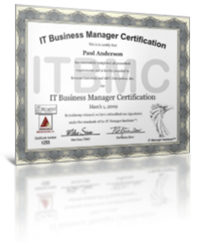
Every student passed the ITBMC exam and will receive their ITBMC certificate. CONGRATULATIONS guys, , , and gal.

My 45th Institute is only a couple of weeks away. This time, I’m headed to London, Ontario Canada and looking forward to it.

Executives have selective memory

Senior managers of your company often have what you might call “selective memory“. In other words, they remember what they want to remember.

This can be a real problem if you aren’t careful. You have to manage their expectations and if they expect something to happen that won’t, , , your performance will be graded less than satisfactory.

Let me give you an example:

I joined a company as their new CIO. This company was in poor shape and needed to be turned around, , , in all areas of the company, not just in IT.

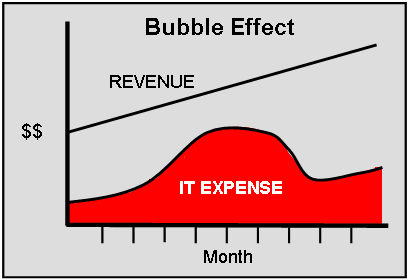
In the IT area, we were spending 7.2% of revenue in an industry where my CEO and I both knew we should spend somewhere between 2-3 % in a normal situation. After conducting my assessment, I gave him a recommendation that would cause us to spend over 9%, , , maybe as much as 10% of revenue for a period of 4 to 6 months.

The reason was to fix some serious IT issues and to position us to acquire  other companies, , , quickly. For us to acquire other companies meant we needed to be prepared to assimilate these companies into our own. If your IT organization isn’t working well, , , it’s going to slow you down and become a ball and chain around your neck, , , a very challenging issue.

Spending more money in the short run is not exactly what your CEO wants to hear. And guess what, , , he is quite likely going to want to forget some of what you say as time goes by.

In the meeting, I told him what we needed to do and what the cost should look like, , , and it meant IT expenses would increase a bit for a period of time. Once we stabilized some things and began to come out of the “turnaround” phase, IT expense as a percentage of revenue was expected to fall to a 2-3% of revenue level over time, , , where a normal IT operation should be in this industry.

I drew him a picture of what to expect and named it the “Bubble Effect”.

I wanted this image etched into his memory banks. You see, even though he heard what was going to happen, agreed to it, even supported my recommendation, , , it’s painful when he starts seeing the Profit and Loss Statement (P&L Reports) every month with more and more IT expenses.

Truly painful.

Before long, he might even forget the initiative we started to get the IT situation turned around quickly. All he will think is that “IT appears to be out of control, , , we are simply spending too much.”

Realizing senior managers can have selective memory, I managed to find a way to show my CEO this Bubble Effect graph just before he received his monthly P&L Reports, , , and I did this for three straight months. The third time he told me, “I know you are reminding me and understand why you are spending more money, , , but let’s hurry up and get this thing done so we can move forward.”

Sometimes a senior manager chooses to have selective memory, , , other times they genuinely forget things that were said or agreed to. It’s good practice to document commitments and find an easy way to remind your senior managers in situations of importance, , , it will save you the trouble of explaining yourself all over again.

What’s different about the ITBMC certification?

Certifications have become pretty much the norm in the IT world. Let’s see, there are dozens of technical certifications, project management certifications, and even a few management certifications. In fact, you can get a certification on almost anything in the IT world, , , it seems that IT people really like certifications.

I may be an exception, , , ,they don’t mean that much to me and never have. The same thing goes for titles, , , call me whatever you choose, just pay me well, let me do my job, and recognize me for the results I get.

But, , , titles and certifications are important for a lot of your people so you don’t want to underestimate the importance in someone else’s mind. In addition, some certifications are now required just to get in the door for an interview with some companies.

In reality, a certification doesn’t mean you can actually do the job well, , , it just means you have received the knowledge and been certified by passing an exam in many cases.

You probably know my company offers the IT Business Manager Certification, ITBMC. I never would have if not for the encouragement of the managers who attended our first few IT Manager Institute programs.

I’ll deliver the 44th and 45th IT Manager Institute program this month and I can tell you that the ITBMC certification has probably been one of the reasons for the longevity and success of the program, , , this is our 9th year in delivering the program with hundreds around the world to receive their ITBMC status.

I can hardly wait to deliver each new class, , , they are a lot of fun and seeing the enthusiasm for the program is very rewarding.

At the end of the day
Certifications do not guarantee you will be successful. What they indicate is that you have received knowledge about a particular subject and passed an exam that suggests you have a good comprehension of the material.

Execution is something else, , , you still have to do the work that is required in order to achieve success.

That’s why I structured the IT Manager Institute program to not only deliver the material of what to do and how to go about it in class, , , I also give you the tools to make it happen plus some takeaways to help you implement the IT Management Process we teach to achieve more success. Things like:

  • 30 Day Action Plan, , , specific steps to take when you get home
  • My entire library of e-Books that reinforce the class presentations
  • IT Manager ToolKit containing 102 tools and templates to use immediately or modify as needed
  • Ongoing support and access to me for assistance

The IT Manager Institute program is unique in many ways because of how we structure the class and also the additional tools and resources you take back to your company. Because the class follows a structured process and is delivered in a “how to” format, your retention is better, , , plus you have many resources to help you remember things from the class.

The bottom line
I think the key to any certification is how well people respond to the program. In our case, we have a 100% positive satisfaction from those who have attended. The reason is simple, , , the practical processes and tools are easily understood and put into practice, , ,  and they work.

It’s one thing to understand a concept. To succeed, you have to actually do the work and that’s why the IT Manager Institute program is structured so you can follow specific steps and use tools designed for specific uses that lead to more success in an IT manager role.

An ITBMC beside your name says something other than signifying a technical skill. ITBMC says you have learned the importance for your IT organization to deliver tangible and quantifiable business value in support of your company. It also indicates an understanding that IT initiatives are driven by business needs and issues and that every initiative you recommend will be cost justified and targeted to some specific business value.

Why is this important? It tells senior managers of your company you have a business perspective when managing your IT organization, , , not so focused on technology and missing the tremendous business leverage opportunities your IT organization offers your company.

Business managers become business partners, , , and without having these “partners” in your company, your success will be limited.

As I prepare for next week’s class, I get a high sense of enthusiasm in thinking about meeting a whole new group of IT managers and giving them the tools and resources that potentially changes their life and boosts their career.

They will leave with the knowledge and tools to make it happen, , , but they still have to do the work just as with anything in life.

Check out Institute class photos at https://itlever.com/institute-photos/

More photos at http://www.mde.net/institute/page4.html

It’s not bragging when, , ,

I know you’ve seen the person who likes to boast about his or her achievements all the time.

In general, I think you need to let your results do the talking.

Let me give you another scenario. I knew a guy one time who wanted everyone to think he was wealthy. He was in decent shape financially, but not what I would consider truly wealthy, , , he had a mortgage and two car loans. Someone who is truly wealthy doesn’t owe for his home or automobiles.

Something else, a truly wealthy person doesn’t try to convince you he is wealthy, , , he already knows it and probably doesn’t care what you think.

When someone tries to constantly tell me how good they are, I tend to be a bit skeptical. On the other hand, when someone shares information and speaks to the quantifiable results they are getting, , , the results tell me this person is successful.

It’s not bragging when you share results or communicate key measurements. Communicating these things is a responsibility you have. Failing to communicate your successes is actually a weakness and does not support your team the way you need to.

It’s bragging when you try to suggest you are accomplishing something you really aren’t or you are trying to one-up the next person.

No one really cares for the bragger, , , but they respect someone who gets results and can show it with specific measurements that can be validated.

Successful people don’t go around trying to convince others they are successful. They already know this and are content to let others judge them based upon the results they can show.

Keep an employee file to develop better performance reviews

If you conduct annual employee performance reviews, it can be somewhat challenging to develop the review unless you can remember the things that took place for the past year for the employee you are about to review.

Here is a simple tip that can not only help you create a higher quality employee review, , ,  it will also make it easier and faster.

What a concept, , , better, faster, and easier!

Start by creating a file folder for each employee who reports to you. If you have 12 employees, that’s 12 manila folders.

This will take only a couple of minutes.

Next, put in each folder a sheet of paper with the employee’s name and the current year, , , or the date range by which the next review will cover at the top, , , something like the example below.

Now, you are ready.

At the end of each day, take just a few minutes and think through your day of what took place that is of significance for any of your employees. Things like:

  • Successes and accomplishments
  • Client feedback
  • Coaching sessions
  • Observations

Add a note to the employee’s “Employee Review Notes” sheet in his or her folder so you can remember the event. When you fill up a sheet, add another one.

Get into a habit of dropping things into your employee files that reflect something about an employee’s performance. Things like a note about a nice phone call from a client, , , a mistake the employee makes, , , a positive thing you see the employee take initiative for, , , anything that can tell you later about your employee’s performance.

Believe me, this only takes a few minutes a day, , , or you can spend 10-20 minutes at the end of each week to do it.

The point is that at the end of a year, you aren’t going to remember much of what happened 10 to 12 months ago. You will tend to remember the things that take place in the most recent 60-90 days, , , and that could be good for the employee but it could also be bad. At a minimum, it tends to skew your thoughts toward the end of the performance review period.

You need to consider the entire body of work over the past 12 months, , , not just the most recent months you remember well.

Believe me, , , having these notes when you sit down to develop the employee performance review will be a big time saver and help you develop a much better review for your employee, , , and you will have specific examples to discuss  with him or her.

Not only that, , , I guarantee you the first time you sit down and look at the notes accumulated for an employee will probably shock you. You have never had so much material to work with when developing an employee review.

Employees who don’t get along

Ever had a couple of employees who don’t get along with one another? If you manage people for very long, you will encounter this at some point.

My attitude is that I don’t think people have to like one another, but they do have to respect and work with each other.

So what do you do when you have two employees who aren’t getting along?

First, try to understand the dynamics of what’s going on. If you have a work behavior or personality traits tool, it can give you quite a bit of insight. For example, I had two managers who were not getting along and could not for the life of me figure out why. They were both competent and I thought they should be doing great together, , , but not so.

Their work behavior profiles pointed out what was going on. One of the managers was significantly more detail oriented than the other and she wasn’t getting enough detail from her counterpart. When this happens, high detail people think the other person is lazy or not smart. The fact was that both were very hard workers and very smart.

When I outlined the issues for them, their attitude toward one another improved and they began working much better with one another.

Sit down with the two employees and discuss what’s going on, , , get it out in the open and create the opportunity for them to work it out. It’s also appropriate for you to expect them to work out their differences.

Another thing I do is that when we have some kind of group event or contest, , , the two people who aren’t getting along always get paired on the same team so they have an incentive to help one another.

These two people may never like one another and become best friends, but they do have to work with one another and respect each other.

Develop a quick PowerPoint presentation

Let’s say you are the senior IT manager for a small company and your CEO has asked you to present an IT update for the Board of Director’s Meeting next week.

Where to start?

If you are like me when I first encountered such an opportunity, there may be some initial shock. After the panic leaves you, it’s time to prepare, , , where do we start?

Let’s outline what I do and then I’ll explain each part:

  1. Gather information about the presentation objectives
  2. Collect the data
  3. Make a list or two
  4. Develop a draft of title slides
  5. Fill in the slide bullet points
  6. Create your PowerPoint presentation
  7. Prepare for the presentation

Developing a presentation can be fairly quick, , , or you can agonize over it for days. Use this simple approach and it might make it easier for you. Let’s take a look at each step:

1.  Gather information about the presentation objectives
First of all, you need some information from your CEO, , ,  things like:

  • Anything specific you need me to cover?
  • What’s the background of the Board Members?
  • What’s the objective or goal of the presentation?
  • How much time do I have?

You may also want to get some other quick facts, such as:

  • Board Member names and where they are from
  • Sample of past presentations that worked well
  • PowerPoint format or template to use

Once you know what the objectives are and what your CEO wants you to cover, you should be able to identify the appropriate content to develop a presentation. That’s actually the easy part.

You also now know how much time you have, , , let’s say it is 30 minutes.

You need to get a feel for the type of people on the Board. Is this a group that usually lets the presenter walk through a presentation and asks questions at the end, , , or does it have Members of the Board who ask questions every step of the way.

The latter will eat up your time quicker than a bee can dart past your nose, so you need to know that this group can only absorb a little information.

In fact, that’s an important piece of information for presenting to any Board of Directors. In general, members of the Board of Directors are high level and mostly concept people, , , not highly detail oriented people who want to get into the muck. But, there are some who like to get into the detail so learn from your CEO what type of audience to expect.

For an audience who waits to ask questions at the end, , , count on 1 -2 minutes per slide, , , that means you can deliver 10 to 12 slides at most and still have time at the end for questions and discussion.

For the interactive group who asks lots of questions, consider 3-5 minutes per slide, , , that means you can only get through 5-8 slides comfortably.

2. Collect the data
What to cover is very important to know from your CEO. He may want you to deliver a general overall view of what’s taking place in IT for the company, or he may want you to spend the majority of your time to provide an update about a specific IT initiative the Board is interested in.

Once you know what the presentation objectives are and the subject, collect the data you need to develop a presentation. It might include recent management reports, cost justification analysis, project status updates, etc., , , whatever data you have that supports your topic and allows you to develop a few PowerPoint slides to discuss the subject.

It is also reasonable that every bit of the material could come out of your head, , , read on.

3.  Make a list or two
At this point, step back and put yourself into the mindset of your audience. In this case, the Board of Directors represent the owners of the company, , , so what would a company owner want to hear about this subject you are about to present?

Make a quick list of what you think they would want to know about. Ask your CEO or the meeting sponsor the question and gain their insight, , , always helpful.

When completed, think about key points you think are important to share. Make another list.

Now, you have a list of what the audience wants to hear and important points you believe need to be presented about your subject, , , plus you have supporting material by which to start developing slides.

4.  Develop a draft of title slides
Each of your slides needs a title, , , this is sort of like an outline of a book if you were writing a book. What I do when I plan to write a book is start by developing the Table of Contents, , , this is my book outline. A PowerPoint presentation works the same way, , , each slide is a key point you want to make as you walk through your subject, so create a title for each slide.

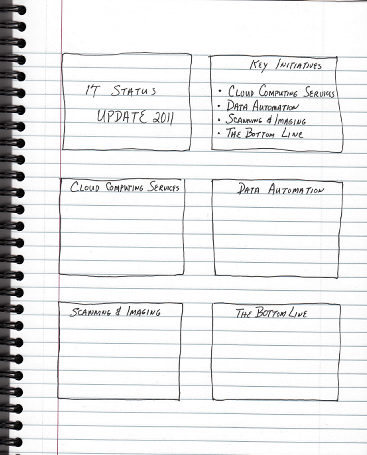
A quick and easy way to do this is to take a blank sheet of paper and draw a set of rectangle squares , , , I usually put 6 to 8 boxes on a sheet of paper. Each box represents a slide in your presentation.

Now, put the title of each of your slides in the top part of the boxes. I work left to right and to the bottom in the sequence I want my presentation.

Going into this process, you may not know how many slides your presentation will be or in exactly what order. Creating a paper draft makes it easy and creates thought as you work through the process.

When finished with identifying your title slides, check the number of slides and be sure you have ample time to present the content you are going to end up with based upon the guidelines I discussed earlier.

Once you get the slide titles defined, the rest is fairly easy, , , creating bullet points for each slide based upon its title.

When you start developing the detail of the slides, you may identify new slides you need to add or possibly slides that can be better discussed by combining them. The point is that the finished presentation will be slightly different from what you think it will be as you start working on it in the beginning.

5.  Fill in the slide bullet points
Next, put in the bullet points for each slide on the paper to complete the draft of your presentation.
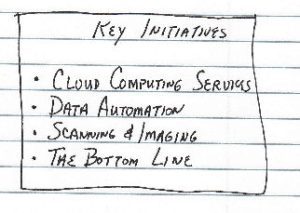
A couple of key things to remember. First, you need to resist your urge to provide too much detail. In a slide presentation, too much detail makes it difficult for people to follow. Use short and crisp bullet points that you can talk about.

Next, keep the number of bullet points on a slide to a reasonable list, , , no more than 4 to 6 points on a slide. Anything over that is too much detail.

Finally, a single point and graphic on a slide can be a powerful message so focus on highlights, , , not detail, unless of course your CEO says he wants you to discuss the detail.

6.  Create your PowerPoint presentation
When you are comfortable with the presentation “draft”, create the PowerPoint slides using the presentation template needed to make it consistent with your CEO’s presentations look and feel.

As you build each slide from your paper draft, think about graphics that add value to the presentation or make your points easy to follow. Don’t be too cutesy, , , but good graphics can add a lot. As you build the slides, you will also make adjustments to your bullet points because you will think of things that need to be in the presentation.

Another point about graphics, , , senior executives love charts and graphs that make your message visible. A good chart showing positive progress can add tremendous value to your presentation.

By drafting the presentation on paper first and then building the PowerPoint slides from the draft, it allows you to walk through the presentation a couple of times, , , and this is always helpful for your thought process and will ultimately make the presentation better.

Let me repeat something here. Fight your tendency to provide too much detail, , , we want the major points, , , just the major points.

Fewer bullet points is better than lots of bullet points. Remember, these guys are high level, , , they want the answer, not all the detail. If they need detail, they will ask you questions and you can fill in the blanks.

IT people think everyone needs all the information possible. Just the opposite is the case, so keep your presentation at a high level, , , and use graphics to enhance the message.

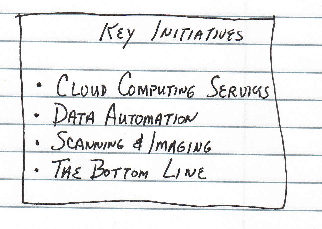
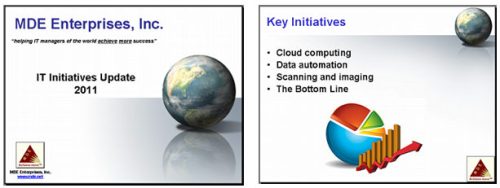
Here are the first two slides of my presentation:
7.  Prepare for the presentation
Before the presentation, do a few things:

  1. Prepare a good opening to get things started smoothly, , , it will help calm your nerves.
  2. Rehearse what you plan to say and become intimately familiar with every slide you present.
  3. Anticipate questions you may be asked and come up with appropriate answers.
  4. Develop a list of key message points you want to make for each slide. This can help you stay on message and insure you emphasize each key point.

Prepare and you will come across knowledgeable and on top of your game. Go in there unprepared and they may rip you apart, , , so be prepared.

How do you change the perception of people in order to take on more responsibility?

People’s perceptions, especially senior management’s perceptions, are made up by the results we achieve, how we achieve them, and how we conduct ourselves. It really is a combination of each of these things, , , not just a matter of getting the job done.

Don’t underestimate the significance of “how you go about your work” and “how you conduct yourself with others” plays when senior management starts looking to promote someone.

If you aren’t getting assigned additional responsibilities and you think you should be, take a step back and try to objectively assess what the manager sees in your performance.

You may be getting results but possibly the manner in which you are getting your results is not quite what senior management wants to see. It may also be that you aren’t getting the results they expect.

Are you setting the right tone in terms of teamwork?

Are you creating positive energy for those around you or is it negative energy?

Are you creating the right role model image senior management wants?

All of these questions are worth asking yourself, , , and when you answer them, , , be objective and honest with yourself.

Ask your senior management why you are being passed over and ask in a non-confronting way. Be open to what they have to say and listen objectively. You may not like what you hear, but it is their perception that you have to deal with just like dealing with an unhappy client.

Don’t try to rationalize or defend yourself, just listen!

Don’t talk, , , LISTEN !!

Listen to what they have to say and incorporate their input into your approach to do a better job, whether doing a better job is getting better results or changing how you go about getting the results.

Personal story
My career took off when I stopped pushing senior management to give me more responsibility and to do more for me. Up until November 1986, my approach was all about me. I couldn’t understand why I wasn’t getting more promotions, more money, more responsibility, , , all the things I thought I had earned.

Then, in November 1986 our company had a major reorganization. I was assigned a management responsibility for a small technical support group of 22 people supporting 23 clients.

My focus changed almost overnight although I didn’t realize it until much later. I started focusing on our clients and my employees to achieve some specific company objectives, and I was working so hard on this and having so much fun, , , I forgot about “me”.

When I truly focused on doing a great job for our clients and the company and started getting results in those areas, more responsibility just started coming my way. I suddenly became promotion material and was getting more and more responsibility when it seemed that I wasn’t even trying to get more responsibility. Sometimes, you just have to “let it happen”. It seems to happen easier when you aren’t pushing so hard.

In hindsight, it was about results and also about how I approached my responsibility.

My perception of myself before the reorganization was very different from my senior manager’s perception of me. I thought I was getting great results, but the reality was I was probably getting meager results at best. And I was always pushing for more every chance I got, , , and this created a negative vibe that I didn’t realize.

After the reorganization, the results were specific, quantifiable and matched up with what senior management wanted. It also helped that these results were visible, , , they have to know about it to appreciate the effort. Our monthly reporting processes communicated the results in an objective fashion and it made a difference.

Two more tips that may be worthwhile
First, raise your perspective to a senior manager level. They want managers to be mature and to think in terms of the client and in providing tangible business value. Being proactive in developing a strategy that’s in sync with the client and business owner’s needs is critical. Do things that reduces cost or improves productivity of groups of people and you endear yourself to senior management, especially if it helps achieve business financial goals.

Second, I can’t tell you how many times I have sat in senior management meetings to discuss the need to fill a senior management position and we had to turn potential candidates down because they didn’t have anyone in their organization who could step up and fill their management position if we promoted them.

To move up, you have to be able to fill your position with as little ripple as possible.

When we make management changes or promote someone, we look closely at the impact it’s going to have, both positive and negative. Management Rule #1 is to identify and develop your replacement.

Many managers tend to avoid doing this because they are concerned it makes them vulnerable. That’s completely wrong in my mind. Getting your replacement in position actually shows us you can develop a strong organization and it positions you to take on more responsibility.

Focus on positive results and how you go about getting those results. Both are important.

Square peg in a round hole

We all know how difficult it can be to drive a square peg into a round hole. The image on the right shows it best, , , driving a square peg into a round hole can break some things.

It’s exactly the case when dealing with people, , , specifically your staff.

When focusing an employee you want to take advantage of his or her strengths and interests as much as possible. It makes their development easier and you will get more from the employee because they are working on things they like, , , it’s sort of like swimming downstream versus trying to swim upstream against the current.

Make it a point to learn about your employee and to discover these strengths, likes and dislikes. When you tap into the strength and interest of an individual, they will work harder to learn something new and to do their job well, , , because they like it and it’s a good fit for them. It’s a common trait we all have.

Things to consider are the technologies you have them focus on, the area of responsibilities you give them, the type of projects you assign them, even the people you assign them to work with.

Try to make life better for people when you push them into certain areas of work. If they love what they do and have the tools to do the job, you can get powerful results, , , and that’s what we all want to achieve.