Here are two of my favorite buddies (Corky and Boo) in my favorite series of photos.
Hurry up, get your photo and let’s go!
A classic pose of our company Security Officer and Social Director
Looks like a late night out partying
Here are two of my favorite buddies (Corky and Boo) in my favorite series of photos.
Hurry up, get your photo and let’s go!
A classic pose of our company Security Officer and Social Director
Looks like a late night out partying
Posted in Just for FUN !!
A major challenge for many IT managers is being able to make the transition from a technology expert to a business manager. The requirements and skills of being one of the technology resources in your company versus managing technology resources is entirely different.
It certainly helps to have a technical understanding, but when you start managing you cannot afford the time and energy to remain the expert. The best advice I can give anyone is to “leave your technology competence behind and focus on managing”.
Before you start sending me ugly email messages, let’s qualify this statement a bit. I’m not saying you need to forget everything you know about technology. I’m also not saying that you should stop learning about new technologies. This base of technical understanding will be invaluable in your future management efforts.
What I am saying is that to be an effective manager of an infrastructure support group or a programming support organization does not mean you have to continue to be the expert in those technologies. In fact, unless you have to be the “player-coach” role in your company (often required in a small company), you better decide to let your team play the “technology expert” role.
I speak from experience on this subject. Transitioning out of my technical role to a manager was very difficult for me as it is for so many new IT managers. Fortunately, I had a few senior managers who helped me understand the need to make the change and mentored my development.
You see, as the technology expert your success comes from what you are personally able to do to help the client or the company. The challenge is that you tend to carry this mindset with you when you become the manager.
Not a good thing.
It was an eye opener when my CEO explained to me that it was, “far more important in what I could get the team to achieve than what I could do on my own”. I probably should have known this and most likely did know it intuitively. However, it hits home when your boss explains it to you.
more important in what you can
get the team to accomplish
than what you can accomplish alone
The bottom line is this: If you are spending your time trying to stay current with technology, you are probably not doing the things you need to do to be an effective manager.
Managers need to focus on things such as:
Management is a full time job. I have only seen a couple of people who I thought were able to maintain their technical expertise and also manage their organization at a high level. Guess what, they were both in very small companies and had no choice.
When you become a manager, it’s extremely important to develop business skills, leadership and management skills, planning skills, and communication skills than ever before. Fail to do this and you will limit your success.
One of the reasons there is such a gap between what IT organizations focus on versus what their companies need is because many IT managers, even CIO’s, continue to focus on the expertise they developed as a technology resource. A person who now has the full IT responsibility for a small company must make the transition to learn about the other facets of his technology support responsibility, , , these other parts may be more important for the company.
For example, if your background is infrastructure, you need to learn more about the business and the critical business applications, the processes to make application programming changes effectively, Help Desk operations, etc.
If you allow yourself to stay primarily focused on the infrastructure, your company will probably have a stellar infrastructure and data center; but critical components of your company’s technology that reside in support of the user and client will be lacking. The result will become very clear and fairly soon – you will not be successful focusing only on infrastructure.
In my early management days, I was authoritative, did much of the work myself, and was controlling. Looking back, I know how bad that must have been for some of my employees. It was caused by inexperience, possibly a lack of confidence at times, and simply not knowing there was a better way.
The “not knowing” part is what causes the IT-business needs gap most of the time. Learn how to assess needs and issues, plan and prioritize those issues, manage projects effectively, and motivate and develop your staff so they can succeed and you will achieve much more success.
The reason I started writing the IT Manager Series books was because I could relate so well to the difficulty many managers have in making the transition to a true manager role. Having the title doesn’t mean much to your staff if you don’t do the things to lead the organization and help them be successful.
Your staff and clients all need some of the same things. They want to know your technology vision, how you plan to get there, and they need confidence that your plan is achievable. Senior executives need to know that your initiatives are cost effective and will provide real value to the company.
In other words, “Are we doing the things that give us the best value for our technology investment?”.
How do you go about making the transition easier?
First, find a mentor or coach in someone who recognizes the challenge and who has had to make that transition themselves.
Second, attend classes that focus on the management fundamentals of managing technology resources. Obviously, I believe my classes to be some of the best in the industry and highly recommend them. Do some research and find educational help that can “short cut” your learning curve. It will pay you dividends in your career and help your company get more from its IT investment.
Third, read as much material on the subject of managing technology as you can. We should never stop learning. When we do, it’s time to retire and just watch the grass grow.
Fourth, approach learning about management and leadership with the vigor and enthusiasm you had when learning a new technology. Both are disciplines that we can all be competent in, but we will never be competent unless we make a personal investment to learn what we do not know. In my case, it was just as much of a matter of not realizing I didn’t know something as anything.
Have you ever had a “light bulb flash” moment? That’s what happens when you learn why something happens a certain way with a particular technology. It’s also exactly what happens when you see the cause and effect of implementing a new management concept that you were not aware of. It can be a true “eye opener”.
MDE can help in several ways:
Our 41st & 42nd IT Manager Institute will be held in September in Nashville, TN and Honolulu, HI in October. If you can’t attend, the Self Study version is always available. This program follows my proprietary IT Management Process and includes my complete library of management books and tools. It is by far the best price value of anything you will find in the industry in developing sound IT operational management skills. Take a look at www.mde.net/institute .
MDE consulting services provides several options – see www.mde.net/consulting:
My fourteen books and IT Manager ToolKit were developed to provide IT managers practical insight on what to do to be successful, instruction on how to go about it, with tools and examples to help you implement each concept quickly. They are quick reads and have received high marks from managers in over 120 countries. Information is available at www.mde.net/cio .
Summary
Focus your energy as a new manager in learning how to become an effective manager. Just because you were an outstanding technology resource has no bearing as to whether you will become a successful IT manager. Key things you want to learn will be:
Posted in IT Manager Tips
Actually, I believe life is more than fair but it’s all about what you make of what you have to work with.
What made me think about this topic is my golf game and the results of the Hohenwald Invitational Golf Tourney we played in this weekend. Four of us have played in this annual event for well over 20 years. Chris Cantrell and Chris Ideker (the two in the middle of our team photo below) always team up against Larry Johnson and me.
(Larry Johnson, Chris Cantrell, Chris Ideker, Mike Sisco)
Larry and Chris C. are by far the best golfers although I used to be able to give them a run for their money until I stopped playing more then a few rounds a year. Been playing more this year but the results haven’t shown up yet, , , need more practice I think. Well, actually I know that’s the case.
It takes work to do anything well and golf is no exception. I’ve put in more time for golf this year but the last 20 years of very little play have coated on some thick layers of rust, , , and then there’s the fact that I’m not as young and flexible as I once was.
Still, I see a few positive signs from time to time, a good drive here, , , a couple of good iron shots to the green, , , a few nice putts. Soon, we will put a good round together if I keep on working.
Results of this weekend
Larry and I ended up paying Chris and Chris $3.00 so they get bragging rights for a whole year – OUCH! Our scores were not great but we had a great time as we always do, , , and after all, that’s the whole point. Larry and I have won three years in a row so it was time for the “other team” to rebound. If Larry’s partner (that’s me) had played well we would have taken the crown another year.
Weekend highlights
There were many actually, but none like last year when Larry made a hole-in-one. That was special.
Remember my post earlier this year about “Make a decision: Get in the game or get out”? Well, I have been playing and practicing to improve my golf game and even though I hit the ball poorly most of the weekend, there were some “all world” up and downs from just awful places, , , places you don’t want to go on this golf course. And, there were a few good tee shots and iron shots, , , not many mind you, , , but a few.
The good news is that I broke 80 for the first time this year and did it twice, , , the practice round on Friday and then again on Sunday. That’s under 80 even when hitting the ball pretty bad, , , so there is light at the end of the tunnel and more fun to come. And hold the presses, I shot even par 36 on the last nine holes.
This same principle works for managers, you know. Even when you perform poorly, there can be parts or moments that you can look to as making positive progress, , , you may just have to look for it. The key is to maintain a positive outlook and think of the good things to come. We become what we think, , , and I’m convinced that I’ll shoot under par once again. I’m a long way from that right now but it’s going to happen.
So, the morale of this story is, , , believe in yourself, put the necessary work in to prepare yourself, and persevere through the struggles that you will likely have during your journey. It would be nice if steady improvement was a straight line, but it usually isn’t. Be prepared for some falls along the way, but if you keep working at it, the goal you seek will ultimately be achieved.
If you had told me I would shoot 78 the way I hit the ball yesterday, I would have laughed. What’s even funnier is that it would have been 2 shots better (76) if I had just tapped in two putts, but I was so disgusted I mishit two backhand tap-ins. Took the extra strokes and went on.
The most positive thing of this weekend is that even though I struggled terribly, I never gave up and called it quits. I truly tried on every shot (except for those two backhanded tap-ins). 🙂 🙂
Take the lesson I learned from all of this in that often you are actually doing better than you think you are. Most of us in IT are high detail people and we can be our own worst critics, , , something we all need to work on.
Give yourself a break and stop being such a perfectionist. Perfection rarely happens, and you don’t need to be perfect to do extraordinarily well in life and career.
My wife will read this post later and I can already hear what she will say, “Mike, you need to take some of your own advice.”
Hit ’em long and straight !!
Posted in IT Manager Tips
There is a great debate within the IT ranks, , , ever wonder which side you are on?
The debate about whether the IT Manager should be technically competent or not has been going on since the first commercially available computer systems hit the scene in the 1960’s. This is not a debate fought in the “public eye” so many people aren’t aware it occurs in companies every day.
The debate is simple and there are definitely two different opinions in this one:
1. The manager must be technically competent to know what the technology resource can do and how to manage such a person effectively.
“You can’t manage someone effectively if you can’t walk in his/her shoes.”
2. The manager does not need to be technically competent in the technology to be an effective manager of resources supporting the technology.
“You can’t stay technically proficient and manage effectively at the same time.”
Let’s address my position on the issue right up front. I am a “non-technical” manager. That means that I’m not an expert on systems, networks, or business applications. However, I am definitely technically oriented and was once proficient with certain technologies.
I now know how to identify issues that exist in a company’s technology and how to prioritize the project initiatives that need to take place to mitigate risk and to provide real value for the company.
In my opinion, the best IT managers are business oriented first and foremost and know how to apply technology resources to address company issues cost effectively. That’s who I am. Early in my career I was a technology expert on certain business applications and computer systems and liked the role very much.
You will never find me learning how to do data entry in a business application or to configure a Cisco (no relationship, , , and they spelled it wrong) router in a network.
As a CIO or an IT Manager, that’s not the value the company needs to get from me. My job as the manager is to organize and focus the resources on the issues that give the company the greatest payback for its technology investment. When you consider IT expenses usually run anywhere from 1% to as much as 10% or more of the company’s revenue, it is a big price tag for most companies.
You might be confronted by a “senior programmer” or “senior network administrator” as their new IT Manager or CIO. They may challenge you in that you don’t have the right credentials to manage their group. I can assure you that you don’t have to be a programmer or a network specialist to manage those type of people effectively.
In fact, being a technical expert will actually hinder you in a manager role.
You don’t have to be a technical expert to be able to identify issues that cause risk or that offer potential savings for your company. Experience, a solid understanding of the business operation and the industry, plus knowing how to achieve a true Return on Investment (ROI) are much more valuable than knowing the inside workings of an operating system or how the router works when you are in a management position.
The manager needs to know how to find the experts and focus them on the appropriate priorities, not do the job.
Don’t get me wrong, I believe in staying current with what’s taking place in technology. It’s changing more rapidly than ever before and every IT manager needs to stay current to some extent with the issues of the day.
Keeping up with what’s happening doesn’t mean continuing to be the expert. There simply isn’t enough time.
One of the best pieces of advice I got as a young manager was that to be effective, “You have to let go of the technology and the desire to be proficient in it when you become a manager. If you don’t let go, you aren’t spending the time or making the effort you need to in your management responsibility.”
Managing people and organizations is an entirely different discipline than being a technology expert. One of the problems technology organizations have everywhere is that too many managers are focusing on the technology and not on the business. That’s why you hear so much about “technology needing to be properly aligned with the business” these days.
A few years ago I conducted an IT assessment in a small manufacturing company. The proposal being presented to the CEO was a $350,000 upgrade to improve the company’s network. He called me in to take an objective look because he wasn’t certain it was an appropriate investment.
Key findings in my assessment were:
Are you getting the picture? The IT manager was a former network administrator and probably a very good one. The problem was that his focus was on the network technology that he understood, not on what the company needed. He was spending too much time dealing with technology and not enough time in understanding the business issues and needs.
The morale of the story is that we saved the company hundreds of thousands of dollars in a two week assessment and refocused IT on issues that had real value for the company. I’m all for spending and making investments in technology, but only when it provides value.
My recommendation is that when you have the opportunity to manage technology resources, focus in on the skills of management, understanding what the business needs and how to get things accomplished through your people. Let go of the need to be technically proficient.
If being the technology expert is what you like, great, , , take that path and you will probably be a lot happier and more effective.
The debate goes on, , ,
Posted in IT Manager Tips
This is a good question and an issue that comes up quite often.
You could panic, , , but there is a better option.
Let’s break it down a bit.
First, when you submit a budget it’s important to list the business assumptions you are basing the budget upon. This includes any special project initiatives that you think you will be working on in the coming “operational year”.
It’s normally impossible to know everything you will be working on so in most cases you should build in a few “buffers” to cover the surprises that you are inevitably going to run into in the coming year. I’ve never managed an IT operation when there were no surprise projects to pop up and had to be taken care of.
Quantifying your assumptions and building in a certain amount of buffer for the extra things that will come up is your best safeguard.
Second, if you have done a good job in quantifying your assumptions and have buffer, you may be able to absorb the new project and still make your plan. If it will cause you to exceed the plan (spend more than the budget), you need to manage senior management’s expectations in that such a project was not planned for and it will require several things, one of which is redeploying resources to focus on the unplanned project.
As soon as you can, you should quantify the incremental cost of the project and the extent it will cause you to exceed your budget and lay it out for management to see both the resource impact and the budget impact.
The new project issue may be something the company would prefer not to do but has no choice (like a regulatory issue that has come up). Helping senior management understand the cost and resource implications helps them manage to the company’s overall budget and positions you in a light of “business manager” and not just the “technical manager”. In doing this you are also trying to ensure they understand that the original project plans you were going to accomplish are affected by this new project requirement.
In my IT Management Models book there is a model called the 5-pound sack. In this model, it explains that your IT organization has a certain amount of capacity. How the capacity is used can be changed and you can even find several ways to add more capacity. But you can’t add capacity for long periods of time without adding more resource without causing morale issues.
If the company requires you to take on a large unplanned project and your commitments are already a “fully loaded 5-pound sack”, something has to give.
Managing resource availability is very similar to managing budget dollars. The key is that you have to manage other people’s expectations as to what is realistic and enlist their help in determining the best way to use the resources when “key projects” compete for limited resources (either staff, equipment, or budget dollars).
Finally, let’s assume you have no buffer in your plan. Your efforts still must be focused to managing senior management’s expectations and that there will be a trade-off of resources and budget dollars to focus on the new project.
In IT, we don’t really care where we are focusing our teams as long as senior management considers it to be in the best interest of the company and provides best value for their IT investment. As a CIO, I will certainly help direct where these resources can be best utilized but ultimately my mission is to serve the company’s needs so I answer to my customer – the senior management of the company and department heads who manage the resources utilizing the technologies of the company.
If you are caught off guard (something that rarely happens when you do a good job of quantifying your budget business assumptions and you have strategically inserted a few key buffers that will offset many such surprises), you will need to quantify the new project as quickly as possible in terms of resource needs, existing project implications, and cost. Before you have all the information, start setting the appropriate people’s expectations that you believe there are budget implications and impacts to current project plans.
When you have determined the specific impacts, sit down with the appropriate people to explain the impacts this new project will have on current plans. In this meeting you should lay out the implications, offer suggestions for possible alternatives in managing the issue to minimize budget impact or planned project impact, etc.
Your senior management team can help you arrive at a decision as to what are the best options to take or will take the issue offline to gather more information to determine what’s best for your company in meeting overall objectives.
One of the best ways to minimize these types of impacts is to develop a strategic plan where you identify all the major project initiatives planned for the next year. This helps you manage senior management’s expectations and is tremendous help when budgeting your IT organization for the following year.
Posted in IT Manager Tips
This weekend starting today, I plan to take three days off from my business to play in the annual Hohenwald Golf Club Invitational golf tournament. It’s a 9-hole course where I grew up and learned to play golf. I have hundreds of great memories there including a double eagle on #9.
Four of us have played in this tournament together for many years (26 or 27 years we think), and we have a great time. It is one of the few times we can get together each year and the fun we have has some great benefits.
I work on most days including weekends because I truly enjoy what I’m doing at my company. Even so, it is important to find the time to “remove yourself” from the business and just get away for a few days. If you don’t you run the risk of “burn out”.
We all need to “recharge” our bodies and minds at times to keep ourselves positioned for maximum performance. All work and no play will ultimately become a burden and when that happens we start losing interest, our focus isn’t as good, and ultimately our productivity and results of our work are diminished.
It is vitally important for each of us to take some time to have fun in life if we are to be solid contributors over a long stretch of time. I must admit that it is easier for me to say this than to practice it at times. My office is in my home and unless I’m on the road teaching one of my classes, I’m usually in the office developing new content or taking care of business.
Having my office in my home has many benefits (no commute, flexibility, etc.), but it also has some drawbacks as well (the work is always right there). Unless I force the issue, you might find me in my office for days without ever leaving because I literally get so involved in what I’m doing. My wife jokes with me at times and suggests that she sees less of me now than when I used to commute to an office every day. I’m fairly certain she is exaggerating, but I do tend to put in a lot of hours.
Enough about me, but I hope you are starting to pick up the essence of my message.
There are two things you should always try to do when managing a staff of technology people:
Getting people’s productivity to a high level is dependent upon them enjoying their work to a certain extent and definitely in their being able to enjoy their work environment. Create an unhappy, miserable work environment and productivity is going to be low.
Creating an enjoyable work environment doesn’t mean that you require less of your staff. It’s about how you go about the work, showing appreciation for individual and team efforts, and staying focused on issues that make a real difference for your company. Winning organizations do certain things very well:
An unhappy staff does not stay focused nor will they go “the extra mile” to support your client. A staff that is not motivated and does not work as a team essentially does only what it takes to get by. That type of attitude is a cancer that eats away at your team’s productivity and true potential.
In looking back at my 30-plus years of working in a technology environment, I can tell you that my fondest memories are when I was part of a winning team. Every one of those teams were focused and had fun together. Winning is contagious and helps promote teamwork and more successes.
The journey is just as important as reaching the destination.
What I mean by this is that when you can create a fun environment where people enjoy what they are doing, the process of achieving the result makes it much more worthwhile. It also creates a self sustaining environment where you position your team for more successes.
As you get older, you begin looking closer at the “quality of life” you have. At some point, most of us will simply not work in an environment if we don’t enjoy it. Life is simply too short to be miserable in our job, , , so we look elsewhere.
What can you do to create a “fun” environment?
1. Define your targets – Your employees need to know what the objectives are just as much as your clients need it.
2. Communicate with your staff – Your IT staff hungers to know what’s going on, how they are doing, , , and they look to their manager to keep them informed. Take every opportunity to communicate regularly with your employees. I use several methods and recommend all of them for you to use:
Not only will these sessions motivate your staff and gain their loyalty, it gives you such a great opportunity to stay close to what’s going on in the organization and stay in touch with your employees.
3. Invest in your employees – Technical people want to learn more and develop their skills. This is one of the strongest motivators you have, even more so than salary. Most of our technical employees respond well when they know you are investing in them and developing their skills to help improve their capabilities.
4. Coach employees for better performance – Help your employees achieve more success by coaching them on what it takes to be more successful. Be positive and constructive, never criticizing.
5. Reward positive behavior – Rewarding the behavior that leads to success will cause other employees to follow that lead. We all want to succeed and when we see what gets rewarded, we will try to make it happen for ourselves.
6. Be a positive force – Employees watch your actions and attitudes. Maintaining a positive outlook even under difficult circumstances helps your team stay positive.
7. Appreciate your staff – Be genuine in your appreciation of your IT staff’s efforts. They can sense whether you are sincere or not. Caring for people and their success is a strong element in creating loyalty. Loyal employees will go the extra mile for you and the team, but it’s a two-way street. Give true appreciation and you will receive much better efforts.
8. Initiate “fun” activities – Do things to break up the day to day grind and routine. One of the fun things I always liked to do was to bring in boxes of ice cream sandwiches or popsicles and pass them out in the afternoon. Little things like this are inexpensive, easy to do, and show that you care about your employees, , , plus if you like ice cream like I do it really is fun.
9. Take your vacation and require employees to do the same – Getting away recharges you and helps you maintain a positive focus. It is important for everyone to take time away from the office and the pressures of the job.
10. Be your team’s advocate – Telling others about the successes of your team and the progress the IT organization is making is vitally important. Employees appreciate a manager who promotes what they are doing and who works to see that others realize the hard work and effort that’s being put forth.
11. Remind your team of their successes – It’s very easy to forget the accomplishments and to focus on the problems. Positive things happen throughout the year. Track them and remind your employees of these successes. Remember, small successes lead to bigger successes. Positive reinforcement is one of the best ways to create the right kind of momentum.
Working in an IT organization can be tough work and stressful for all of
us at times. Help reduce the stress of your organization by making the environment more fun for your employees. Productivity will increase and everyone will enjoy the work more. It will also help you retain your good employees and will create loyalty among your staff like you’ve never seen before.
Best of success, , , and have some fun along the way, , , and wish me well in this weekend’s golf tournament.
Posted in IT Manager Tips
In just a few weeks, many companies will begin their budgeting process for 2011. You can get a real jump on the effort to come by following a few preparation suggestions.
For most IT managers budgeting is an ordeal and one royal headache that fortunately only comes around once a year. Yes, it does take a certain amount of work, but when you have a simple process to follow and tools that truly help you in the effort it can be a breeze.
I go about my entire management process in a way that makes things easy for me. Call me lazy if you want to, but the bottom line is that I just don’t like to work hard to accomplish some of the things I know have to happen. Don’t get me wrong; I’m a very hard worker as anyone who has worked with me will attest. I just refuse to work hard on things that ought to be simple and easy to do. Budgeting an IT organization falls into that category.
The reason budgeting is hard for many IT managers is that they lack an understanding of how to go about it and don’t have the proper tools to help them. The first step of the process is to prepare, so let’s begin.
Start a Budget – 2011 file folder and begin collecting the following:
2009 and 2010 Profit and Loss (P&L) Trend Report – You want the report or reports that list the month by month trend of expenses your IT organization has incurred for the last 12 to 18 months. Trends will help you see your spending pattern for each expense category as well as major expense “spikes” incurred in the past that may relate to annual or semi-annual vendor payments. These “spikes” can be tangible.
Employee salary report – You should maintain an employee roster with annual salary, bonus terms (if any), and expected new positions for the coming year. A tool is included in my IT Budgeting book just for this purpose. In general, if you budget your salary and benefits part adequately, you have over 70% of your budget completed. Maintaining an organization salary list makes this part a simple and quick process.
Vendor contract log – When you have a vendor list that includes contract terms, you can budget this part quickly plus be certain that you have anticipated any possible contract price increases that are built into a contract.
Telecom circuit log – If you have several remote office connections, you will want to pull out your Telecom circuit list to quantify the ongoing monthly telecom costs. You can also list possible office openings which have estimated one-time implementation costs to get started and ongoing monthly telecom costs. Maintaining this list for a large set of remote offices makes budgeting this part easy and gives you the tool to reconcile your telecom vendor invoice each month as well.
2011 strategy & project initiatives list – You can’t develop a comprehensive budget if you don’t have a good idea about the large projects you will be working on for next year. Large project initiatives have cost implications that need to be budgeted. One of the last things I will do when building my operational budget is to walk back through next year’s anticipated projects to determine if I have the major cost issues covered in my operational plan (budget). Your project initiatives may change in the actual year, but if you have included the big projects you believe will be worked on you will usually have changes covered in your plan.
Start asking questions – Some of the “extra cost” efforts have to do with supporting your company’s operational units. For example, when a remote office moves to a new building because they have outgrown their existing building, there are IT expenses related to supporting such an effort. Now is the time to start getting inside your operational manager’s heads to get a feel for what they are planning to do in the coming year, , , many of their plans require IT support and you better know about them.
Employee training plan – If you have not started developing an Employee Education & Training Plan, now is the time to start. Your IT staff loves to learn new things and to improve their professional skills. Training is one of the best motivators you have for keeping IT people committed to your company and motivating them to do more. It is an investment you can’t afford to miss out on and will reward your employees as well as your company.
New hire expectations – You want to have a good assessment of all new hire positions planned in the company as it will affect supporting new hire startups and the purchase of equipment, license agreements, etc.
Major expense items analysis – In an IT organization budget, you may have 40 to 50 expense categories, , , but for most organizations there will 6 to 8, maybe 10 expense categories that make up 85-90% of your budget. Identify from past Profit and Loss Reports these major expense categories and be sure you understand the full implications of each of them, , , and anything that can impact the amount you spend in them the next year.
Budgeting is about anticipating future activities and estimating the costs related to those activities.
Pull this information together and budgeting becomes much easier. Learn how to apply appropriate “buffers” in the right places and you will always achieve your business plan.
Learn more in IT Budgeting: operational and capital budgeting made easy.
Posted in IT Manager Tips
Description:
The whole is greater than the sum of it’s parts.
Leverage is very important in managing any operation. It is especially true in technology. There are many scenarios in IT where you can do things to get more than the sum of the parts.
For example, working on several programming requests that affect the same program often buys you a productivity boost. Likewise, taking the best of two companies’ technologies can make a merger of the two companies a much more powerful company than either might have become on their own.
Key points:
Category:
Discussion:
Opportunities abound in technology support to leverage situations. Think of the idea of adding “two plus two” and coming up with “five” versus “four”.
As an IT manager, we should always look for leverage opportunities. It can be anything from combining two programming requests that affect the same program into one project to finding multiple skills needed for your staff in one new hire.
You might also find the opportunity to combine the technologies of an acquired company and your parent company into a technology strategy that is much more powerful than what you would have produced at either company. Such a combining of the positives of the two companies offers significant leverage for the two companies and possibly a significant competitive edge.
Combining two assets can produce results greater than their sums – To find these types of opportunities, you have to look for them. They exist in every corner and aspect of technology. Stay alert to possibilities and look for combinations of things that boost productivity.
Look for complimentary elements – If you need to take a physical inventory of all the technology assets in a company, you can ease the pain by collecting the information when one of your staff visits a remote office to do other work. Add the inventory task to his/her list of “to do’s” and you will leverage your staff’s time and productivity.
Team member differences can be powerful assets – Combining two complimentary, yet different sets of skilled employees on a project can give you significant advantage and a higher likelihood of project success. Taking advantage of people strengths and reducing the impact of their weaknesses is a management focus we must all have.
Look for “win-win’s” and leverage opportunities – When doing things to correct a client satisfaction issue, add a little extra to the solution that goes a long way in showing the client your team is responsive to their needs. The “little extra’s” can be powerful components to a solid client relationship that benefit both companies for years to come.
I look for leverage opportunities all the time. One of the best examples I’ve seen is when movie producers film one movie but have enough material to produce a sequel or complimentary film. When you think hard enough, you will find many opportunities in technology to get “five” from adding up “two plus two”.
IT Management Models includes 72 models developed specifically for use in managing technology resources. The material is beneficial for IT managers, team leaders, project managers, and employees alike. Includes two publications: a 200-page reference document with model detail and a small Summary booklet to carry with you easily. The reference publication is a quick read and provides examples that can be used in any number of technology situations. Details at www.mde.net/cio/page20.html
Posted in IT Manager Tips
Believe it or not, your company’s CEO and CFO have tough jobs with difficult decisions to make. It’s not a matter of sitting in the nicest offices and beaming over your company’s successes. There are hurdles around every corner and overcoming challenge is the name of the game for any top executive.
You’ve heard me say before that the CEO has limited resources just as you do in your IT management or CIO role. You will probably never have an organization where you have all the resources you need to do the things you would like to do, , , or even need to do. If you do, you are either not wanting to do enough or you probably have more resources than you should have.
One of the things CEO’s have to balance is where to put the cash in funding new projects. Every department manager needs funds to do the things that will make a tangible difference for his/her department. For example:
And then there are the IT initiative needs.
Get the picture?
First of all, the company can’t do everything at once. Even if it had all the available cash to do so, the company’s staff resources may not be able to absorb this amount of change simultaneously.
This means that the CEO has to balance approving new capital intensive initiatives and handing out the funds. In order to make knowledgeable decisions as to which project makes sense, has more benefit, etc. the CEO and CFO need something that can sort of “normalize” all the project initiatives so they can compare them side by side.
One of the tools they use is a Return on Investment (ROI) calculation.
A new initiative proposal that includes an ROI calculation tells senior executives several things:
Just because a project has a huge payoff does not necessarily mean it gets priority over projects with less return. For example, if a project costs the company $1,000,000 and has a $2,000,000 expected return over three to five years, it’s probably a worthwhile project to do. However, a $100,000 project that has a 9 month payback might get preference for several reasons:
Three things have major influence with your CEO and CFO in getting your projects funded:
This third item is where having an ROI component in your IT initiatives recommendation will make the difference. It also makes a difference in that you are presenting a business solution with elements that speak the same language as your CEO and CFO, something that helps them a great deal.
So, how do you go about calculating an ROI?
First, understand how companies will look at the financial part of a proposed initiative. Some companies take a very deep, analytical look at it including time value of money etc. However, most company execs will look at the issue at a higher level. What most want to know is how much does it cost, how long to recoup the cost, and how are you going to recoup the cost.
I will typically map out by month the expenses we expect to incur in the project and actually break it down by type of expense (labor, supplies, travel, outside contractor, etc.). This is simply part of building a high level budget for the project as you normally expect to do.
Then, I extend the time to show when and how much savings we start to see beginning at the appropriate time until the project is paid for. The total number of months it takes to complete the project and receive the benefits that pay for the project is the ROI, , , or “X” months to pay us back for our investment.
Let’s take a very simple and hypothetical example to show you what I mean.
Assume we have a project to cut our $80,000 per month postage cost in half. The project takes three months and costs the company $240,000 to complete. Let’s also assume that once the project is completed, we start saving the company half of our average monthly postage cost, or $40,000 per month.
One quick calculation of dividing the cost ($240,000) by the monthly savings ($40,000) tells you the payback is 6 months upon completing the project. Every CEO will jump at such an opportunity, especially since the $40,000 monthly savings will be an ongoing benefit to the company.
In my proposal, I will show the project time line, estimated cost, and a forecasted Return on Investment of 6 months after the project is completed. I will also explain how the savings are going to occur and other benefits that may result by doing the project.
Behind the scenes, I will develop more detail to help me arrive at the numbers I need to present to the executive committee. This detail will include a high level summary of the project’s budget and detail showing how much we will save, when savings are being achieved and where they occur.
A sample of the proposal to the executive committee will include something like the following:
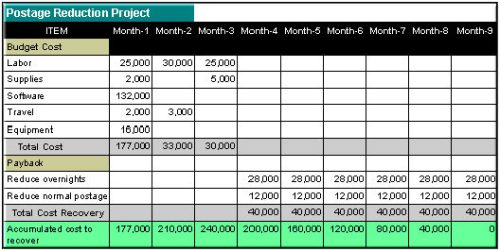
In this example, the project has a 9 month Return On Investment (ROI). It takes nine months from beginning the project to completely recoup the costs of the project.
Most CEO’s and CFO’s relate to the entire time frame it takes to implement the project and to recover the project cost. As long as you can give them a reasonable assurance it can be done in the amount of time you forecast, you have a good chance in getting the project approved assuming it falls within their “reasonable payback criteria”.
CEO’s differ in how long a reasonable payback is. Some will jump at almost anything that has an 18 month payback or less while others are more selective. It helps to understand your executive team’s personality and how they look at funding new initiatives.
Even at this level, it’s still a summary. You should estimate the labor costs based on the types of resources needed even though you may not have picked out the staff to do the project yet. Other costs will be estimated and you should gain a pretty good idea for the equipment and software costs as they are more significant and a major part of the actual solution.
Bottom line is that you will have exact numbers for some cost items and will estimate conservatively for other cost items to insure you can meet or exceed the cost expectations you are setting with your proposal.
The good thing about having the project summarized like the example above is that it is very easy for your executive team to follow and understand.
What do you do if there are no clear financial savings to be gained?
Good question and one that often occurs. In such a case, you need to translate tangible benefits into dollar equivalents, if possible. For example, if a proposed initiative reduces systems downtime, take the expected time of additional uptime and multiply by an hourly dollar factor of the total number of users that are affected by such downtime, , , to get an estimated “cost of downtime” hit in productivity. Learn more about this in my Calculating Cost of Downtime article.
In some cases, arriving at a dollar value may be virtually impossible. In those cases, you still need tangible benefit such as meeting a compliance issue, maintaining business continuity, supporting company growth, etc. If you can’t quantify cost savings or identify tangible benefits, your proposal has a difficult chance in getting approved.
Remember, a project doesn’t have to have financial savings to have a return on investment. Addressing a compliance issue and reducing the risk of business interruption is like buying insurance. You don’t plan to use homeowner’s insurance but it comes in handy if you have a catastrophic event.
Make it a habit to include a Return on Investment section in all of your technology initiative proposals and start tracking the actual results to determine if the ROI objectives are actually being met. This type of action exhibits business maturity similar to that of a business owner, a sure winner in the eyes of CEO and CFO’s.
Need help in calculating an ROI? CLICK HERE to learn more and download my free ROI Tool.
Posted in IT Manager Tips
Do you need to develop policies and procedures for your company?
How do you know?
Is it because someone suggested you need them, and if so, is there a tangible reason they are needed in your company?

Don’t develop new policies and procedures unless they will specifically provide some benefit that you want to achieve. It’s better to spend your time and energy on doing something else that provides value than to develop a bunch of policies that are just there “for show”.

Provided below are excerpts from my book, Practical IT Policies & Procedures that will give you a quick guide in developing new policies.


Let’s get started. In my books, you will find that I don’t waste a lot of time. My belief is that if you can get your message across in 40 pages versus 240, then you should save the paper and the time required to read all the extra “stuff”.
Step 1 – List areas of risk
Take a shot at listing things that can cause your company risk. Here are just a few to get you thinking:
One company may consider all of these issues worth the time to develop formal policies and procedures while a similar company of comparable size and in the same industry may consider just a few, or none, worthwhile for its company.
I will keep emphasizing that what’s important and useful for one company may be very different from another. That’s the “practical” application of reviewing your situation and deciding for yourself what’s important for your company.
Step 2 – List desired behavior or processes you want
List the processes you want and the behavior that’s important for a smooth running operation. Simply start listing things that are important in the operation of your company that you truly think make you more productive or better at what you do.
Here is a quick list of items to consider:
Step 3 – Assign a “relative importance factor”
This step is to assign a relative weight of importance to each risk issue or desired behavior issue you have identified so you can decide on whether you want to put in a formal policy and procedure to address the issue.
This step is somewhat subjective. Actually, it’s very subjective and reinforces what I have been saying. It’s “your” company and the determination of whether a risk issue or a behavior issue is important enough to cause you to decide to develop a formal policy and procedure is up to you.
It’s the same as buying life insurance. Some of us prefer to have a lot while others go with much less. Who is right or wrong? I’m not so sure there is one person more right than the other; everyone’s situation is different. Companies are all unique as well.
Once you identify the policies and procedures that are important enough to develop formal documentation for in your company, you can determine how to develop them.
Step 4 – Define the list of policies and procedures you need
Identify a specific policy and procedure that addresses the risk or behavior issues you have deemed to be of major importance in Step 3.
For example, if your company is having difficulty in managing travel expenses, you may decide to develop and implement a formal Travel Expense Guidelines policy.
Step 5 – Prioritize your list of policies and procedures
Spend time on your most important policies and procedures first. One way to determine importance is to develop an estimated dollar value for the risk exposure or estimate the value of improving productivity or reducing costs by implementing a policy to address a specific behavior issue you have identified to be important.
The point is that you want to focus your priorities on the issues that give you the best return on your investment of time as possible. Focus on things that provide you and your company value.
Step 6 – Determine how you will develop your policies and procedures
There are essentially three ways to approach this task:
It’s important to remember one of the comments made earlier. You must take full responsibility for the content of any policy or procedure you develop. It is simply not enough to take a policy from another source and use it “as is”.
Every company has unique situations and whenever you decide to develop a policy or procedure, you need to consider your unique issues. Only you and others in your company can take the responsibility for the policies and procedures you implement.
Step 7 – Develop and implement your policies and procedures
There are three important aspects from this point forward.
Step 8 – Monitor and enforce your guidelines
It really doesn’t do a lot of good if you document what you want to happen but don’t enforce your new guidelines. In fact, it can do more harm than good if employees of the company perceive your company is not really serious. You want to be certain that if you decide to develop a formal policy guideline and introduce it to the company that your company is prepared to back up what it says by enforcing the policy.
This is a quick guideline that I’ve used in past management positions and can get you started. More is discussed in the book, Practical IT Policies and Procedures and it includes 23 sample policies you may use to develop many of your new policies quickly.
Posted in IT Manager Tips