Monthly Archives: June 2010

Is soccer real football?

With the US and England playing in the World Cup Soccer matches this past weekend, it reminded me of a model that I’ve used hundreds of times in coaching others on my team through the years.

It begins with understanding the basics of American football and focuses on playing your position.

In an offensive line (shown as the “O’s” in the graphic below), the primary mission is to block defensive players (the “X’s”) and to protect the quarterback, , , to move the ball forward in order to score points.

Each lineman has a designated area to block. When one player fails to execute as planned, the team can bog down making forward progress more difficult. Every player has to play his position and count on his teammates to execute their assignments to achieve success.

This example works the same for an IT organization. I’ve seen too many IT organizations perform ineffectively because they either:

  • lack focus due to a lack of specific responsibility
  • team members lack the skill to succeed
  • team members wander away from their assignment to help another area

Focus is key. Missed assignments of responsibility or lining up your players without the skills to be successful is a management issue. Once proper responsibilities are established and communicated, and the skills are in place; it is the team member’s responsibility to execute. When they do, success is usually achieved.

Management has to insure the skills are in place and each staff member knows their responsibilities and how to take care of their assignments. When this happens, you simply let the team do what it knows how to do, , , with minor coaching and tweaking when necessary.

Key management points:

  • Assign every team member specific responsibilities
  • Take advantage of strengths and “shore up” your weaknesses
  • Insure each team member has the skills necessary to succeed
  • Provide the tools that allow each person to be successful
  • Expect each team member to succeed individually and to support the team
  • Build your strategy around your team’s capabilities

Oh, by the way, , , CONGRATULATIONS to the US and England in a 1-1 tie, , , and we all know that most people in the world consider “real football” to be soccer.  I’m OK with that until American football season starts.

Go Tennessee !!!      Go Titans !!!

Why is the IT Department so misunderstood?

Business managers and users don’t really understand what you and your IT organization are all about. Here are a few of my own personal ideas as to why this exists:

  • IT is not normally the core competency of your company; therefore, most managers of the company do not need to be very knowledgeable about technology, , , so they aren’t and they don’t want to be.
  • Many IT managers have excellent technical skills but lack strong management and interpersonal skills.
  • The nature of technology is that equipment breaks and users need support, something they would actually rather not have to deal with.
  • Many companies lack the discipline to manage a true change management process and a project management culture that helps prevent problems.
  • Some departments use IT as an excuse for their poor performance.
  • IT managers often miss the mark when prioritizing initiatives for the company.

I’m sure there are many more reasons, but this list should give you plenty to think about in assessing your situation.

Staff meetings are worth the time

Contrary to what a lot of people believe, staff meetings do not have to be a waste of everyone’s time. In fact, a well run monthly staff meeting can have many benefits for your IT organization.

As a young IBM Systems Engineer, monthly staff meetings were great breaks from the daily work routine. It was there that I learned the value of a properly conducted staff meeting.

I’ve incorporated regularly scheduled staff meetings throughout my management career to help me accomplish many things with my IT organization including:

  • Keeping staff informed of company events & issues
  • Reinforcing teamwork
  • Coaching key points
  • Providing group education
  • Building camaraderie within the IT group
  • Recognizing successes and achievement
  • Having fun

You need to balance the impact on productivity against what you gain by having a meeting. Fifty employees out for one hour in a meeting is potentially 50 hours of lost time, maybe even lost billable time if your organization generates revenue. That’s a hit against your organization’s output or billable revenue to be sure.

On the flip side, getting everyone together once a month keeps them informed and allows you to emphasize key issues that need their focus. The bottom line is that it helps you manage the output of their productivity potential. Informed employees who know their manager realizes the importance of both hard work and having fun tend to be more motivated. Highly motivated employees produce more in a 40-hour work week than those who are not.

When I hear employees or managers make statements that meetings are a waste of time, one of two things is happening. Their meetings lack substance and are held simply to meet, or the person doesn’t realize the peripheral benefits that are taking place by keeping the team informed.

Your IT employees typically have a huge need to know what’s going on. Staff meetings are one way to keep them informed. Meeting time is high quality time with your people when you organize and prepare for the event and make it a priority to make it meaningful for your staff.

IT Management Model – Bite the head of a frog

I’m sure you are using the management model, “Bite the head of a frog”, , , right?

What’s that, , , haven’t heard of it?

I pose this question in every IT Manager Institute class. So far, I haven’t found anyone who knows what it is.

It’s one of 72 models in my book, IT Management Models. Each model has a management principle behind it and the graphic helps you remember it. Once you learn “Bite the head of a frog”, , , you will remember it for a long time.

Want to learn about it? The following is right out of the book and will give you a good idea of how all the models are presented:

23.  Bite the head of a frog

Description:

Tough issues and decisions often get put off until a “better time” to deal with them. When you have a painful or difficult issue to deal with, make it a point to go into the office and deal with the issue early or at a specific time, i.e., do the distasteful deed proactively and get it out of the way. You will find that it’s less stressful for you and has a positive impact on your productivity as you won’t be worried about the issue all day.

Take care of your most “distasteful” issue first and it clears the way for a better day.

Key points:

  • Deal with the “ugly” issues early and avoid procrastination
  • Address tough issues early in the day
  • Evaluate consequences and prepare for the impact
  • Plan for the event and get your act together
  • Approach the issue with a win-win perspective

Discussion:

Most of us have this thing called a “procrastination factor”. When we have a tough issue to deal with, we often put it off until the very last possible moment.

This burns up a tremendous amount of energy, creates a lot of stress, and lowers our productivity quite a bit because we can’t stop thinking about the tough session we are about to have when we finally deal with our tough issue. There is a solution. Take care of your ugliest situation first thing in the day and get it out of the way.

Deal with the “ugly” issues early and avoid procrastination – Once you are prepared, tackle your toughest issues early and avoid procrastinating. Putting it off doesn’t do anything but build up anxiety and cause you to lose focus on important issues of the day so handle the problem and move on.

Address tough issues early in the day – Handling your toughest issues first thing will make you feel better that day. Think of it as “biting the head of the frog” being the worst thing you have to do that day. Go ahead, do it, and get past it so you can be productive the rest of the day.

Evaluate consequences and prepare for the impact – Once you determine how you need to handle a tough issues, it’s best to go ahead and handle it. Be sure to evaluate the downside and possible ramifications so you go in prepared. In many cases, the toughest part is the anxiety that builds leading up to when you actually deal with the issue. If you have prepared well, handling the issue won’t be as tough as you think.

Plan for the event and get your act together – Do whatever it takes to prepare. Seek help from those with experience in such matters and develop a planned approach. If it’s a really tough employee or client issue, it’s worth the time to prepare.

Approach the issue with a win-win perspective – Approach tough situations with a win-win attitude and seek a way for both you and the other party to find something positive with your solution. For example, if I have to fire someone for consistent unacceptable performance, I approach the issue in the perspective that I’m helping the employee move on to another career opportunity where he/she will be successful. It’s unfair for the company, my team, myself, and especially the employee to allow him/her to continue working when he/she is not going to be successful.

IT Management Models actually comes with two e-books:

  • The large Reference Manual with the detail discussions and a lot more
  • A smaller Models Summary document that fits in your briefcase

For more information, CLICK HERE

This was the most fun book I’ve written. There is plenty of practical information and management insight, , , but there are also some models that are intentionally developed with a bit of humor behind them.

I use visual illustrations all the time when I’m trying to discuss an issue. IT Management Models will help you coach your staff, discuss key points with senior managers, and even deal with difficult issues with people you work with.

I hope you take advantage of the lesson discussed in “Bite the head of a frog”.

Save

Save

What I like about my job !!!

I just posted comments about an article I read about “CIO burnout”.

It made me stop and think about, “why I like my job”.

I’ve worked for some great companies in my career and have had some great responsibilities, , , I can honestly say that I’ve truly enjoyed the “jobs” I’ve had in my career, , , well, for the most part. Certainly, in over 30 years there have been a couple of situations that we don’t like to talk about.

Here is an exercise for you. Take 10 minutes (no more) and write down 10 things you like (maybe even love) about your current job, or current position.

If you can’t think of 10 things in ten minutes, , , you better start taking your pulse of where you are.

Here is my 10 “most likes” about my job as the CEO of MDE Enterprises, Inc.

  1. I’m helping IT managers all over the world achieve more success, and I love developing IT managers.
  2. I get to travel to some very interesting places.
  3. I get to work and meet with some of the best people in the world.
  4. I have a flexible work schedule that allows me to work from a home office and be close to my family (sometimes working from home can be difficult because you never really get away from the work).
  5. I love what I do and get to focus on what I want to do, , , for the most part, except when the “boss” (that’s my wife Dorine) needs me to do something.
  6. I get feedback from managers all over the world about the benefits and value they are receiving from my books, tools, or training, , , it’s a great feeling.
  7. No politics in my company, , , as long as I say, “Yes Ma’am” at the end of our discussions, I’m in good shape.
  8. I get to dress casually every day at the office and even when teaching my classes.
  9. I can work from Camp Liberty, , , or virtually anywhere in the world.
  10. My business is pretty simple and allows me to use my creativity.

This is just a quick list that came to mind in less than 10 minutes. I probably missed something important but that doesn’t matter. The point is that I love what I do and thinking through this exercise reinforces it to me.

That’s a “two thumbs up”!!

I hope your list has lots of positives and you can say the same thing about your job.

Leave a comment to this post, , , I would like to hear what you think.

IT manager burnout

I just read an article on CIO.com about “CIO Burnout” and thought I would post something about it.

CLICK HERE if you would like to read the CIO.com article.

In essence, an IT Director seems to be burned out about his job so he posed a question to other CIO’s about, “How do you get yourself motivated every day to do the same old job?”.

The feedback results were summarized into 7 responses, plus an additional commentary response:

  1. Take pride in your team
  2. Look for a new challenge on the job
  3. Keep a pet project
  4. Promote your work
  5. Give yourself a pat on the back
  6. Delegate your dirty work
  7. Remember why you went into IT
  8. If all else fails, , , take a vacation

Here are my two cents on each of the responses:

1.  Take pride in your team
You betcha!!  Your team’s performance and the ability to work with great people is one of the best parts of the job. Not only take pride, but do something that shows your team you appreciate their hard work and the successes you are having.

2.  Look for a new challenge on the job
I left a CIO role to create my company in 2000. In talking with one of my former employees, I asked, “How’s it going?” The answer was, “We are pretty bored, not much going on and we aren’t all that busy.”

Well, I was shocked because when I left just 3 months ago there was all kinds of things to do, , , it’s virtually impossible to be in a company and not have anything to do in the IT organization, , , unless you aren’t looking for it.

3.  Keep a pet project
Be careful with this one. All your IT projects should be initiated based upon a legitimate business need. Don’t do work just because it’s a neat technology to play around with, , , unless it is realistic research work to explore the viability of a new technology for your company.

4.  Promote your work
Absolutely !!!!

Let me say that again, , , ABSOLUTELY !!!.

If you aren’t communicating and promoting the positives of what your IT organization is getting accomplished, no one will know. You owe it to everyone to keep other managers aware of the successes you are having, , , senior management, department managers, your staff, , , and the company.

5.  Give yourself a pat on the back
Yessirreee, , , but I would pat your team on the back, , , it is the same as giving yourself a compliment, but it has far more effect.

6.  Delegate your dirty work
I’m not too sure about this one. It depends on what the dirty work is, , , some things need to be handled by you, , , such as dealing with a problem client, focusing on a weak employee, developing your budget, etc.

7.  Remember why you went into IT
I agree with this one, but if you have been in IT for a long time, this might be a bit difficult. I tend to take an inventory of what I like about work and my career and try to focus my attention on the positives.

It’s also good to do a status check on yourself from time to time. It’s possible you have ended up in a job that you just don’t like, , , or you aren’t well suited for. If that’s the case, you ought to let someone else have the job and go seek something that you can truly have passion for.

There is nothing worse than working at a job that you hate, and life is simply too short for that.

8.  If all else fails, , , take a vacation
Great idea, , , burnout can be caused because you haven’t taken care of yourself and you are simply tired. Vacations are there for a reason, , , lets you recharge your batteries and re-energize yourself. It helps to get away from the office.

Sometimes, we get to believing that the company can’t operate without us so we can’t afford to be away from the office. If that’s the case, you have some serious problems. There isn’t a company in the world that won’t operate without their IT manager. It may cause some problems, , , sure, , , but, if the company has to replace the manager and make some adjustments, it will. Life will go on after you, , , or without you there for a week or two.

Take care of yourself, , , it will make you a better employee.

Personal reflection
I’ve been in a job where I was burned out. It was so hard to get up and go to the office, , , I’ve never been so depressed in all my life. The company had been a great young company but had become extremely political and essentially lost it’s way, , , what was a great situation turned into one of the worst I’ve ever experienced, , , and I couldn’t do anything about it.

Ultimately, I made a change by leaving the company and going to another, , , my sense of duty and the old feelings of excitement and interest in what I was doing snapped right back in place.

Right now, we are entering vacation time in the US. You need to think about the fact that if you can become burned out and lose interest, your people can do the same. Every year, you want to encourage your staff to take their vacations for two key reasons

  1. It’s important for them to take some time and get away from the work so they can recharge their batteries.
  2. You don’t want everyone to save their vacations for the end of the year and holiday season, , , you need some people in the office during the holidays to support the business.

It’s Friday, , , time for me to start thinking about the weekend and what to do to recharge my batteries. Hope you do the same!!


Are IT people different?

Do you think your IT people are different?

How about other managers of your company, or the CFO, or the CEO? Do they think IT people are different?

You bet they do. I can tell you what you will hear if you ask the other non-IT managers of your company this question, , , it will be, “Absolutely, IT people are very different !!”

Do you know what makes IT people “tick”?

View the online segment out of my IT Manager Institute Self Study below to learn about IT employee work behavior tendencies.

It will be a real   EYE OPENER


Information technology attracts a certain type of personality, and that’s a good thing. However, a challenge surfaces rather quickly when we try to transition from technical expert to manager. What they teach us to be excellent technicians doesn’t really prepare us to manage.

If you are to manage an IT organization well, it’s imperative that you learn something about the make-up, , , or personality, , , or better put, the work behavior tendencies of IT people, , , what makes them “tick”.

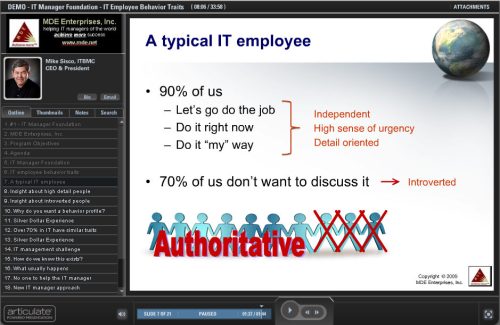
Are you aware that over 70% in IT have similar work behavior tendencies?

Would you be shocked to learn that 90% of us in IT actually have similar work behavior in 3 of 4 very measurable traits?

It doesn’t matter what your role in IT is, , , programmer, systems administrator, , , project manager, Help Desk, , , desktop support technician, database administrator, , , even IT manager or CIO. If you are in the IT organization, the odds are extremely high that you will operate (or approach your work) in very predictable ways.

If you had told me this in 1990 when I first got exposed to tools that measure a person’s behavior tendencies, I would have laughed at you. However, seeing is believing; I’ve seen too many things that reinforce the accuracy of these tools.

To some extent, our work behavior tendencies are very good and help us achieve success, , , especially when we have technical roles. In reality, there is nothing right or wrong with a person’s personality traits, , , it just means that’s how we are wired.

The challenge comes when we try to do things that do not come natural for us, , , our internal tendencies can actually work against us in many ways. Therefore, it is imperative that we have some level of understanding of these dynamics as it will help us overcome many of our challenges.

It also helps us understand what’s going on with our staff.

In my IT Manager Institute (both the classroom version and the IT Manager Institute Self Study), I spend the first part of the program to explain all of this so students can appreciate why some things work so well for us and some things are so difficult as we discuss the management processes throughout the rest of the program.

Rather than write an article about it, let me treat you to a segment from the first session of the IT Manager Institute Self Study. This section is about IT employee work behavior.

CLICK HERE or on the image below to access the online presentation.

Interested in learning more about the IT Manager Institute?

Classroom schedule — www.mde.net/institute

Self Study — www.mde.net/selfstudy

Project Kickoff – Step-2 is to hold an effective meeting

The Kickoff Meeting for a new project is your best opportunity to energize the project team and establish a common purpose toward completing the work. A great kickoff is the result of good planning.

After you’ve done your Project Kickoff Meeting prep work (see my previous BLOG titled, Kickoff your project – Step-1 is preparation), you need to plan to actually hold an effective meeting.

I’ve developed a set of tactics that I use to set the tone for the meeting. These items help me stay organized, establish a sense of leadership, and begin moulding the individual project participants into a team. These tips will help you kickoff your next project successfully.

Agenda
As in any effective meeting, participants are better off when they have a clear understanding of how the meeting will progress. To help team members prepare, I use the following basic agenda for most of my project kickoff meetings.

  • Project description
  • Purpose
  • Goals and Deliverables
  • Project team member introductions
  • Project assumptions
  • Project schedule
  • Key success factors
  • Status meetings
  • Other communication vehicles
  • Questions and Answers

The meeting
Keep the meeting flowing and avoid wasting time. Be personable and be upbeat; everyone will enjoy participating more if you take this approach.

Be conscious of people’s time and hold a concise and productive meeting. The best way to do this is to be organized and prepared.

Getting started
Take immediate charge of the meeting. Welcome all participants and don’t forget to introduce yourself. Briefly explain that you’ll walk everyone through the agenda and material and that you’ll leave time for questions at the end.

Define the project, its purpose, and expected goals and deliverables. Now is a good time to reinforce the importance of delivering the project successfully. You might even mention any significant implications to the company if the project is not delivered successfully.

Introduce the project members and briefly discuss the role of each. You want to do this yourself, , , don’t let the team members introduce themselves unless it’s a small meeting. Some of your high detail members like to talk and you don’t that much detail to get the project moving.

You should do most of the talking in this first meeting. The kickoff is intended to bring everyone up to speed, not to discuss every item in detail. Every participant needs to see you taking charge of the meeting agenda.

Presenting the project schedule
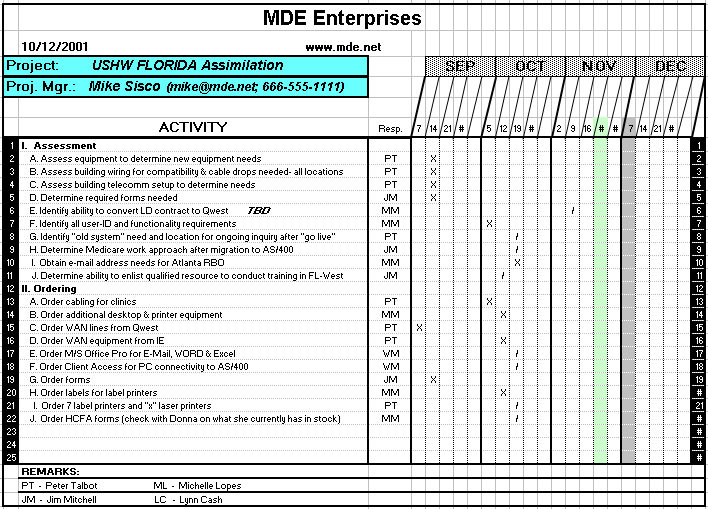
Now that you’ve set the tone, discuss the project assumptions that set the stage for how you developed the plan. Refer to the project plan document that you sent to everyone and go through it task by task. Explain and reinforce to everyone that this is a “first cut” and that the important thing to do in this meeting is to verify that the tasks are comprehensive, assigned appropriately, and have reasonable time frames.

The time to modify the plan is before the next meeting. Explain that the project plan becomes the foundation for status meetings and is used as the primary communication vehicle for managing the project. As you step through each task, point out key dependencies or factors you noted in preparing for the meeting that affect the completion of the task.

By walking the team through the plan, you’ll be able to point out tasks that are potential bottlenecks in completing the project. Keep your discussion to the point. Don’t get bogged down, but take the opportunity to help staff members anticipate problems.

Reinforce key success factors and explain why they are important.

Establish a timeline and team member expectations
Determine an appropriate time and day of the week to conduct weekly one-hour project status meetings. Reinforce the need for everyone to attend and to have that week’s tasks completed. Explain to them that you expect their tasks to be completed on time. If there are concerns about timelines, now is the time to scrutinize them, , , not after we commit to the schedule.

Take time to remind the group that teamwork is essential. Reinforce the need for participants to look out for one another. The objective is to complete the project successfully, and it is up to everyone to do their part and to help one another.

You might want to mention that, “Asking for help is a sign of strength, not weakness. Not asking for help is a weakness.”. High detail people tend to avoid asking for help because they think it’s viewed as weakness, , , encourage them to ask for help early if needed, , , it gives us time to do something. Requesting help too late prevents us from being able to provide the help and can jeopardize the project.

Empower team members to own their responsibilities and to ask for help. Repeat that you expect everyone to attend project status meetings prepared and with all tasks completed.

Part of your project management job is to help the team identify bottlenecks and to eliminate obstacles. Explain to them that you will be inspecting the status of tasks and you are always available if they need your assistance.

Explain the communication plan
Discuss your plan to share information and updates with the group and interested parties, including the following:

  • Weekly project status meetings
  • Subproject planning sessions
  • Project plan status updates
  • Senior management updates
  • Use of the company intranet or other communication vehicles

Emphasize the need to communicate to the project manager anything they see that might affect the project.

Ask for feedback and then close
At the end of the meeting, it’s time for questions and answers. Be certain you’ve blocked out ample time. If time runs out, ask everyone to send questions to you or to call you. You can later send out a Frequently Asked Questions document or even post it on your company intranet for people interested in staying abreast of the project.

Summarize the meeting with a call for action and list outstanding items that require immediate follow-up. Provide direction on any follow-up communication needed and what you expect from everyone at the first project status meeting.

Final thoughts
If you read both articles in this 2-part BLOG post, you might have picked up on the four actions that will increase your success in leading a project:

  • Establish an organized presence. Demonstrate to your team that you are on top of things.
  • Empower the team members. Give each team member responsibilities and expect them to accomplish their assigned tasks by the scheduled due dates.
  • Create teamwork. Encourage all to help one another and to be accountable to the project. Everyone pulling together for a common cause can have dramatic results.
  • Demonstrate leadership. Organize, empower, and develop the team, and everyone will see your leadership and follow.

Take advantage of the opportunity an effective Kickoff Meeting gives you. It can make a big difference in the success of your next project.

Kickoff your project – Step-1 is preparation

Your first project meeting is an opportunity to share your plan to lead the project to a successful completion. You should take advantage of this one-time chance to energize the group, set proper expectations, and establish guidelines that will help you complete the project on time and within budget.

You need a Project Kickoff Meeting !!

Fail to prepare for this meeting and you put the project at risk right from the start.

When you leave the Kickoff Meeting, everyone on the project team must be on the same page. Your preparation beforehand will determine whether you actually kickoff the project and prepare each project team member or put your project in jeopardy.

— Kickoff Meeting preparation —

Step 1:  Develop the project goals and deliverables
Defining these elements will drive the decisions you must make for staffing the project and developing the project plan. Write the specific goals and deliverables down and validate your definitions with the project sponsor (whoever justified and initiated the project, , , usually from the business side).

Step 2:  Identify the project team members and their responsibilities
Resource needs vary based upon the size, complexity, and nature of the project. Include resources from four key groups, as needed, to fully support your project.

  • Business operations  (knowledge experts, etc.)
  • Corporate support  (Legal, Human Resources, other support staff)
  • Management
  • Technical

Develop a project team contact list that includes the name, responsibility, department, physical location, phone number, fax number, and e-mail address for each member. You’ll want to distribute this information to the team prior to the Kickoff Meeting – see Step 7.

Step 3:  Develop a project assumptions list
It’s important for project team members to be aware of major assumptions that apply to the project. For example, spell out the assumption that each team member has been selected and assigned to the project by their manager to insure its success. That assumption means that their assigned tasks must take priority, and each participant must be committed to the success of the project if they are to participate.

Step 4:  Develop the preliminary project plan schedule
You can save a lot of time by going ahead and developing the Project Schedule of tasks, responsibilities, and time frames of the project plan. Going through this exercise will help you validate whether you have the right resources, identify risks, and determine the appropriate time lines for tasks and milestones.

Use whatever resources you need to help you create the initial project plan schedule. The point here is that when you go into the Kickoff Meeting, you will already have a plan drafted that each team member can review prior to the Kickoff Meeting. Doing so will save time and help you get the project off to a faster start.

Realize that the plan is not carved in stone at this point. It is only a draft until you meet with the team and everyone agrees that it’s an achievable plan. Once you have the team assembled and assign clear responsibilities, you should ask team members to validate their task responsibilities and time frames for reasonableness, completeness, and accuracy.

Step 5:  Define key success factors
Every project team member needs to know what it takes to complete the project successfully. Take the time to define in specific terms each item that will be required for success. Validate your list with the project sponsor.

Step 6:  Schedule the project kickoff meeting
It is important for all project team members to participate in the kickoff meeting. You want every member of the team to hear what you have to say at this meeting. Send a communication to each participant with a preferred time and date and include options in case they are unavailable. Even if someone is “out of pocket,” he or she can participate by conference phone.

Your goal here is to assemble the entire team so they all hear the same message at the start of the project. Instruct all participants to look for meeting materials on a specified date and to prepare for the Kickoff Meeting by reviewing them before the meeting, , , you want them to come to the meeting prepared to commit to the project schedule or to provide insight to appropriately adjust elements of the schedule.

As soon as you have a firm time and date, schedule a conference room and phone services to support conference calls, as needed. Plan for a 90-minute meeting depending upon the size and complexity of the project. Most of the Kickoff Meeting will be spent in walking through the Project Schedule to confirm accuracy and gain commitment from the team so be sure you have sufficient time to do all that you need to do.


Personal note
In a project, I had 12 team members from four company departments located in seven physical office locations in five cities. It’s not always feasible to get all team members in the same conference room, as in this case. By preparing a solid agenda, providing supporting documentation ahead of time, and organizing the flow of the meeting, you can conduct an excellent Kickoff Meeting that gets all participants focused on the same objectives, even when many have never met one another.


Step 7:  Send Kickoff Meeting materials to all team members
On your designated date, send a package of meeting materials to each project team member, including:

  1. Meeting time, date, and location
  2. Call-in phone number and access code for “out-of-towners”
  3. Meeting agenda
  4. Project Team  Member contact information
  5. Project Schedule draft

In your correspondence, ask each person to review the project plan carefully and confirm that all tasks under his/her responsibility are achievable by the dates listed. Also ask them to assess whether any tasks are missing or inappropriate.

Indicate that additional information will be discussed at the Kickoff Meeting and everyone should be familiar with his or her part of the plan. Explain that there will be a Question & Answer session at the meeting to discuss any questions.

Step 8:  Identify key issues and project dependencies
Review the Project Schedule prior to the Kickoff Meeting and make notes on points that you want to make at the meeting. Pertinent items include potential bottlenecks, impact issues, risk areas, status meeting process, communication plans, etc.

By going through these steps, you should be prepared to hold a successful Project Kickoff Meeting.

What’s next?
After all of your preparation, knowing how to conduct your Kickoff Meeting is the next step. In my next post, I will walk you through this part.

Too many diskettes, , , an old but funny story

In the early part of my career with IBM, I was able to sit in on a national customer service desk in Atlanta for a week to support a hospital software package that I was very familiar with.

On the 3rd day, I receive a call from a hospital employee from Kansas, a nice lady, who was having some difficulty.

First some background: In those days and the system this lady was using, the data backup was completed using large 5 1/4-inch diskettes. In the old days, we called them “floppy disks” because they truly were a bit “floppy”.

When performing a daily backup, the system copied to a diskette until it was full, and then asked for another, , ,  and then another until the backup was completed. The system put a number notation on each diskette’s header record so it knew the proper sequence in case a recovery was required.

In her case, she had 5 diskettes so the system numbered the diskettes in the header record (1 of,   2 of,   3 of,   4 of,   and 5 of 5).

When the lady called, she was trying to restore her data from her backup diskettes for some reason and had encountered a problem. I asked a few questions and thought I understood her problem. The system error message she was getting sounded like she had inserted the wrong diskette, , , in other words I thought she might have gotten them out of sequence.

So, I asked her to do the logical thing – “It sounds like the diskettes are in the wrong sequence so try inserting the next diskette you have.”

She did.

There is complete silence on the other end of the phone.

I asked, “What’s happening? Are we working properly now?”

She answers, “No. I’m getting a different error this time.”

She reads me the computer error message. This message sounds like a hardware error, , , now, I’m more confused.

I’m still thinking the diskettes are out of sequence so I tell her, “Maybe the diskettes are still out of order, so try putting the next diskette into the reader.”

Silence, , , , , , , , , , , , , , , , , , , , , , , , , , , ,

I ask her, “What’s up? Is it working now?”

She responds with an answer I’ll never forget, , ,

“Honey, I have two diskettes in there already and I can’t put the third one in; it won’t fit !!”

The lesson – be sure the person on the other end understands exactly what you are saying.