Category Archives: IT Manager Tips

Helpful articles and tips

Do you have an Escalation Plan?

escalation planWhat does your IT organization do when a mission critical event takes place in your company?

Does the appropriate IT support component spring into action to minimize the risk imposed by the problem, , , or have you even sat down to think about and determine what these issues are and what you should do if they occur?

Sadly, many IT organizations wait until a major problem occurs before thinking about it. Unfortunately, this is a terrible time to start analyzing what you would do in the event of a major problem.

Major issues can occur in any industry, , , some things are unique to a particular business or industry. Here are some situations to think about:

  • Server or network failure
  • Remote office loses connectivity
  • Data interface between applications or outside entities goes down
  • Anything that endangers patient care in a hospital
  • Anything that puts employee safety at risk
  • Issues that can cause financial risk to the company
  • Things that significantly jeopardize client satisfaction

fireman1It’s important for your IT support team to respond quickly when major problems occur like the examples above. To do this, you need some type of high alert process that causes your team to take action when key events happen.

It will be much more effective when your employees know what causes an escalation event. what their action steps need to be, and have the knowledge and tools to be able to troubleshoot and resolve the problem, , , even who the escalation owner will be to manage and close out the response activities.

You want escalation to take place automatically so think about these things now. Trying to figure it all out when you have a problem is not a good time to start.

Dealing with possible employee misconduct

ripped offI received a question from one of my followers this morning about how to handle an employee’s possible misconduct:

Question: Recently one of my assistant managers decided to delete emails from a couple of business users email accounts. What would be the appropriate course of action to take? I would investigate then fire this person. However, I know if I kept him, he would probably be more loyal in the future, , ,even grateful? 
Need some advice.

My response: 
Hello,
Thank you for your message. Here are some things to consider:

First, IT employees deleting any emails of others (especially our clients) should be prohibited unless you make a corporate decision to purge email from time to time, , , such as all email older than 2 years, etc. as decided by a senior management committee that represents users, senior management and IT.

Second, you probably want to find out why the employee deleted the email messages. It could be he thought this was not only appropriate but needed for a valid reason. He may even have deleted the messages as a request of the client. There could be many valid reasons, , , you need to understand the reasoning behind it.

Third, unless the act was for something illegal or unethical, I would never fire the employee for a first offense. Even then, you may not want to take such harsh action if you think the employee was possibly not aware his action was improper. However, depending upon the circumstances surrounding the email deletions, I would certainly coach and council the employee and make it clear this type of act will have serious consequences in the future, , , and be sure to spell out what those consequences are.

Quite often, an employee isn’t completely aware that his actions are improper, especially if a client has requested it. The key here is to get underneath the issue to determine why email messages were deleted and take appropriate action based upon what you learn.

Hope this helps,
Mike

Summary
There are a few issues that would warrant terminating an emp0loyee on the first offense, but they are few and far between from my experience. I try to always give the person the benefit of the doubt when facing questionable situations, , , whether it is an employee, a client, or a senior manager I work for.

People make mistakes, , , all of us do. It’s important that a company develops managers who are supportive and help minimize these type of mistakes. More importantly though it’s important for the company to have a culture where people aren’t threatened every time they make a mistake and see management focused to support them and help them succeed.

Management is about coaching, , , it requires continuous coaching and reinforcement to get the results you want as well as the behavior you expect from your team.

What would you do in this case? I’m interested in your perspective and thoughts! You can add a Reply in the box below.

Teamwork is not automatic in IT

21 SecretsThis is an excerpt from my new book, 21 Secrets Every IT Manager MUST Know

SECRET #8 – Teamwork must be developed

It goes without saying that you need strong teamwork to become a successful IT organization, but did you know teamwork is not a natural thing for IT employees?

Probably not, so let me explain.

teamwork1You see, over 90% of us in IT have two personality traits that actually work against teamwork to an extent.

First, almost all of us are technically oriented (a good thing), independent, goal oriented, and self-starters.

Most of these traits are good, especially as technicians or technology experts. However, this independent trait can be a challenge when it comes to working well with others.

In addition, over 90% (virtually everyone in IT) are high detail, , , also a good thing, , , you would think. For the most part, it is good, but one of the aspects of a high detail person is that they “like to do things their way”.

Let me get to the essence of what I’m driving toward. Technology attracts a certain type of individual and people with consistent personality traits. These traits summed up would describe an IT individual as someone who:

  • Likes to work independently and on his own
  • Wants to be precise and do things his way
  • Doesn’t like to communicate outside of his inner circle

The bottom line, , ,

teamwork is not a natural or easy thing for IT employees

High detail people can dig their heels in and become stubborn about how things are done. IT people are smart and they have strong opinions about things, , , it can be a real challenge to build teamwork for an inexperienced IT manager.

Don’t get me wrong here, , , IT people are conscientious and want to do a good job, but most want to do it a certain way, , , and that would be, , , their way.

What this means for an IT manager is that you have to build teamwork in your organization, , , that’s right, it is up to you to make it happen because it’s not going to happen automatically.

The good news is that building teamwork and camaraderie is the most fun aspect of being an IT manager, , , at least, I think it is.

I used to coach my teams a lot about, “We will succeed as a team; if the team fails none of us will be successful.”

The key is to create focus and coach your employees on working together positively.

Focus is provided by creating an IT strategy, running projects like projects, and delivering solid employee performance plans and reviews. When you deliver these, you always want to reinforce teamwork and the positive benefits of working together as a team.

Another opportunity to reinforce teamwork is when you have staff meetings. I like to hold them at least once a month and in every meeting there is something to reinforce the importance of teamwork.

Example
I joined a company to run their IT operation of some 35 employees. They lived in two different cities and it was obvious there were teamwork issues with the groups.

Shortly after joining the company I held an IT Kickoff Meeting to bring them all together and to refocus everyone to our company’s mission and the IT strategy I built to support this mission. The meeting had a key theme – TEAMWORK.

To have some fun, we divided the groups into three teams (Managers, City#1, & City#2) and created a competition among them to stress the importance of teamwork. Each team had to do a short skit (a play of sorts) that emphasized the teamwork message. Our management team presented a message of,

canoe row together“Put your oars in the water and row together, and we will be successful.”

The bottom line here is that teamwork occurs when managers cause it to happen, , , it doesn’t happen all on its own.

Reward desired behavior as well as successes

blue ribbonIt’s important to reward people for the successes achieved in your organization, but it’s also important to reward the behavior you want from the team.

You see, what gets rewarded gets emulated by others who see these things being recognized and rewarded.

Want your people to follow-up better? Find a way to recognize a positive action of one of your people in this area and reward them for it. Make an example of it.

Need people to ask for help when they run into challenges with one of their project tasks? Show the project team it is an example of strength when someone asks for help early enough so we can do something and avoid putting the project at risk, , , reward someone for asking for help.

There are hundreds of things you can do to reward the behavior you want in your organization. The key is you need to stop and think about the behavior you need on the team to mold your people into a highly effective IT support organization.

Are any behavior traits coming to mind that you want to reinforce with your team?

Think about the following list, , , just a small portion of behavior traits to consider:

  • Follow-up
  • Strong communication
  • Punctuality
  • “Going the extra mile” for a client
  • Helping a teammate
  • Being organized
  • Asking for help
  • Making good recommendations
  • Doing something to prevent support problems
  • Escalating a problem issue
  • Over communicating when needed
  • High work quality or high productivity
  • Positive handling of a client issue
  • Positive recognition of a fellow employee
  • Proactively working on a critical project task

Recognition needs to be for more than just for completing projects successfully. You want to encourage your team to be professional in how they go about their work as well.

An organization’s professionalism and client service reputation is built on not only what you accomplish but also how you go about it, , , i.e. the behavior of your team.

An IT organization’s reputation is solid only if the manager chooses to pay attention to it.

If not, your reputation will evolve based upon what’s going on and how your people handle the support business. Take charge of the situation by encouraging best practice behavior, , , you do this by recognizing and rewarding the desired behavior you want.

It’s difficult to force people to do things, but they will follow examples of positive behavior when they see it recognized and rewarded by their manager.

Create a training studio for your company

class-2Training is a tremendous motivator for IT employees so identifying a training program for each of your employees is very important. The same thing is true for other employees in your company.

Something you should consider is creating a training studio for your company to develop and package training classes that can be used over and over. It’s a lot simpler and cheaper than you probably think. It can even save your company thousands of dollars in training expenses.

There are many variations to “packaging” a training class, , , anything from creating an audio file that can be listened to repeatedly, , , developing a PowerPoint presentation that you do a voice-over and record, , , to video recording a live presentation.

Each of these variations are easily accomplished and inexpensive to produce with today’s technology.

The easiest to do with both audio and video is the 2nd option, , , creating PowerPoint slides and recording a presentation, so let’s focus on this approach.

Let me clarify something. In this approach, you will record an audio voice-over and screens of a PowerPoint presentation as you deliver it in a controlled studio setting, not in front of a class or group of people, , , although you certainly could record in a live class.

recording a class

What you need:
There are just a few things you will need to develop and package training programs effectively, and you probably already have most of it:

  • Laptop or PC
  • PowerPoint software
  • Camtasia Studio software for recording a presentation
  • High quality microphone
  • Quiet room to record in

A couple of comments here, , ,

First, Camtasia Studio is one of the best and easiest recording products available and it’s inexpensive at $299.00 as of this post. I use it and highly recommend it. Camtasia records your PC screen and audio as you work through a presentation, , , browse the Internet and make comments, , , whatever you do is recorded while it is turned on, , , can even access your PC webcam to record you if you wish.

camtasia

Second, good audio is a requirement so you want a good microphone. The good news here is that audio quality has improved significantly and a quality microphone is inexpensive. I have a professional grade Audio-Technica microphone on my desk that I use, but you don’t need to spend what I had to spend 7 years ago. I recently purchased a small portable mic to take with me on the road and it does a great job, , , almost as good as the pro mic in my office.

The mic I bought is a Samson Go Mic Compact USB Microphone – Plug n’ Play from Amazon.com; sells for $39.99 at time of this post, , , plus it’s usb and works with no additional software, , , it’s been a great tool for me.

Did I say portable? The case is 2 x 3 inches, , , slips in a small pocket of my briefcase.

Samson Go microphone  Samson GO-Mic

Steps to take:

  • Develop a PowerPoint presentation for your training class. Prepare bullet talking points for each slide in your presentation – it will help you focus and cover all the key points when you record your presentation.
  • Install your microphone and test it so you know it works
  • Install and become familiar with Camtasia Studio – Now, Camtasia has lots of features and capability, but you don’t need most of it initially. There are only two key things you need to learn to get started:
    1. How to record your screen and audio while you presenting
    2. How to edit out the sections where you make mistakes in the recording. In any recording session there will be mistakes, , , deleting these minor hiccups is easy with Camtasia.
  • Set up a quiet room to do your recordings. The microphone is quite sensitive and will pick up outside noise so you want to do your recordings in a quiet space.
  • Set up your PC to record – turn on the audio and Camtasia recording.
  • Do a quick test of just a slide to insure all is working as you expect.
  • Record your session
  • Edit as needed to clean up the recorded session
  • Publish your session to the desired format you want to use. Another nice thing about Camtasia is that you can publish your recordings to mp4, YouTube, and other formats that makes your recordings accessible by virtually any PC, laptop, or mobile device technology.

Summary
You can set up a recording studio in your company quickly and easily and at a very low cost to begin developing training programs that can be used again and again, , , not only for your IT organization but for your entire company.

Total cost if you already have a laptop and PowerPoint (and most of us do) – $338.00. Not bad when you consider doing this can save your company thousands of dollars by reusing packaged training programs, making them available over the internet, etc.

12 To Do’s in Preparing for an IT Manager role

questionSo, , , you want to be an IT manager, huh?

Well, I have two questions for you:

  1. Why?
  2. Are you prepared?

I always ask anyone who tells me they want to be an IT manager, “WHY ??”. We aren’t going to spend time on the “why” here, but if you are interested in analyzing this for yourself, take a look at a previous post after you read this article:
https://itlever.com/2011/02/10/why-do-you-want-to-become-an-it-manager/

Let’s assume you are beyond the “why” part, , , let’s focus on the preparation part.

To be promoted into an IT manager position can be a difficult proposition. You see, senior managers want people who can actually manage others and lead them to success. They want leaders who can motivate other employees and can make things happen. They want people who are organized and who take appropriate initiatives. And lastly, there aren’t a lot of new IT manager positions to open up in most companies.

Senior managers know that the IT manager role is a difficult position to be successful in. In my opinion, IT manager is the most difficult management position in your company.

Few companies offer programs that will develop and groom a technical employee for an IT manager position. Only the bigger companies tend to have formal training programs, and even they do not really offer a program that focuses on developing an IT manager. At best, they will offer general management topics.

Sound difficult? It should, , , unfortunately, more people fail at IT management than succeed, , , it is a challenging job and far too often there is no one around who can help a young IT manager “learn the ropes”.

Enough already, , , what are the things you can do to prepare for an IT manager role so that when an opportunity comes up you have a good chance in being selected for the position?

Here is what I recommend.

1.  Establish a positive track record – You need to start as early in your career as possible in establishing a track record that says two things:

  1. You do what you say you will do.
  2. You complete your assignments successfully.

This is extremely important because the results you achieve and how you go about your work tells senior management whether you are reliable and they can count on you to do a good job. You need an excellent track record if you want to become an IT manager.

I also think it’s important that you exhibit to senior managers that you are concerned about the quality of work and that you are willing to “go the extra mile” to insure you take care of your client and that you do a thorough job.

2.  Gain project management experience – Managing projects is some of the best preparation you can do to prepare you for an IT manager role. You deal with people, you have to manage client expectations, deal with target deadlines, , , plus you have to plan, budget, organize and hold meetings, communicate with different groups of people, etc., , , many of the things an IT manager has to do.

Every project you manage needs to be delivered on time, within budget and meet the client’s expectations for the project. Be sure you invest in your projecBook_IT Project Managementt management knowledge and find tools that will help you succeed in this area, especially if your company does not have a development program.

If interested, I offer a book and tools that can help you learn how to manage projects effectively titled, IT Project Management, a practical approach.

Something you will want to do is to track your project success rate. There is a big problem in IT about failing to deliver projects successfully. Your ability to show that you have a strong success rate in delivering projects can make a huge difference. A simple tool called an IT Initiatives Portfolio can help you show how well you do in this area. Check out the article and free download in ITLever.

3.  Invest in your IT management knowledge and skills development – Your company may not provide training that will groom your IT management skills but that doesn’t mean you can’t invest in developing these skills yourself. Here are some resources from my company worth considering:

  • Hundreds of Free IT management articles, tips, tools and templates at http:itlever.com

4.  Learn about the business – You need to learn about what the business does and what makes it successful, , , both profitable and productive. Who are your company’s ultimate clients and what role does technology play in each department’s ability to support your company?

Start with a high level view of what the company is all about and learn about the strategy your senior management team has in place to grow the company and make it more successful. Then, work your way down to the departments in the company and begin learning “what makes them tick” by learning about their objectives, challenges, and how they depend upon technology to do their jobs.

Now, you don’t need to become an expert in the business side but having a good perspective about what your customer has to do to be successful and their dependencies, issues, and challenges they have with technology is very good insight to have.

5.  Develop your communication skills – One of the biggest hurdles a new IT manager has to overcome is being able to communicate effectively. Most of us in IT have poor communication skills and even have a low desire to communicate outside our “inner circle”. To become an effective IT manager, you have to communicate well with all different types and levels of people.

Start immediately in developing your communication skills, , , it will be a big benefit to you throughout your career regardless of what you decide to do. Key communication skills include things like:

  • Presenting
  • Writing
  • Negotiating
  • Holding meetings
  • , , , even developing your listening skills

6.  Show everyone you are a team player – How you go about your work means a lot, , , probably much more than you might think. Learning to work with others in a collaborative way so you reach a “win – win” result is key. It doesn’t matter if you are talking about working with other employees or if it is clients or outside vendors.

Senior managers want their young managers to be positive and work constructively through challenging issues, , , and teamwork is a key trait they look for.

7.  Exhibit traits of working well under pressure – IT managers deal with tough issues from time to time. Be aware that how you handle pressure situations will be something senior managers will evaluate you on before they give you an IT management position. Show them you are calm yet have a high sense of urgency and that you think through issues and possible outcomes before “pulling the trigger” on problem situations.

8.  Show managers that you understand business value – Effective IT organizations deliver tangible and quantifiable business value, , , they don’t deliver technology. Every recommendation for investment of time and money from the company needs to be targeted to deliver business value.

Business value is defined as a project initiative that does one of the following:

  • Increases revenue
  • Decreases cost
  • Improves productivity
  • Differentiates the company
  • Improves client satisfaction

Start as early as you can in your career to look at the business reasoning for spending money and using people’s time to do things. If there is no business value that will result from a project, you need to question whether you should be doing the project.

When making IT recommendations think like a business owner. If it were your money, would you want to spend money on this recommendation?

9.  Make your manager aware – Your manager needs to be aware you aspire to become an IT manager. He or she must agree that you would be a good candidate for such a position so again, , , your track record and how you go about your day to day work speaks volumes in terms of whether they see you as a viable management candidate.

Sit down with your manager to discuss your goals and the possibility of preparing yourself for a future management position. Develop a game plan with your manager on specific education you should obtain as well as experiences you should gain in your preparation efforts.

Once your manager knows management is your goal and agrees you have good potential for it based upon what he has seen, , , he can position you for project management work, make investments in your training that will help prepare you for a management role, and begin positioning other senor managers for your future promotion.

10.  Find a mentor – Learning from someone who has already, “been there, done it, and has the t-shirt” as they say can help you in so many ways. Try to find a senior manager in your company or even outside it who will be willing to help provide guidance in developing your skills that are necessary for your future IT manager responsibility.

You can learn a great deal from a mentor plus they can be great resources to run questions by, ask for their advice, or just have long casual discussions about things that happen in a management role.

Your management mentor does not have to be an IT manager although it would certainly be beneficial. What’s important is that you learn about basic management principles so you are preparing yourself and gaining insight from experienced managers.

The other nice thing about developing a strong relationship with a mentor is that once you become an IT manager you will have someone to call when you deal with new issues for the first time. I’ve had 30 years of IT management experience and I still have a couple of people I consider to be my mentor, , , you’re never too old to learn and another manager’s insight can be very valuable.

11.  Volunteer – Candidates who have shown they are willing to “do more” and who consistently look for ways to help the team have an edge over other candidates who do just enough to get the job done.

Look for opportunities to help your manager and other managers in the company, , , even to help fellow employees and your clients. This “willingness” to help others goes a long way.

12.  Create a professional image – IT employees need positive role models so take a good look in the mirror every morning before you go to work. Are your clothes nicely pressed and professional looking, are your shoes shined, is your haircut nice and neat?

You may not think it’s a big deal, especially if your company operates in a business casual environment, , , but I can assure you that when senior management looks for a new manager, they want a strong positive role model, , , someone who represents your company well.

Your casual attire may not affect you all that much as a technology expert, but when your role impacts other employees and is one where you need to be a positive role model, I can assure you it’s something that will matter.

If you are serious about wanting to be a manager, take a look at how senior managers of your company dress and how they look when they come to work. Find a role model and start doing your part to create a good example for others to follow.

There are no guarantees!

Getting prepared to manage does not guarantee you will be promoted into a management position. More on this in just a minute.

However, if you are not prepared, the odds of receiving a management position are extremely low, , , so if you think you want to become an IT manager, the smart thing is to start preparing. And, what I can tell you is that when a manager invests in someone to take on more responsibility, he or she usually wants to help the employee obtain the opportunity.

Let’s talk just a bit more about there being no guarantee. Just because you think you are prepared to be the next great IT manager in your company, several things have to happen before you will get the opportunity:

  1. There has to be a management position open.
  2. You have to be qualified for that specific position.
  3. Senior management needs to think you can do the job and you are the best fit.
  4. There probably needs to be a replacement strategy for the vacancy you will create when promoted.

In addition, if you are in a small company where there is only one IT manager, you may have to be prepared to leave your company to be promoted because the one manager who is there isn’t going anywhere. My advice in this area is that you should be patient, , , especially if you work for a strong IT manager, , , you might be able to learn a great deal from him or her that can help you considerably down the road.

Final thoughts

Additional responsibility goes to those who are prepared and who have shown they can “do what they say they will do”. When senior managers look at management positions, they also look for candidates who have shown they can work well with people, are positive role models and who can make a difference.

Position yourself and develop your knowledge and experience in a few key areas and you may find yourself managing an IT organization one day.

Want a quick checklist? 12 To Do to Prepare for an IT Manager Position – Summary List.

10 skills that can help you get an IT manager job

managersYour experience and technical credentials may make you a strong candidate for an IT manager position, but the CIO may want something more. Non-technical attributes can help you stand out from the competition and tip the hiring decision in your favor.


Maybe you have the skills and experiences the CIO is looking for in a certain position — but there may be many other applicants with similar resumes on the CIO’s desk. The 10 traits listed below extend beyond the required skills and can help set you apart from the other candidates. Look at your resume and try to tie in examples and experiences to these traits in cover letters and during interviews.

#1: A self-starter attitude

CIOs want managers who take initiative and want to do a good job. Being proactive is an excellent trait as long as it’s consistent with the mission.

#2: Adaptability to change

Our IT world is constantly changing and those who are adaptable tend to achieve more. CIOs need managers who can adapt to change and maintain high levels of productivity even in uncertain times.

#3: Appreciation for good customer service

People who understand the importance of client service know that clients, or users, are the reason we have an IT career. They also know how to take precautions when working on issues that can cause downtime and loss of productivity.

#4: Team player

Too many excellent technicians lose their value to an organization when they can’t work effectively in a team environment. Demonstrating an ability to work successfully with mixed teams of IT staff and users is a tangible asset.

#5: Proven commitment

CIOs want people they know will go the extra mile when called upon to take care of a situation — those who will do what it takes to succeed individually and for the team. True performers come through under pressure.

#6: A strong desire to achieve

It’s hard to teach people to want to succeed if they don’t already have the desire. Having such a desire puts an emphasis on getting important issues resolved, and CIOs need people who recognize when a situation calls for “all hands on deck”.

#7: Problem-solving skills

Putting out fires is a big part of any IT manager’s role, and competence doesn’t necessarily mean a manager has to have all the answers. Good managers are willing to work hard to find answers and enjoy the challenges that land on their desks.

#8: Solid communication skills

Being able to communicate effectively with others is necessary in any IT management role. IT managers communicate with everyone these days — from senior management to the CIO to users. Strong verbal and written communication skills will set you apart from most of your peers.

#9: Strong follow-up skills

Nothing is more frustrating for a CIO than to have a manager drop the ball by not following up on a commitment or issue. It probably harms the credibility of the IT organization more than anything. The ability to follow up shows commitment and an understanding of client service.

#10: Low maintenance

CIOs want managers who can operate independently, solve problems and who don’t create personnel or workplace problems. No CIO wants a manager tapping them on the shoulder all day, double-checking things and seeking help. The manager who requires minimal direction and who can deal with issues while ensuring that the appropriate steps are being taken is a valuable asset.

Often, it’s the soft skills and the “warm and cozy” feeling a CIO picks up in an interview that helps you get that management job. Senior managers look for candidates they believe can and will be able to do the job, will require minimal support, and have great “can do” attitudes who lead by example.

Be sure you load up your resume and interviews with things that help demonstrate these type of attributes as well as your technology understanding, , , it can make a big difference.

Why most presentations fail

When it comes to presenting, most IT managers struggle, , , and they struggle for several reasons.

First, they are uncomfortable getting in front of people. Guess what, , , this is true for most people, not just IT managers, , , but it is something that you can and will overcome with practice.

I remember being scared to death the first time I had to make a short 5-minute presentation, , , that’s right, “truly scared”. You wouldn’t notice it now because I don’t get nervous when I need to make a presentation. The reason is because I’ve done it a lot, but in my early career years it was a very intimidating issue for me.

The key is being prepared and knowing your material.

Another reason IT managers struggle with presenting is because they haven’t learned how. Presenting and communicating is not what you “jump out of bed in the morning to go do”, , , it is simply not a fun or interesting thing to do for most of us who find ourselves in the IT world.

When you do have an opportunity to make a presentation, you want it to be a good one. There are three key reasons most presentations fail, so I’m about to share them with you and give you quick and easy solutions to help you be successful.

Problem #1 – Too much text
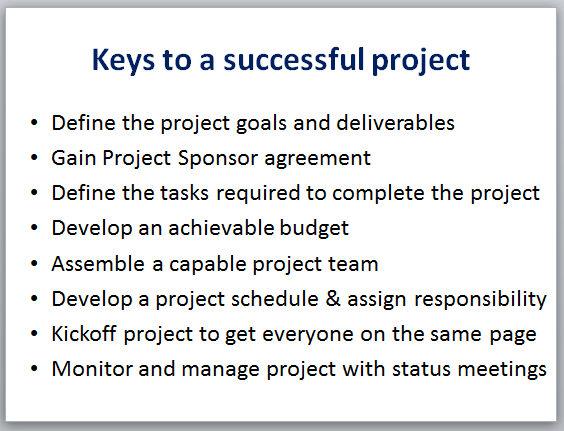
This is by far the worst problem. IT people are high detail and we tend to try to put all the content we want to say on a slide. I’m sure you have seen a slide like the one below where there are lengthy detail bullet points the presenter talks about, , , or worse yet, reads from the slide.

Nothing turns an audience off faster than when the presenter simply reads his slides.

The good news is that there is certainly some valuable content on this slide, but there are many problems with it:

  • Too busy
  • Includes too many points
  • Not memorable
  • BORING

We will address these issues in a few minutes.

Problem #2 – People don’t understand your message
When there is lots of text on a slide it creates a challenge for your audience. Most people have difficulty in reading and listening at the same time, , , plus many who are high detail tend to take notes as well. That’s as many as three things going on, , , and what gets the least amount of a person’s attention is the listening part when you have all of this activity.

There are a couple of things you can do to reduce the competition that’s taking place in getting your audience to listen and to hear you, , , and one of the best ways to help people understand your message is by creating an environment where they can focus on your verbal message.

  1. Create slides that contain one key point
  2. Spend time to discuss your point so it is understood
  3. Discuss your points in conversational mode
  4. Prepare handouts to minimize the note taking

In the case of our sample, it’s better to have 6 or 8 slides to discuss all of these points than to try and discuss them from 1 slide. Multiple slides won’t be as busy, you will have your audience’s attention for the key point you are making on each slide, and you have room to make the slide more interesting, , , and maybe even memorable.

Problem #3 – People’s memories are limited
In most cases, people only remember about 20-30% of what you tell them. Knowing this to be the case is a plus and gives you insight to do some things that will help your audience “remember” your presentation.

  • Handouts can help
  • Images are memorable and make a presentation more interesting
  • Repeat key points to drive home your message

Let’s take our example, , , a “presentation remake” is in order. Below are revised slides that I think help you achieve better understanding, create more interest, and make your presentation more memorable.

Slide-1:  Start the presentation with “why” project management is so important. Your audience needs to hear, “what’s in it for me” and “why this presentation is important” right up front.

Slide-2:  Next, lay out the three phases of project management (project definition, project development, and project execution). Then explain that 70% of a project’s success is based upon the planning (project definition and development) work done in the beginning before you actually start doing any of the project work.

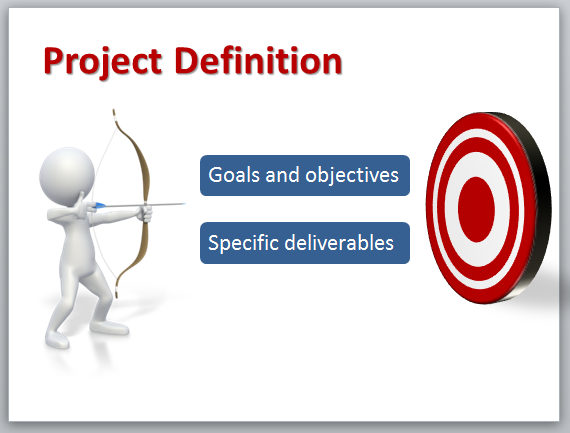
Slide #3:  The first phase is Project Definition. Explain the two key things are defining the project goals and objectives and quantifying specific project deliverables.

Slide #4:  You don’t have a real project unless your project sponsor agrees with the objectives and what you will deliver.

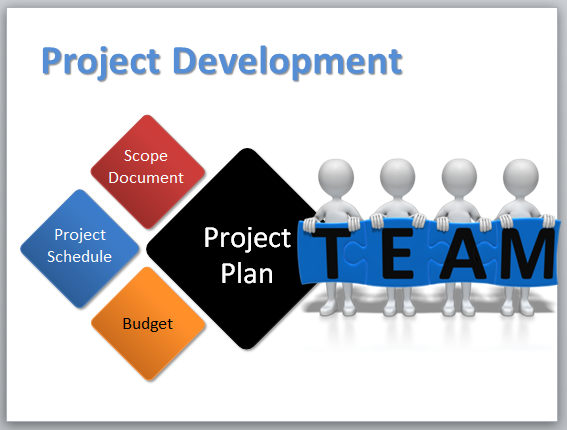
Slide #5:  Phase 2 is Project Development. Once you know what is required (objectives and deliverables), you develop the project plan made up of the Project Scope document, Project Schedule, and Budget. When you have all the tasks identified, you know the skills required so you can assemble a competent project team.

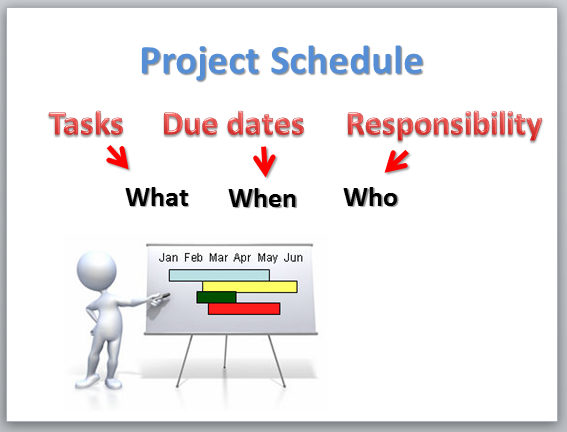
Slide #6:  Developing the project schedule is a key part of the plan. It defines what needs to be done to complete the project (tasks), who should do the work, and when the work must be completed to deliver the project successfully.

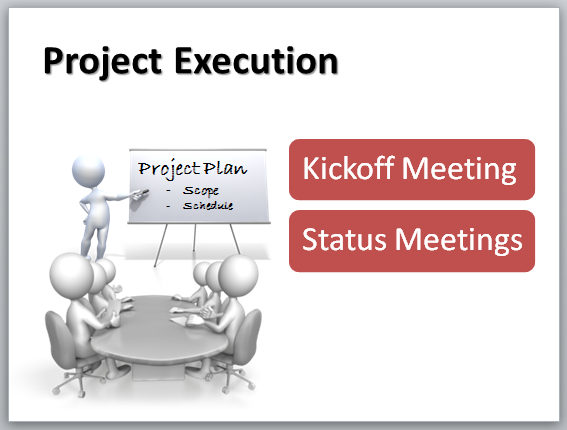
Slide #7:  Phase 3 is Project Execution. Executing the project means kicking off the project to get everyone on the same page and manage your team’s expectations and then monitoring and shepherding the project along to success with project status meetings.

It takes a few more slides but your total discussion will be about the same amount of time. Show the slides and discuss the key point of each slide, , , don’t read text.

It will make a big difference in your next presentation by helping your audience better understand your material and make it more memorable.


Caution – be careful when a client describes his problem

I was reminded of a basic client service issue last week, , , “You need to be careful in reaching conclusions based upon your client’s description of a problem”.

My wife’s cousin called us last week. He is more like a big brother to Dorine so our families are close. He was in town trying to get his PC fixed, but was getting nowhere fast.

I knew he was having a problem because he mentioned something about it a couple of weeks before. He had others work on the problem but it was apparently not yet resolved. He decided to take the PC to one of the major computer stores which apparently resulted in no help, , , so he called to see if I knew anyone who might be able to look at the issue.

I asked him to describe his problem, and here is what he told me.

  • It started when he installed a new printer. The new printer driver apparently messed up several things on his PC.
  • He took it to a local guy who was successful in removing the printer driver and restoring is PC.
  • Everything seemed to work except for his Photoshop software. For some reason, he couldn’t view his newer photos. All the older photo files could be opened and viewed but recent photos could not be opened.
  • He receives an error stating, “Can’t view the file. It is an invalid file type.”

Kenny uses Photoshop quite a lot and he was extremely frustrated. He had reinstalled Photoshop a couple of times but could not get past this “invalid file type” problem. As a result, he can’t use Photoshop to work on his new photography projects. This is a significant business problem for him.

What to do?

Initially, I thought about restoring his PC to a previous date to see if that would fix the problem. Then, I thought of a couple of other possible ways to resolve his problem.

But then I had an idea that would save us time and ultimately lead to the solution.

I thought, “Let’s focus on the problem we know we have (invalid file type) and let’s not assume the installation of the printer has caused this problem with Photoshop. Maybe the printer installation is the issue, but we need to focus on the specific problem that has been identified for us, , , Photoshop cannot open and view a new photo file, , , and we have a specific message telling us what the problem is.

How do you find the answer to a problem? 

Most of the world’s questions are answered in GOOGLE.

So, I keyed in the phrase “Photoshop – invalid file type” and search Google for possible help.

Sure enough, the first listing comes right off the Adobe web site and since Photoshop is an Adobe product, , , I’m feeling pretty good already.

I read the information and in it is listed the specific steps to diagnose and solve this problem.

To make a long story short, Kenny brought his PC over to our house and we resolved the problem in just a few minutes. Now, this was after several weeks of having others look at the problem but not able to resolve the issue.

I’m not a heavy technical person, , , in fact, you don’t want me working on your PC.

What was the problem?

The issue actually had nothing to do with the printer Kenny had installed and subsequently removed. It was an entirely different issue.

The problem was that he had bought a new camera and the Photoshop plug-in that converts a camera’s raw image to a Photoshop file that can be modified and manipulated needed to be updated to support the new camera.

The reason the others were not able to fix his problem is because they were working on what the client thought to be the problem. Unfortunately, both the client and his support people were chasing the wrong issue, , , a waste of time, , , and very frustrating for all.

Now, I’ll be the first to tell you, I was lucky to solve this issue so easily and quickly. But the reason I was able to solve it is because I focused on the defined problem (Invalid file type in Photoshop) as opposed to assuming the client was correct in his assumption that it had to do with installing a printer.

The printer may have caused other issues on his PC but it had nothing to do with the fact he could not view his new photos in Photoshop.

The lesson – Don’t just assume your client knows what is wrong. Diagnose the problem based upon the facts you can determine, , , not assumptions someone gives you. The assumptions may be helpful, but they can also lead you down the wrong path and cost valuable time and create tremendous frustration for all involved.

At the end of the day, most problems are caused by something pretty simple. The trick is to discover what that “simple thing” is that’s causing the problem.

I get real nervous when I see a PC technician start making all kinds of changes on a PC very quickly. In many cases, they create more problems rather than taking their time to troubleshoot the issue before making any type of changes to the PC.

Another lesson – GOOGLE has the answers. . . I’ve discovered the answer to many technical issues using GOOGLE searches.

6 things that will set you apart from other IT managers

Senior managers of companies need partners who can lead IT organizations in a way that helps the company succeed. When they find an IT manager who is able to do this, quite often they give this person more responsibility.

In many companies, business executives don’t want to spend a lot of time with an IT manager or CIO. When they see their CIO walking toward them, they literally want to find a window to jump out of or a back room to hide in until the CIO leaves.

The reason, , , the CEO believes his CIO is going to do these things:

  • Ask for more money
  • Recommend projects he can’t understand or appreciate
  • Talk in a “techie” language that makes understanding him impossible

The problem is that far too many CEOs view their IT leaders as spenders, managers who like new toys and who are infatuated with technology, and people who talk in acronyms and terms that no one can understand. They just don’t understand what their CIOs are telling them. If this is the case, business executives tend to avoid you.

A better picture of this would scenario be when the CEO can’t wait to sit down to talk with the CIO because he is genuinely interested in what he has to say. Guess what, , , he won’t be interested unless he knows he will be able to understand what his CIO is about to discuss with him.

This only happens if the CIO establishes trust and credibility, , , two key things any IT manager must have to succeed.

You earn trust and credibility, , , it is not given to you just because your title is “CIO”.

“Trust” and “credibility” are similar to “respect”, , , all three must be earned, none of these attributes will be given automatically.

Then a key question is, “How does an IT manager or CIO earn trust and credibility?”

It’s actually simpler than you might think.

There are 6 key things that will distinguish you from other IT managers, , , truly set you apart from the masses of IT managers in the world. Plus, do these things and you will earn the trust of others and establish much needed credibility.

1.  Understand and communicate business value – Succeeding in IT management is not as much about technology as it is in supporting business managers and their units effectively. It’s more about “business value” than about the technology.

Business managers and executives understand business value, , , they “get it” when you discuss issues in business value terms. They don’t understand technology, , , don’t want to, , , and aren’t going to for the most part.

Business value includes the following:

  • Increase revenue
  • Decrease cost
  • Improve productivity
  • Differentiate the company
  • Improve client satisfaction

IT managers must learn to discuss IT initiatives, projects, recommendations, etc. in business value terms, , , when they do, the business manager will start listening and understanding.

2. Project recommendations are always cost justified – There has to be a reasonable benefit for spending money and using company resources to work on a project. These benefits are ideally presented with a Return on Investment (ROI). At a minimum, there needs to be quantifiable and tangible benefits discussed in business value terms that makes a project worthwhile to do.

If you cannot articulate the business value your project recommendation will provide, then you probably shouldn’t be recommending it.

Put your “owner’s hat” on. If you own the company, you only spend money on things that are going to provide some type of business value for the company. You invest in things, , , you don’t simply spend money. If there is no return on investment (i.e., no real benefit), then you keep the money to use it on something that will provide a benefit for your company.

3.  Develop an IT strategy and gain approval – Do this and there is no way your IT organization can be out of sync with your company’s business needs and issues. Too many IT managers simply want to go do the work and avoid the effort associated with developing an IT strategy, presenting it and gaining approval.

Other managers suggest that they can’t develop an IT strategy because there is no formalized company strategy. Unacceptable! Even if the company has no formal company strategy, IT managers still need to develop their IT strategy, present it and gain approval before you spend money and use resources, , , otherwise there is a big risk of IT being out of sync with your company’s needs.

4.  Communicate proactively – IT managers are generally shy and introverted. We don’t particularly like the idea of having to communicate with department managers and executives of the company, , , we just want to be left alone so we can get the work completed.

Shy and introverted people have a lower desire to communicate. An IT manager must break through this challenge and set up processes that forces him to communicate with key department managers (the big users of technology support), senior management, and IT employees.

And when you communicate with business managers, be sure to communicate in business value terms, not in technical terms and acronyms.

5.  Manage within your budget – Many managers in IT don’t seem to realize the importance of managing their organization within financial guidelines, , , and the key piece to this is your operational budget.

IT managers who show they have an appreciation for the financial side of the business and the importance of achieving their financial business plan earn respect from senior executives.

The keys to the kingdom lie in the financial aspects of managing IT support. Look at the components of business value, , , every item has a financial implication.

IT managers who do things that are financially supportive of the company’s success stick out, , , most executives view IT managers as “spenders”, , , not managers who always seek “value add initiatives”.

6.  Deliver projects successfully – Another way you earn credibility is when you deliver projects successfully, , , they are on time, within budget, and meet your client’s expectations.

When you do what you say you will do by delivering projects successfully, you gain trust by the company managers and executives you support.

Summary
The CEO will eager to sit down with you to hear what you have to say when you

  • Develop an IT strategy and get confirmation from senior management to insure your team is in sync with the business.
  • Always recommend projects that are cost justified and provide quantifiable business value.
  • Complete projects successfully and demonstrate your IT organization will “do what you say you will do”.
  • Communicate in business value terms.

IT managers who operate in this manner gain credibility and trust in their companies, , , and executives view them as partners who become integral components to the success of the company. As a result, they quite often give these type of managers more responsibility.

So, next time the CEO sees you walking down the hall toward his office, will he run and hide, , , or will he step forward to meet you because he wants to hear what you have to say. When IT managers operate more like business owners, executives usually want to hear what you have to say.