I’m reminded of things taking longer than planned

Tom Mochal and I decided to develop new 20 Minute IT Manager e-learning sessions this year. For three years between March-2006 to March-2009, we delivered weekly 20-minute training sessions to our subscriber list, , , 162 sessions in all. See www.20minuteitmanager.com for details.

These sessions are excellent training modules that will be great training resources for years and years to come because they aren’t hinged on any specific technology. They are practical tips and techniques on:

  • IT management
  • Project management
  • People management
  • Leadership
  • Professional development

Well, I started getting prepared to produce new sessions, , , essentially developing PowerPoint presentations, recording the voice-over, and publishing the sessions for upload to our Internet servers.

Sounds simple enough, , , after all, I’ve developed over 100 training sessions using the tools we use, , , Articulate Presenter, , , GREAT TOOLS.

But I forgot one simple thing, , , I upgraded my computer system in October and this will be my first time to use these tools in my new environment.

This one little change made my setup preparation a much bigger deal than I had planned. I thought I would be recording in just a few minutes.

WRONG !!!

First, had to install a new licensed set of software so I downloaded the trial version and tried to register it with my registration key.

“Houston, , , we have a problem!”

Apparently to do this we needed to uninstall the version on my old desktop to free up the license. Unfortunately, this desktop has been put away never to be used again except for dire emergency and the longer we go the bigger the emergency needs to be. Surely we can avoid this “hassle factor”.

When making the system conversion I didn’t worry about this part because I knew I had the registration key needed to activate the software on my new system. Didn’t realize I would actually need to uninstall the software on the old system to free up the license.

A few hours to get the licensed software setup on my new system after contacting their support team, , , they are very good by the way.

OK, ready to go.

Not so fast, , , let’s test a few things before we go too far.

Good thing I did because when I imported an audio file for one of the slides, , , my PowerPoint system freezes, , , locked, , , can’t do anything.

Uh-oh!

Everything else works fine but PowerPoint is locked solid.  “HU^$%#^%&VFF#”

After considerable Google searches I contact Articulate Support once again and they send me recommended solutions to identify and fix problem. I walk through their recommendations and sure enough, they work.

The issue, , , my new Lenovo laptop (which I absolutely love by the way) comes configured with WinDVD and it causes a conflict with Articulate Presenter. The Articulate Support Team was right on top of the situation, , , told you they were good.

I follow the problem resolution steps, do another audio import test and see that we are now in business, , , no lockup when importing audio.

OK, , , ready to go.

Not so fast, what’s your hurry?

Let’s do another simple test, , , let’s create a 3-slide presentation and publish it to see what it looks like just to ensure all is working well. We don’t want to have to do lots of rework down the line after completing an entire presentation, , , right?

My test presentation publishes the 3 slides without a hitch except for one thing.

It does not look like our other 20MITM sessions we have created. It is obvious that I have to set up Articulate Presenter all over again, , , things like:

  • Our custom user interface template
  • Presenter photos and biographies
  • Default attachments we include in every session with new file paths
  • Even the PowerPoint Slide Master has to be updated.

The bottom line:  My 1-hour prep work turned into a 2-day effort due to the lag time back and forth with support, my learning curve, and the extra work I had to do to troubleshoot and get my presentation production environment back to where it was with the old PC.

The good news, , , I’m set up once again and the new production environment is better than ever, , , faster and even easier to use.

Remember the IT Project Golden Rule, , ,

IT projects usually take longer and cost more
than you think they will.

Don’t you just love these support calls?

I want you to put yourself into your client’s shoes for a minute as I tell you about a support call I made yesterday.

Our DSL service has been having intermittent problems of late. In every case, I was able to unplug and replug the modem and wireless router to “reboot”.

Worked fine, , , no worries.

This week the number of “lost internet” issues increased so when the problem occurred twice yesterday and I had more difficulty in re-establishing connectivity, I decided to give my DSL provider a call.

I’m the client in this situation.

I was fairly certain the problem was with either the DSL line or the modem. Everything looks good on my end, , , I’m just not getting out to the Internet plus the Internet light on the modem is either red or doesn’t light up at all and it should be green.

The Support Rep is courteous enough but not very receptive to input I try to provide so he can focus on the line or the modem.

We establish pretty quickly that the line is OK, but then he starts having me disconnect the wireless router and do all kinds of things assuming the problem is on my server and cable end.

After an hour, we are no closer to a problem resolution and my system has been totally disconnected from what we need, , , then he says that to replace the modem will be a $75.00 charge plus an activation charge of $125.00.

Are you kidding me?

Their modem is faulty, I pay a monthly service fee that includes the equipment, , , and, “I have to pay to fix your problem?”

About this time, I’m getting a bit frustrated so I ask to speak to a manager. After another 10 minutes he comes back to say they are all busy and not available but he can arrange a callback. Yeah, , , right.

I have a serious problem. My business depends upon Internet connectivity. This has to be resolved and resolved quickly.

The Support Rep starts giving me all kinds of explanations and possibilities but he isn’t taking us to a resolution. We need this problem resolved, , , and it lies with the modem I’m pretty sure.

After considerable more time of working with this chap, we determine that the problem appears to be with a firmware problem within the modem. We reset the modem and reconfigure it and wallah! All works well again.

Today the problem occurred again but this time I was able to replace the modem and so far, , , all is working just like it should work, , , and normally does.

I think we could have saved a lot of time and frustration if he had focused on the modem as a possible source of the problem in the beginning rather than stepping me through all the hassle of disconnecting and reconnecting cables and suggesting I probably had a systems problem.

My point, , , it is easy to point to your customer as the problem. In some cases, they actually are but in my experience it is more often something on our technology side that’s causing the issue.

2011 in review

The folks at WordPress.com stats prepared a 2011 annual report for my blog.

Here’s an excerpt:

The concert hall at the Syndey Opera House holds 2,700 people. This blog was viewed about 33,000 times in 2011. If it were a concert at Sydney Opera House, it would take about 12 sold-out performances for that many people to see it.

Click here to see the complete report.

My Annual Review – 2011

My first thought, , , what happened and where did the year go. Don’t know if you feel the same way, but 2011 just seems like a blur it went by so fast.

Time for my Annual Review to recap the year, , , maybe this will help explain why 2011 went by so fast.

  • 3 IT Manager Institute classes and only 1 trip this year, , , to London, Ontario Canada, , , that’s #44, 45, and 46
  • Tested webinar training and delivered three 1-hour classes for European managers
  • Taught a 4th IT Manager Institute (our 47th) via webinar, , , 5-hour days for 5 straight days, , , reviews were good
  • Rewrote my first ten books, , , a major effort that took over a year to complete
  • Upgraded our company’s entire systems, processes and business applications infrastructure, , , from hardware to shopping cart, a major effort but positions us well for 2012
  • Rebuilt our web sites from the ground up using a WordPress platform, , , see www.itmanagerinstitute.com
  • Posted approximately 200 ITLever Blog articles and posts
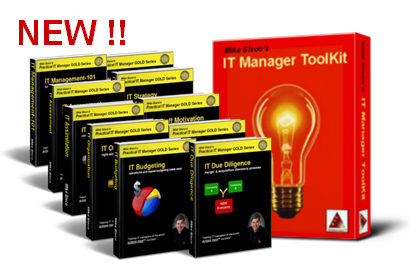
  • Updated the IT Manager ToolKit

Most of the year was spent on the big rewrite project and the infrastructure upgrade, , , both were huge efforts. To be able to focus on these projects, I pulled back on my travel schedule and minimized the number of classes in 2011. Our company took a financial hit but it was something we needed to do to position for 2012 and beyond, , , and we are excited about where we are.

In my next blog post, I’ll lay out some of the results of what we have been working on to make 2012 one of our biggest and best years in “helping IT managers of the world achieve more success”.


Excellent graphics software

In my small business we constantly need to develop images to promote our products and to make our web sites, brochures, etc. more appealing.

Three software products I use are powerful yet very inexpensive.

Developing 3D books, boxes, etc.
I use two software products primarily and they work great.

3D eBook Cover (Click here for info)
$ 59.00 (discounted often by 50%)
Powerful with many options including developing PNG files with transparent backgrounds, , , a must have for this type of work. Has a bit of learning curve like most products but pretty intuitive by playing with it some. Creates some truly great images like the ones below.

Quick 3D Cover (Click here for info)
$ 57.37
I’ve had this one for a long time and it is a tried and trusted tool in my marketing arsenal. Doesn’t have as much creative flexibility as 3D eBook Cover, but when you need to create a 3D book cover quickly, this is the one I tend to go to.

3D text

XARA3D (Click here for info)
$39.99
XARA 3D is the way to go even though you can do a lot with PowerPoint these days. Xara3D gives you all types of 3D effects plus it animation of your text using standard templates you can customize if this is something you like. I’ve been using Xara3D for 5 years and it has been a great addition.

I also use Xara Web designer on occasion, , , also a handy tool.

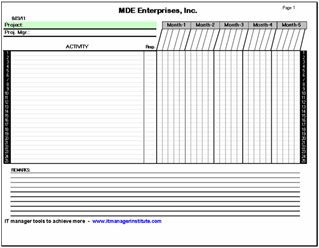
Download this simple project scheduling tool

Managing projects does not have to be complex, , , the simplest of tools can be very effective.

While there are plenty of tools you can use to keep track of everyone’s tasks and responsibilities, here is one that is easy to use and understand.

I’ve been using it since my IBM days in the late 1970’s, , , before spreadsheets and PC’s. I still use it today and teach others how to use it to deliver projects successfully. You don’t throw something away when it works well and gets you positive results.


How it works
Here are some instructions for using the spreadsheet template. These are also included in an Instruction workbook in the spreadsheet tool:

  1. Fill in the Project name.
  2. Fill in the Project Manager name and contact information (e-mail, phone number, etc.).
  3. Fill in the month at the top of the column groups (Jan., Feb., Mar., etc.).
  4. Fill in the week ending dates for each weekly column. There are five columns for each month to provide for five-week months.
  5. List the tasks required to complete the project.
  6. List the person responsible for each task.
  7. Place a slash mark (/) in the cell of the week in which the task should be completed.
  8. List the resource participants and their initials at the bottom of the first page for reference.

CLICK HERE to download the Excel spreadsheet tool.

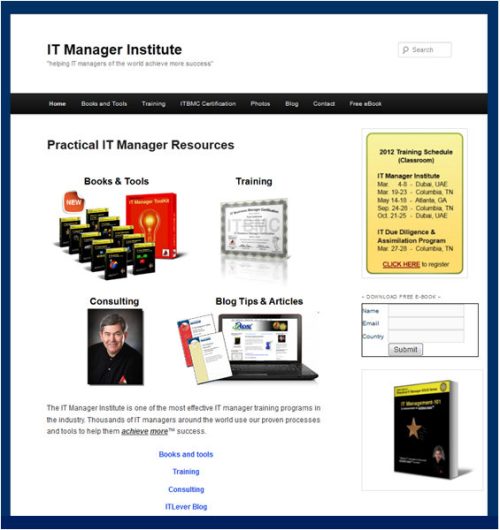
New web site is completed – itmanagerinstitute.com

Wow, you forget how much content you have developed over the years until you have to develop new web sites to showcase it. We have a tremendous amount of “how to” training material for the IT manager and it has to be one of the most comprehensive libraries of IT manager resources in the industry.

The itmanagerinstitute.com web site is officially launched! Check it out.

This new website and domain becomes the foundation of our ongoing brand, , , the IT Manager Institute, , , something we have been developing for many years. The key pieces are in place, but we still have several more items to add to the list of products plus there will be new announcements shortly.

Our mde.net web site will be history in just a few months although you will still be able to use it as a path to get to our company resources, , , you may like the shorter url. 🙂  I will continue to use mde.net as a corporate domain and for email.

We have other domains that will be put to use in the near future to compliment the IT Manager Institute brand and to promote specific products or services.

The two sites you want to watch are:

  1. http://itmanagerinstitute.com – our IT manager products and services site
  2. http://itlever.com – our IT manager BLOG

We will make new announcements on the ITLever.com site as well as in our monthly newsletter, Practical IT Manager Tips. Subscribe to our newsletter and receive a free copy of IT Management-101 at http://itmanagerinstitute.com/free-ebook

I chose WordPress as the development foundation primarily because of:

  • Ease of use
  • Search engine optimization
  • Flexibility and functionality access with plugin options
  • Key functionality features that are key to our future, , , you will hear more about these in the near future

Our infrastructure migration is nearing completion. We have been working on the new web sites and other projects you are yet to see for months, , , all to position our company with the ability to deliver better IT manager resources that are both accessible and affordable to the IT managers of the world.

I’m very excited about 2012 and the future and believe we are well positioned.

Merry Christmas and Happy New Year

We mailed our Christmas cards and the annual Sisco Christmas Letter to family and friends last weekend, and I thought you might like to read it.

After all, I consider all of you who read my Blog a friend, , , and I’ve been fortunate to meet many of you. Click on the images for a better view.


Annual Sisco Christmas Letter

I’ve been sending a Sisco Christmas Letter with our cards since 1993, the year Eddie had his accident. Many of the early letters were an attempt to keep people posted on his progress. Over time we’ve tried to share a few memorable things that have occurred in our lives.

We receive many positive comments, , , our friends and family seem to appreciate the small effort we go through to keep them aware of what’s going on with The Sisco’s, albeit such a small piece of information on two pages.

Send me your comments, , , maybe you do something similar.

Sorry for the temporary absence

foundation blocksYou haven’t seen many posts on ITLever lately because I’ve been very, very busy on some major projects that will be important for 2012. I’ve been hard at work laying the foundation blocks for the future of our company.

That’s right, we have big plans for 2012 and you are about to start seeing some of the results of our efforts.

  • New training – both in available options that allows me to cost effectively reach many more IT managers around the world as well as new content that will help you achieve more success.
  • New books – I’ve finally rewritten my first ten books (now called the Practical IT Manager GOLD Series) so I can focus on several new titles that have been waiting for me to get to them.
  • New products – What I will tell you here is that even though I probably have more material and training resources for IT managers than any other organization in the world, I feel as though we have just begun. You may want to subscribe to ITLever so you won’t miss any of the new announcements that will be coming. To subscribe to ITLever, see EMAIL SUBSCRIPTION in the right-hand column of this page.

Getting the rewrite of my first ten books behind me and updating our company’s infrastructure has been a major time constraint, , , so much so that I reduced my training travel schedule considerably this past year in order to dedicate the time needed for these big projects.

Would have been nice if I could have delegated the books rewrite to someone else, but I had to do the work. Thought I could just “tweak” the books slightly and be finished in 30 days, , , that is, until I started working on the first book and saw how poorly written they were. Seems that my writing skills have improved some in 8 years. The new version is much, much better than the originals.

Dedicating time to focus on these big projects meant taking a financial hit to our business in 2011 but I believe it was worth the investment.

Well, I’m back.

We still have some major infrastructure work going on but the heavy lifting is all but over and I will soon be able to devote much more time to developing new content and delivering more training than ever before.

We are excited about the future and I hope to be posting much more to ITLever in 2012.  We have a lot more to develop and share in our mission of, “helping IT managers of the world achieve more™ success”.

Stay tuned.

Webinar services option for my business

I’ve been researching webinar services options for my business and have been experimenting with a few of them over the past few months.

If you have webinar experience I would be interested in reading your comment and recommendations as we finalize our selection.

We have narrowed our selection to the following options:

  1. Webex
  2. GoToWebinar
  3. iLinc
  4. ClickWebinar
  5. VIA3

From a usage standpoint, I’m most familiar with Webex having just delivered a 5-day IT Manager Institute for a group of IT managers from Croatia and Slovenia and several 1-hour training sessions leading up to the Institute, , , see Class #47 at https://itlever.com/it-manager-institute-photos/

Webex worked well and was easy to use, but I still have a bit of learning curve. I’m also a bit familiar with GoToWebinar and a couple of other services I have sampled.

The Institute webinar went well overall, but 5-hour sessions over 5 days is a challenge for students although it was much easier for me. I didn’t have to stand up all day, no airports or hotels to deal with, , , simply show up in front of my PC at 8:00am to deliver the class (3:00pm their time).

A couple of students stated the webinar approach worked exceptionally well for them, but one student said it was not that effective for him, partly because he may have had a poor connection, , , so reactions to long classes are a bit mixed at this point. I’ll plan to do another Institute by webinar soon to see if we can get a clearer picture.

I plan to deliver a whole series of 1 and 2-hour training sessions in 2012 so finding a webinar service that works well for me is important which is why I’m spending extra time to scope out the alternatives.

Here is a short list of key features we are looking for in a webinar service:

  • Low cost
  • Scheduling and reminder capability
  • Audio via Internet
  • Video (webcam)
  • Ability for administrator to control the audio and video
  • Preferably no user download requirement (but not an absolute requirement)
  • Easy to navigate
  • Desktop sharing
  • Annotation
  • Messaging, Raise Hand, etc.
  • Recording and playback
  • Ability to collaborate with several people in a meeting

If you have experience in any of the vendor products mentioned above and want to provide insight, we will appreciate your comments.

Stay tuned for my decision.