How much staff do I need?

Many IT managers are asking for a quick fix, a “road map” of what to do to manage their organization. One of the questions often asked is, “How many people should I staff in my organization?”

It would be great if there was an easy formula you could apply to determine the number of resources you need in an IT organization to support your business, such as:

  • Number of programmers per business application
  • Number of desktop support resources per “x” number of users
  • Number of Help Desk resources per number of support calls per month

Unfortunately, none of these measurements or other criteria you could come up with will be effective barometers for giving you exactly what you need to quantify the number, or even type of staff you need to support your business.

CLICK HERE to download and read the short Practical IT Manager Perspectives article for insight.

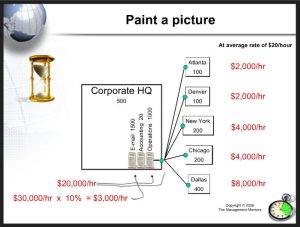
Calculate the cost of downtime

Getting funded for infrastructure projects can be difficult.

One of the best ways to help senior management understand a recommendation you make regarding infrastructure investments is to help them see the financial impact of downtime.

Use this Cost of Downtime tool from my IT Manager ToolKit to quantify the impact of virtually any server, network, or telecommunication device, , , even a printer.

CLICK HERE to download the Cost of Downtime tool

Need more insight – take a quick look at the 20 Minute IT Manager session titled, Justifying Infrastructure Projects.

CLICK HERE to view the 20-minute training session.

ROI Tool

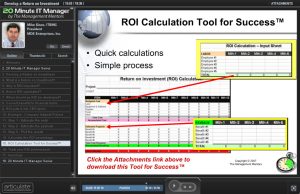
Need help in calculating a Return on Investment (ROI)?

Use this simple ROI tool and take a look at a 20 Minute IT Manager session for more insight. Communicate in financial terms with senior managers of your company and you will be much more effective. Learning to develop an ROI for project recommendations is a key ingredient.

CLICK HERE to download the ROI tool

CLICK HERE to view the 20 Minute IT Manager session

There are 162 training sessions in the 20 Minute IT Manager that focus on:

  • IT management
  • People management
  • Project management
  • Leadership
  • Personal development

Details are at www.20minuteitmanager.com

Jumpstart your year with an IT Kickoff Meeting

In an earlier post, I mentioned holding an IT Kickoff Meeting to jumpstart your team at the beginning of your fiscal year.

I give you all the information you need to deliver a great Kickoff Meeting in one of my 20 Minute IT Manager sessions. In this 20-minute flash presentation, you will learn about:

  • the benefits of a Kickoff Meeting
  • what to include in the meeting
  • who to invite
  • making it motivational
  • tools to help

CLICK HERE to view the flash presentation.

There are 162 training sessions in the 20 Minute IT Manager that focus on:

  • IT management
  • People management
  • Project management
  • Leadership
  • Personal development

Details are at www.20minuteitmanager.com

Yes, I use my management tools all the time

I’m often asked, “Mike, do you actually use any of the tools you tell us about?” My answer is, “ABSOLUTELY !!”.

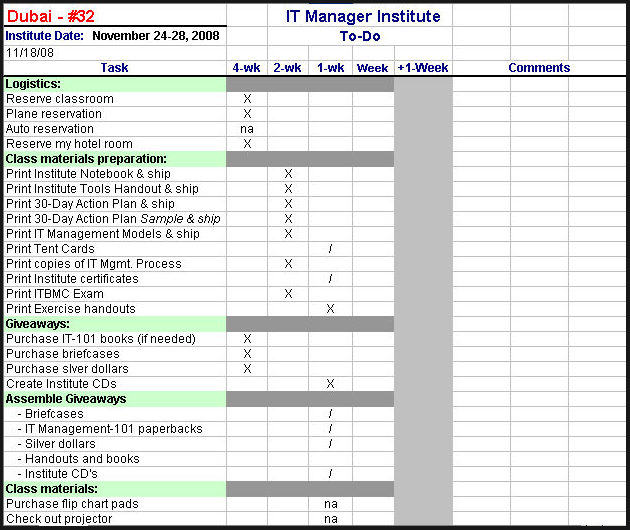
Let me give you an example and tell you why I believe in tools so much. It’s November, 2008 and I’m about to fly to Dubai in a few days to deliver my 32nd IT Manager Institute. One of the things that makes it easier for me is that I have a checklist that guarantees I’m ready for each class.

CLICK HERE to download the Class Preparation Checklist.

This little checklist literally eliminates the stress and concern as to whether I’m prepared, , , or not. It also guarantees that when I arrive at the class location, I have everything I’m supposed to have – i.e., no mishaps.

Let me emphasize two points – “It eliminates the stress of preparing for a class and improves my productivity in getting ready for the class.”

BIG BENEFITS !!

Basically, it’s just a simple project plan that’s organized by weekly completion time before the class, the week of the class, and the week after.

For example, I know that I have to order IT Management-101 paperback books at least 4 weeks ahead of the class if I need them; otherwise they may not get here in time. Same thing with reserving a classroom, etc.

On the other hand, there are many things that can be completed at the last minute – like the week before the class.

And then there are things that I can’t forget to do before leaving for the class such as:
– go to the bank and get money for the trip
– pack my passport if I’m going out of country
– pack the gifts I plan to hand out
– get a haircut

In the example, I’m showing you the status of preparing for the Dubai class and you can see that it is just a few days before I leave. Having this list allows me to quickly see what’s not completed (identified by a “/”) versus what has been completed (identified with an “X”). This totally eliminates the stress of preparing for class because I can see what I need to do and I never worry about forgetting something.

When this list is completed, all I have to do is go deliver the class, , , piece of cake.

You might find this type of tool helpful for many events or things you do like holding a meeting, delivering training, coordinating a User Group meeting, etc.

Good luck

Do you know what your team is getting accomplished?

In 1988, I was planning to hold a January Kickoff Meeting with my IT staff. To prepare, one of the things I wanted to share with them was our organization’s accomplishments for the previous year. I listed the immediate things that came to mind and then began to take a closer look by reviewing meeting notes, calendar events, project plans, etc. When I completed my research, I was literally blown away by how much was accomplished in the past year.


What this told me was that if I, the manager, was surprised and didn’t really know how significant the accomplishments were, then certainly my staff and my clients would be surprised as well. When I shared the information with everyone at the Kickoff Meeting, their surprise was visible.

You see, we all tend to focus on what’s not getting done, rarely thinking about what we have accomplished. It’s a normal tendency, but it doesn’t do justice for the hard work and commitment your employees put into their jobs.

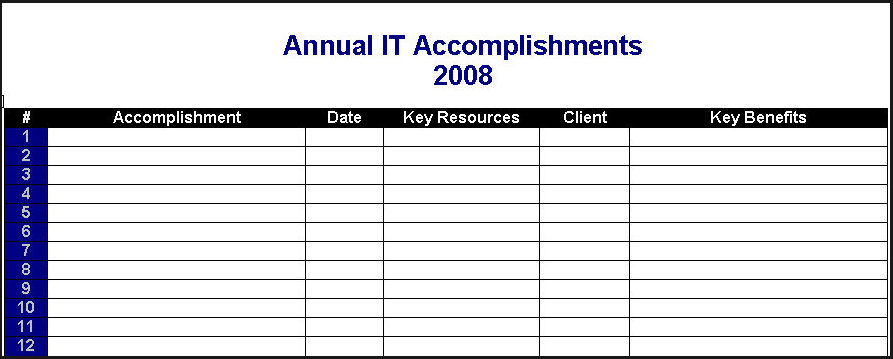
From that point, I started maintaining a list titled Annual IT Accomplishments to track my teams completed work and successes so I can show others (senior management, department managers, and IT employees) how much is getting done.

If you don’t do this as a manager, no one will know!   

As projects get completed, I simply add the information to the list. At the end of the year, I have a nice record of what we worked on.

The approach used in this tool can also be helpful in gathering input for employee performance reviews as it gives you a quick look at who worked on certain projects, etc.

Download the Annual IT Accomplishments tool and start tracking your accomplishments.  CLICK HERE to download.

It’s important for you to share your organization’s accomplishments, , , if you aren’t, I can assure you no one knows how much your IT organization is getting done, , , and that would be a sad state of affairs.

Are your clients happy?

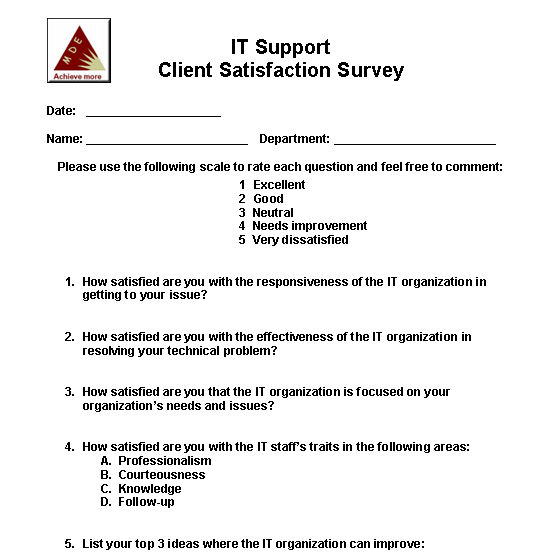
Take a look at a simple survey you can use to measure the level of satisfaction of the technical support you are providing.

At the end of the day, how your client feels about your IT organization and the support you provide is what really counts.

You probably don’t want to send this survey out and expect to get it filled out, , , it won’t happen. What about visiting your client or maybe making a quick phone call and asking them a few questions? That will get a much better response.

When looking for client satisfaction, there are a few things you want to learn:

  • IT responsiveness
  • IT focus
  • IT effectiveness
  • Perception of the IT staff

If you can learn about where you stand in these areas, it is like finding gold. Very valuable. The nice thing about personally interviewing the client is that when he or she responds negatively, you can ask for information that helps you better understand what’s going on – powerful information to have.

Download the simple survey I like to use to understand what your client thinks about their IT support organization.

CLICK HERE to download the Client Survey

By the way, do you know what I mean when I say “client”?

It’s two, possibly three groups:

  1. Senior management of the company
  2. Department managers of the company (also represent users)
  3. Outside clients if you have them (outside your company)

A quick survey can tell you a lot. Learn from it and do something that positively addresses the issues you discover. The benefits to your organization can be pretty amazing.

Client Rescue Guide

When you and your client “get out of sorts with one another”, it is your responsibility (IT) to resolve the issue. It’s up to you to improve the relationship, , , it simply won’t happen the other way.

A simple process I go through when dealing with a problem client is included in my Client Rescue Guide. It worked for me many times and will for you.

A problem client is actually an opportunity in disguise. Their bad behavior and harsh words are simply frustrations seeking their way out of the client. It’s not personal although sometimes it may feel like it.

To rescue a client from the doldrums does not require a technical or complicated process, , , it is actually pretty simple when you get down to it.

CLICK HERE to download my Client Rescue Guide.

Boost productivity with a To Do List

I’m a big believer in keeping a To Do List and have done so for as long as I can remember. It helps me stay focused and ultimately improves my output.

If you have my IT Manager ToolKit, you should already have this tool. If not and you are interested in the complete IT Manager ToolKit containing over 100 management tools, learn more at www.mde.net/cio/page13.html

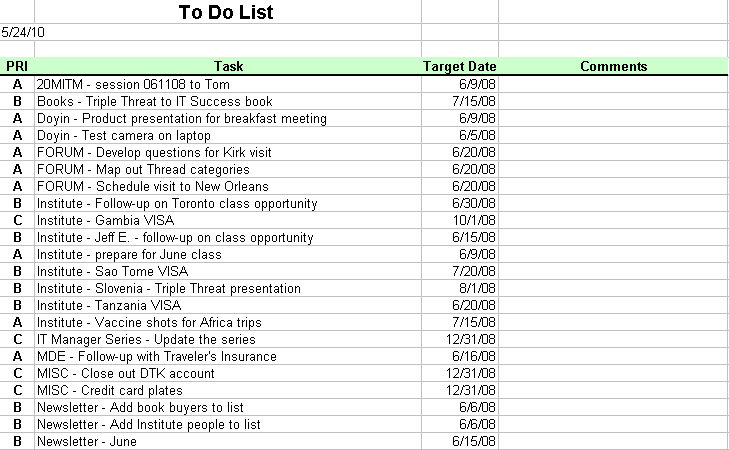
Download the To Do List tool from the link below. It includes simple instructions, 4 templates, and an example.

www.mde.net/tools/ToDo.xls


In the tool, there is a template for Daily, Weekly, Monthly, and Annual Initiatives. I normally use the Weekly To Do List and manage from a weekly set of tasks I want to accomplish. At times, I’ll use the Daily version but tend to fall back into the weekly template.

Every weekend, I sit down to list the key things I need to accomplish in the coming week and place a priority on them. I use a simple priority method of A, B, or C for High, Medium, and Low. The to-do items aren’t listed in any real order, , , just put down as I think of them. Once prioritized, I can sort them by priority so my focus in the week is targeted to the most important items.

That’s a key point – be sure you determine what “has to be done” and organize your work week to take care of the essential tasks first, , , or early in the week. Otherwise, you can find yourself working on the more fun things and possibly less important issues and miss out on getting the truly important issues taken care of.

Getting productive is about focus, but also about being disciplined to work on the most important issues first.

By listing what you want to accomplish for the year and breaking it up into smaller segments (Monthly, Weekly, and even Daily if you prefer), it helps you stay focused to getting things done, , , and that’s what productivity is all about.

I’ve used the Weekly version of this tool since my IBM days in the early 1980’s. It has worked very well for me and continues to make a positive difference in my productivity.

New IT Manager needs a fast start

Just been promoted to a manager position?

Inherited another IT organization because you’re doing a great job?

No matter what the reason, a new IT manager of an organization needs to get off to a fast start, regardless of how much experience you have.

Use this IT Manager Fast Start Checklist to focus on the first 30 days that helps you gain credibility and support from people in your company.

CLICK HERE to download

Interested in my complete IT Manager ToolKit containing over 100 management tools I developed to help me manage IT organizations? Learn more at www.mde.net/cio/page13.html