Category Archives: IT Manager Tools

Tools of the trade to help you achieve more success

Boost morale with a slide show

One way to build camaraderie and teamwork is to reinforce it in your IT staff meetings.  My belief is that every monthly staff meeting should have an element of fun and team building.

Watch the sample IT Kickoff Meeting to see an example at the end of this post.

One of the things I like to do is to produce a slide show of my employees working with our clients. It’s very easy to do and takes almost no extra time unless you decide to be really creative. You can even do this without spending a dime if you want to.

People like to see themselves on the big screen. Put some high energy music to the background and you have something within a few minutes that will make most IT organizations stand up and take notice.

Why?  Because they probably have not seen anything like it come from their IT manager. It can set you apart from other IT managers plus it’s a lot of fun.

Here is what you do:

  1. Assign one or two people to take photos of people at work for a month or two. I usually assign one of my employees responsibility to do this for an entire year, , , to get ad hoc photos of IT people working with clients, record special events, , , anything they want to take a photo of in your company.
  2. Collect the photos and create a slide show.
    1. Use PowerPoint with background music, , , or
    2. Use a product like ProShow to create a slide show product with music embedded
  3. Use high energy music like the theme to Rocky

Be sure to include several photos of each employee in the slide show. I also like to take photos of people waving at the camera or doing things that are funny. The point of this is to take a breather and have some fun with your staff so keep it upbeat and positive.

When you are finished, you can easily create a copy of the slide show file to give to everyone, , ,  or you could even go as far as to create a nice photo album to award to your people.

This last option will cost a few bucks but the technology available today can give you a professional product at a very reasonable cost. See www.mypublisher.com for one example, , ,  it’s what I have used to develop several photo albums for my family. There are many similar products to choose from.

These memories can be very special as people get older in remembering the “good old days” of their career, , , you might even like them as well.

Take a look at a 20 Minute IT Manager session titled, Jumpstart Your Year with an IT Kickoff Meeting. In this session I include a short example on Slide #23 of a slide show with music to give you an idea.

Go to: 
http://www.20minuteitmanager.com/sessions/090102KICKOFF/


Conduct an IT Staff Skills Inventory

One of the things you want to do when you begin managing a new IT organization is to determine what you have, , , in other words, “What is the capability and capacity of my IT staff?”

An IT employee skills inventory can be accomplished quickly and easily using a simple tool, an IT Employee Skills Matrix. You can also use this tool to list the number of resources you think you need for each skill, calculate the total number of people who have the skill and identify any skill gaps you might have.

The tool is completely customizable to add any skill type you want to list as a need in your organization, , , from soft skills like communication or presentation skills to very specific technical skills like Cisco router configuration or Crystal Reports skills.

This tool makes it quick and easy to assess what you have on your team for any skill type you want to measure.

CLICK HERE to download the tool.

IT Manager Institute class request proposal

Trying to cost justify the IT Manager Institute or maybe another  training program?

Use the IT Manager Institute proposal as a guide to communicate your request.

CLICK HERE to download a Word document you may edit.

IT Risk Log

When you conduct an IT assessment, you identify material business issues that have IT support implications. There might be 150 to 200 issues, , , it’s very common.

One of the things you need to do is to prioritize these issues. One of the most important type of issue is one that poses a risk.

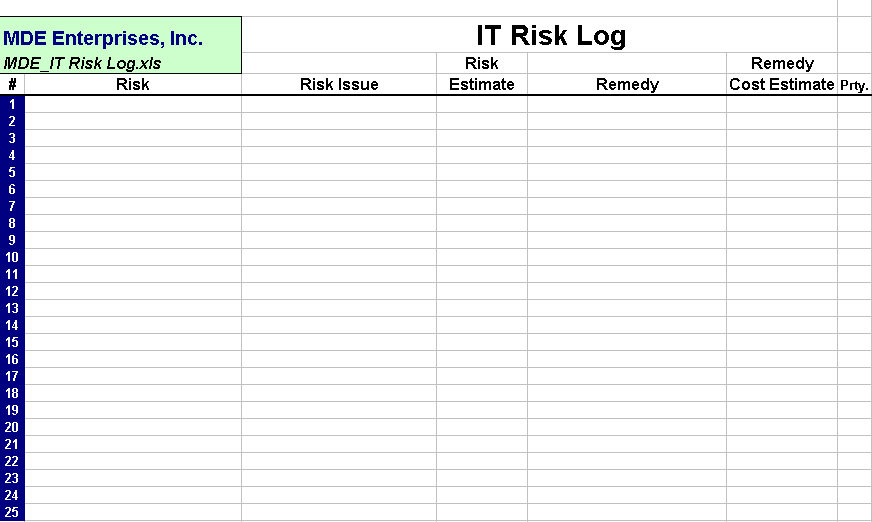
A handy tool to track the risks you identify is an IT Risk Log.

This is a simple tool but helpful to inventory the risks you identify in your company. Information about the data fields is below:

Risk – short description of the risk
Risk Issue – Business issue at risk and more description about the risk
Risk Estimate – Estimated cost of the risk exposure
Remedy – Description of the remedy to eliminate or minimize the risk
Remedy Cost – Estimated cost to implement the remedy
Prty. – Priority of the risk (High, Medium, Low)

CLICK HERE to download the tool.

Transition plan for temporary employees you inherit in a company acquisition

In my last post, I identified there are up to three groups of IT employees you will have in a company acquisition.

The plans for Groups 1 and 3 are straightforward, , , you terminate Group 1 and you try to lock in Group 3 for the long term.

In my next blog post I’ll talk about terminating employees and how to do it professionally so that you minimize risk for the employee and for your company.

In this post, let’s talk about Group 2 – employees you need to help you through the transition efforts of the acquisition but won’t be needed afterward. Once the transition is completed, you plan to terminate this group of employees.

The question is, , , “How do you get employees to help you through transition knowing they will lose their jobs when it is completed?”

What would you do if you were one of these employees, , , what would I do.?

Most likely, we would try to find a new company to work for as soon as possible once we know this is going to happen. Makes perfect sense.

The problem this gives you is that you need this group of employees to support the technologies of the company you have just acquired or maybe help with some of the transition projects your IT team must complete.

When the technologies are migrated and transition is completed, , , you do not need these transition type employees.

You need a transition plan for this group of employees and it has to include incentive for them to help you knowing they will ultimately lose their job.

You might be thinking we could move forward without telling the employees what is going to happen once the transition is completed. Yes, you could try this but the penalties can be severe.

A.  IT people are smart and they ultimately find out, , , when they do, they will leave before you are prepared for them to leave.

B.  I would call this maneuver a bit shady and underhanded, , , handling people or clients this way gets around and damages your company reputation more than you might realize. Taking advantage of others and doing things “one-sided” may help you in the short term but damages you in the long run. In your next acquisition you may find IT employees “running for the hills” as soon as they hear your company name mentioned.

I’ve been involved in over 40 company acquisitions and have faced this challenge many times, , , and one thing I know is that this circumstance is a very delicate issue. Handle it wrong and you lose people prematurely and put your company at risk.

Here is an outline of what I have done that has worked for me:

A.  Develop a transition plan for the group
Put a written plan together that outlines exactly what will happen and when it will happen.

B. Announce the plan to the group
Hold a meeting and give each employee his or her transition plan agreement. Present the outline to the group and explain what you are trying to do to transition the company with their help and to reduce risk for both the company and each of them by obtaining their help.

C. Reinforce the key points with each employee
After the meeting, meet with each employee individually to reinforce what was said in the general meeting, to answer questions, and to  reinforce the need for them to participate in the transition.

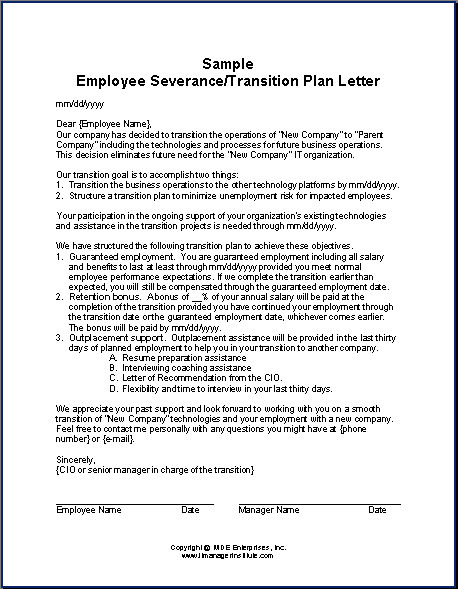
Click here to download a sample Transition Letter I’ve used many times.

A few key thoughts

–  There has to be real incentive in the plan to get their help and it has to be tangible, , , otherwise they will tell you they are “on board” until a week later when they come into your office and give you a resignation letter. To get their help, there has to be upside for the employee.

–  I usually built in a 25% of annual salary bonus for transitions taking 3 months or longer. Remember, you are asking people to put their careers on hold, , , they won’t do it if there is no upside, , , and it must be tangible enough to get their attention. Put yourself in their shoes, , , they need certainty and incentive to help you through this phase. Otherwise they will start looking for another employer.

–  The plan needs to have a guarantee of employment through the transition period, , , subject to normal employee performance and conduct. You have to make the employee feel secure in a situation that is very concerning for him.

–  Include outplacement support to help in resume preparation, interview coaching, and maybe even job search help.

–  Provide a Letter from the CIO explaining the reason the employee is leaving the company is because of the acquisition, , , he is just in the wrong place at the time.

–  Be sure you communicate on a regular basis with transition employees. They analyze their situation daily and when they don’t hear from you they get nervous and stressed.

If you handle the situation well there will be upside for the employee who stays with you for a few months to assist in the transition. What you hear when you are successful with this is, “We didn’t like the decision but we appreciated how professionally we were treated and the honesty from the managers who worked with us during this transition.”

Good luck, , , much more detail is included in my book, Acquisition:  IT Assimilation. This and all my books and tools can be found at www.mde.net.

Budget IT salary in under 20 minutes

Salary is one of the largest expenses you have in an IT budget. To budget effectively, you better have a good handle on this one. If you are prepared, it takes just a few minutes, , , if not it can take several hours.

I like the “few minutes” concept, , , don’t you?

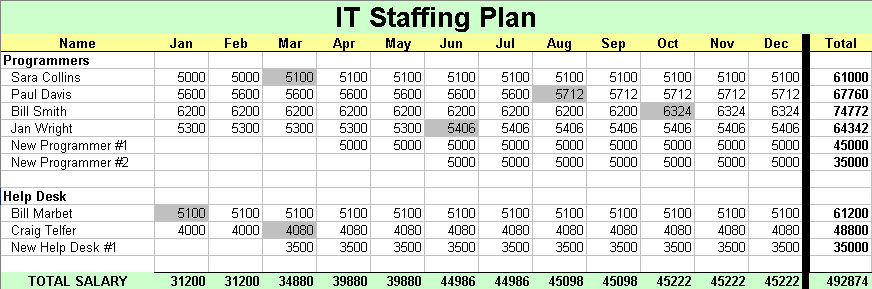
First, you need an IT Staffing Plan for your budget period. Start by creating a budget worksheet like the spreadsheet below or download the tool — CLICK HERE:

Modify the headings if you are on a fiscal year instead of a calendar year.

OK, , , to budget salaries for an IT Operating Budget, you need several pieces of information:

  1. Employee names
  2. Salary
  3. New Hire plans
  4. Salary raise information

In my last post, Track your IT Staff just like any technology asset  I discussed the importance of maintaining an IT Staff Roster.

Step 1  –   List your employees
Grab your current IT Staff Roster and copy the employee names to the IT Staffing Plan worksheet you just created.

I like to group employees alphabetically within organization or function of what they do in my IT Staff Roster, , , Programmers, Infrastructure, Help Desk, etc. It helps when you can see people listed in groups like this.

Step 2  –  Salaries
Copy the salary information from the IT Staff Roster into the first column of months, , , be sure they line up with the proper employee name. Once copied, replicate the salary column across all 12 months.

Quick note: When you budget it is probably October or November if you are on a calendar year. Be sure you update anyone’s salary who will get an increase between now and the end of the year.

WOW, , , the first two parts took all of 2 minutes even if you have 150 people in your organization.

Step 3  –  New Hires
Define your New Hire plans for the coming year. If you have developed an IT strategy and gotten it approved, this should be straightforward. Think through each of your IT organizations and identify how many new resources you need to add.

Add rows in each group where you plan to add new hires. Call them “New Programmer #1, #2, , , etc.

Put each New Employee’s starting salary in the month you plan to hire them and replicate the cell to all cells through December.

Another 10-15 minutes spent and here is what you have so far:

Step 4  –  Add raises
There is a fast way and a tedious way. I’ll give you both options and you can choose which you prefer.

Option 1 – Raise Pool  –  Your company probably wants to manage employee raises to a certain level, , , usually a percentage of salary like 2%, let’s say. There is a subtle difference in how this is interpreted but makes a huge difference in budget dollars.

Note:  The company will interpret how they want to manage salary increases as either 2% of total salary or an average of 2% per employee raise.

Let me explain, , , if every employee was to receive a raise July 1st (mid-year) and you gave everyone a 2% raise, , , your total “raise pool” you include in a budget would be half of what it would be if the company interprets raises as 2% of total salary. All budget months prior to the raise would not include raise money.

For our example, we will assume the company gives us a 2% of total salary guideline.

OK, add a row to the bottom of your IT Staffing Plan below the Total row and call it “2% Raise Pool”. For each monthly cell, do a calculation of multiplying the Total Salary cell just above it by 2% to get your monthly raise dollars.

Add another row and name it “Grand Total”, , , then add the “Total Salary” and “2% Raise Pool” rows to get your final salary numbers.

Not quite 2 minutes to do this, , , done with budgeting salary in under 20 minutes and this is the biggest part of your budget.

Option 2 – By Individual  –  The other option to budgeting employee raises is to estimate a budget increase for each employee and update the employee’s salary in the month the raise is to go into effect.

To do this, you need to know when their raise is due or planned and how much you plan to give them, , , or you can simply use a 2% calculation.

Employee’s last raise date and raise amount is kept in the IT Staff Roster spreadsheet you pulled the employee name and salary information from. This information will help you determine effective dates for each employee’s  raise.

Remember, depending upon how the company interprets the 2% raises, , , you could be short changing yourself by doing it this way.

Here is a look at an updated worksheet where each employee’s salary has been increased to reflect a raise, , , the shaded cells are the raise months.

Summary
The key to developing your salary budget in record time is to have most of the information already available by keeping asset records on employees with a tool like the IT Staff Roster and a change management process that keeps it current.

Track your IT Staff just like any technology asset

If you don’t already have an IT Staff Roster you maintain with a change management process, now is the time to create one. It takes just a few minutes.

Pretty soon it will be budget time. When you develop an operating budget for next year, salary is usually the largest expense in an IT budget. If you have this simple IT Staff Roster, you will be able to knock out the salary part of the budget in a couple of minutes, , , not hours. I’ll show you how in my next post.

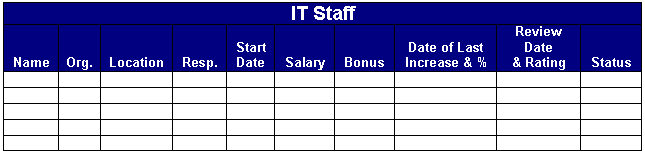
Below is an IT Staff asset tool I use.

Name – Employee name
Org.  –  IT organization (Programming, Help Desk, Infrastructure, etc.)
Location – Office location where employee resides
Resp. – Title or responsibility
Start Date – Start date with the company, , , also anniversary date
Salary – Current salary
Bonus – Current bonus plan (percentage or dollar amount and frequency)
Date of Last Increase & % – Date of last pay increase & raise percentage
Review Date and Rating – Last review date and rating
Status – Current status of employee (Full time, Part time, etc.)

In order to be able to use it for budgeting purposes it has to be current and up to date so let me explain what I used to do as a CIO of a large company with hundreds of IT employees.

Keep it up to date
Put in a change management process to keep your IT staff information current.

As a CIO, all employee paperwork comes across my desk, , , raises, new hire information, , , even termination paperwork.

I approve the request and give the paperwork to my Administrative Assistant. She updates the spreadsheet you see above and it is in her Performance Plan to keep the information current and accurate, , , then she forwards the paperwork to Human Resources or Payroll.

Keeping the tool current and up to date is simply a byproduct of our change management process, , , takes no extra time and saves me a lot of time when in the long run.

When budget time rolls around, I take the IT Staff Roster and transfer the Name and the Salary columns to a budget worksheet, , , two minutes max.

Bonus information is also maintained so I have what I need for the Bonus portion of the budget.

When you have many offices to visit and hundreds of people in your organization, , , it helps to have this tool to remember names of people you don’t see that often, new employees you haven’t met, an employee reaching his 6th year in the company, etc. On your flight to their city, review it and you’ll avoid awkward moments and be viewed as an informed manager.

Download the tool – CLICK HERE

My IT Career Development Plan is one of the first ITBE Project Guides

IT Business Edge launched a new product called IT Project Guides this month. I was fortunate to help develop one of the first project guides for their launch, , , an IT Career Development Plan.

Quick overview
1)  Access the ITBE web site  —  www.itbusinessedge.com

2)  Select the IT Project Guides Menu link at the top

3)  Select the IT Career Development Plan link
, , , or access it directly at this link – CLICK HERE

Each Project Guide is broken into Project Phases and each phase contains 4 or 5 PowerPoint steps with download tools to explain and help you with the subject matter.

In the IT Career Development Plan, there are 4 phases, each with several steps that walk you through developing and implementing a career plan for yourself or in helping your IT employees with career planning.

Here is an overview of what you will find in this Project Guide:

–  Important IT Career Questions
–  Personal Strengths and Weaknesses
–  What Makes You Tick?
–  What Do You Really Want?
–  Your Personal Inventory
–  Beginning Your Career Plan
–  Where Are You Today?
–  Long-term Goals
–  Looking Beyond the Next Step
–  Preparation Is Essential and Ongoing
–  Keys to IT Career Development
–  A Personal IT Career Training Plan
–  Find an IT Career Mentor
–  Learn IT Success from Others
–  Investing in Your IT Career
–  Keys to Establishing Your Credibility
–  IT Recommendations and Business Value
–  Producing Positive Results
–  Communicate Your Track Record
–  More Resources Offered by MDE Enterprises, Inc.
Download Tools
The following download tools are available in this Project Guide:
–  Personal Attributes Inventory
–  IT Career Path Flowchart
–  Personal Training Scorecard
–  IT Initiatives Portfolio
I think you will find the IT Career Development Plan Project Guide and the tools helpful in providing structure and insight to think about your career and in defining what you want to achieve.
Best of success,
Mike Sisco, ITBMC

Personal Development Scorecard

To achieve great things in your career you need to develop your skills, , , skills that help you succeed in your current position as well as any future position you want to reach for.

Use a Personal Development Scorecard to identify skills you need to develop and track the inventory of assets you acquire as you invest in your future.

Download this tool at:
www.mde.net/tools/PersonalDevelopmentScorecard.xls

Part-1 is for Manager Skills


Part-2 is for Non-IT Skills. You need both type of skills to succeed.

Use this tool to develop a training and development track for yourself and while you are at it, why not use it to develop training tracks for each of your employees.

Where does all the time go?

Do you know what you spend the bulk of your time on day to day?

It might surprise you how much of your time is simply wasted.

Time is valuable, , , you have a finite amount of it every day and what you do with your time either adds value for you and your career or it’s wasted, never to be available to you again.

Consider time to be money, , , let’s say every hour of every day is worth $100.00 each. You have two options with every hour you have in a day, , , invest it or waste it.

If you use the time to do something of value that will help you succeed in something, it’s an investment. Spend time on things that do not add value and it’s wasted.

We all start with roughly  16 productive hours a day, , , let’s assume you spend 8 hours a day for sleep and rest. We won’t call this time an investment or a waste, , , we will make sleep time neutral although in reality I think it’s an investment in keeping you healthy. You may not need 8 hours sleep, , , it’s your call.

OK, you have 16 hours or $1,600 of value  to spend. Time to determine what you are spending it on, , , to learn if you are investing or wasting your time. Here is a little exercise for you.

Download the spreadsheet below at www.mde.net/tools/ActivityLog.xls

Let’s take a closer look at the headings I put in the tool.

  • Meeting
  • Phone
  • E-mail
  • Project
  • Planning
  • Travel
  • Commute
  • Personal
  • Rest
  • Other

You can change the column headings to fit your activity as you like.

Put in the time spent on each activity for each hour of the day. I like to use 15-minute increments, , , 15 minutes = .25 hour, 30 minutes = .5 hour, etc.

At the bottom, each activity type is totaled and a grand total should tally to 24 hours. If not, you have missed something.

If you want to be more specific in your activities, add as many columns of activity you want to help you better understand where you spend your time.

Do this for 7 days, , , 14 days is even better. It takes just a few minutes each day to recap where you spend your time.

Be honest with yourself, , , if you took the afternoon off to play golf and spent 5 hours at the golf course, , , mark it personal, , , not meeting time unless you actually did spend much of the time meeting. It is highly unlikely, though.

At the end of the week, do a quick analysis to see where you are spending your time. You might be amazed at how much time is actually lost in a day, , , and especially in a week.

You may want to do this exercise with your staff. It will be an eye-opener for them and should give you lots of insight into the productivity of your team.

Remember, it is your time. Invest your time in productive things and reap the benefits, , , waste it and you miss out on what you could have accomplished.

Best of success.