Category Archives: IT Manager Tools

Tools of the trade to help you achieve more success

Use PowerPoint to store your images

I use lots of images in my ITLever Blog, the Practical IT Manager newsletter, the books and articles I write, web sites, training programs, , , almost everything I do.

You might say I’m a visual person, , , and you would be correct.

I’m visual for two reasons:

  1. Helps me convey my point
  2. Breaks up the text and makes it more interesting

Over the years I’ve bought thousands of royalty free images and have them on CD’s in a shelf beside my desk. The problem is that I won’t use all of these images, looking at them in the image books that come with the CD’s is hard to see, plus loading and unloading CD’s is quite frankly a hassle.

Let me say, , , a real hassle !!

I’m visual all right, , , but I’m also impatient. I needed a way to get to the images I use for work projects quickly. Loading thousands of images into a file folder on my PC didn’t seem plausible because I won’t use 90% of them. Also, when I’m on the road and want to do some work, I need my images, , , so I needed something that was not only practical, but also portable.

My solution was to use PowerPoint.

About two years ago I created an “Images.ppt” file. Initially I went through the file folders on my PC I knew there would be images I use often, , , and copied them to the PowerPoint slides. Then, I went through most of the image CD’s I had purchased and copied many of the images I liked to the PowerPoint slides.

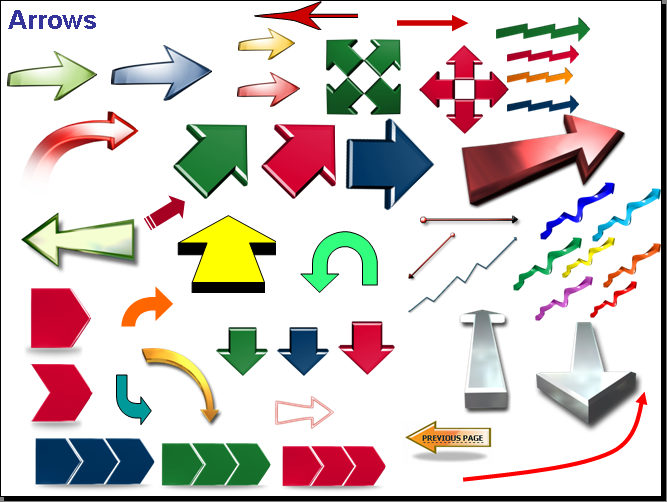
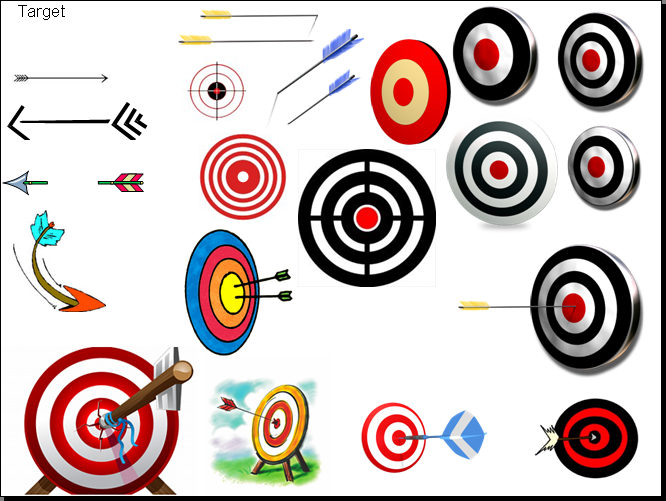
One of the things I did initially and now quite happy about is that I put text in the top left part of each slide to categorize the images. For example, I have categories that include Arrows, Targets, Money, People, Technology, Worlds, etc. When I need to find something, I can search the file on a keyword and usually find the image quickly.

When I buy new images, I go through the file and copy the ones I think we might use later on to the PowerPoint slides, , , and always try to put them on the proper category slide.

My Arrows slide has grown to 4 slides and the entire file is over 400 slides of images.

I also included photos of myself, logos, images of my books, etc. that I might need when I create a product promotion or when I announce something new.

I rarely have to look outside of this images.ppt file to find an image I can use for a project I’m working on.

The whole point to this is that now when I need a good image for something I’m working on, , , I know right where to go. It’s quick and easy, , , helps my productivity quite a bit, , , and the images are always with me as long as I have my flash drive.

I did this for convenience, not because I like to do lots of extra work. This file saves me a tremendous amount of time and aggravation. You will find that all my tools are geared to help me do something a little more efficient.

Another nice thing about using PowerPoint is that it makes it easy for me to combine images to create a different look. Many of my images are png files and eliminate the background color surrounding the object. PowerPoint works well with png’s to create a new image, , , and it’s easy to add a new slide anywhere you want to have a blank space to do the work.

The example on the left used 3 images.

Here are a few samples of the image slides in my “Images.ppt” file:

My images.ppt file is open virtually all the time, , , makes it quick and easy for me to grab something or to save an image when appropriate.

If you work on things where you constantly need to use images, you will find this approach is a great way to collect and store your images. It sure makes a big difference in the work I do.

Others may not know what you know

It always amazes me when I find examples of where someone thinks others know what they know, , , but more often it’s not quite the case.

Don’t take for granted that just because you know how to do something, everyone else will know how to do it as well. It is simply not going to be true.

Let me give you an example. I taught my IT Manager Institute to a group of senior managers from a large consulting company a few years ago. Each of these managers had many years of management experience and the senior guy had who they all reported to had been managing longer than me, , ,over 25 years.

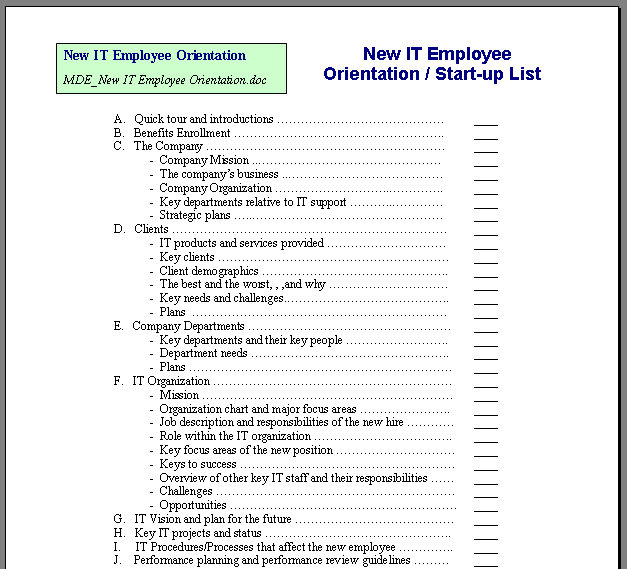
When I talked about getting newly hired employees off to a fast start, everyone in the class agreed this is always what we want to do. But, when I showed them the sample New Employee Orientation / Start-up Checklist I created early in my management career to help me do this, they were amazed, , , and this seems to be the reaction in almost every class.

The most senior manager in the class leaned over to a senior manager with 15 years of management experience from another company and asked, “Do you have anything like this that you use?”

Her answer, “No, , , wish I had something like this ten years ago.”

They were both impressed with what I would consider to be one of the simplest and most basic tools I have. It amazed me that they weren’t using something to help them with the orientation of a new employee because it’s sort of a basic thing we have to do, , , and you want to do this part well.

The fact is that even though this just seems like everyone should have a tool like this, , , most don’t, , , so don’t assume others know what you know. This goes for your employees, , , assume they know everything or have the tools they need and you are going to have some bad surprises. Inspect, coach and teach your employees to insure they know what to do, how to do things, and have the tools they need to succeed.

If you have seen any of my management tools, you know they are as simple as you can get, , , but they help me manage my technology organizations more effectively, with less stress, and best of all with less effort.

The New Employee Orientation / Start-up Checklist is as simple as can be, , , and we all need something like it if we hire new people, , , but very few who have attended my class seem to have a tool like it.

New Employee Orientation / Start-up List

CLICK HERE to download the New Employee Orientation / Start-up List.

So why do I have these simple tools and others don’t? Reducing the effort it takes me to do something is why I usually develop a tool.

You see, , , I’m lazy, , ,

Before I lose you, let me explain. Anyone who knows me knows I’m not actually a lazy person, , , but when it gets to repetitive things or administrative work, , , I don’t really want to be spending my time on these things, , , so I tend to develop a tool that eliminates a lot of the hassle factor.

You know “hassle factor”?

We want to eliminate as much “hassle factor” in our lives as possible !!

Other reasons are to develop a tool that helps you or your team be thorough and consistent when you support your Users, , , little things like checklists to insure we “dot the i’s and cross the t’s”.

Take a close look at the things you have to do today and ask yourself the question, “Are there simple tools I can develop to make this effort easier, higher quality, consistent, or less stressful?” If the answer is YES, then develop a tool to help you manage the situation better.

Lastly, share your ideas with others and don’t think that just because you know something, others do as well.

Software vendor evaluation tool

How do you go about evaluating vendor software products when you need to buy something to meet one of your business needs?

Good marketing can hide poor functionality so you want to do some due diligence when you purchase software to address mission critical business  needs.

One way to do an objective evaluation is to look at side by side comparisons of things you deem to be important in your selection criteria. A great way to do this is to use the Software Vendor Evaluation Matrix tool I developed to help me do this. This is one of over 100 tools in my IT Manager ToolKit.

CLICK HERE to download the tool.

Want to learn more about it? I have a 20 Minute IT Manager session that discusses it fully. There are 162 sessions in the 20 Minute IT Manager series. Details at www.20minuteitmanager.com.

CLICK HERE to access the 20 Minute IT Manager session and learn more about using this tool.

Announcement – Installment payment option for the IT Manager Institute Self Study

Many have requested we offer a multiple payment option for our highly successful IT Manager Institute Self Study. At $995.00, it is by far the best training value for IT managers in the industry. In most situations, our students have the program paid for by their company, , , but in many cases, it’s up to the individual to invest in himself.

Our goal has always been to make our practical IT manager training materials and resources accessible and affordable to all managers in the world who want to improve their operational management skills. The multiple payment option plan is another step in that direction.

Details of the IT Manager Institute Self Study are at www.mde.net/selfstudy

For the multiple payment option, go to  www.mde.net/selfstudy/installment

We are tops at IT Business Edge

Do you know who IT Business Edge is?

Maybe not, but I’ll bet you probably know TechRepublic, , , right?

Well, the same group of 4 people started both companies. They started TechRepublic from scratch in the 90’s and built it’s readership to one of the largest in the IT industry, , , then sold it to Gartner around 2002. They started IT Business Edge, I believe in 2003.

I’ve worked with both companies quite a bit. In 2001-2003, I wrote over 100 articles on IT management for TechRepublic, , , many of which are still published from time to time.

In 2004, I accidentally discovered IT Business Edge in a phone interview with a writer. We began a joint venture and they started promoting my IT Manager Development Series.

Today, I received an ITBE e-mail promotion and was excited to see that my IT Manager Development Series still tops their list of Premium Tools, , , they have done so since IT Business Edge (ITBE) began telling their readers about them, , ,  for 7 straight years.

Here is the excerpt from the e-mail message I received today:

“most popular Premium Tool we’ve ever offered”

“Our Best Value Ever — And Our Most Comprehensive IT Manager Training Package”

What a great feeling seeing comments like these from ITBE, , , but the best part is the thought of how many IT managers we reach through the efforts of ITBE and other partners like them. If you were to subscribe to one of ITBE’s newsletters, you receive a free copy of my e-book, IT Management-101, , , , just like you do when you subscribe to my newsletter. We know that ITBE has distributed well over 300,000 copies of IT Management-101 since 2004.

Interested in learning more about ITBE’s #1 Premium Product?

Go to ITBE’s web site —-  https://www.itbusinessedge.com/commerce/?c=168

Or go to my web site  —-  www.mde.net/cio

Interested in learning more about IT Business Edge?  Great resources for IT managers!!    Go to   www.itbe.com

Develop a career plan

It’s never too late to step back and take a look at your career, where you have come from, where you are, and especially where you want to be in five years.

I have always had a question that I ask my employees in a career discussion, “What do you want to be when you grow up?”

I still ask myself this question every year and I’m an “old guy”, or “over half a century” as my son puts it. It doesn’t mean that I’m still looking for a career; it just means that I analyze where I am from time to time and whether I am living up to my potential.

That’s a key point:  career planning is an ongoing process, not an event.

I have been very fortunate in my career in that I have had many excellent mentors and role models. The years I was with IBM taught me the importance of performance planning and reviews. It also gave me a keen sense of the importance of providing excellent client service and having fun at what you do.

Another company that helped me a lot was HBO & Company, now part of McKesson. I worked with great people and achieved some major career growth at this company. I still have many close friends who are still there.

Being associated with quality people helps mold your management philosophy and character in the right direction. I owe a lot to many that I’ve been associated with throughout my career.

If you have never been part of developing a career plan, now is the time to start. You can use the following steps to develop a plan for yourself or for an employee.

Step 1 – Take an introspective look.

Before you put a plan together, step back and take a close look at what makes you happy. In other words, what type of work makes you want to “jump out of bed” in the morning and get to your work as quickly as you can every day because you love what you do.

Too often, people settle into types of work or roles that are not that interesting or fun for them but they do it “for the money” or for some other reason. Many times a person can get “stuck” in a job that he or she literally hates, , , but will stay in it to avoid making a change.

My sincere belief is that when you find your life’s passion, the money will come. In fact, you may make more than you ever did in an unfulfilling job, , , I’ve seen it happen many times.

Money is not everything, certainly. My Dad never made a lot of money but he was one of the happiest people I know and truly enjoyed his life as anyone that knew him will attest. When you look at yourself, focus in on the type of work or the lifestyle that makes you happy. Loving your work and the people you work with makes life so much more enjoyable.

In coaching others about career planning, I always try to get them to focus on the type of work they like, , , not the position or title. Many employees will say, “I want to be a manager.”, when they do not have the slightest clue about what being a manager really entails. Too many people take jobs because they believe that’s what others expect of them. Career planning is very much about choosing the direction that you want to take in your life, , , it’s about making choices.


Step 2 – “What do you want to be when you grow up?”

To create a career plan, you have to look into the future. It’s hard for some of us to do this; it’s much easier to just sit back and take whatever comes available. You can get ahead that way but it’s similar to floating a canoe down the river without a paddle. I prefer to set a goal, build a plan, and then “go for it”, , , in other words, put a paddle in the water and row to the exact destination you want to go to.

Another thing that you need to contemplate is that once you determine what it is you really want, you will need to develop a plan to get there. For example, if you are a network administrator today and you believe that you would make a good CIO some day and really want the opportunity to manage an organization, there are many paths that will get you there. There are also paths that will block the entrance to the CIO door.

When you determine the type of work that you really want, talk to someone that’s already doing this type of work. Ask very specific questions to learn all that you can about the nice parts of the work and the issues and problems. Remember, any type of work that you choose has challenges; otherwise, everyone might be doing it.

Be honest with yourself. Visualize what your days will be like and what you have to do to be successful at this type of work. Evaluate honestly with yourself whether you have the initiative and perseverance to do this type of work with real passion. Wanting to be a CIO and liking to deal with the issues that a CIO must deal with are two separate issues. It’s not all glory and the phrase, “It’s lonely at the top.” was coined for a reason.

Determine the type of skills needed to succeed in your future career work. If strong communication skills are needed, but you are shy and more introverted, , , then you have to develop these skills. Not impossible by any stretch, but still a challenge that must be overcome.

Take the time and make the effort to look several years out. Simply looking at the next job is not really creating a career plan. You don’t have to figure it all out today, but if you are truly interested in developing a real career plan, you have to start looking further into the future.

Part of the reason for this is that when you begin to develop your plan, you want to take steps that keep doors open for future positions or roles that lead to your ultimate goal. Just taking the next job that materializes can actually limit or block access to the career work that you want.

The sooner you decide what you want, the easier it will be to develop a realistic plan to get there. And remember, just because you decide on one direction today does not mean that you can’t change it later. You may decide that you want nothing to do with a management role after experiencing your first management responsibility, , , that’s perfectly fine, , , after all, it’s your career.

The best example I can give you was when I was an IBM Systems Engineer (SE) early in my career. My manager convinced me to become a salesman rather than move toward an SE Manager path because he knew that it would develop new skills and open additional doors that would position me for greater management roles in the future.

The bottom line here is that he helped me realize the need to look at two or three positions into the future, not just the next one. I discovered that I didn’t want to be a salesman, but I’m convinced that what I learned as an IBM Marketing Rep helped me in my management career later on.

Step 3 – Create a plan.

To develop a career plan, you need three components:

  1. Where you are
  2. Career objective
  3. Paths to get there

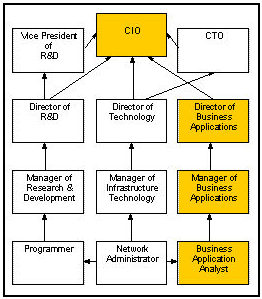
It’s always been easier for me to look at a picture or to take a 20,000-foot view of a situation. You can do the same thing in developing a career plan. Start by drawing yourself a series of three boxes in four rows and describe your current position in the middle box of the bottom row as shown in Figure 1.
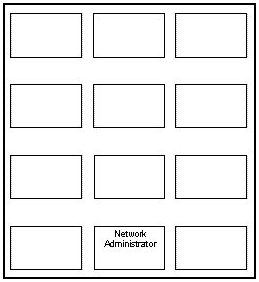
Figure 1

Let’s use an example to illustrate. Assume you are currently a network administrator and that you aspire to become a CIO. This is a bit of an extreme example but will help you visualize what we are discussing.

When you take a close look at the paths that normally lead to the CIO position, you will discover that more CIO’s come from IT managers of the business applications side of IT rather than the infrastructure side. On the other hand, CTO’s tend to come from the infrastructure side.

Several possible paths can be viable paths, but a CIO must be able to relate business issues with technology solutions. Managing business applications development and support tend to prepare you more for that requirement.

Using the template in Figure 1, I fill in typical technical and management positions in the boxes that will prepare one for the CIO position, ultimately getting to what you see in Figure-2. Please note that this is an example; there may be additional steps required to reach a CIO level in your company situation.

Figure 2

If you know that 70% or more CIO positions are filled from the Business Applications side, it’s logical to pursue the path of the boxes that are filled in. Another route is to follow a vertical path that leads to Manager of Infrastructure and then to Director of Technology. At this position, the possibility of filling a CIO role is doable but possibly more remote. The CTO position is a strong logical next step from the Director of Technology position. From the CTO position, you can position yourself for the CIO role.

Nothing is cast in stone and qualified individuals will always break the norm. The example intends to show that there are many paths that lead to the CIO position but one path usually gets the desired promotion more than the others. The trick is to move into positions that keep your options open.

Career planning is similar to when you started college. Some Freshmen know exactly what they want to be when they finish college and can plan their curriculum exactly. Other Freshmen don’t really know what they want to be so they take a general studies curriculum until it begins to become more clear for them.

Career planning requires you to stop and think about your career and to work out a plan that will work. Planning comes more difficult for some.

If you are developing a plan for yourself, always seek the advice of your manager and others who would know about how to reach your desired goal, , , or who have the experience and can discuss your career options with you.

Not all managers are comfortable in developing a career plan for their employees. Don’t let that prevent you from creating one yourself. What I’ve seen throughout my career is that those who decide what they want and put a plan in motion tend to achieve their objectives.

Go for it !!

Calculate the cost of downtime

Getting funded for infrastructure projects can be difficult.

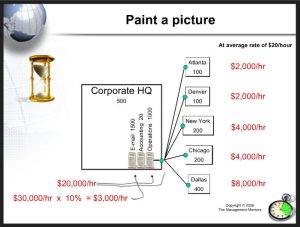
One of the best ways to help senior management understand a recommendation you make regarding infrastructure investments is to help them see the financial impact of downtime.

Use this Cost of Downtime tool from my IT Manager ToolKit to quantify the impact of virtually any server, network, or telecommunication device, , , even a printer.

CLICK HERE to download the Cost of Downtime tool

Need more insight – take a quick look at the 20 Minute IT Manager session titled, Justifying Infrastructure Projects.

CLICK HERE to view the 20-minute training session.

ROI Tool

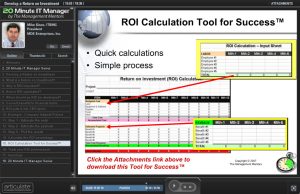
Need help in calculating a Return on Investment (ROI)?

Use this simple ROI tool and take a look at a 20 Minute IT Manager session for more insight. Communicate in financial terms with senior managers of your company and you will be much more effective. Learning to develop an ROI for project recommendations is a key ingredient.

CLICK HERE to download the ROI tool

CLICK HERE to view the 20 Minute IT Manager session

There are 162 training sessions in the 20 Minute IT Manager that focus on:

  • IT management
  • People management
  • Project management
  • Leadership
  • Personal development

Details are at www.20minuteitmanager.com

Jumpstart your year with an IT Kickoff Meeting

In an earlier post, I mentioned holding an IT Kickoff Meeting to jumpstart your team at the beginning of your fiscal year.

I give you all the information you need to deliver a great Kickoff Meeting in one of my 20 Minute IT Manager sessions. In this 20-minute flash presentation, you will learn about:

  • the benefits of a Kickoff Meeting
  • what to include in the meeting
  • who to invite
  • making it motivational
  • tools to help

CLICK HERE to view the flash presentation.

There are 162 training sessions in the 20 Minute IT Manager that focus on:

  • IT management
  • People management
  • Project management
  • Leadership
  • Personal development

Details are at www.20minuteitmanager.com

Yes, I use my management tools all the time

I’m often asked, “Mike, do you actually use any of the tools you tell us about?” My answer is, “ABSOLUTELY !!”.

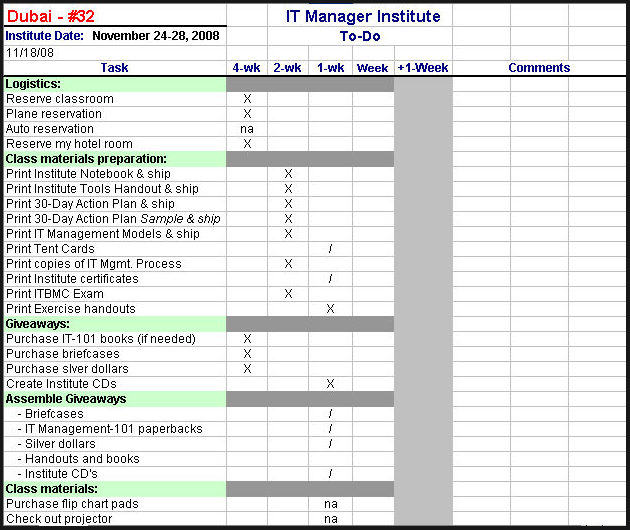
Let me give you an example and tell you why I believe in tools so much. It’s November, 2008 and I’m about to fly to Dubai in a few days to deliver my 32nd IT Manager Institute. One of the things that makes it easier for me is that I have a checklist that guarantees I’m ready for each class.

CLICK HERE to download the Class Preparation Checklist.

This little checklist literally eliminates the stress and concern as to whether I’m prepared, , , or not. It also guarantees that when I arrive at the class location, I have everything I’m supposed to have – i.e., no mishaps.

Let me emphasize two points – “It eliminates the stress of preparing for a class and improves my productivity in getting ready for the class.”

BIG BENEFITS !!

Basically, it’s just a simple project plan that’s organized by weekly completion time before the class, the week of the class, and the week after.

For example, I know that I have to order IT Management-101 paperback books at least 4 weeks ahead of the class if I need them; otherwise they may not get here in time. Same thing with reserving a classroom, etc.

On the other hand, there are many things that can be completed at the last minute – like the week before the class.

And then there are things that I can’t forget to do before leaving for the class such as:
– go to the bank and get money for the trip
– pack my passport if I’m going out of country
– pack the gifts I plan to hand out
– get a haircut

In the example, I’m showing you the status of preparing for the Dubai class and you can see that it is just a few days before I leave. Having this list allows me to quickly see what’s not completed (identified by a “/”) versus what has been completed (identified with an “X”). This totally eliminates the stress of preparing for class because I can see what I need to do and I never worry about forgetting something.

When this list is completed, all I have to do is go deliver the class, , , piece of cake.

You might find this type of tool helpful for many events or things you do like holding a meeting, delivering training, coordinating a User Group meeting, etc.

Good luck