Category Archives: IT Manager Tools

Tools of the trade to help you achieve more success

Mimeo.com makes my life easier

When I find something that makes life easier, I like to tell people about it.

Mimeo.com is one of those things you discover that makes what used to be a major effort for me to prepare for one of our classes almost effortless, , , truly effortless.

My class materials arrive at their destination in London, Ontario Canada today for the class I will deliver next week. It took me all of three minutes to order them yesterday afternoon.

I simply reorder my last shipment, key in the new ship to address and BAM, , , we are done. Get up this morning and check the tracking link and can see that the 3 boxes containing 11 sets of materials are in London and “on the truck to be delivered”.

I am one happy guy!!

It takes a couple of extra days to send them to Dubai or Johannesburg, , , but the order process is just as quick, , , 3 minutes worst case. This effort used to take my office several hours to copy, bind and tab to prepare new materials  for a class, , , plus we had to carry heavy boxes of materials, , , what a pain.

Now, the effort is easier, faster, and the quality is great every time, , , plus the cost is extremely reasonable when you consider your time, not having to carry heavy materials to airports, etc.

The biggest challenge will be opening the boxes when I get to my hotel classroom and setting out the materials for our students, , , gotta love it!

UPDATE — just as I’m writing this post, I get an email from my client in London telling me the materials have arrived. We are good to go!!!

Details at www.mimeo.com.

Keep an employee file to develop better performance reviews

If you conduct annual employee performance reviews, it can be somewhat challenging to develop the review unless you can remember the things that took place for the past year for the employee you are about to review.

Here is a simple tip that can not only help you create a higher quality employee review, , ,  it will also make it easier and faster.

What a concept, , , better, faster, and easier!

Start by creating a file folder for each employee who reports to you. If you have 12 employees, that’s 12 manila folders.

This will take only a couple of minutes.

Next, put in each folder a sheet of paper with the employee’s name and the current year, , , or the date range by which the next review will cover at the top, , , something like the example below.

Now, you are ready.

At the end of each day, take just a few minutes and think through your day of what took place that is of significance for any of your employees. Things like:

  • Successes and accomplishments
  • Client feedback
  • Coaching sessions
  • Observations

Add a note to the employee’s “Employee Review Notes” sheet in his or her folder so you can remember the event. When you fill up a sheet, add another one.

Get into a habit of dropping things into your employee files that reflect something about an employee’s performance. Things like a note about a nice phone call from a client, , , a mistake the employee makes, , , a positive thing you see the employee take initiative for, , , anything that can tell you later about your employee’s performance.

Believe me, this only takes a few minutes a day, , , or you can spend 10-20 minutes at the end of each week to do it.

The point is that at the end of a year, you aren’t going to remember much of what happened 10 to 12 months ago. You will tend to remember the things that take place in the most recent 60-90 days, , , and that could be good for the employee but it could also be bad. At a minimum, it tends to skew your thoughts toward the end of the performance review period.

You need to consider the entire body of work over the past 12 months, , , not just the most recent months you remember well.

Believe me, , , having these notes when you sit down to develop the employee performance review will be a big time saver and help you develop a much better review for your employee, , , and you will have specific examples to discuss  with him or her.

Not only that, , , I guarantee you the first time you sit down and look at the notes accumulated for an employee will probably shock you. You have never had so much material to work with when developing an employee review.

Solve the IT management maze with an IT Management Process

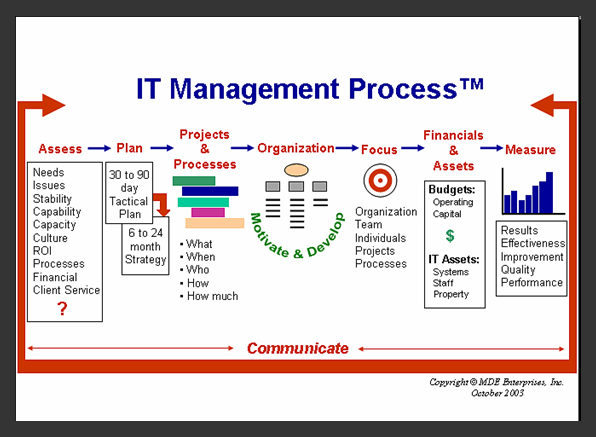
Does this look like what you found when you first became an IT manager?

If so, it’s not really surprising, , , it’s what I discovered and millions of managers around the world discover when they first get their BIG OPPORTUNITY.

Managing an IT organization can seem like one big complicated maze.

Well, it really is unless you have a process to follow and tools to help you achieve the things that are necessary for IT management success.

In my case, I had to learn the hard way about many things, , , but I was also fortunate to have some very strong managers around me to learn from. Not all of them were IT managers, , , some had very little knowledge of technology or in understanding IT employees, , , but they possessed excellent management skills and were good resources to learn from.

Don’t limit yourself to learning from only IT managers, , , it limits your possibilities. It’s going to be helpful to your career to learn things from company executives, sales and marketing, , , Human Resources, , , your client department managers, , , even vendor managers.

What you also need is a proven management process, , , a path to follow that will help you find your way through the maze. There are obstacles at every turn in an IT manager role, , , some can even be deadly impediments to your career.

Here is the management process I use in managing an IT organization.

There are 8 key components:

1.  Assess – Conduct an IT assessment to determine what the business needs and issues are plus what your IT organization’s capabilities and capacity is. Once you understand the “demand and supply”, you can develop a plan of attack.

2.  Plan – Develop an immediate 30-90 day tactical strategy and once you get your people focused on it you can start working on developing your long term strategy.

3.  Projects and Processes –  Delivering projects successfully is the key to credibility and there are key support processes you must put into place in order to support your clients effectively.

4.  Organization – You must build an appropriate IT organization and when you have people, you need to motivate them and develop their skills to create a world class support organization.

5.  Focus –  Evert aspect of your organization needs clear focus, from the individual employee to the entire organization.

6.  Financials and Assets –  Managing the financial side of your business and keeping track of technology assets becomes a key part of managing a successful IT operation.

7.  Measure –  To improve, it is important to know where you are and whether you are making positive strides, , , practical measurements will spell it out for you.

8.  Communicate –  What ties it all together and makes such a powerful difference is being able to communicate well.
CLICK HERE to purchase the 20 Minute IT Manager video for only $9.99 to learn more.

Or, purchase the entire library of 162 sessions of the 20 Minute IT Manager
CLICK HERE for a special 50% discount offer for ITLever Blog readers – only $249.00.

Attend an IT Manager Institute class or access the Self Study program to learn step by step how to become a successful IT manager.

IT Manager Institute classes — www.mde.net/institute

IT Manager Institute Self Study  — www.mde.net/selfstudy

Prioritize your work , , , a video to watch

Yesterday, I posted a short article on How to prioritize IT projects. It’s a good overview, but there is more to take into consideration in prioritizing work.

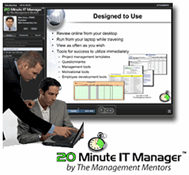
CLICK HERE to review my 20 Minute IT Manager session titled, Prioritize your work.

Gain additional insight in 19 minutes about things you must consider as you determine the priority of what you work on in your IT organization. 

There are 162 sessions in the 20 Minute IT Manager Series. It is a comprehensive training library for IT managers and focuses on:

  • IT management
  • Project management
  • People management
  • Leadership
  • Professional development

It took Tom Mochal and me over three years to develop this unique training program and it covers virtually every aspect of managing an IT organization. Most sessions include Tools for Success™ or templates you can download.

Details at www.20minuteitmanager.com

BIG OFFER was a BIG SUCCESS

The 3-day BIG OFFER we promoted in early December was so successful we decided to make the bundle a permanent item. Every IT manager should have these tools to achieve more success.

Three BIG bundles and two Bonus Items in one BIG OFFER

Our  BEST VALUE and
the biggest bundle of
IT manager resources in the industry

—  #1 — Practical IT Manager e-Book Series
My entire library of 14 IT management e-books. Practical and to the point to help you achieve more success, , , used by thousands of IT managers around the world.
Retail value – $705.50


—  #2  — IT Manager ToolKit
Over 100 IT manager tools and templates developed from my 20+ years in managing IT organizations. Simple, practical and they work, , , you can even customize them to meet your specific needs. 
Retail value – $175.00

—  #3  — Mike Sisco’s 20 Minute IT Manager training sessions
A comprehensive online training library of 82, 20-minute e-Learning sessions from the 20 Minute IT Manager. Covers virtually every aspect of managing a successful IT organization, , , over 25 hours of training.
Retail value – $819.18

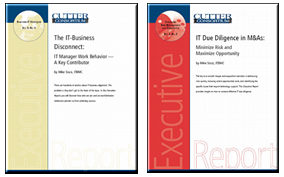
—  Bonus #1  —  Executive Report
The IT-Business Disconnect: IT Manager Work Behavior – A Key Contributor
Learn about one of the most serious issues facing CEO’s and CIO’s today and why our work behavior plays such a significant role, , , a real eye-opener and information every IT manager needs to know.
Retail value – $150.00


+

—  Bonus #2  — Executive Report
IT Due Diligence in M&A’s: Minimize Risk and Maximize Opportunity
I’ve led the IT due diligence on 45 company acquisitions and developed an IT due diligence process and tools to boost my productivity in conducting an IT assessment. Gain valuable insight from my experiences in this 25-page Executive Report. 
Retail value – $150.00


$1,999.68
$399.00

These materials will BOOST YOUR CAREER by helping  you:

  • focus your team to deliver tangible business value
  • conduct a thorough IT assessment
  • quantify your company’s business needs and issues
  • develop and present your IT strategy
  • create an appropriate IT organization
  • gain credibility by delivering projects successfully
  • budget more effectively and productively than ever before
  • motivate and develop your team to be world class
  • identify simple measurements to achieve more
  • track and report your IT initiatives easily and effectively
  • deal with difficult clients or problem employees
  • find cost saving opportunities to help your company
  • communicate effectively with clients and employees
  • , , , and much, much more

Knowledge empowers you to achieve more !

This bundle of IT manager training materials is the most comprehensive I’ve ever offered and represents over 20 years of IT management experience and thousands of hours of development work designed to help IT managers achieve more success.

ORDER NOW

$399.00

My complete set of 14 e-Books
Over 100 IT manager tools
82 online training sessions
2 BONUS Executive Reports

Learn more

———————————————————————————–

Enterprise Option

Would you like anyone who has access to your company Intranet be able to access any of the tools, e-books, or online training?

Our Enterprise Option is very cost effective

$1,500.00

Enterprise option

In-house training the easy way

There are many areas where your company can benefit by having “canned” training classes. The tools that are available today are pretty awesome and so easy to use.

What type of training do you do in your company, , , or what would you consider doing if you had something you could provide to people in the company?

Examples might include most anything, such as:

  • New employee orientation from Human Resources
  • Benefits enrollment guides
  • Operations policies and procedures
  • Employee Handbook
  • Change management processes
  • Employee education and training program guide
  • Any number of employee development classes
  • Filling out expense reports
  • Virtually anything your people might need to know
  • Process to fulfill a PC order
  • How to deal with a difficult client
  • Management training

To deliver training by having someone deliver a class is time consuming and costly. But to provide training via an e-Learning class on your Intranet can help boost productivity and get the information to people who need it, , , regardless of where they are in the world.

Some training is pretty static in that it doesn’t change very often. For this type of training, I highly recommend using a PowerPoint plug-in called Articulate Presenter.  You can find it at www.articulate.com.

I used Articulate to develop our 20 Minute IT Manager training sessions as well as my IT Manager Institute Self Study. It’s a great tool with a very nice and flexible user interface. When installed, it becomes a plug-in option to your PowerPoint application and gives you lots more options than comes just with PowerPoint.

Your Sales and Marketing organizations along with Human Resources and Operations organizations have lots of opportunities to package training, sales collateral, and other information that’s useful for employees, clients, and prospects of your company. Articulate Presenter can be used for many types of projects and is worth taking a look at.

In addition, Articulate QuizMaker is excellent quiz and testing software and integrates into Articulate Presenter or you can run it standalone as you wish.

Take my quick IT Manager Evaluation Exam

Take this simple exam and identify how you stack up. Quick and easy, even some fun.


http://itmanagement.articulate-online.com/2015555068

This exam was produced using a great product called QuizMaker, , , part of the Articulate family of products we used to develop our IT Manager Institute Self Study and the 20 Minute IT Manager courses. The Self Study allows you to achieve your IT Business Manager Certification (ITBMC) status when you pass the exams in the program.

Peace of mind for $54.95

What would happen if your home PC crashed and could not be fixed?

Well, hopefully not much because you have good backup of your data files.

Yeah, you would have to purchase a new PC and reload the critical software you need, , , certainly a hassle but still recoverable.

If you don’t have good backup of your data and image files, it could be a nightmare – right?

I was always pretty good about backing up my files because I run my business on my PC. The data I have here is irreplaceable and critical to my company, , , so I backed up the data at least once a month and kept a copy off site in a bank lock box. I felt pretty good about it.
Then, I learned about Carbonite, www.carbonite.com.

Cabonite backs up the data you select to be backed up automatically from a PC and stores it onto a remote server. The data is encrypted to protect it and you always have access to it, no matter where you are as long as you can get to the Internet.

Need to recover lost files, , , or an entire PC disk drive? No problem.

Need to get a copy of an old PowerPoint presentation while in Brussels? No problem, , , login to your Carbonite account and download it.

I can tell you that since starting to use Carbonite about two years ago, I feel better about my backups and off site storage than ever. It’s simple and cheap.

I know a few CIO’s who have decided to use Carbonite in their corporate office to be sure certain high level PC users (CEO and CFO, for example) have their data backed up and accessible when they are out of town, , , or in case of a disk crash on their PC.

Can you imagine how painful it would be to a CFO if he lost his company PC? Sure, you want them to back up all their personal files onto the corporate backup drives, , , but they tend not to. I can tell you that a lot of these personal files are important work files and to lose them would be very painful, , , possibly very expensive to the company.

And when a problem happens where you can’t restore a simple little PC, who gets the blame? You got it, , , the IT department.

For $54.00 a year, you can take care of the CFO and have peace of mind. Recovery of his personal files is just an internet connection away.

Got any favorite tools you like?

Post a comment and let the ITLever readers and me hear about them. Don’t assume everyone knows about your favorite tool, , , I can assure you many won’t know about it and that probably includes me.

My BIG Offer – 2010, , , 3 days only

I just sent out a promotion to my newsletter list announcing a 3-Day special, , , one of the best offers we have ever made.

Four big bundles:

  1. 14 e-Books from my Practical IT Manager Series
  2. Over 100 tools and templates from my IT Manager ToolKit
  3. 82, 20-minute e-Learning sessions from the 20 Minute IT Manager
  4. Two BONUS Executive Reports
    1. IT Business Disconnect
    2. IT Due Diligence

This entire bundle would cost you over $1,500.00. You can purchase it for $299.00 through December 9th, 2010.

$299.00

Offer expires midnight December 9th.

14 IT manager e-Books

102 tools and templates

82, 20-minute training sessions

2 special bonus reports

If you have been interested in any of my materials, this is the offer you want to take. Hurry, , , the offer expires midnight Thursday night December 9th.

A nice file transfer tool

Profile Magazine is writing an article about my company for a future edition and they need some high resolution photos. As you know, sending large files can be a pain. Even when zipped, image files are still quite large and can hang up an email system.

What do you do if you need to transfer a 120MB file?

Well, the people at Profile Magazine turned me onto a super utility that helps facilitate this process. It’s a free online service called WeTransfer.

WeTransfer gives you the ability to transfer one or more files up to 2GB to anyone with an email address.

The user interface is as simple as can be. After selecting the files you want to transfer and the email addresses you want to send them to, you can include a text message.

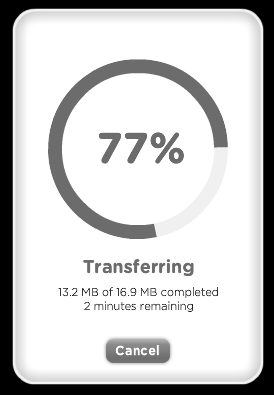
Select Transfer and you see a nice monitoring window that tells you the status of your file upload as it sends the file(s) to a temporary Internet storage facility.

Once the file transfer is completed, your targeted recipient(s) receives an email message with a download link to retrieve the file(s). This way no one’s email server gets hung up. In addition, you receive a Thank You email message that includes an option to share the file(s) with more people or to download the file(s) yourself.

When the recipient actually downloads the file(s), you as the Sender receive a nice email message telling you your recipient has retrieved the file(s). This is a very nice touch so you know everything went through.

Simple tools like WeTransfer can help your productivity. More importantly, they reduce the “hassle factor” in your life, , , and that’s a good thing.

WeTransfer is a free service at www.wetransfer.com

Do you have tools you would like to share, , , either something you created yourself or you discovered like in my case with WeTransfer? Comment on this post and let me know about your favorite tool(s). If they are helpful, I’ll create an article to share with our ITLever readers and give you credit for your submission.