Keegan Bradley’s example for all IT managers

You probably have never heard of Keegan Bradley before unless you keep up with golf. Keegan is a rookie on the PGA Tour and he just won one of the four major golf championships this past weekend – the PGA Golf Championship.

What’s more amazing is how he won, , , and it is a great lesson for IT managers.

You see, rookies are supposed to choke on the last day of a major, , , they tend to shoot 75 to 80 on the most pressure packed day of their life when they get into contention on the final day of a major championship. It is exactly what he did the week before at the Firestone tournament.

Not only was he a rookie on tour, , , this was Keegan’s first major golf tournament. This alone made him a most unlikely candidate.

It looked like Keegan would succumb just like so many before him.

The final four holes of Atlanta Athletic Club were touted as maybe the toughest finishing holes in tournament golf, , , ever. Water on three of the four holes with essentially no bail-out options and all very, , , very long holes. Only a few players had played these holes even or under par for the first three days.

On the 15th hole, , , it happened.

Keegan hits a tee shot to what looks like a good safe spot on this treacherous par-3 hole with water to the right of the green. He is just off the green to the left with a downhill chip and it sits deep in the thick Bermuda grass, , , a tough shot.

His chip goes racing across the green and into the water. The net result is he takes a whopping triple bogey 6 and falls five shots behind the leader, Jason Dufner, who is in the group behind him, , , with only three holes to play.

Most believed he had just blown the tournament with one unlucky chip shot.

Not to be, , , Keegan birdies the next two holes while the leader goes bogey, bogey, bogey, , , he picks up five shots in essentially three holes and then wins in a dramatic three-hole playoff.

The lesson, , , don’t give up when disaster strikes. Buckle down and play hard. As Yogi Berra used to put it, “It ain’t over ’til it’s over.”

The PGA Championship this weekend was a great lesson about persevering and getting positive results when you remain focused to the task at hand.


Merger and acquisition overview

I’ve been involved in 45 company acquisitions, leading the IT due diligence in all of them. Prior to 1990, I had no idea what “due diligence” was, , , since then I have gained more experience in this area than possibly any IT manager or CIO.

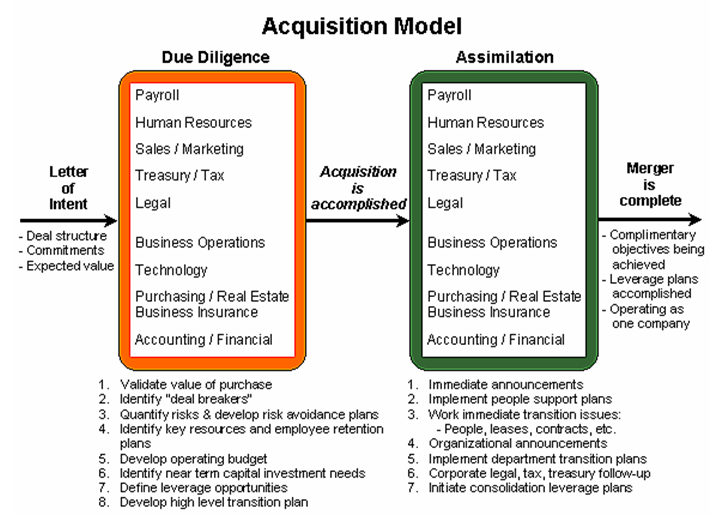
Here is a merger and acquisition (M&A) overview that might be helpful to you one day:

An acquisition begins with a Letter of Intent from the acquiring company to the targeted company. When accepted, due diligence begins.

The model above shows each department in the company being involved in due diligence, , , orange box. To complete a successful merger of the two companies it is important for each department to conduct discovery in order to develop an appropriate transition plan.

It is vitally important the IT organization be involved in due diligence because many of the things that must take place immediately after the deal is completed will be dependent upon the IT support organization.

Once due diligence is completed, final negotiations take place and the companies agree to a merger.

When the deal is completed, assimilation activities begin, , , green box. The IT organization will be busy even if the company decides to leave the acquired company alone and to operate it as it has been operating. Even so, the parent company will want to merge Payroll, accounting and accounts payable into the parent company systems.

In addition, the company will want everyone to be on the same email systems and all company offices networked together for communication purposes, , , requires IT support to make it happen.

The assimilation box also shows every department being involved in assimilation activity.

Once the key transition projects are completed, the merger is done and we now operate as one company.

Make your presentations interesting

I’m sure you have sat in a boring presentation before. Everything in it is so boring it is all you can do to sit through the whole thing.

Presentations don’t have to be boring, , , in fact, they ought to be fun, informative, and interesting, , , something that makes the audience sit on the edge of their seats in anticipation of the next slide.

Here are some quick tips to “spruce up” your next presentation:

Tip #1 – Create an appealing slide master

  • Keep it simple, use warm colors and a theme that ties into your presentation topic.
  • Minimize background “noise” so it does not distract from your bullet points

Tip #2 – Slides with impact

  • One key thought per slide
  • Minimal bullet points
  • Don’t read your slide, , , discuss your key points
  • Incorporate personal experience stories and examples

Tip #3 – Create visual interest

  • Add an interesting graphic to enhance your point
  • Animation can be good but also distracting
  • PNG files are made for PowerPoint slides with background

Tip #4 – Energize your audience

  • Raise your energy level and it will boost audience interest
  • Use pauses and emphasis on key points for effect
  • Keep it moving
  • Smile and have fun

Tip #5 – Prepare

  • Become very familiar with each slide to glide through them
  • Know your key points on each slide
  • Practice in front of a mirror until you are comfortable

Delivering a presentation is frightening for many, but don’t let it intimidate you. Being nervous is not only natural, , , it is a good thing and shows you care.

The more you present the easier it gets, , , even becomes second nature over time. Remember to have fun and enjoy the opportunity and experience.

Five lessons about the way we treat people

I received an email from a close friend that had some valuable lessons in it. Most of the stuff I get like this is pretty much junk, but this one is worth sharing.

Five Lessons About the Way We Treat People

1. Cleaning Lady
During my second month of college, our professor gave us a pop quiz. I was a conscientious student and had breezed through the questions until I read the last one:

“What is the first name of the woman who cleans the school?”

Surely this was some kind of joke. I had seen the cleaning woman several times. She was tall, dark-haired and in her 50’s, but how would I know her name?

I handed in my paper, leaving the last question blank. Just before class ended, one student asked if the last question would count toward our quiz grade.

“Absolutely,” said the professor. “In your careers, you will meet many people. All are significant. They deserve your attention and care, even if all you do is smile and say ‘hello.’”

I’ve never forgotten that lesson. I also learned her name was Dorothy.

2. Pickup in the Rain
One night at 11:30 p.m., an older African American woman was standing on the side of an Alabama highway, trying to endure a lashing rain storm. Her car had broken down and she desperately needed a ride. Soaking wet, she decided to flag down the next car.

A young white man stopped to help her, generally unheard of in those conflict-filled 1960’s. The man took her to safety, helped her get assistance, and put her into a taxicab. She seemed to be in a big hurry, but wrote down his address and thanked him.

Seven days went by and a knock came on the man’s door. To his surprise, a giant console color TV was delivered to his home. A special note was attached. It read:

“Thank you so much for assisting me on the highway the other night. The rain drenched not only my clothes, but also my spirits. Then you came along. Because of you, I was able to make it to my dying husband’s’ bedside just before he passed away… God bless you for helping me and unselfishly serving others.

Sincerely,
Mrs. Nat King Cole”

3. Always Remember Those Who Serve
In the days when an ice cream sundae cost much less, a 10-year-old boy entered a hotel coffee shop and sat at a table. A waitress put a glass of water in front of him.

“How much is an ice cream sundae?” he asked.

“Fifty cents,” replied the waitress.

The little boy pulled his hand out of his pocket and studied the coins in it.

“Well, how much is a plain dish of ice cream?” he inquired.

By now more people were waiting for a table and the waitress was growing impatient.

“Thirty-five cents,” she brusquely replied.

The little boy again counted his coins.

“I’ll have the plain ice cream,” he said.

The waitress brought the ice cream, put the bill on the table and walked away. The boy finished the ice cream, paid the cashier and left.

When the waitress came back, she began to cry as she wiped down the table. There, placed neatly beside the empty dish, were two nickels and five pennies.

You see, he couldn’t have the sundae, because he had to have enough money left to leave her a tip.

4. The Obstacles in our Path
In ancient times, a king had a boulder placed on a roadway. Then he hid himself and watched to see if anyone would remove the huge rock.

Some of the king’s wealthiest merchants and courtiers came by and simply walked around it. Many loudly blamed the king for not keeping the roads clear, but none did anything about getting the stone out of the way.

Then a peasant came along carrying a load of vegetables. Upon approaching the boulder, the peasant laid down his burden and tried to move the stone to the side of the road. After much pushing and straining, he finally succeeded.

After the peasant picked up his load of vegetables, he noticed a purse lying in the road where the boulder had been. The purse contained many gold coins and a note from the King indicating that the gold was for the person who removed the boulder from the roadway.

The peasant learned what many of us never understand: Every obstacle presents an opportunity to improve our condition.

5. Giving When it Counts
Many years ago when I worked as a volunteer at a hospital, I got to know a little girl named Liz who was suffering from a rare and serious disease.

Her only chance of recovery appeared to be a blood transfusion from her five-year-old brother who had miraculously survived the same disease and had developed the antibodies needed to combat the illness.

The doctor explained the situation to her little brother, and asked the little boy if he would be willing to give his blood to his sister.

I saw him hesitate for only a moment before taking a deep breath and saying, “Yes I’ll do it if it will save her.”

As the transfusion progressed, he lay in bed next to his sister and smiled, as we all did, seeing the color returning to her cheeks. Then his face grew pale and his smile faded. He looked up at the doctor and asked with a trembling voice, “Will I start to die right away?”

Being young, the little boy had misunderstood the doctor. He thought he was going to have to give his sister ALL of his blood in order to save her.

Summary
Think about how you treat your employee, your client, even your family. Sometimes, I know I lose sight of how important they are and take them for granted, , , shame on me.

Take responsibility for failure

I have always believed there is a “golden rule” when it comes to managing an IT organization.

Give credit to your team for successes and take the responsibility for failures

Let’s say you have a support programmer who puts some new code into production without testing it completely and without communicating it to the users affected.

In most situations your change management process will prevent this but in a small company it might happen so let’s use it to explain my point.

He installs the code and something breaks, , , big surprise – right?

You get a call from a manager, , , one of your largest clients, , , and she is irate to put it mildly. Not only did it break but several screens have changed and many on her staff are confused and have called her or gone to see her.

All of this is impeding her organization’s productivity and she doesn’t like it. Who does she share her frustration with?

You bet, it will be you, , , but that’s not all. She may share it with her boss, the CFO or other senior managers. Unhappy people tend to share their displeasure with others, you know.

Even though this has happened before and you have told the programmer to never do it again, it still happened.

When the client shares her frustration, the last thing you want to do is to pass the blame onto the programmer.

Yes, he caused the problem and you have discussed the issue with him before, but you still have to take responsibility. You are the manager.

Accept responsibility and tell your client you will take care of the issue, , , never bring the programmer up. The client may even know who actually caused the problem, but that’s ok. Don’t mention the programmer, , , just take your medicine and move on.


After the client meeting, , , now is the time to have a one-on-one meeting with the programmer. Behind closed doors you can make absolutely clear this is not to happen again and you spell out the consequences if it does.

Taking the “hit” for failures yourself and giving your team the credit for successes builds loyalty among your team. Your employees will walk through fire for a manager they know supports them to the fullest.

Believe it or not, , , word gets around about the problem that occurred and how you handled the issue. You gain respect from your IT employees and clients as well.

And, , , the programmer won’t do this again if there are real consequences for failing to follow your direction.

6 rules in building an IT organization

There are many things to consider when building an IT organization. Here are six rules you should consider:

#1 – Find your replacement and position to fill your shoes.
Take this seriously. It’s hard to be promoted and gain additional responsibility in a company when your organization is completely dependent upon you to manage it.

 #2 – If there is a gap, IT must close it.
Often there is a gap between what the IT organization is working on versus what your client really needs from you. It is up to you to determine if there is a gap first of all and if so, you must take the initiative to close it. It is not the client’s responsibility.

#3 – Right-size the organization.
Understand that most CEO’s want to spend little to nothing in IT. You should spend the lowest possible amount that is sufficient to support your business. Company need should dictate the size, skills, , , even the organizational structure of IT.

#4 – You must earn respect.
Respect is not a given, , , you earn it every day. Employees and clients may respect the position you hold but they won’t respect you unless you deliver what you say you will, it provides business value, and you treat others with respect.

#5 – Managing people is a specialized skill.
Teamwork is not an easy thing for IT people, , , over 90% are independent who like to do things themselves and do it their way. Building an organization has a lot to do with developing a culture of teamwork with people who are not particularly inclined to work on teams.

#6 – Great client service is built.
World class client service only happens if the manager makes it happen. Again, this is not necessarily something that comes natural to highly independent people. You must create a culture built around client service.

Find good people, focus them on the business need of your company and coach them on ways to be responsive the demands of the business.

Best of success.

Photos from my IBM scrapbook

I began my career back in the late 1970’s when small and mid-size companies were buying their first computer. It was an exciting time.

One of the things I remember most was the great fun we had at IBM amidst some very hard work and long hours. It was a great experience where I learned the value of “working hard and playing hard”.

You may be experiencing some of the best time of your career right now. You owe it to yourself to capture a few memories along the way.

Here are a few photos from my IBM days:

Ginger and I receive Salesman of the Month honors from Macon

After the meeting we played golf and a had a big cookout, something we did once a year and it was great spending time on the big houseboat on the lake

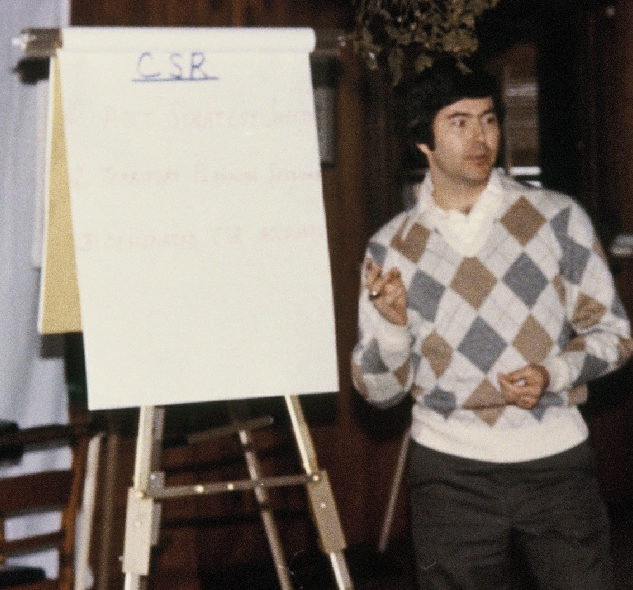
Another presentation in an off-site event

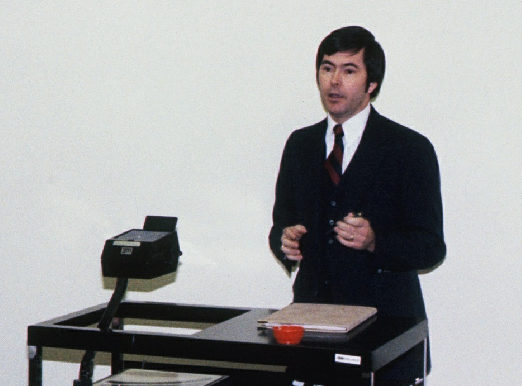
It was the days of the 3-piece suit and white shirts, , , an early presentation

Ron and I after a sales call

This is what it’s about, , , my two senior mentors who helped me so much in my early career are on both sides as I receive a Regional Manager’s Award.
Charles Carroll and Jim Cockerham influenced my career considerably and I’ll always owe them a huge debt of gratitude.

How much was accomplished this month?

Today is July 31st, the last day of the month. Here are some questions worth asking yourself at the end of every month:

– “What did we accomplish this month?”
– “Did we achieve our objectives this month?”
– “Did I invest in my people to help them succeed?”
– “Did I develop myself in an area this month?”
– “Did we improve relations with our clients this month?”
– “What were the problems we had and did we learn from them?”

There are many more questions you can ask yourself, I’m sure, , , the key is that we need to evaluate our progress from time to time and the end of every month is a great time to do it.

Not only do we need to assess our IT organization’s progress, we need to quantify it and share the information with senior management, department managers and our employees. They all need to hear what their IT organization is doing.

Board of Directors interview

When I was to interview for the CIO position of my last company, it just so happened the Board of Directors Meeting  was taking place that week. The CEO asked me if I would meet with the Board of Directors, and I welcomed the opportunity.

The interview began with a few of the typical questions you get in an interview and then there was a great question, “Tell us why you will be a good fit for our company.”

I gave them a short list of accomplishments in a similar business and then made a comment I don’t believe they expected:
“If you are looking for a technical manager who focuses on technology, I’m not your guy, , , but if you are looking for someone who can quantify business needs and issues and focus IT resources to address them and to deliver business value for the company with your IT investment, that’s who I am.”

There were a few other questions and later that night I received a phone call with an offer to join the company.

The CEO told me later that one of the things that impressed them was how open and forthcoming I was about what they were getting with me and the fact I was not a technology expert was a good thing. The CIO I replaced was a technology focused manager and they could never understand what she was working on or why she was spending money in certain areas.

Budget IT salary in under 20 minutes

Salary is one of the largest expenses you have in an IT budget. To budget effectively, you better have a good handle on this one. If you are prepared, it takes just a few minutes, , , if not it can take several hours.

I like the “few minutes” concept, , , don’t you?

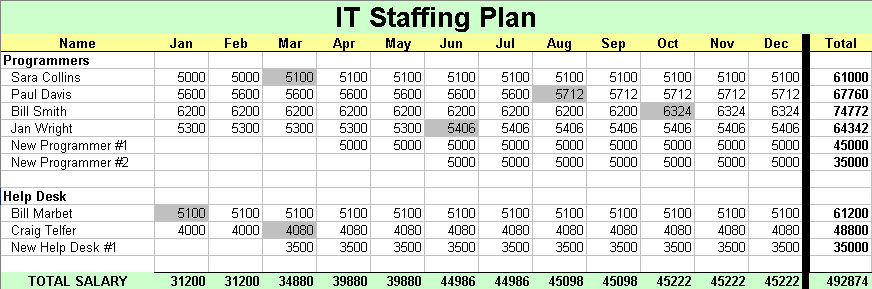
First, you need an IT Staffing Plan for your budget period. Start by creating a budget worksheet like the spreadsheet below or download the tool — CLICK HERE:

Modify the headings if you are on a fiscal year instead of a calendar year.

OK, , , to budget salaries for an IT Operating Budget, you need several pieces of information:

  1. Employee names
  2. Salary
  3. New Hire plans
  4. Salary raise information

In my last post, Track your IT Staff just like any technology asset  I discussed the importance of maintaining an IT Staff Roster.

Step 1  –   List your employees
Grab your current IT Staff Roster and copy the employee names to the IT Staffing Plan worksheet you just created.

I like to group employees alphabetically within organization or function of what they do in my IT Staff Roster, , , Programmers, Infrastructure, Help Desk, etc. It helps when you can see people listed in groups like this.

Step 2  –  Salaries
Copy the salary information from the IT Staff Roster into the first column of months, , , be sure they line up with the proper employee name. Once copied, replicate the salary column across all 12 months.

Quick note: When you budget it is probably October or November if you are on a calendar year. Be sure you update anyone’s salary who will get an increase between now and the end of the year.

WOW, , , the first two parts took all of 2 minutes even if you have 150 people in your organization.

Step 3  –  New Hires
Define your New Hire plans for the coming year. If you have developed an IT strategy and gotten it approved, this should be straightforward. Think through each of your IT organizations and identify how many new resources you need to add.

Add rows in each group where you plan to add new hires. Call them “New Programmer #1, #2, , , etc.

Put each New Employee’s starting salary in the month you plan to hire them and replicate the cell to all cells through December.

Another 10-15 minutes spent and here is what you have so far:

Step 4  –  Add raises
There is a fast way and a tedious way. I’ll give you both options and you can choose which you prefer.

Option 1 – Raise Pool  –  Your company probably wants to manage employee raises to a certain level, , , usually a percentage of salary like 2%, let’s say. There is a subtle difference in how this is interpreted but makes a huge difference in budget dollars.

Note:  The company will interpret how they want to manage salary increases as either 2% of total salary or an average of 2% per employee raise.

Let me explain, , , if every employee was to receive a raise July 1st (mid-year) and you gave everyone a 2% raise, , , your total “raise pool” you include in a budget would be half of what it would be if the company interprets raises as 2% of total salary. All budget months prior to the raise would not include raise money.

For our example, we will assume the company gives us a 2% of total salary guideline.

OK, add a row to the bottom of your IT Staffing Plan below the Total row and call it “2% Raise Pool”. For each monthly cell, do a calculation of multiplying the Total Salary cell just above it by 2% to get your monthly raise dollars.

Add another row and name it “Grand Total”, , , then add the “Total Salary” and “2% Raise Pool” rows to get your final salary numbers.

Not quite 2 minutes to do this, , , done with budgeting salary in under 20 minutes and this is the biggest part of your budget.

Option 2 – By Individual  –  The other option to budgeting employee raises is to estimate a budget increase for each employee and update the employee’s salary in the month the raise is to go into effect.

To do this, you need to know when their raise is due or planned and how much you plan to give them, , , or you can simply use a 2% calculation.

Employee’s last raise date and raise amount is kept in the IT Staff Roster spreadsheet you pulled the employee name and salary information from. This information will help you determine effective dates for each employee’s  raise.

Remember, depending upon how the company interprets the 2% raises, , , you could be short changing yourself by doing it this way.

Here is a look at an updated worksheet where each employee’s salary has been increased to reflect a raise, , , the shaded cells are the raise months.

Summary
The key to developing your salary budget in record time is to have most of the information already available by keeping asset records on employees with a tool like the IT Staff Roster and a change management process that keeps it current.