Make budgeting a breeze by preparing now

In just a few weeks, many companies will begin their budgeting process for 2011. You can get a real jump on the effort to come by following a few preparation suggestions.

For most IT managers budgeting is an ordeal and one royal headache that fortunately only comes around once a year. Yes, it does take a certain amount of work, but when you have a simple process to follow and tools that truly help you in the effort it can be a breeze.

I go about my entire management process in a way that makes things easy for me. Call me lazy if you want to, but the bottom line is that I just don’t like to work hard to accomplish some of the things I know have to happen. Don’t get me wrong; I’m a very hard worker as anyone who has worked with me will attest. I just refuse to work hard on things that ought to be simple and easy to do. Budgeting an IT organization falls into that category.

The reason budgeting is hard for many IT managers is that they lack an understanding of how to go about it and don’t have the proper tools to help them. The first step of the process is to prepare, so let’s begin.

Start a Budget – 2011 file folder and begin collecting the following:

2009 and 2010 Profit and Loss (P&L) Trend Report – You want the report or reports that list the month by month trend of expenses your IT organization has incurred for the last 12 to 18 months. Trends will help you see your spending pattern for each expense category as well as major expense “spikes” incurred in the past that may relate to annual or semi-annual vendor payments. These “spikes” can be tangible.

Employee salary report –  You should maintain an employee roster with annual salary, bonus terms (if any), and expected new positions for the coming year. A tool is included in my IT Budgeting book just for this purpose. In general, if you budget your salary and benefits part adequately, you have over 70% of your budget completed. Maintaining an organization salary list  makes this part a simple and quick process.

Vendor contract log –  When you have a vendor list that includes contract terms, you can budget this part quickly plus be certain that you have anticipated any possible contract price increases that are built into a contract.

Telecom circuit log –  If you have several remote office connections, you will want to pull out your Telecom circuit list to quantify the ongoing monthly telecom costs. You can also list possible office openings which have estimated one-time implementation costs to get started and ongoing monthly telecom costs. Maintaining this list for a large set of remote offices makes budgeting this part easy and gives you the tool to reconcile your telecom vendor invoice each month as well.

2011 strategy & project initiatives list  – You can’t develop a comprehensive budget if you don’t have a good idea about the large projects you will be working on for next year. Large project initiatives have cost implications that need to be budgeted. One of the last things I will do when building my operational budget is to walk back through next year’s anticipated projects to determine if I have the major cost issues covered in my operational plan (budget). Your project initiatives may change in the actual year, but if you have included the big projects you believe will be worked on you will usually have changes covered in your plan.

Start asking questions –  Some of the “extra cost” efforts have to do with supporting your company’s operational units. For example, when a remote office moves to a new building because they have outgrown their existing building, there are IT expenses related to supporting such an effort. Now is the time to start getting inside your operational manager’s heads to get a feel for what they are planning to do in the coming year, , , many of their plans require IT support and you better know about them.

Employee training plan –  If you have not started developing an Employee Education & Training Plan, now is the time to start. Your IT staff loves to learn new things and to improve their professional skills. Training is one of the best motivators you have for keeping IT people committed to your company and motivating them to do more. It is an investment you can’t afford to miss out on and will reward your employees as well as your company.

New hire expectations –  You want to have a good assessment of all new hire positions planned in the company as it will affect supporting new hire startups and the purchase of equipment, license agreements, etc.

Major expense items analysis – In an IT organization budget, you may have 40 to 50 expense categories, , , but for most organizations there will 6 to 8, maybe 10 expense categories that make up 85-90% of your budget. Identify from past Profit and Loss Reports these major expense categories and be sure you understand the full implications of each of them, , , and anything that can impact the amount you spend in them the next year.

Budgeting is about anticipating future activities and estimating  the costs related to those activities.

Book_IT BudgetingPull this information together and budgeting becomes much easier. Learn how to apply appropriate “buffers” in the right places and you will always achieve your business plan.

Learn more in IT Budgeting: operational and capital budgeting made easy.

IT Management Model – 2 + 2 = 5

Description:
The whole is greater than the sum of it’s parts.

Leverage is very important in managing any operation. It is especially true in technology. There are many scenarios in IT where you can do things to get more than the sum of the parts.

For example, working on several programming requests that affect the same program often buys you a productivity boost. Likewise, taking the best of two companies’ technologies can make a merger of the two companies a much more powerful company than either might have become on their own.

Key points:

  • Combining two assets can produce results greater than their sums
  • Look for complimentary elements
  • Team member differences can be powerful assets
  • Look for “win-win’s” and leverage opportunities


Category:

  • IT Strategy & Planning
  • IT Organization and Staff

Discussion:
Opportunities abound in technology support to leverage situations. Think of the idea of adding “two plus two” and coming up with “five” versus “four”.

As an IT manager, we should always look for leverage opportunities. It can be anything from combining two programming requests that affect the same program into one project to finding multiple skills needed for your staff in one new hire.

You might also find the opportunity to combine the technologies of an acquired company and your parent company into a technology strategy that is much more powerful than what you would have produced at either company. Such a combining of the positives of the two companies offers significant leverage for the two companies and possibly a significant competitive edge.

Combining two assets can produce results greater than their sums
– To find these types of opportunities, you have to look for them. They exist in every corner and aspect of technology. Stay alert to possibilities and look for combinations of things that boost productivity.

Look for complimentary elements – If you need to take a physical inventory of all the technology assets in a company, you can ease the pain by collecting the information when one of your staff visits a remote office to do other work. Add the inventory task to his/her list of “to do’s” and you will leverage your staff’s time and productivity.

Team member differences can be powerful assets – Combining two complimentary, yet different sets of skilled employees on a project can give you significant advantage and a higher likelihood of project success. Taking advantage of people strengths and reducing the impact of their weaknesses is a management focus we must all have.

Look for “win-win’s” and leverage opportunities – When doing things to correct a client satisfaction issue, add a little extra to the solution that goes a long way in showing the client your team is responsive to their needs. The “little extra’s” can be powerful components to a solid client relationship that benefit both companies for years to come.

I look for leverage opportunities all the time. One of the best examples I’ve seen is when movie producers film one movie but have enough material to produce a sequel or complimentary film. When you think hard enough, you will find many opportunities in technology to get “five” from adding up “two plus two”.

IT Management Models includes 72 models developed specifically for use in managing technology resources. The material is beneficial for IT managers, team leaders, project managers, and employees alike. Includes two publications: a 200-page reference document with model detail and a small Summary booklet to carry with you easily. The reference publication is a quick read and provides examples that can be used in any number of technology situations. Details at  www.mde.net/cio/page20.html

What is an ROI and what’s the big deal?

Believe it or not, your company’s CEO and CFO have tough jobs with difficult decisions to make. It’s not a matter of sitting in the nicest offices and beaming over your company’s successes. There are hurdles around every corner and overcoming challenge is the name of the game for any top executive.

You’ve heard me say before that the CEO has limited resources just as you do in your IT management or CIO role. You will probably never have an organization where you have all the resources you need to do the things you would like to do, , , or even need to do. If you do, you are either not wanting to do enough or you probably have more resources than you should have.

One of the things CEO’s have to balance is where to put the cash in funding new projects. Every department manager needs funds to do the things that will make a tangible difference for his/her department. For example:

  • The HR Director needs a new HR system to streamline his operation and to avoid hiring four more people.
  • An operations unit needs more office space due to growth. A move to a new office is anticipated.
  • Your internal Billing and Receivables department wants scanning & imaging capability to eliminate tons of paper.
  • A new company acquisition is being eyed to expand the company’s market share.

And then there are the IT initiative needs.

Get the picture?

First of all, the company can’t do everything at once. Even if it had all the available cash to do so, the company’s staff resources may not be able to absorb this amount of change simultaneously.

This means that the CEO has to balance approving new capital intensive initiatives and handing out the funds. In order to make knowledgeable decisions as to which project makes sense, has more benefit, etc. the CEO and CFO need something that can sort of “normalize” all the project initiatives so they can compare them side by side.

One of the tools they use is a Return on Investment (ROI) calculation.

A new initiative proposal that includes an ROI calculation tells senior executives several things:

  1. Cost of the project
  2. Timing of expenditures
  3. Benefits of the project and how the investment will be recouped
  4. Timing of when the benefits will occur to pay for the investment

Just because a project has a huge payoff does not necessarily mean it gets priority over projects with less return. For example, if a project costs the company $1,000,000 and has a $2,000,000 expected return over three to five years, it’s probably a worthwhile project to do. However, a $100,000 project that has a 9 month payback might get preference for several reasons:

  • The cost is lower and more affordable at the time.
  • The payback is much quicker and the company needs to show faster results for any number of reasons.
  • There may be issues such as compliance or other types of risk that push the smaller project to the front of the line.

Three things have major influence with your CEO and CFO in getting your projects funded:

  1. Your track record of success
  2. The company’s need for what you are proposing
  3. A good feeling that the return is real and of reasonable time for the cost

This third item is where having an ROI component in your IT initiatives recommendation will make the difference. It also makes a difference in that you are presenting a business solution with elements that speak the same language as your CEO and CFO, something that helps them a great deal.

So, how do you go about calculating an ROI?

First, understand how companies will look at the financial part of a proposed initiative. Some companies take a very deep, analytical look at it including time value of money etc. However, most company execs will look at the issue at a higher level. What most want to know is how much does it cost, how long to recoup the cost, and how are you going to recoup the cost.

I will typically map out by month the expenses we expect to incur in the project and actually break it down by type of expense (labor, supplies, travel, outside contractor, etc.). This is simply part of building a high level budget for the project as you normally expect to do.

Then, I extend the time to show when and how much savings we start to see beginning at the appropriate time until the project is paid for. The total number of months it takes to complete the project and receive the benefits that pay for the project is the ROI, , , or “X” months to pay us back for our investment.

Let’s take a very simple and hypothetical example to show you what I mean.

Assume we have a project to cut our $80,000 per month postage cost in half. The project takes three months and costs the company $240,000 to complete. Let’s also assume that once the project is completed, we start saving the company half of our average monthly postage cost, or $40,000 per month.

One quick calculation of dividing the cost ($240,000) by the monthly savings ($40,000) tells you the payback is 6 months upon completing the project. Every CEO will jump at such an opportunity, especially since the $40,000 monthly savings will be an ongoing benefit to the company.

In my proposal, I will show the project time line, estimated cost, and a forecasted Return on Investment of 6 months after the project is completed. I will also explain how the savings are going to occur and other benefits that may result by doing the project.

Behind the scenes, I will develop more detail to help me arrive at the numbers I need to present to the executive committee. This detail will include a high level summary of the project’s budget and detail showing how much we will save, when savings are being achieved and where they occur.

A sample of the  proposal to the executive committee will include something like the following:

In this example, the project has a 9 month Return On Investment (ROI). It takes nine months from beginning the project to completely recoup the costs of the project.

Most CEO’s and CFO’s relate to the entire time frame it takes to implement the project and to recover the project cost. As long as you can give them a reasonable assurance it can be done in the amount of time you forecast, you have a good chance in getting the project approved assuming it falls within their “reasonable payback criteria”.

CEO’s differ in how long a reasonable payback is. Some will jump at almost anything that has an 18 month payback or less while others are more selective. It helps to understand your executive team’s personality and how they look at funding new initiatives.

Even at this level, it’s still a summary. You should estimate the labor costs based on the types of resources needed even though you may not have picked out the staff to do the project yet. Other costs will be estimated and you should gain a pretty good idea for the equipment and software costs as they are more significant and a major part of the actual solution.

Bottom line is that you will have exact numbers for some cost items and will estimate conservatively for other cost items to insure you can meet or exceed the cost expectations you are setting with your proposal.

The good thing about having the project summarized like the example above is that it is very easy for your executive team to follow and understand.

What do you do if there are no clear financial savings to be gained?

Good question and one that often occurs. In such a case, you need to translate tangible benefits into dollar equivalents, if possible. For example, if a proposed initiative reduces systems downtime, take the expected time of additional uptime and multiply by an hourly dollar factor of the total number of users that are affected by such downtime, , , to get an estimated “cost of downtime” hit in productivity. Learn more about this in my Calculating Cost of Downtime article.

In some cases, arriving at a dollar value may be virtually impossible. In those cases, you still need tangible benefit such as meeting a compliance issue, maintaining business continuity, supporting company growth, etc. If you can’t quantify cost savings or identify tangible benefits, your proposal has a difficult chance in getting approved.

Remember, a project doesn’t have to have financial savings to have a return on investment. Addressing a compliance issue and reducing the risk of business interruption is like buying insurance. You don’t plan to use homeowner’s insurance but it comes in handy if you have a catastrophic event.

Make it a habit to include a Return on Investment section in all of your technology initiative proposals and start tracking the actual results to determine if the ROI objectives are actually being met.  This type of action exhibits business maturity similar to that of a business owner, a sure winner in the eyes of CEO and CFO’s.

Need help in calculating an ROI? CLICK HERE to learn more and download my free ROI Tool.

Simple process to develop policy & procedures

Do you need to develop policies and procedures for your company?

How do you know?

Is it because someone suggested you need them, and if so, is there a tangible reason they are needed in your company?

Don’t develop new policies and procedures unless they will specifically provide some benefit that you want to achieve. It’s better to spend your time and energy on doing something else that provides value than to develop a bunch of policies that are just there “for show”.

Provided below are excerpts from my  book, Practical IT Policies & Procedures that will give you a quick guide in developing new policies.

Let’s get started. In my books, you will find that I don’t waste a lot of time. My belief is that if you can get your message across in 40 pages versus 240, then you should save the paper and the time required to read all the extra “stuff”.

Step 1 – List areas of risk
Take a shot at listing things that can cause your company risk. Here are just a few to get you thinking:

  • Software license compliance
  • Employee safety issues
  • Security
  • Data backup and recovery
  • Illegal access to company systems
  • Infringing on privacy
  • State and federal regulatory issues
  • Email spam
  • System viruses
  • Company confidential information
  • Losing clients
  • Systems downtime
  • Inappropriate use of company assets (equipment, facilities, money, etc.)

One company may consider all of these issues worth the time to develop formal policies and procedures while a similar company of comparable size and in the same industry may consider just a few, or none, worthwhile for its company.

I will keep emphasizing that what’s important and useful for one company may be very different from another. That’s the “practical” application of reviewing your situation and deciding for yourself what’s important for your company.

Step 2 – List desired behavior or processes you want
List the processes you want and the behavior that’s important for a smooth running operation. Simply start listing things that are important in the operation of your company that you truly think make you more productive or better at what you do.

Here is a quick list of items to consider:

  • Programming change requests
  • Vacation and time off requests
  • Purchase authority and approval
  • Equipment change requests
  • Travel expense management
  • Employee performance planning and reviews
  • New employee orientation and quick start guidelines
  • IT escalation steps to resolve downtime issues
  • Use of company cell phones

Step 3 – Assign a “relative importance factor”
This step is to assign a relative weight of importance to each risk issue or desired behavior issue you have identified so you can decide on whether you want to put in a formal policy and procedure to address the issue.

This step is somewhat subjective. Actually, it’s very subjective and reinforces what I have been saying. It’s “your” company and the determination of whether a risk issue or a behavior issue is important enough to cause you to decide to develop a formal policy and procedure is up to you.

It’s the same as buying life insurance. Some of us prefer to have a lot while others go with much less. Who is right or wrong? I’m not so sure there is one person more right than the other; everyone’s situation is different. Companies are all unique as well.

Once you identify the policies and procedures that are important enough to develop formal documentation for in your company, you can determine how to develop them.

Step 4 – Define the list of policies and procedures you need
Identify a specific policy and procedure that addresses the risk or behavior issues you have deemed to be of major importance in Step 3.

For example, if your company is having difficulty in managing travel expenses, you may decide to develop and implement a formal Travel Expense Guidelines policy.

Step 5 – Prioritize your list of policies and procedures
Spend time on your most important policies and procedures first. One way to determine importance is to develop an estimated dollar value for the risk exposure or estimate the value of improving productivity or reducing costs by implementing a policy to address a specific behavior issue you have identified to be important.

The point is that you want to focus your priorities on the issues that give you the best return on your investment of time as possible. Focus on things that provide you and your company value.

Step 6 – Determine how you will develop your policies and procedures
There are essentially three ways to approach this task:

  1. Write them yourself from scratch, , , i.e., a blank sheet of paper and pen.
  2. Obtain copies from a company in your industry to use as a starting point.
  3. Research sources for examples to provide a starting point. Plenty of examples you can purchase or even find on the Internet that will help you get off to a fast start.

It’s important to remember one of the comments made earlier. You must take full responsibility for the content of any policy or procedure you develop. It is simply not enough to take a policy from another source and use it “as is”.

Every company has unique situations and whenever you decide to develop a policy or procedure, you need to consider your unique issues. Only you and others in your company can take the responsibility for the policies and procedures you implement.

Step 7 – Develop and implement your policies and procedures
There are three important aspects from this point forward.

  1. Assign responsibility for writing each policy and procedure with deadlines, objectives, and important points that should be included.
  2. Define your review process: who, how, when, review criteria, etc.
  3. Define your implementation or “roll-out” process. This will probably be different for different policies and procedures.

Step 8 – Monitor and enforce your guidelines
It really doesn’t do a lot of good if you document what you want to happen but don’t enforce your new guidelines. In fact, it can do more harm than good if employees of the company perceive your company is not really serious. You want to be certain that if you decide to develop a formal policy guideline and introduce it to the company that your company is prepared to back up what it says by enforcing the policy.

This is a quick guideline that I’ve used in past management positions and can get you started. More is discussed in the book, Practical IT Policies and Procedures and it includes 23 sample policies you may use to develop many of your new policies quickly.

Photos from my South Africa safari

Last week, I delivered the 40th IT Manager Institute in Johannesburg, South Africa. It was a super class with every participant getting their IT Business Manager Certification (ITBMC).

The week was capped off with a full day safari at Pilanesberg Game Reserve. Here are some of the photos I took. The first set of 12 elephant photos was an awesome experience as you will see in the sequence of events.

Herd of 10 elephants headed our direction to a water hole

They form a tighter group as they approach the road

Flanking the youngest for protection, , , they sense something ahead

One of the adults eases toward a group of hippos who also have a “small” one

Larger adult elephants begin forming a barrier

The big bull (far left) is ready for action (ears flared) as the little guy catches up

The herd begins to move on and the big bull stands guard – ears are still flared. Hippos are also grouped to protect their little one

Two adult elephants stand guard as the rest move away from the hippos

The big bull moves off with the herd leaving an adult posted

The guard stands his ground until the herd is safely away

The herd is out of range so the guard elephant turns

A 2nd adult returns to defend the guard elephant as he leaves, , , just in case

Papa elephant, , , goes anywhere he wants to

Life is just a box of chocolates (Forrest Gump)

Giraffe at the water hole

It’s a long way down to the water for these guys

This giraffe watched while the other giraffe drank water

Beautiful and very, very tall

Giraffe’s head cocks as he senses the wildebeast approaching from behind

More giraffes eating from the tree tops

“Her Mama thinks she is good looking!” – wildebeast are plentiful

He is called Pumba in the movie Lion King, , , warthogs move comfortably with the deer

Zebra on the move

Which type of zebra is this? White with black stripes or black with white stripes?

Not sure what type of deer this is, , , beautiful and not afraid

Large buck stands guard on the perimeter of his group

Our gang on the path to the water hole observatory

A photo of the Ruth’s at the end of our day of safari

This trip was great, , , super class that I got to know quite well. I owe Herbert Ruth a real debt of gratitude for helping me put this one together and in sharing the real Africa wildlife experience with me.

It was a trip I will always remember.

13 technologies that changed the game

Just saw an article from PC World this weekend I thought was interesting about “game changer” technology innovations. The list of 13 technologies in all mentioned are excellent and have had true paradym shift implications, so I’ve written a short summary below. CLICK HERE to read the entire article.

Got some technologies you think should be added? Post a comment and make your case.

PCWorld’s List

1.  Henry Ford’s Model-T automobile  (1912) – Ford’s assembly line dramatically reduced the price of an automobile and made cars accessible to millions, , , dramatically changing the way we live and providing quick access to products and services that were once too far away to take advantage of.

2.  Zenith Flash-Matic TV Remote (1955) – What would we do without the TV remote? Well, “remotes” weren’t always available although many of you reading this article do not remember it. As a kid, I remember sitting next to the TV changing through the channels and adjusting the volume as my parents surfed the TV programs the hard way. This technology allows remote devices to control your TV, radio, DVD player, audio center, garage door, and many more things to make life easier.

3.  Sputnik (1957) – Sputnik started the space race and began an unprecedented launch of new technology efforts including the birth of ARPA (Advanced Research Projects Agency) in the US. Without Sputnik, we might not have the Internet today, , , think aout what we would be missing without Internet access, , , OUCH!

4.  Atari Pong (1972) – The most basic of games on your TV screen set the stage for a tremendous electronic game industry. When Pong came out, everyone was amazed at being ale to control the digital paddles to hit the moving “ball” and score when your opponent missed. Games have come a long, long way.

5.  IBM PC – Model 5150 (1981) – There were PC’s before IBM launched their first, but the 5150 was released with an open architecture so all types of companies could build compatible devices and software to work with the IBM PC. This approach blasted open the capability of the PC and helped make it a consumer product.

6.  Motorola DynaTAC 8000X (1983) – The first cell phone, , , sure doesn’t look like what we have these days. This guy was over 2 pounds and cost around $4,000. It set the tone for future communication capabilities we have today. Just last week, I pulled out my iPhone and called home from Johannesburg, South Africa, , , some 7,000 miles away, , , just like calling across town. We don’t think it’s a big deal today but this technology changed our lives for the better.  It took 13 more years (1996) before Motorola created the first slim phone more like we use today.

7.  IBM ThinkPad 700C laptop (1992) – One of the first truly portable PC’s made computing on the road actually portable. Prior to this small and lightweight capability, we had “luggable” PC’s that weighed in at 20-30 pounds like the Osborne 1, the IBM 5100, and the Compaq Portable. They were back breakers and could barely fit under an airplane seat. Then the challenge was, “Where do I put my feet on this airplane?”. So, what you had was very limited amount of people carrying a PC with them, , , today, most business people have portable computing capability on their laptops, iPads, or cell phones. If you like technology, today’s capabilities are truly remarkable compared to what we had just 10-15 years ago.

8.  Broadband (1995) – Here is where it starts getting real interesting. With high volume data transfer capability, we start to see more visual software with images, sound, and even video that we see today. In 1995, a Canadian company released the first 56kbps broadband capability, , , several years later it went to 1.5mbps, , , and now we see 3G and 4G that open the possibilities to do more via the Internet than ever before. The future holds some wonderful capabilities based upon the achievements of the past.

9.  The Slammer Worm (2003) – This is not a good technology but it made significant impact and changed our technology world forever it would seem. The Slammer/Sapphire Worm was possibly the first “worm on steroids” and took down millions of networks, ATM machines, even 911 emergency call centers in just 10 minutes. It helped create a new software industry to fight cyber attack. WHAT A PAIN !!

10.  Apple iTunes (2003) – The beginning of online access to music made all kinds of music more accessible and cheaper, , , plus eventually easier to play anywhere you want. Apple had to show the music industry how to benefit from such a vast worldwide audience, , , and make a fortune in doing so. Don’t you love technology?

11.  WordPress (2004) – We have met the media and it is us. WordPress is the largest of the Blog platforms with millions of Blogs hosted for free. This ITLever uses WordPress and I’ve been so impressed since finding it. Blogs have changed the age of information and are making it easier and easier for us to communicate.

12.  Capacitive touchscreens (2006) – Apple didn’t invent the capacitive touchscreen, but its use in the Apple iPhone revolutionized the cell phone industry. It wasn’t until I purchased this little jewel that I became “phone literate”, , , hated multi-function cell phones before getting my iPhone and only used them to make and receive phone calls. Traveling is so much easier and interesting with the apps I have on my cell phone.

13.  The Cloud (2010) -The Cloud is already having dramatic impact on technology organizations and companies around the world. With high speed data transfer that we have now, more and more business applications are being hosted by the companies who produce and support them, , , making them more affordable and less expensive to support with our own employees. This technology will likely spawn new and fascinating technologies that bring us closer together.

This is the tip of the iceberg of what’s to come. Some of these technologies provided the foundation for many newer technologies and will set the stage for future innovations, , , can’t wait to see what happens in the next ten years.

Got a list of your own that you think should be included? Post your ideas by making a comment.

Hello from South Africa

This was a great week delivering my 40th IT Manager Institute class in Johannesburg, South Africa. We had a small class this time, but I sort of like smaller classes because I get to know everyone so much better, , , I made an exception this time to make the long trip and deliver the program to a few who really wanted the training. What a great group this was, , , I’m sitting in the classroom with them right now as they take their ITBMC exam, , , hope they all pass.

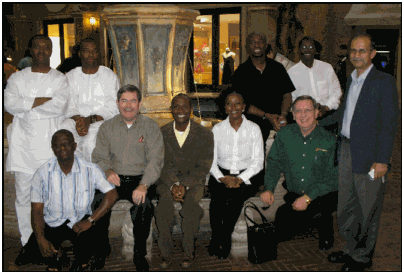
Brian, Mike, Moses, Jacques, Herbert

Large classes are also great. Every class is different and I have enjoyed being part of each and every one. This class was especially fun to work with.

Tomorrow, I get to go on a mini-safari before catching a flight home. Hope to get some photos of wild animals such as rhino, giraffe, elephant, and lion and an assortment of smaller animals. Look for my post this weekend for the photos.

15-hour plane rides

I’ll be headed to the airport in a little while. First, a quick flight from Nashville to Atlanta, , , only about 45 minutes. This flight was upgraded to first class so it will be a nice start.

Then tonight at 7:00pm I fly out of Atlanta on my way to Johannesburg, South Africa, , , a non-stop 15 1/2 hours of air travel. Amazing when you think of it, , , but a pain when you realize having to be in such a confined space for such a long time.

It’s a good thing I can sleep anywhere, , , and I mean anywhere. Never had any real trouble getting to sleep on trips. When I get there at 5:00pm tomorrow night SA time, I’ll get to my hotel, have some dinner and get a full night’s sleep so I’ll essentially be on SA time come Monday morning.

I look forward to this class like I do all my classes. I’ll have a former student sitting in and who will present a couple of the sessions as we prepare him to deliver the program in Africa going forward.

Unfortunately, the Atlanta to Johannesburg flight is coach and a middle seat.

Ouch!!

That’s because it is often late before I can purchase a ticket if I don’t know whether the class will confirm or not. This class is small but just large enough to justify the trip, , , maybe I’ll be able to get my seat moved to an aisle or window. Cross your fingers on this one!

The best long trips are when you have an open seat next to you and you are able to spread out. I tend to use these trips to work and can get quite a bit done. If I’m in a middle seat, I won’t get much work done.

Hope you have a great weekend. Me, I’ll be on a plane or waiting to get on a plane all weekend.

The next post you see will be coming from Johannesburg, South Africa.

South Africa plans bring back good memories

As I plan to leave for my 4th visit to South Africa in a couple of days, it brings back some positive memories of earlier trips.

2005

2005 South Africa IT Manager Institute

In this first class, Dan Tankersley went with me. Dan and I have been co-workers and good friends since 1994. His family and mine have become as close to family as you can get and we try to see one another every year. Dan’s contributions to the start-up of my company were very helpful so the South Africa trip was a small way for me to give back to him. Both of us enjoyed this class very much.

I called this group the “fun class” because they bonded so quickly and had a good time together. Our excursion to Sun City was one I’ll never forget, , , we had a most interesting driver who we determined must have been paid by the hour.

2006

2006 South Africa IT Manager Institute

Our 2nd class in South Africa was my 20th overall and also a fun and interesting group. I would later reconnect with some of the Nigerians in this class during my first visit to Nigeria in 2009. It was in this class where I would meet Gynt Schoeman and his fiance, , , they would take me to a nice dinner a year later when I returned to South Africa.

This class included Herbert Ruth, a senior IT manager in his own right. We have stayed in contact and on the trip coming up we will be working together to put plans in place to do more for South Africa and other African countries.

2007

2007 South Africa IT Manager Institute

One of my larger classes and one in which Dan Tankersley participated in again. He was a great help and it makes a long trip all the more fun when you have someone to talk to at dinner, , , or to visit one of the African tribal cultural centers like we did. Great class and my 26th Institute  at the time.

It has been three years since I was in South Africa and much has changed from what I hear. For one thing, the World Cup was just hosted there and many improvements have been made at the airport and in the infrastructure in and around Johannesburg, , , will be interesting to see.

I look forward to this class as I always do. This class will be a smaller group which I like in many ways because I’ll get to know each of the students much better.

Look for my posts next week when I add to the ITLever Blog from South Africa.

Cost saving needs are a fact of life

I spoke to a group of IT managers a while back and the theme was consistent, “We need to cut costs and do more with less.” My immediate thought on the matter was that “some things never change”.

You might be surprised that many companies go through what I call a “tradition” every year, a “cycle of events” you might say. You can almost gauge the time of year based upon what comes down from the executive wing.

The cycle of events (assumes a calendar year budget and operational plan)

  • In August or September we start developing our operational budget for the next year.
  • In December (hopefully, but not always), we finalize the budget for the new upcoming year.
  • The first three months of the new year, it’s smooth sailing. Or, as they say in Australia, “No worries.”    🙂
  • In April of the new year, the first quarter results are released to senior management and Department managers.

Now the fun begins

Budgeting is not an exact science; any CFO or CEO will tell you that. However, many managers (including IT managers) try to be so exact that they budget much too tight to have the possibility of achieving their financial forecast for the new year, , , they leave no wiggle room or buffer to deal with unexpected surprises that might occur.

Another cause is that during the budgeting process, the departments are squeezed by upper management to reduce their budget expenses in order to achieve the forecast number the company wants to show for growth and profitability in the company.

I won’t go into how to budget so you avoid the problem of budgeting too tightly (that’s another article), but the message here is that what often happens after the first or second quarter results come in is:  senior managers wake up to find they are already “behind the 8-ball” in terms of meeting the company’s financial projection, , , they are at risk in achieving their budget.

The budget was so aggressive (so tight), the company is already falling behind the financial performance it had forecast.   NOT GOOD !!

Fairly quickly, the CEO and CFO begin to strategize the “corrective actions” the company can take to meet the year’s financial objectives. These financial objectives are the main drivers for the two highest executives of the company, and essentially the scorecard for their performance. So, you can see why they are very interested in doing things to insure the company will “make its numbers.”

It’s an uphill climb to make the budget numbers for the year if they are already getting “behind the 8 ball”, , , so they have to do something tangible and do it quickly.

The reaction
The easiest decision and often the decision made is to estimate the budget deficit problem and then go require each department to cut a certain percent of its ongoing operational expenses to help the company achieve the number. Additional approaches might include simply cutting “discretionary spending” for the remainder of the year. This usually includes things like stopping or limiting new hires, training and education, travel, contract work, optional projects, etc.

To employees of the company, this change of plans can be unsettling and appear to be caused by a lack of planning in the company. The actions result in issues that prevent their professional growth or impede their ability to be successful. It’s viewed as a “real bummer” and can adversely affect morale.

Anyone who has been in a company where a unilateral directive comes down to cut 10% of your expense knows the feeling of “having to do more with less”. What I forgot to mention is that even though the expenses are slashed, many companies still expect to accomplish the initiatives planned for in the original budget, , ,  truly a “get more done with less” scenario.

Get ahead of the power curve
Failure to anticipate this typical cost cutting cycle to pop up is a mistake. There are a few things you can do to offset this cycle of events:

1.  Place budget buffers in your plan. It will help you make your financial commitment every year. Surprises always occur in every operational year, and it gives you room to find cost savings in your department without having to cut muscle when the “cut costs” call comes down, , , and it will.

2.  Be proactive in implementing a cost saving strategy in your company. Companies always need to find cost savings. As an IT manager or CIO, you are in one of the best seats in the house to create change that can improve profitability and productivity. IT is literally a lever that can affect significant financial improvements within the company.

3.  Begin now in creating a management track record of prioritizing initiatives that improves profitability. As an IT manager, your actions create one of two images of you for senior management of your company. The first view is of a manager who understands business needs and proactively seeks ways to do things that provides tangible business value results. To the CEO and CFO, tangible value is almost always translated into some sort of financial impact.

Or, you are viewed as a manager who probably performs well and who is sharp technically but who doesn’t necessarily understand what it takes to run the company profitably. The right business decision often does not coincide with the right technical solution.

Let’s put it this way, the primary responsibility of senior management is to create and maintain a viable business. In most companies, that means they have to be profitable.  There are many parts of the company competing for a limited company asset called cash. Your company executives have to make tough decisions when the numbers aren’t being met. More often than not, the decisions end up impacting IT negatively because IT is viewed as a cost center and not an organization that can create financial leverage for the company.

However, there is light at the end of the tunnel, and it’s not a train coming down the track.

CIO’s and IT managers who establish track records of prioritizing IT initiatives that improves profitability have a very good opportunity of being hit less or even passed over when budget reduction requirements are passed out.

When you gain the trust of the CFO and CEO to make prudent decisions that are consistently cost justified and add value to your company, they view you as a business partner. Believe me when I say that they need internal partners who can help them achieve the company’s objectives, , , they need their IT department to be a true business partner.

Establishing a track record where you become known as a manager who understands the business comes first and helps target prudent technology initiatives that provide business value is extremely important.

Those who establish these track records tend to get more leeway when cost cutting measures are handed out. Put yourself in your senior management team’s shoes. Wouldn’t you be more lenient with someone who has consistently helped the company reduce costs or deliver some type of business value over time as opposed to the manager who always needs more money for technology projects that aren’t fully understood or appear to have little to no value?

I’m sure you would, and so would I.

I wrote a book titled, Technology Cost Saving Strategies. Let me give you some insight into it:

1.  Why did I write it? I developed the material for my IT Manager Institute class because I wanted to include a session that would provide insight and tools to help each participant recoup more than the cost of the entire program (registration fee, travel, lodging, and other expenses) within a short time of returning to their company.

Initially, I was going to discuss my “Top 20” list of cost saving opportunities. After spending time on the idea, reviewing my “archives”, etc., I had over 50 cost saving strategies that I have used to save companies hundreds of thousands of dollars. Granted, I didn’t create all of these strategies myself, but I’ve used them successfully to save money, some of them for many companies.

2.  Why is the book priced so high? Simple answer. I’m very confident in these 50 strategies because I’ve used them and I completely guarantee you will identify more than enough cost savings from the material to save your company thousands of dollars, no matter what level of IT management responsibility you have.

The book is intended to be a “thought catalyst” to help you start thinking aout possible cost saving opportunities in your company. The material can also be beneficial in developing your thinking about how to find cost savings, how to estimate the savings and how to go get the savings.

Not every strategy will apply to every company but every company will find multiple opportunities from the list of fifty strategies in the book.

All companies have cost saving opportunities. Some of the opportunities lie in “low hanging fruit” situations that are easy and inexpensive to get to. Other opportunities require investment and time but can reward you handsomely when the project is completed.

I have used several of these strategies in past CIO roles to save hundreds of thousands, even millions of dollars in companies. Yes, that’s right – millions of dollars in company expense reductions potentially lie in a few of these strategies for you just as they gave me the opportunity in past companies.

Remember, we are going after company expenses, not simply our IT expenses. There is much more opportunity throughout your company than in your IT budget. That’s why savvy executives will spend more in IT because they know there is more opportunity in other parts of the company than say a 10% reduction in the IT department, , , but they only recognize it if the IT department has displayed a sense of working on things that make a positive impact for the company.

Want to see your CEO or CFO’s eyes “light up”? Make a recommendation that costs very little but has tens of thousands of dollars in cost savings potential, or a technology initiative with a reasonable payback period that can improve EBITDA (earnings before interest, taxes, depreciation, and amortization) by half a percent or more and you will see what I mean.

IT managers and CIO’s who know where to look for cost savings, understand how to quantify the opportunity and how to go after it have a big edge on other IT managers who know how to spend the money but don’t appreciate the need to always be looking for cost savings in their company.

The need for reducing company costs never goes away, so I encourage you to take advantage of the need all companies have in this area. You may find as I have that your management team will ask you to actually spend more in IT if it allows the company to go faster because they value the leverage impact IT can have on the company’s financial performance.

Take advantage of the leverage your IT organization offers your company and “heads will turn”.