Monthly Archives: April 2011

Lead by example

In a manager role, you set the tone for the type of organization you want to be. Your employees are watching you and they will emulate what they see from your actions.

Say one thing and do another, , , you lose credibility, and your employees will follow your actions, , , not your words.

Let me give you a few examples:

“I expect you to be at work on time.”
Expecting employees to be at work on time doesn’t have much meaning if you are coming in late two or three days a week. When your employees see your actions, they follow the example you set.

“Have a sense of urgency.”
When something is broken and the clients can’t access systems to do their work, there needs to be a high sense of urgency to resolve the problem. If the manager’s demeanor and attitude is lackadaisical and without urgency, your employees will not have an urgency in resolving the issue.

There is a fine line in this one. You want to display a sense of urgency but not be running around like Chicken Little yelling, “The sky is falling.” Managers need to create a calming effect while placing importance and urgency in resolving issues.

“The client is always right.”
This does not mean there will not be differences, even heated discussions with some of your clients from time to time, , , but you don’t want a feeling of animosity to grow toward a difficult client. We always want to be professional and supportive in helping our clients  use technology effectively to conduct their business.

If you complain about one of your clients and an employee hears you do this, he or she will think it’s ok to complain about clients. That’s not good, especially if it becomes commonplace. Clients and their need for technology in their work is why we have good careers in IT. The client is why our IT organization exists, , , and you don’t want to forget this.

Before we leave this point, I need to emphasize something. Having the thought, “the client is always right”, does not mean the client is always factually correct. They may be completely wrong about something, , , but their perspective has to be managed. When their perspective is incorrect, your IT organization has to do the things that will correct their perpective.

You set the tone
An IT manager’s action sets the tone for what you want the organization to be and how you want to operate as a support team in areas like:

  • responsiveness
  • professionalism
  • ethics
  • attitude
  • competence

Be sure your actions exhibit what you want in your team , , ,

Want your employees to communicate well? You must do this and teach them how and what to communicate.

Want your employees to follow-up well? Then you must follow-up consistently and quickly, , , and explain to them how important follow-up is in your organization.

Want your employees to do what they say they will do? Then certainly you must deliver what you say you will do.

Want your employees to get along and work well with others? They will only if you set a positive example in this area.

Want employees to be on time for meetings? Then start your meetings on time and expect them to be there.

Want employees to go the extra mile when needed? It won’t happem unless their manager does this and you also explain when and why this is needed.

Your team becomes what you cause it to become, , , it all starts by your actions and the example you set for your employees.

My favorite employee appreciation event

In the fast and furious life of an IT manager, it is easy to focus on the work and forget about your employees who are doing the work. Ask yourself this question:

“When was the last time you thanked your IT staff?”

I put some things into motion that forces me to remember to thank my employees for the hard work they do. First, I include a recognition component in every monthly staff meeting. I also like to have at least one “just for fun”  event in every staff meeting, , , something that says, “I appreciate you.”.

Second, I will have my secretary remind me twice a month to do something that shows my appreciation for my employees.

My favorite employee appreciation event is to buy ice cream sandwiches or popsicles in the afternoon and pass them out to my employees. It gives me a reason to visit them in their work area, creates a short break for them, , , and exhibits the fact that I appreciate what they do for our company.

You see, that’s really the big deal, , , and it is a big deal. It shows employees that their manager appreciates them.

In the IT world, your employees don’t receive a great deal of appreciation from their customers (other department managers and users). For many, they feel unappreciated by others in the company. You can turn this around by handing out ice cream and doing other things that demonstrate an appreciation of their efforts.

IT employees have a huge need to feel appreciated and to receive recognition for their work, , , they seek out confirmation that they are doing a good job.

In your IT manager role, one of the key responsibilities you have is to build team camaraderie and motivate your employees. Appreciation and recognition events go a long way in doing this. Never underestimate the importance it has when you show your employees you appreciate them.

Doing things like this tells your employees, “Thank you.”; and it means a great deal to them.

Are you prepared to present?

I attended a 1-day photography workshop this past weekend hosted by an organization in my home town. I went more to donate and support the organization than to learn about photography, , , I’m also always interested in observing the techniques and tools of others who make presentations.

Observing others is something you have probably heard me recommend in the past. “Observe others and incorporate the good things into your approach to things” was one of the best pieces of advice I received from my first IBM manager. I’ve been doing this my entire career.

You can learn a lot from people who are capable and good at what they do. You can also learn a great deal from those who are not so capable. This workshop was one of those.

This workshop was simply awful. Even though I learned a couple of things, it was just a terrible presentation and the following information explains all.

Learn what not to do
Here is a rundown of what I consider critical flaws in this workshop:

  • Forgot his laptop power cord so he had to turn the laptop off every chance he had because he was afraid the battery would run out. It did in the middle of a point he was making.
  • Didn’t verify connection with the projector and ability to view the PowerPoint slides beforehand. As a result, he spent 10 minutes getting his laptop and the projector to sync up, , , he didn’t know how to do this.
  • Information slides were all text on a dark background, , , not interesting at all.
  • Presentation rambled and had no real organization or flow to it, ,, appeared to be very ad hoc with no sense of direction.
  • He rarely looked at students, , , rather he looked down most of the time. Got to have eye contact to gain interest.
  • His presentation was very technical. There were 21 people in the workshop and only 3 or 4 knew what he was talking about when he discussed aperture and f-stop.
  • He didn’t understand who his audience was and as a result most of his presentation was over their heads.
  • He showed some photos but did not show cause and effect of how he created the type of photo he was discussing.
  • There was no Feedback form to fill out, , , so he doesn’t learn whether he does a good job or a poor job.
  • He asked for questions but most in the room didn’t know where to start, especially with such a technical presentation they were experiencing.
  • Had to search for files he wanted to show, , , terribly unorganized.

The bottom line is that our presenter was not prepared to present. As a result, most in the class were lost or did not get much value from the class.

If you plan to get in front of a group of people to present something to them, you owe it to your students and to yourself to be organized and prepared to do a good job.

I’m glad I attended this workshop because it gave me new ideas of opportunities I think are worth pursuing and material for this post.

IT manager tools

I’m a big believer in using tools in your work. Over the years, I developed dozens of tools in my IT manager and CIO roles to help me organize, manage and monitor my IT organization, , , in other words,  to do my job. I also developed tools to assist me before I became a manager.

Five key reasons
I think there are five main reasons why you want to use tools in whatever position you currently hold, , , whether it is a senior IT executive position, a project manager, or a programmer.

1.  Improve productivity  – Completing your work faster and more efficiently is a good thing. Simple tools can help you do just that by working smarter and having aides that allow you to complete tasks quicker.

2.  Improve quality  – You will be more consistent and deliver higher quality when you use tools to help you do the job. Things like simple checklists will insure you “dot every ‘i’ and cross every ‘t’ “.

3.  Reduce stress  – Using a tool that’s appropriate for a particular task will remove stress by knowing you are doing everything needed to do the job well. An example of this is that I have a Class Checklist that I use to help me prepare for every class.  It totally eliminates any doubt or uncertainty for me as I prepare for class, , , when everything on the list is checked off, I know I’m ready to go.

4.  Make your job easier  – Probably the biggest benefit in using tools is that it makes the work easier, , , and that is always a good thing. I tell students in my IT Manager Institute class, “I’m lazy!”. In reality, I’m not lazy; but I hate doing redundant work or doing something in two hours that should take 30 minutes.  Tools make a huge difference in this area.

5.  To gain respect  – You might be surprised when someone gives you a nice compliment about how organized you are or how well you are approaching something at work because they notice a tool you are using. I’ve had many of my IT Manager Institute students tell me about impressing a senior manager or colleague by using one of my tools.

The simplest tool can be a big winner
Your tools do not have to be complex or sophisticated. Sometimes, the simplest approach to handling something is the best. Tools work the same way, , , I have many simple tools that senior managers with over 20 years experience thought were great. To me, I had a problem I needed to deal with and the tool I developed helped me deal with it.

One example is that I created a New Employee Orientation Checklist to help me get a newly hired employee off to a fast start. It’s important for the employee, my team, and me to make this happen, , , a simple checklist does the trick. I’ve been surprised at how many managers don’t have something like this, , , in fact, many ask themselves, “Why didn’t I think of this?”

IT Manager ToolKit
I documented my tools and made them available to help other IT managers. Today, thousands of IT managers around the world use them, , , one of the more gratifying things to occur in my business. 

The IT Manager ToolKit contains 102 IT manager tools and templates, , , several of which are available for free in ITLever.

CLICK HERE for a complete list and to learn more.

Summary
Tools can make your life easier and more productive and much less stressful. When you have problems or challenges, I highly recommend you take a close look at the issue and determine if you can develop a simple tool to help you deal with it more effectively.

Two questions you must be able to answer

Every time you introduce change, , , any type of change to clients, employees, or senior managers, , , there are two questions you must be able to answer.

They may not ask you these questions directly, but in their thinking they want to know:

1.  What’s in it for me?
2. Why is this beneficial?

Implement a new software release, hire a new employee, reorganize the company, cancel a project or recommend a new project, , , any time you want to do something different, you need to be able to determine who will be affected and answer these two questions.

Lat’s take an example I used in my last post, , , you plan to hire a senior programmer to add expertise to the team you do not have. If you recall, I mentioned your employees being high detail and analytical people probably come up with negative implications regarding this new hire. The don’t identify the new hire as something that will be good for them.

So, your communication with your programming team, even managers and leaders of these teams, needs to answer the two key questions.

1.  “What’s in it for me?”  You have to explain the reason we are hiring a senior programmer is because of the experience and expertise this person has in an area that we need experience in. It will help our progrmming staff develop and come up to speed faster in an area where we have no experience.

2. “Why is this beneficial?”  It will benefit each of our programmers by learning an area of technology we need faster and in a more consistent manner and it will help our organization in gaining this expertise. The company benefits because of the work we will now be able to do and the business value we will be able to deliver.

Clients and senior managers ask these questions as well every time you intrduce change, , , so prepare ahead of time to communicate and answer their questions proactively.

IT people are very analytical

Your IT employees are analytical by nature, , , in fact, over 90% are high detail oriented people  and high detail people are analytical.

There is nothing wrong in being analytical. It’s actually a good trait for an IT employee, especially when troubleshooting a problem.

However, it can also be a dangerous thing for your organization if you do not understand the dynamics that take place.

Here is the issue, , , when high detail people are faced with change and they don’t fully understand the change, they analyze the issues they are being confronted with. It could be a reorganization, adding a new employee, changing priorities, cancelling a project, , , any of the things that happen in our day to day work.

Analyzing the situation is not the problem. The problem comes when the analysis results are arrived at by the person, , , ,and in almost all cases, the results high detail people come up with are negative.

Let me give you an example. Let’s say we plan to add a senior programmer to our programming support team so we hire this new employee. If we don’t explain why we are doing this to our other programmers, they start analyzing and come up with their own results as to why the manager is doing this.

They come up with things like:

  • “I should have been promoted.”
  • “They don’t think I’m doing a good job.”
  • “I might lose my job.”

They do not arrive at, “This is going to be a good thing for me.”

What this means is that when you introduce change into your IT organization, it is important to know that over 90% of your employees are high detail people who analyze change. It is critical that you explain what’s going on and why we are making these changes, , , and why this will be helpful to each and every programmer on your team.

If they can’t get to why this will be helpful to them, you will meet resistance, possible morale issues, loss of productivity,  etc.

Head all of this off by communicating with your team so they better understand change and why the change is important.

Best weekend of the year – The Masters

Our family looks forward to this week every year, , , yep, it’s time for, , ,

THE  MASTERS

If you are a golfer and have never been to Augusta National Golf Club, you can’t imagine what you have missed. When you first walk onto the grounds, you know this is something special.

As you walk past the historic clubhouse and out to the first tee you can see out over the course and you sense something magical about the place. This is truly hallowed ground with rich history and tradition unlike any other place in golf with possibly the exception of St. Andrews in Scotland.

One of the first things you notice is how elevated you are and how hilly the course is. The clubhouse and first tee actually sit high above most of the grounds, , , 200 feet higher than #12 and Rae’s Creek. When you walk the course, you learn firsthand how hilly it is; I can’t think of a single flat hole unless it is the short and dangerous par-3 12th.

The Masters Invitational Golf Tournament started in 1934 by Bobby Jones and a few of his friends. It has become one of the best and most recognized tournaments in the world.

As I prepare to watch the 2nd round of this year’s tournament, I thought it would be fun to write a post and share some of the interesting things about this great event.

A number of traditions and iconic images come to mind when you think of The Masters, , , things like, , ,

  • Bobby Jones  –  Bobby Jones is Augusta National. A truly heartwarming scene for all who remember him was when he would go out to the course to watch some of the action in his later years.

  • Amen corner – Holes 11, 12 and 13, , , one of the most scenic and most treacherous walks in golf and always deliver some great moments in the tournament.
  • Hole #12, , , shortest and hardest – Hole 12, a par-3 across Rae’s Creek is usually the hardest hole even though it is the shortest. As I write this, Matt Kuchar has just made double bogey and Graeme McDowell is in process of making triple bogey 6, , , little wonder some call this hole the “toughest par-3 in golf.
  • Gene Sarazen’s double eagle – Gene Sarazen hit a 4-wood into the hole for a 2 on the par-5 15th in the 1935 tournament. He goes on to win the tournament in a 36-hole playoff against Craig Wood.
  • Amateurs – Something Bobby Jones felt was important was to include the best amateur golfers, , , there are 6 in this year’s tournament.
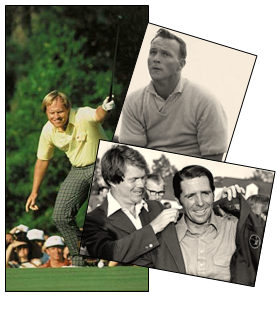
  • Palmer, Nicklaus, and Player – Arnold Palmer helped put Augusta on the map as he won the ’58, ’60, ’62, and ’64 Masters tournaments just as TV coverage was coming into play. His charismatic style and The Masters created tremendous growth in golf. Jack Nicklaus has won the most with 6 victories, , , his most popular was in 1986 as a 46-year old, still the oldest to win. His 30 on the back remains one of the most memorable rounds in golf. Gary Player was the first international player to win in 1961 and has won three times. Gary played in his 52nd Masters this week. All past champions have an automatic invitation to play in the tournament every year.

  • The Crows Nest – A room in the tower of the clubhouse is designated for amateur players, , , a unique and memorable event for those who get to stay there.
  • The Masters trophy – A silver replica of the clubhouse.

  • Crystal goblets for eagles – Make an eagle and you are awarded a pair of crystal goblets.
  • Champion’s dinner – The previous year’s winner hosts a dinner for all past champions, , , he picks the menu and organizes the festivities. It began when Ben Hogan invited past champions to a 1952 dinner at the club before the tournament started.
  • Roars of the crowd heard through the pines – You can tell what goes on in the tournament from the roars, , , even to an extent who is doing it. There are birdie roars, there are eagle roars, , , and there are Nicklaus and Palmer roars of old and the Tiger and Michelson  roars of today.
  • Green, , , everything green – From fan bleachers, TV towers, sandwich wrappers to scoreboards, winner’s jackets and especially the grounds with not a blade of grass out of place, , , everything is a beautiful green at The Masters.
  • The Green Jacket – All winners receive a green Augusta National member’s jacket, , , but you aren’t allowed to take it with you, , , just ask Gary Player who mistakenly took his with him. A phone call from the club requested prompt return of the jacket. First green jacket was awarded to Sam Snead in 1949.
  • Hogan Bridge – The bridge crossing Rae’s Creek on the 12th hole was dedicated to past champion, Ben Hogan.

  • Ceremonial first tee shot – The tournament begins with a tee shot from one of the great past champions.
  • Tiger Woods – Tiger has won 4 times already, beat everyone by 12 shots in the 1997 tournament and is the youngest champion.
  • Magnolia Lane – The drive into the club is lined with huge magnolia trees and one of the most impressive entries into any club.
  • Azaleas and dogwood – The 13th hole is one of the most beautiful in the world with azaleas and dogwood in full bloom, , , and Rae’s Creek accents it beautifully. 
  • Butler Cabins – Several cabins line the 10th hole, , , Butler Cabin is used for TV commentaries.
  • Rae’s Creek – Rae’s Creek comes into play on 12 and 13, , , it has played a vital part in many championships.
  • Eisenhower Tree – President Eisenhower lobbied with members to have a large loblolly pine tree on the 17th hole cut down because he seemed to hit it far too often, , , it is still there but the pros of today have no problem flying over it.
  • Phil Mickelson – Phil has won three times now. His spectacular 2nd shot on #13 in last year’s final round will be one to remember for all time.
  • Wednesday’s Par-3 contest – It has become a family affair allowing kids and wives to caddie, even hit a shot or make a putt in this event. No winner of the Par-3 Contest has ever won the tournament in the same year.
  • Ham sandwiches in green wrappers – A real tradition of the tournament are the ham sandwiches and also the pimento cheese sandwiches.  They are wrapped in green paper just in case they find the ground instead of the green trash bins. No eye sores or distractions in this tournament.
  • Skipping shots on hole #16 – Players like to skip shots across the pond on 16 during a practice round, , , and the fans like it too.
  • The back nine on Sunday – The tournament always seems to come down to the back nine of the last day. It’s what all of us dedicated golfers wait for.

There are many, many more traditions and memories of The Masters. It is the best of what golf offers.

My first presentation

Have you ever been truly scared of something, , , I mean really, really frightened?

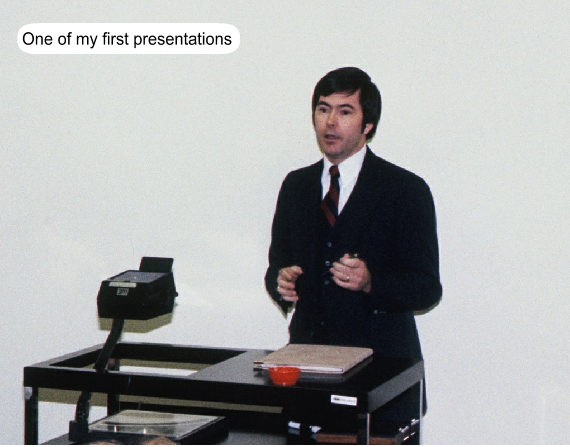
I have been truly scared at least once in my life, and it probably isn’t what you might think it would be. It was when I had to make my very first presentation in front of a group of people I did not know.

You need some background
It was a cold, snowy January day when I arrived at my first IBM class in Atlanta. I was 28 at the time and had just graduated from college, , , I was a bit older than a typical college graduate because of spending 4 years in the Marine Corps.

In the class there were some 30 or so students from all parts of the US, , , we were all proud “IBM rookies” eager to make our mark in the world, , , and we were about to go through IBM’s class called A-Mod.

I remember having to introduce myself to the class like everyone else did and how nervous I got as it got closer and closer for my time to speak. I would soon learn this would just be a teaser.

At the end of the first day, our Instructor brings out flip chart pads and magic markers, , , then he proceeds to pass out assignment material to each of us. He returns to the front of the class and proceeds to assign us a task for the evening, , , we would learn that homework was going to be a common theme in all IBM classes.

Our assignment was to develop a short, 5-minute flip chart presentation on the topic we were given. Everyone had a separate topic, , , no teamwork in this exercise. The following day we were to deliver a stand-up presentation of our topic using the flip chart bullet points we came up with.

The presentation would be recorded so we could view it and our Instructors could critique them to help develop our presentation skills. Our presentations were to be graded and this is important because it leads to our final grade average, , , something our future Performance Review from our managers back home would take into consideration.

Grading would be based upon three things: content, organization of the content, and presentation delivery.

I had never made a presentation to a group of people I did not know, , , never, , , and even though I was older than most in the room and a former Marine, , , I was intimidated by the whole thing.

Intimidated is putting it mildly, , , I was scared.

Not physically scared mind you, , , but afraid of making a mistake, looking foolish, or just generally not doing well in front of my peers, , , even though I didn’t know any of them. It’s a trait I would learn 15 years later is pretty consistent among IT people.

Well, we all go to our apartments and everyone focuses on developing their presentation. My flip charts look great and I believe I have created bullet points that capture the key points of my topic. I was totally comfortable with this part.

But I’m still very much afraid of this task because of the presenting part to come, , , so much concern that I gave real thought to checking out, going to the airport, and heading home to tell my manager that I did not sign up to be  a salesman.

Fortunately, I didn’t go through with it. Can’t hurt that much, can it?

The next day we begin making our presentations and we deliver them in alphabetical order, , , so my name beginning with an “S” means I’ll deliver mine in the afternoon.

How much of the morning sessions do you think I heard?

That’s right, , , none of them.

Why? because I’m thinking through my presentation and analyzing every aspect of it, , , trying to remember what I need to say, etc. The closer we get to my turn, the more nervous I become.

Well, it finally comes my time to deliver, so I go up to the front of the room, they help me place my three flip chart sheets on the stand, , , put a microphone around my neck, , , , , , , ,

Did I mention they were going to place a microphone around our neck and record the whole thing?

More pressure!!!!!!!

OK, I’m finally all set and ready to begin, , , but first, a question for you:

Are you aware of what happens when you are truly scared, , ,  I mean truly frightened about something?

Well, your body does some strange things that I learned for the first time at this moment in my life.

First, you can perspire or sweat.

Your body can tremble or shake.

Your voice can quiver, even come out at a higher pitch.

Your heart certainly beats faster and pounds like it’s coming out of your chest. I know this to be true.

But there is another thing that happens to you that I had no idea of until it occurred to me in this presentation.

Your mouth gets very dry, , , cotton dry, , , dry as the desert sand.

Well, when you speak, your tongue actually bounces off the roof of your mouth as you say certain words and when your mouth is cotton dry, your tongue sticks to the roof of your mouth. As you talk, your tongue gets stuck and when it releases, there is a distinct “POP“.

That’s right, you will hear an intermittent “popping” sound, , , you don’t know exactly when the “POP” will occur but it definitely does.

And remember, I have a microphone hanging around my neck.

As I work through my presentation, I hear this “POP” from time to time and I’m sure everyone else hears it. It’s a bit unsettling, but something occurred during this ordeal, , , as I went further and further into my presentation, it all got easier and easier.

My presence here today is testimony that this frightful event did not kill me, , , but it truly did scare the “bejeevies” out of me leading up to the event.

I’ve been very nervous in a few other large presentations in my career, but they got easier the more I presented.

The lesson
Today, I can deliver a presentation to hundreds of people and I don’t get nervous, , , as long as I’m prepared and know my material. What this says is that you can overcome your fears and learn how to do things that once intimidated you. It’s all about making an investment to become what you want to become.

They say the two things people are most afraid of are public speaking and death. Well, I’ve overcome the first one and so can you.

Being able to present to groups is an important skill for IT managers to have so create opportunities that forces you to present to groups, , , and especially groups that are outside of your immediate network of people.

Strong communication skills can help you considerably in your career, , , well worth the investment to gain them.

Start an employee training program in minutes

In my last post, I emphasized the need your IT people have in training and education, , , it is a key motivator for IT people and ranks as one of the top 3 reasons people say they stay with their company in surveys year after year.

How would you like to have the ability to customize your own training curriculum in minutes and make it available to your employees?

Tom Mochal and I spent three years developing weekly 20 Minute IT Manager (20MITM) training sessions to make a comprehensive training library available to IT managers.  There are 162 sessions in the series, each 20 minutes or less in length, , , an ideal time to focus on a specific topic.

Many of our clients host weekly training lunches or early morning training breakfasts for their team where they deliver a 20MITM session while everyone eats. At the end of the session, they discuss the training material and how it applies to their situation or what they can take from the session to improve their business.

The 20MITM sessions focus on 5 major categories that are important for IT organizations in any industry:

  • IT management
  • Project management
  • People management
  • Leadership
  • Personal development

In these categories, there are dozens of training classes that are appropriate for every IT employee to learn about, not just your IT managers. For instance, all your employees would benefit in learning about:

  • Problem solving techniques
  • Project roles
  • Simple project management tools
  • Fundamental status reporting
  • Dealing with an unhappy client
  • Effective communication tools
  • Understanding IT employee work behavior
  • Prioritizing your work
  • Coping with stress
  • Active listening is the key to effective communication

CLICK HERE to download and review the entire list of 162 sessions.

From such a large and diverse list of topics, you could create several training tracks for your staff, , , one for managers and supervisors, one for project managers, one for Help Desk staff, another for the programming support team, , , even one for your desktop technicians.

You could also put the training programs onto your Intranet and make them available for anyone in your company via the Enterprise license.

Create a specific program targeted to a group of people or make it available as needed in your company. The point is that you are making an investment in your people’s education and growing their professional skills, , , and this investment is valuable for your employees and your company.

Why is it valuable? Simple, , , one single tip or tool discussed in any one of the 20MITM sessions could be worth thousands of dollars to your company in cost savings, improving productivity, or avoiding a key risk.

Purchase individual licenses for $499.00 each or an Enterprise license for $2,000.00 that gives anyone in your company access to 162 online training sessions via your Intranet. It also gives you a great vehicle to develop teamwork and improve productivity of your IT organization.

CLICK HERE to learn more.

GET STARTED in minutes by ordering the complete 20MITM series, 162 sessions in all.

or

20 Minute IT Manager sessions are also available in single sessions at $9.99 each. Details are available at www.20minuteitmanager.com.


Top motivator for IT people is training and education

One of the top motivators for IT staff is always training and education. IT people have a huge need for continuing education in order to develop their skills and become more valuable.

Training and education is always in the top three reasons why IT employees stay with their company, what motivates them, and what they look for in a company.

If you are not investing in your employees, they will become disillusioned and seek alternatives that feeds this need; it can even cause them to leave your company. Because training is such a big issue for IT employees, you should develop a specific training program for each employee every year and include it in their Performance Plans.

Doing this shows commitment and an interest in your employee, , , and they pick up on it very quickly.

Some managers don’t want to train or educate their employees for fear it might position the employee to go somewhere else. My belief is that if you are managing your organization well, this investment is a big reason people stay with you, , , not look for ways to leave.

There are many training options these days, especially with all the online classes. There is absolutely no reason to not have an active training focus in your company in today’s world, , , and if you do not, you are missing a real opportunity with your employees.

The benefits are huge. Not only will your staff be doing things better, this investment goes over great in your efforts to improve morale, build teamwork and to develop a more capable organization.

Start an employee training program in minutes
In my next post, I’ll give you a quick and easy way to create an employee training focus in your company in minutes.