Track your IT Staff just like any technology asset

If you don’t already have an IT Staff Roster you maintain with a change management process, now is the time to create one. It takes just a few minutes.

Pretty soon it will be budget time. When you develop an operating budget for next year, salary is usually the largest expense in an IT budget. If you have this simple IT Staff Roster, you will be able to knock out the salary part of the budget in a couple of minutes, , , not hours. I’ll show you how in my next post.

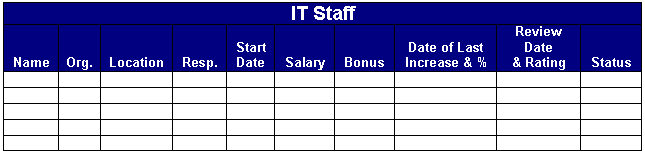
Below is an IT Staff asset tool I use.

Name – Employee name
Org.  –  IT organization (Programming, Help Desk, Infrastructure, etc.)
Location – Office location where employee resides
Resp. – Title or responsibility
Start Date – Start date with the company, , , also anniversary date
Salary – Current salary
Bonus – Current bonus plan (percentage or dollar amount and frequency)
Date of Last Increase & % – Date of last pay increase & raise percentage
Review Date and Rating – Last review date and rating
Status – Current status of employee (Full time, Part time, etc.)

In order to be able to use it for budgeting purposes it has to be current and up to date so let me explain what I used to do as a CIO of a large company with hundreds of IT employees.

Keep it up to date
Put in a change management process to keep your IT staff information current.

As a CIO, all employee paperwork comes across my desk, , , raises, new hire information, , , even termination paperwork.

I approve the request and give the paperwork to my Administrative Assistant. She updates the spreadsheet you see above and it is in her Performance Plan to keep the information current and accurate, , , then she forwards the paperwork to Human Resources or Payroll.

Keeping the tool current and up to date is simply a byproduct of our change management process, , , takes no extra time and saves me a lot of time when in the long run.

When budget time rolls around, I take the IT Staff Roster and transfer the Name and the Salary columns to a budget worksheet, , , two minutes max.

Bonus information is also maintained so I have what I need for the Bonus portion of the budget.

When you have many offices to visit and hundreds of people in your organization, , , it helps to have this tool to remember names of people you don’t see that often, new employees you haven’t met, an employee reaching his 6th year in the company, etc. On your flight to their city, review it and you’ll avoid awkward moments and be viewed as an informed manager.

Download the tool – CLICK HERE

My IT Career Development Plan is one of the first ITBE Project Guides

IT Business Edge launched a new product called IT Project Guides this month. I was fortunate to help develop one of the first project guides for their launch, , , an IT Career Development Plan.

Quick overview
1)  Access the ITBE web site  —  www.itbusinessedge.com

2)  Select the IT Project Guides Menu link at the top

3)  Select the IT Career Development Plan link
, , , or access it directly at this link – CLICK HERE

Each Project Guide is broken into Project Phases and each phase contains 4 or 5 PowerPoint steps with download tools to explain and help you with the subject matter.

In the IT Career Development Plan, there are 4 phases, each with several steps that walk you through developing and implementing a career plan for yourself or in helping your IT employees with career planning.

Here is an overview of what you will find in this Project Guide:

–  Important IT Career Questions
–  Personal Strengths and Weaknesses
–  What Makes You Tick?
–  What Do You Really Want?
–  Your Personal Inventory
–  Beginning Your Career Plan
–  Where Are You Today?
–  Long-term Goals
–  Looking Beyond the Next Step
–  Preparation Is Essential and Ongoing
–  Keys to IT Career Development
–  A Personal IT Career Training Plan
–  Find an IT Career Mentor
–  Learn IT Success from Others
–  Investing in Your IT Career
–  Keys to Establishing Your Credibility
–  IT Recommendations and Business Value
–  Producing Positive Results
–  Communicate Your Track Record
–  More Resources Offered by MDE Enterprises, Inc.
Download Tools
The following download tools are available in this Project Guide:
–  Personal Attributes Inventory
–  IT Career Path Flowchart
–  Personal Training Scorecard
–  IT Initiatives Portfolio
I think you will find the IT Career Development Plan Project Guide and the tools helpful in providing structure and insight to think about your career and in defining what you want to achieve.
Best of success,
Mike Sisco, ITBMC

Ask great questions in an interview

An interview is a two-sided event. Yes, the company interviewing you will have a lot of questions and will “size you up” to determine if you are a good fit for them.

You need to do the same thing. Just because a company is big and has an opening doesn’t mean it’s the right fit for you. You should use as much discretion as the company managers who will interview you.

For this new job to be a winner, it must be a fit for you and the company.

One of the things you want to do is ask good questions, , , probing questions that will give you insight into the environment and what type of company you are going to join assuming you get an offer and accept.

One of the best ways to make a great impression in an interview is to ask great questions. It shows you have a sincere interest and an intellectual curiosity. It tells an interviewing manager you are engaged in the conversation and aren’t just going through the motions.

Here are a few questions I like to use when I interview:

  • Why is the position open?
  • Was the previous manager successful? If not, why?
  • What do you believe are the 3 keys to success in this position?
  • What are the company’s long-term plans?
  • What are the biggest challenges you have?
    • In the company
    • In the position
  • What do you think the primary focus should be in the first 90 days?

Their answers may create more questions. In addition, their questions to you will probably make you think of things you want to ask.

I think one of the important parts of a successful interview is to establish a comfortable rapport with the interviewer. The more the interview feels like a comfortable and open discussion as if you were enjoying a coffee together the better.

A key in doing this is to simply have a comfortable two-way conversation with the person interviewing you. Having questions handy will help you do this.

Another thing is to avoid putting lots of pressure on yourself. Be confident, not cocky, , , and be sincere in your desire to learn more about the company and the position.

A key to reduce the pressure so you will be less nervous is to realize that the worst thing that can happen is that they don’t make you an offer. It’s not a life or death situation if you don’t get the job.

It’s OK to be nervous, , , it means you care. That’s a good thing, , , but displaying too much nervousness can be a negative in an interview.

Remember, you are interviewing the company as much as they are interviewing you, , , and if both parties like what they see there will probably be an offer in the making.

GOOD LUCK in your interviews.

Why I became a believer in IT work behavior tendencies

Have you ever had two employees who didn’t get along?

Do you wonder why some people can’t seem to do certain types of work?

Do you wonder why you struggle in communicating with your clients and employees?

Are you aware technology attracts a certain type of personality and 90% in your organization have three of the four traits in that personality type. That’s right – 90%!!

There are very specific reasons in what makes an IT employee “tick”. It doesn’t matter if you are the CIO, a Programmer, or a Desktop Technician, , , if you are part of an IT organization there is a high probability your work behavior tendencies are similar to all of us.

Every IT manager needs to understand the dynamics of IT employee work behavior!

Our personality traits help us as technicians but hinder us as IT managers!

I didn’t know much about all of this until 1990 when I joined a new company as their CIO. This company used tools to measure the work behavior tendencies of its employees.

At first, I didn’t believe in any of this “hocus pocus”, , , it was a bit far-fetched for me.

Then, three things happened that locked me into the value of this forever.

First, I shared my work behavior profile summary with my wife of 20 years at the time, , , someone who knows me better than I know myself. I asked her to read the profile and tell me who she thought it described of the people we know. Her answer, “It is you, Mike.”

My response was to point out phrases in the summary and told her that I wasn’t like that.

Her response was quick, “Yes you are, , , you just don’t admit it.”

I still had a lot of doubts about all of this.

Second, I went to a class to learn about using the tools as a manager a week later. At the class the Instructor had us take the 10-minute survey again and taught us how to grade it. My results were very different from when I took the survey during my interview. In fact, two of the four measurements were almost opposite of what they were before.

Not only that, the Instructor showed an example of what my results looked like and made the comment, “If you have a manager with these indicators, , , he needs serious help.”

This caused me a lot of concern, , , I’m a manager who needs lots of help?

I pulled the Instructor aside during the break and asked him about what was going on with me. “Why has my profile changed so much and help me understand what you mean by giving this person help?”

His answer, “Aren’t you the new guy at Medaphis?”

My response, “Yes, but what does that have to do with this?”

He posed another question, “Do you have everything figured out about what you and your team need to work on?”

My answer, “No, not at all, , , I’ve been there a week so I’m still trying to learn the names of people and what the issues are, , , I’m several weeks away from this.”

You see, I was a little disappointed I had to attend a 3-day class when I knew I needed to be in heavy assessment mode to get to where he was asking me about.

Then he gave me information that clicked. He said, “This is exactly what your profile says. When you interviewed, you were in another company and had been managing several years there, , , you knew what the issues were and what your team needed to do to be successful. It’s what your interview profile pointed out.” He had already seen my interview profile.

He added, “Today’s profile reflects you being in a new company and you don’t yet know who all the players are, let alone the issues and what you need to work on. What it says to me is that you are telling yourself to slow down until you get more information, , , it says you are communicating much more than you normally would probably because you are meeting so many new people and discovering what the issues are. It also says you are depending more on others right now than you normally would, , , all of this is normal in a new management job and in a new company.”

His last comment was big, “Once you know what the issues are and what you and your team needs to focus on, this profile will snap back to what it was when you took the survey in your interview.”

He was right, , , even the managers who worked for me at the time can tell you when my work behavior “snapped back” to my normal management approach. Once I knew what the IT support issues were and understood my organization’s capabilities, , , we started pushing forward as opposed to treading water while I was in assessment mode.

This opened my eyes and I began to think there might be something to it.

Third, and this was a clincher that happened about a year later. I had two managers who reported to me who could not seem to get along. I had worked with both of them in a previous company and knew they were both strong managers. They should have been doing amazing work together but they were fighting one another.

I couldn’t figure out why these two managers could not get along so I called the Instructor of the training program I attended for his help.

I provided the profiles of each manager and explained the situation. Without hesitation he said, “The reason is very obvious, , , it is right here on their profiles”.

Well, it certainly wasn’t to me but he was right on the mark in what he told me. I sat down with the two managers and explained the dynamics of what was going on and it resolved their differences once and for all. They were amazing managers and worked very well together and were supportive of one another after our discussion.

Startling similarities
I’ve studied and measured IT employee work behavior over ten years and discovered startling similarities in almost everyone who works in IT.

In fact it is so predictable that if you put me in a room of 20 IT managers or 20 programmers, I can confidently tell you what the profile make-up will be of the group, , , even before talking with anyone or determining each person’s work behavior profile.

More validation occurred in my IT Manager Institute
I was able to measure the work behavior tendencies of over 200 IT managers from all parts of the world. Every class had exactly the same make-up with 90% the same in three of the four measurement categories, , , exactly the same results I saw as a CIO for the 8 years I used similar tools.

Initially, I thought it was an anomaly, , , I concluded over time that certain personality types are drawn to work with technology. These employees become IT managers, , , and this is where the challenge presents itself.

What helps us succeed as technicians actually hinders our success as managers. 

The point and benefits
Every IT manager needs to understand IT employee work behavior, , , it is the underlying reason why people do things the way they do, , , and IT employees have very similar traits.

Knowing what makes your people and yourself “tick” is important because it helps you  several ways:

  • understand why things happen
  • resolving employee conflicts
  • assigning responsibilities that aligns with an employee’s work behavior tendencies
  • understand why some things are difficult and others are easy for you

I developed a 4-part series of articles for my ITLever Blog that explains this.

Two ways to learn more about IT employee work behavior
1)  Online training session, , , an excerpt from my IT Manager Institute Self Study.  Learn why the two managers were fighting and what I did to resolve the conflict.

http://itmanagement.articulate-online.com/2015518424


2)  4-part article series

Part 1    IT Employee Work Behavior

https://itlever.com/2011/06/06/it-employee-work-behavior-part-1-of-4/

Part 2    Who we are

https://itlever.com/2011/06/07/it-employee-work-behavior-part-2-of-4/

Part 3    Challenges in who we are

https://itlever.com/2011/06/07/it-employee-work-behavior-part-3-of-4/

Part 4    70% in IT have authoritative management style

https://itlever.com/2011/06/08/it-employee-work-behavior-part-4-of-4/

I hope you watch the 30-minute video and read the articles, , ,  this information will probably be an eye-opener for you just as it was for me.

Understanding work behavior tendencies of your people and yourself gives you an edge in managing better and will help you achieve more success.

Best of success!

WordPress statistics overview

I really like WordPress tools for web sites.

I like the statistics information WordPress keeps track of and shares with you with a click of the mouse. Here is a brief overview and examples of what you can see on a daily basis.
1.  Page views
You get a daily total of page views for the last 30 days, , , you can look at the detail for any day just by clicking on the bar for that day. You can see this gantt chart in weeks and months as well.
2. Summary Tables
Pull up summary tables that shows total page views by month, average per day and recent weeks summaries. This gives you insight as to traffic volumes you are able to generate with  awareness activities you create.

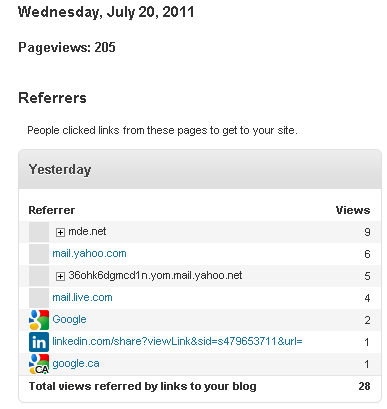
3. Referrers
Tells you who referred your site, , , visitors who selected links from other web sites to get to your Blog
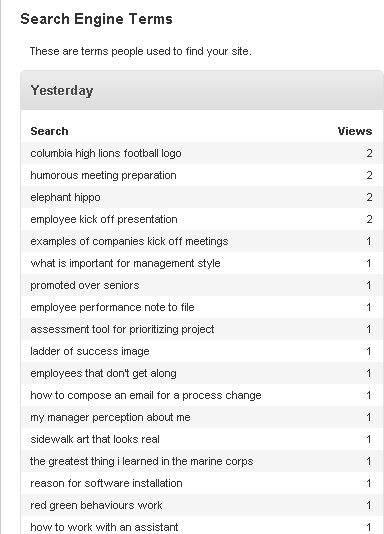
4.  Search engine terms
Shows you search engine terms used by people who came to your Blog from a search engine. This is one of my favorites and very helpful.
5.  Top Posts and Pages
It’s always nice to see what pages and posts people are looking at. This one is very helpful.
5.  Clicks
Another great tool is to know what links people are clicking on when they visit your Blog.
Now, you know as much as I do. WordPress is powerful, , , like it a lot. If you are about to develop new web sites in your company, you might want to take a look at WordPress, , , it has made our work easier and more productive.

Are you building personal capital?

Your career will only be as good as you make it. A question you should ask yourself often is, “Am I building personal capital in my company?”

Go a bit deeper with this question and ask:

  • “Am I succeeding in this job?”
  • “Do others view me as a contributor to our company success?”
  • “Does senior management realize my value?”
  • “Can I quantify the value I bring to the table?”

The personal capital you have in a company includes many things. People in a company have value and you are perceived as having more or less value than the people sitting next to you.


Obviously, you want your “personal capital value” to be perceived as very high, , , and well worth the investment in salary and benefits your company pays to include you as a member of the team.

You gain personal capital in many ways, such as:

  • Personal successes
  • Teamwork
  • Leadership successes
  • Ideas that create value
  • Attitude
  • Helping others succeed

I could list a dozen more things, , , what is important is that essentially everything you do in your company either adds or subtracts from your personal capital total.

Think about it this way. Let’s say you are the holder of 100 shares of stock in 50 companies. When you put them side by side to determine their value, you should think about several things, , , current stock price, , , potential growth opportunity, , , maybe some pay a dividend and others do not, , , etc.

Many things to think about if you had $5,000 and wanted to invest more in a few of your current stock holdings. Which stocks do you invest more in? Probably, the one you think offers the most opportunity for growth and has low risk.

Key point here, , , low risk. We like our investments to be safe investments.

When senior managers evaluate people in their company, they do the same thing to a certain extent.

First, they value you and compare the investment they have in you to other people in the company. Then they decide whether they should invest more in you for the future, , , or is it better to invest in someone else.

The people who get the most investment and career opportunity are the people who display competence and achieve success, , , their personal capital goes up when this happens.

The point
Think about whether you are adding to your personal capital balance or detracting from it in everything you do, , , even in the suggestions or ideas you present.

Do things that help your company succeed and it pays you back over time, , , focus only on yourself and it diminishes your opportunity.

An IT manager must be a teacher

Let me share a personal story that goes far back into the dark  ages of time, , , the mid-1980’s.

I was with a company and we reorganized the company to place more focus on our clients. In this reorganization I was assigned the IT support manager position to support 25 hospital clients using software applications our company developed.

I inherited 25 or so IT employees, , , mostly programmers with a few Business Analysts, Help Desk and Infrastructure people. Most of my new staff had 3-5 years experience in supporting these clients. It was a young group but very smart and high energy, , , one of the best IT organizations I’ve worked with.

They knew the software application inside out, , , knew a lot about client service, , , and were very conscientious about doing a good job for our clients.

Experienced, smart, and conscientious, , , seems like we would have been very successful without the new manager (me) having to do very much.

WRONG!!

What the team was missing was processes and insight about what it actually takes to take care of your client. I would learn the hard way over the first few months that I would need to teach them some of the basics in:

  • Troubleshooting problems
  • Follow-up
  • Communication, , , especially listening
  • “The client is always right”

Let’s take just the first one, , , troubleshooting.
We had a very large client who had apparently always had problems, , , people from this large hospital were difficult to deal with, demanding, and could even be rude.

If you step back for just a moment and think about these things, there is usually a reason why people act this way. In this case, it stemmed from a recurring problem the client had every month end. It was a real problem for them and my staff either discounted the issue or did not fully understand the problem, , , so the same issue came up every month.

After getting hit with this issue myself, I decide to take a small group to the client to observe what was taking place. To resolve a problem, you have to know what the specific issues are, so that’s what we set out to do, , , troubleshoot the problem.

The issues were immediately apparent because we were there and “heard” what the client was saying, , , we experienced it with the client so we understood what was actually taking place.

Here is where it gets important:

  • We quantified the specific issues
  • Got the client’s agreement these were the issues
  • Recommended a solution
  • Gained client agreement again to support our recommendation
  • Implemented the solution

This solved our client’s issues, , , and guess what!

They became less demanding and more pleasant to work with. Interesting how this works.

The point
Even though my team had tremendous knowledge and experience and they were very intelligent people, , , they were not troubleshooting the issues with this client very well. They could not quantify the issues for me when I asked about the problems the first time I received a phone call from our “unhappy client”.

It was a great teaching opportunity that helped the team develop into a more capable organization.

Inspect and be sure your people know how to troubleshoot a client issue.

Personal Development Scorecard

To achieve great things in your career you need to develop your skills, , , skills that help you succeed in your current position as well as any future position you want to reach for.

Use a Personal Development Scorecard to identify skills you need to develop and track the inventory of assets you acquire as you invest in your future.

Download this tool at:
www.mde.net/tools/PersonalDevelopmentScorecard.xls

Part-1 is for Manager Skills


Part-2 is for Non-IT Skills. You need both type of skills to succeed.

Use this tool to develop a training and development track for yourself and while you are at it, why not use it to develop training tracks for each of your employees.

Where does all the time go?

Do you know what you spend the bulk of your time on day to day?

It might surprise you how much of your time is simply wasted.

Time is valuable, , , you have a finite amount of it every day and what you do with your time either adds value for you and your career or it’s wasted, never to be available to you again.

Consider time to be money, , , let’s say every hour of every day is worth $100.00 each. You have two options with every hour you have in a day, , , invest it or waste it.

If you use the time to do something of value that will help you succeed in something, it’s an investment. Spend time on things that do not add value and it’s wasted.

We all start with roughly  16 productive hours a day, , , let’s assume you spend 8 hours a day for sleep and rest. We won’t call this time an investment or a waste, , , we will make sleep time neutral although in reality I think it’s an investment in keeping you healthy. You may not need 8 hours sleep, , , it’s your call.

OK, you have 16 hours or $1,600 of value  to spend. Time to determine what you are spending it on, , , to learn if you are investing or wasting your time. Here is a little exercise for you.

Download the spreadsheet below at www.mde.net/tools/ActivityLog.xls

Let’s take a closer look at the headings I put in the tool.

  • Meeting
  • Phone
  • E-mail
  • Project
  • Planning
  • Travel
  • Commute
  • Personal
  • Rest
  • Other

You can change the column headings to fit your activity as you like.

Put in the time spent on each activity for each hour of the day. I like to use 15-minute increments, , , 15 minutes = .25 hour, 30 minutes = .5 hour, etc.

At the bottom, each activity type is totaled and a grand total should tally to 24 hours. If not, you have missed something.

If you want to be more specific in your activities, add as many columns of activity you want to help you better understand where you spend your time.

Do this for 7 days, , , 14 days is even better. It takes just a few minutes each day to recap where you spend your time.

Be honest with yourself, , , if you took the afternoon off to play golf and spent 5 hours at the golf course, , , mark it personal, , , not meeting time unless you actually did spend much of the time meeting. It is highly unlikely, though.

At the end of the week, do a quick analysis to see where you are spending your time. You might be amazed at how much time is actually lost in a day, , , and especially in a week.

You may want to do this exercise with your staff. It will be an eye-opener for them and should give you lots of insight into the productivity of your team.

Remember, it is your time. Invest your time in productive things and reap the benefits, , , waste it and you miss out on what you could have accomplished.

Best of success.

Should your CIO be technical?

This is a long-standing debate in the IT world, , , should a CIO be technical or not?

I’ll give you my perspective having managed IT organizations at a CIO level for more than 20 years.

The answer you will get from me is “No, , , definitely not.”

Before you get mad and leave, let me explain.

I was technical early in my career and when I got an opportunity to manager I tried to continue doing some of the things that helped me achieve success as a technician. I tried to do much of the technical work.

The problem was that I was doing more of the work than I should have been doing and not requiring the work to be done by my IT staff. I was having a tremendous challenge in transitioning from technical expert to manager.

Let me describe it slightly different, , , difficulty in becoming a business manager.

In reality, I was stealing from my employees but didn’t realize it. I was still trying to be the hero like a technical expert tries to do in an IT organization by showing my boss “what I can do”.

I learned a hard but valuable lesson from this first CEO I worked for as an IT manager. He told me, “Mike it’s no longer important what you can do, , , but what you can get accomplished through your team. You can’t do it all and certainly can’t get enough accomplished yourself.”

This lesson was ingrained in my head and I’ve never forgotten it.

He wasn’t telling me I shouldn’t be technical but he was suggesting I needed to delegate and depend upon my IT staff much more.

It’s great to have a technical perspective, but a manager should spend time learning about management processes, strategic planning, how to communicate effectively, and how to coach and motivate IT employees, etc. These are the things that will make you successful as an IT manager, not being the technical doer.

Your success will be based upon what your team gets accomplished for the company.  The more you can organize and focus your team to do what’s needed by your company the more successful you will be, , , it’s about your organization becoming successful, not you.

As an IT manager or CIO, you now have a full-time job learning about the business issues and needs of each of the departments in your company and then developing IT support strategies and plans to address these needs.

Management is a full-time job, , , and IT management is more than a full-time job. There is much to learn and considerable amount to do, , , every day.

My recommendation is that you must leave your technical skills behind and accelerate your learning in areas of:

  • communication
  • strategy
  • negotiation
  • business understanding
  • budgeting
  • project management
  • employee development and motivation
  • planning skills
  • presentation skills

Most CIO’s come from technology backgrounds just like I did, but I have seen a few very effective CIO’s that had no technical background at all. What they did have was excellent management skills and understanding of what a manager role was all about, , , defining appropriate goals and objectives for your team and then organizing and focusing the team to achieve them.

Best of success in your transition from technical expert to business manager.