Monthly Archives: January 2011

Who do you call ?

Two nights ago our downstairs heater went out. It was not a good time. It has been very cold, in the 20° to low 30° Fahrenheit range all week. Last night got as low as 12° F , , , that’s  -11° Centigrade, , , very cold.

That’s our son, Eddie, , , waving “Hello” to you

What’s the first thing you do when one of your systems goes down, , , like your e-mail server or one of your mission critical business applications? Do you know what to do?

Well, if you are capable, you might try to troubleshoot the problem. That’s what we did, , , the blower wasn’t operating and we smelled something like burnt plastic around the vents. That’s the extent of our troubleshooting ability in this case.

I’m not very knowledgeable about heating furnaces and air conditioning units, , , in fact I would say I have zero knowledge about them other than basic operation of the unit.

So, the next thing you do is call someone for help – right?

That’s exactly what we thought, but we had a problem. It was already 10:00pm Wednesday evening and we weren’t going to get someone out this late. Fortunately we didn’t have an emergency, , , just a problem we needed to resolve in a reasonable time. Our upstairs heater is working fine and our fireplace keeps it warm enough in our main living area so we are good. We just need to keep the water running a little at night so the pipes won’t freeze, , , that would create a much bigger problem.

Our heat situation is just like what an IT manager faces when your e-mail server goes down or some other key component of your operation stops working.

To resolve the heater issue, we know exactly who to call even though we don’t make a call like this very often, , , only once before in the eight years we have lived here.

You have the same situation in finding support for your servers, network components, and other systems when something breaks. You don’t call for support that often but when something breaks and you need help, you really do need to know how to get hold of the support you need.

What used to really irritate me as a young IT manager was when we would have a problem like a down system. No one seemed to know who to call for help, , , so we had to scramble and figure it out in the midst of a crisis. That’s not when you need to identify who to call.

A quick and easy recommendation for you is to make a quick list of all your critical systems and operational components that you might need support for. Then identify the support vendor name, contact name, and phone number.

This will probably only take you ten to fifteen minutes to list the dozen or so mission critical vendors. Add additional support vendors that are less critical as you feel is needed.

You might even want to include a manager’s name and phone number in case you need to escalate an issue. I would even recommend going to lunch with this manager and get to know him or her, , , and allow them to get to know you. If you do need to escalate an issue, it always helps when they know you.

Personally, I like to put this information in a spreadsheet that I’ll always have close by. You may want to print a copy and put it in your manager notebook, , , give a copy to your managers and to your Help Desk, , , anyone who might need it in the future.

When a problem happens, , , and it will, , , you have a quick reference and know exactly who to call.

I promise you, it will take some of the stress out of the situation when you are able to identify and contact your support resources quickly in order to respond to a broken or inoperable system.

Another good lesson learned this week
Be sure to stay on top of your warranties. In our heating situation, we really got lucky. The heating units and motor have to be replaced, but it’s still in its 10-year warranty for two more months. We were actually  lucky the problem occurred when it did.

IT Manager Institute – 2011 class schedule

I have scheduled 4 IT Manager Institute classes for 2011. One of them will be a closed event just for the host company.

  • March 8-11, 2011  –  Columbia, TN
  • March 24-26, 28, 2011  –  London, Ontario Canada  (CLOSED)
  • May 2-5, 2011  –  Dubai, United Arab Emirates
  • September 20-23, 2011  –  Columbia, TN

Early registration discount if you register by February 15, 2011

Additional information and registration details at www.mde.net/institute

Can’t attend one of these classes? You should consider our Self Study – same material in an online “learn at your own pace” format. Comes with all the BONUS items and ability to take the ITBMC exam as the classroom version offers. Details at www.mde.net/selfstudy

Snow day

We have a major snow here today and when that happens in these parts, lots of things come to a standstill.

Here are a couple of photos from my house.

You probably can’t see it in the top photo, but there is a car stuck on the road because it can’t get up the hill. The county Department of Transportation has been working for 30 minutes trying to get them going but they aren’t making much progress from the looks of things. For us, we will stay in today.

Last night the storm hit Atlanta and having lived there for 20 years I know what kind of headache snow and ice can create for your IT department. Hearing about it brought back some “not so fond” memories.

It’s not a big deal if everyone can get to work but when people can’t get out of their hilly neighborhoods because of snow and ice, , , you better have a special support strategy for “snow day”.

The problem in Atlanta and here in middle Tennessee is that we don’t have snow tires, studded tires, snow chains, , , the types of things you need to get around when the roads are covered with ice and snow.

The Department of Transportation does a good job of clearing the main roads, but it’s the neighborhood streets that cause the problems.

It’s nice when it is just snow, but most of our conditions begin with rain, turn to ice, and then snow. What this creates is a nice layer of ice on bottom that makes driving conditions extremely difficult.

We always hear what you “Northerners” say when you hear about Atlanta coming to a standstill, , , “Those Southern people just can’t drive in the snow.” Well, all I can say to that is, “You need to come and give it a try with no snow tires and lots of ice in hilly neighborhoods.” I believe you will understand the issue quickly.

Back to my point. In Atlanta, I always had a “snow day” escalation procedure to notify all our remote business units of the impending difficulties we were expecting in the Atlanta office when we knew snow was coming, , , after all, it’s still warm and sunny in Miami. The communication explained we would be working with minimal on-site resources when the storm hits us, , , and maybe for a few days until it melts off the neighborhood streets.

Today, it is easier to work from home, , , a good thing; but there are some jobs that must be done on-site and in the office. For this reason, you need to develop a “minimal support plan” that spells out what you can do and how your team will respond to issues during the bad weather timeframe.

Your clients will understand and appreciate it, , , well, all but that one irritable client from Michigan who thinks Southerners can’t drive in the snow.

Before I leave this, let me explain why Atlanta gets so paranoid when a snow storm is headed their way. In 1982, there was a big ice and snow storm that hit the entire Southeastern United States. It literally caused people in Atlanta to be stranded in hotels, in their offices, or in local homes or shopping malls where they sought refuge for 3 days because it was impossible to get home by car. Truly impossible.

Hotels ran out of food, , , company vending machines were emptied, , , people slept on office desks and in chairs, , , even in hotel lobbies.

It was bad.

I was lucky because I didn’t live in Atlanta at that time, but a business colleague and I were trying to make a flight connection from Philadelphia to our home in Jackson, Mississippi. All the Atlanta airport hotels were booked solid so it looked like we were stuck in the airport.

Fortunately, we learned one flight to New Orleans was going to get out. We decided to take it because we knew it wouldn’t be snowing there, , , and worst case, we could take the train to Jackson and get back home if we couldn’t fly into the airport. Jackson airport was also closed due to the heavy snow.

All ended well for us even though it took us two more days to get home. New Orleans is a fun place to spend a weekend and much better than being stranded in any airport I’ve ever been in.

The point to my message, , ,  identify where your weak areas are and develop a support plan to address them ahead of time, , , your clients need you to, and your employees will appreciate your leadership.

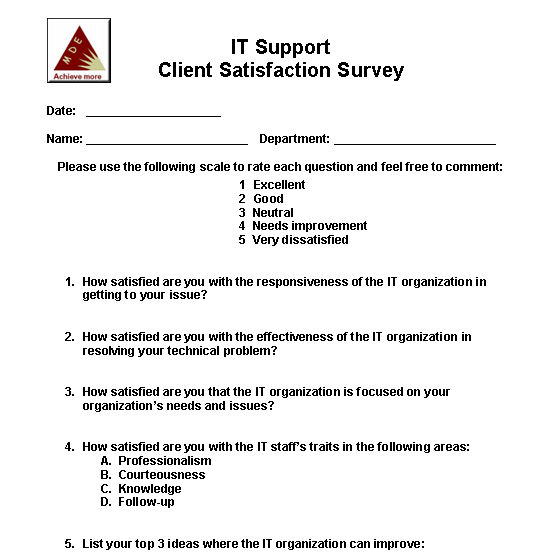
Don’t send client surveys

Management style is important

How are you coaching your team?

  • Yelling at them?
  • Encouraging them?
  • Empowering them?

The manner in which you approach your employees is important. There are some managers who are so controlling that they seemingly push and beat their employees into submission.

The best managers I’ve worked for did a great job of defining our responsibility and positioned us to own that responsibility, , , they empowered their employees.

What I’ve seen is that the managers who try to bully their employees aren’t very effective. Often, that type of approach comes from the fact that the manager is a controlling individual and wants things done their way. If you look at it closely, most of us in IT are high detail and one of the traits of a high detail person is to want people to do things their way.

When you become a manager, it is important to let go of some of this control and let the employee shine, , , empowering someone positions them to “shine” when they succeed, , , it still requires the person to get things done.

Take a hard look at your management style and ask yourself, “Am I empowering my employees or am I micro managing them?”

Empowered employees achieve a lot more and are much more fun to work with.

Understanding the numbers

It’s very important for you to understand the numbers of your IT business. There are certain things you should know if you are going to support your company effectively.

Let me give you an example. In conducting an IT assessment for a small company many years ago, I asked the IT resource responsible for their Help Desk, “How many client support calls do you get a month?”

The reason I asked this question was because I had learned from the IT clients (Senior managers and Department managers) that IT was poor in following-up and in communicating the status of their support requests, , , sort of like, “things just fall into a black hole”.

It’s a simple question and doesn’t even get into the detail of:

  • What is the mix of type of calls you receive?
  • Where do the majority of calls come from?
  • What is your response rate?
  • Who on your IT staff is getting most of the work done?

A good Help Desk process captures this type of data and tells you what’s going on.

The technical resource answered, “I don’t know.”

What did this tell me about how Help Desk support was being conducted?

You got it, , , this IT organization wasn’t supporting the client very well, , , and the rest of the IT assessment verified it. If you don’t know what kind of support calls you are receiving, how many, where they are coming from, how quickly you are responding, and who is doing the work, , , then you don’t know very much about your support business.

And if you don’t know much about your support business, , , it is very hard, if not impossible, to support your client very well.

It is imperative you understand what’s going on so you can determine what to do and where to focus to become a more effective IT support organization.

There are many other numbers you need to know. Here is a short sampling:

  • How much is IT spending?
  • How much is IT spending as a percentage of company revenue?
  • Where are your major expense areas and how significant are they?
  • What are the spending trends of your major expense areas?
  • How big is your business application software request backlog?
  • How much programming output are you getting per programmer each month?
  • What is the quality level of your programming support team?
  • How many users per desktop support technician in your company?
  • How long does it usually take to resolve a support issue?
  • How happy are your clients?
  • What are the trends of client satisfaction surveys year over year?
  • How effective are you in delivering projects successfully?
    • On time
    • Within budget
    • Meeting client needs
    • Achieving expected benefits

Collecting and tracking the numbers of these types of things helps you understand the “Business of IT”.

Your approach in what you track doesn’t have to be complex or even sophisticated. Basic information can tell you a lot and even give you a good story to share with your client.

Let me give you another example.

Let’s say you just start tracking the number of Help desk calls you receive in a month, , , just the total number of calls that come in. After 30 days, you learn that it is roughly 400 calls in a month and half, or roughly 200 calls a month are printer related, , , some kind of printer or printing type of issue.

You analyze the information captured in these printer support calls and determine you have similar trends that are causing a lot of the printer support issues.

You and your team devise a preventive action strategy to prevent these specific types of issues from occurring, , , and sure enough, after a few months, your printer calls go from 200 per month to less than 100 calls per month. That’s a 50% reduction in the number of printer problems your clients report, , , a POWERFUL and POSITIVE story.

Here is why:

  • You realize there is a problem
  • You track and measure what’s going on
  • You take action with preventive strategies
  • The positive results show up in the numbers

A chart like this is as simple as you can get but as simple as it is,  it tells management you are operating more like a business than just working on technology. It says you recognize what the issues are and you take action to do something about it, , , preventing client problems is actually a BIG DEAL.

It’s a positive story for many reasons:

  • Your client’s productivity improves
  • Your IT staff support productivity improves
  • Hassle factor for the client goes down, , ,  and they like it

Knowing your numbers and understanding the dynamics of your support business is key. Make it a focus to better understand all parts of what’s going on in your business and you will see an improvement in how others perceive your organization.

ITLever contest wraps up

The weekly contest we ran to celebrate our company’s 10th Anniversary last year ended on December 31st. We gave away 20 sets of the IT Manager ToolKit in the last 20 weeks of last year plus an Apple iPad winner was randomly drawn from our ITLever Subscriber list on December 4th.

Andrew Carter of Toronto, Canada won the iPad, , , he seemed very pleased about it when we traded email messages, , , and it arrived to him just in time for Christmas Holidays.

The ToolKit winners included subscribers from all parts of the world, , , pretty neat:

  1. Aug. 15-21, 2010 Ladd Vagen (Flagstaff, AZ)
  2. Aug. 22-28, 2010 Sham Raju (Bangalore, India)
  3. Aug. 29-Sep.4, 2010 – Jorge Murillo (Heredia, Costa Rica)
  4. Sep. 5-11, 2010 – Jim Biggins (Torrance, CA)
  5. Sep. 12-18, 2010 –  Phil Sargeant (Alexandria, VA)
  6. Sep. 19-25, 2010 –  Steven Schauer  (East Moline, IL)
  7. Sep. 26-Oct.2, 2010 –  Michael Martin (Grapevine, TX)
  8. Oct. 3-9, 2010  – Edwin Lee (Luzerne, Singapore)
  9. Oct. 10-16, 2010 – Dave Stringer (Sydney, Australia)
  10. Oct. 17-23, 2010  – Rogana Ranu (Port Moresby, New Guinea)
  11. Oct. 24-30, 2010 – Glen Sabatier (Edmonton, Alberta, Canada)
  12. Oct. 31-Nov. 6, 2010 – Steve Huff (Topeka, KS)
  13. Nov. 7-13, 2010 –  Brian Grafsgaard (Minnetonka, MN)
  14. Nov. 14-20, 2010 –  Susan Engelbosch (Durham, NC)
  15. Nov. 21-27, 2010 –  Steven Reid (Fortitude Valley, Australia)
  16. Nov. 28-Dec. 4, 2010  – Duncan D’abreton (Pretoria, South Africa)
  17. Dec. 4 – GRAND PRIZE (Apple iPad)  – Andrew Carter (Toronto, Canada)
  18. Dec. 5-11, 2010  – Brandon Bango (Warren, PA)
  19. Dec. 12-18, 2010  – Brad Smith (Madison, AL)
  20. Dec. 19-25, 2010  – Wayne Mclachlan (Sydney, Australia)
  21. Dec. 26-31, 2010  – Christian Janssen (Korschenbroik, Germany)

My thanks to all who have subscribed to ITLever and the many positive comments we have received since starting the ITLever Blog last May. We are looking forward to doing much more in 2011.

Motivate Staff With an Annual IT Kickoff Meeting

It’s the beginning of a new year and you want to “make it happen”. A new year to a certain extent can create a sense of a “new beginning”. Shed the problems of the past and look forward to the successes of the future. As a manager, you should take advantage of this sense of “new year” in a way that will motivate your staff to accomplish more.

Hold an Annual Kickoff Meeting for your staff.

An important lesson I learned at IBM many years ago was how much people appreciate knowing what’s going on in their company and how much they appreciate being “part of the team”.

Not just the IT team but the “company team”.

Monthly staff meetings were looked forward to and they built teamwork. Maybe I was in a special office, maybe it was just me, possibly it was my imagination, , , but I don’t really think so.

Want to know why?

It’s simple, I replicated this process for over 20 years in my IT management and CIO career and saw the same results with many different IT organizations. The bottom line is that your technical staff really does appreciate you taking time to discuss what’s going on, recognize accomplishments, develop a few skills or educate them on a topic of importance.

AT IBM, I was the “skit man”. For those who don’t know, a “skit” is a short play acted out to illustrate a certain theme or point, , , in my case, it usually included as much humor as possible. Whenever we needed to do something that allowed us to laugh a little, you better believe I was usually a part of the “skit”.

I’m a very serious person and committed to my work, but I can laugh at myself (and others) with the best of them. Not only is it fun, it builds camaraderie.

At IBM, I dressed up and acted parts that included a Wang salesman (remember the company Wang?), a Howdy Doody puppet, a gorilla, a Marine Drill Sargeant, , , even a 2-foot tall IBM “small person”.

One of the major events of the year was always the January Kickoff meeting. I have kicked off virtually every year of my management responsibility with a staff “kickoff” meeting. Depending upon the size of the group, this can become quite a production and require a good bit of work, even cost you some money, , , but it certainly doesn’t have to cost a lot of money.

The benefits are significant. Here is why I start the year off with an IT Kickoff Meeting.

  • Rally the troops
  • Motivate employees
  • Build teamwork
  • Share the past year’s accomplishments
  • Present the new year’s objectives
  • Identify where we need to improve
  • Educate
  • Have some fun with my employees

At a Kickoff, it’s time for a little “rah-rah”, , , maybe a lot of “rah rah”. Get excited, pump yourself and your team up, and be positive and upbeat.

Part of a manager’s responsibility is to lead the team and to motivate the people in it. It’s hard to motivate if you aren’t a positive force yourself. I’m not suggesting you be fake about it, but at the beginning of a new year it’s actually quite easy to be optimistic about the future if you allow yourself to.

What ends up motivating employees is the additional insight into the business from their manager and your ability to be “charged up” in your delivery and optimism about the year ahead. Having specific objectives and details of what was good (and bad) in the past year is also very beneficial.

Technology employees in general are very conscientious and want to do a good job. They are looking for leaders who will bring them together and point out the direction we need to take as a team.

Here is a sample agenda I use for my IT Kickoff Meetings:

  • Welcome
  • Past year performance
    • Company
    • Key Organizations
    • IT Organization
  • Key accomplishments of the IT Organization
  • New Year Objectives
    • Company
    • Key Organizations
    • IT Organization
  • Guest Speaker (Executive Officer, Motivational Speaker, or someone who helps motivate)
  • Skit (some lighthearted fun)
  • Keys to a successful year
  • Recognition
  • Q&A time
  • Wrap-up

It’s important to start and end the meeting in a positive manner. I like to start my meetings with some upbeat music tied in with a slide show of photos showing all my employees at work and play during the past year.

People love to see themselves on the “big screen”.

Even if you don’t have any photos, you can get this part done in a single day or two with a digital camera. Take a walk around the company and start snapping pictures. You will be amazed at how much your employees will like this. When you are taking photos, coach your employees to be a bit creative in their poses, , , otherwise you may end up with a lot of solemn and boring photos. Including some of your clients in work related photos is also a very good thing.

I normally use PowerPoint’s slide show feature to do present the photos at the beginning of the Kickoff Meeting and pick a few really upbeat songs to go with the photos, , , something like the theme to Rocky works very well.

For the meeting, prepare PowerPoint presentations that are professional, organized, and share knowledge about the business. Mix it up with different topics and multiple speakers.

Give everyone a t-shirt or something unique to remember the Kickoff Meeting by. Use your imagination here. Again, you don’t have to spend a lot of money.

I suggest you provide morning and afternoon breaks and a nice lunch. This is usually where the expense will be.

Invite a speaker who can have a positive impact on your IT staff. This might be the CEO, a senior manager of the company, your CIO, or even an outside client who can do a credible job of speaking to your group. Senior executives are good, especially when they can articulate the importance IT has in the company meeting its objectives last year and in the future.

Consider conducting the meeting offsite. Getting everyone “away from the office” for a day is healthy. Just remember that even though you are having an offsite meeting, you must still support the technology of your company so communicate your whereabouts and create the ability for appropriate support people to be reached as necessary.

Positive things happen when your staff sees you going out of your way to make them aware of what’s going on in the company. When they see that you care about them, about whether or not they are successful or not, and that you are taking steps to help them succeed, watch out. People will walk through fire for you when you need it the most, but only if you have earned their respect.

A Kickoff alone won’t earn their respect. That’s pretty obvious, , , but doing things like this on a regular basis that keeps them informed, identifies where they are succeeding and where they need to improve is truly powerful. Have some fun with your Kickoff meeting and carry it through to monthly staff meetings. It has a positive impact on employee morale and is a great tool to focus on areas that need improving and to coach the team for higher performance.

Most managers don’t conduct these meetings. It’s either because they don’t know how, don’t realize the value of them, or are too lazy to make it happen, , , or maybe they think it takes people away from work. Remember, you have to create a support process that will support the business even though you are in an all day meeting. The client is working and IT must still be able to support your client.

What I can tell you is that you are missing a big opportunity to spend quality time with your employees if you don’t hold an annual Kickoff Meeting with something that “gets their attention” and shows you appreciate their efforts. It is great motivation material and excellent coaching time to improve the capabilities of your team.

Register to attend my webinar and learn more.Webinar1_Kickoff
Motivate Staff With an Annual IT Kickoff
will give you step by step instruction and insight into delivering a successful Kickoff Meeting that will be fun and memorable.

What did you learn in 2010?

Was 2010 a good year, a GREAT year, or one you don’t want to remember?

No matter what unfolded for you during the year, you ought to take a moment to look back and evaluate what you learned during the year. I can guarantee you that when you look through your calendar and think about the events that occurred to you (both personally and professionally), you will find some valuable lessons that make you better and stronger in the years ahead.

“Are you kidding me???”, you might ask.

Not at all. We all have things that occur in our lives that may not appear at first glance to make much of a difference, , , but if you look a bit closer you might find they have significant impact on many things, such as:

  • your outlook and perspective of things
  • how you approach similar situations in the future
  • how others perceive you
  • cause and effect of things that happen
  • a new interest or curiosity

Challenges build character. Successes create positive feelings. Failures can be valuable lessons learned and not to be repeated.

It’s possible to learn from most anything you do or that happens to you in your life. Whether we learn from these events is up to each of us individually. For me, I value the lessons I learn as I go through my daily life and professional career, , , I believe these events and what you can learn from them are what makes you who you are.

Personally, I want to become the best person I can be, , , and believe me, I have a long way to go.

Here are some things I learned in 2010:

  1. Don’t use a VISA processing company – A very bad experience taught me that these companies charge you a good fee to do what you can do very easily yourself. From now on, I’ll take care of getting my VISA myself.
  2. Holding an open class in a new venue is a challenge – We tried to hold a class in Hawaii and Australia and failed. New places are difficult unless you have a local host and facilitator.
  3. The best class model is to deliver to a large company – The Tanzania IT Manager Institute class we just held in Dar es Salaam had 14 students (12 from the Tanzania Revenue Authority). This model is always the best model in many ways (easier to coordinate and fill, no classroom expenses or challenges, easier communication, and more profitable).
  4. Listen to your advisors – A couple of my close advisors recommended I begin a BLOG way back in 2006. I didn’t do it because I felt I was too busy, , , discovering WordPress early this year and starting the ITLever Blog proves that this idea was all wrong. I wish I had started it in 2006, , , never too late, I guess.
  5. Practice does make a difference – I committed to hitting more golf balls last year and it made a difference. Go figure.
  6. Education and knowledge is key – An investment in our Internet marketing knowledge is beginning to pay off. Even though marketing and sales is not something I get excited about, it’s a key piece for any business to succeed so we are investing more in this area going forward.

I could share more but I won’t bore you. What did you learn from your travels and experiences of 2010? Feel free to share them with a comment.

Top 10 Posts of 2010

We started the ITLever Blog last May and in a short time we have posted over 200 IT manager tips, tools, , , and some Just for Fun items.

Here are what I consider to be some of my best ITLever posts in 2010. Hope you enjoyed the tips and tools as much as I have enjoyed posting them.

1.  Business value is key

2.  Do you know what your team is getting accomplished?

3.  Address poor performers proactively

4.  10 ways to eliminate paper and incur BIG cost savings

5.  A question I get quite often

6.  Photos from my South Africa safari

7.  Ten ways to improve client service

8.  Bottlenecks will “thwart” your progress

9.  Why some managers get promoted over others

10.  What vs. Why

Share this post with your colleagues, , , there is something in this list for everyone who cares about managing technology resources well.