Category Archives: IT Manager Tips

Helpful articles and tips

Don’t you just love these support calls?

I want you to put yourself into your client’s shoes for a minute as I tell you about a support call I made yesterday.

Our DSL service has been having intermittent problems of late. In every case, I was able to unplug and replug the modem and wireless router to “reboot”.

Worked fine, , , no worries.

This week the number of “lost internet” issues increased so when the problem occurred twice yesterday and I had more difficulty in re-establishing connectivity, I decided to give my DSL provider a call.

I’m the client in this situation.

I was fairly certain the problem was with either the DSL line or the modem. Everything looks good on my end, , , I’m just not getting out to the Internet plus the Internet light on the modem is either red or doesn’t light up at all and it should be green.

The Support Rep is courteous enough but not very receptive to input I try to provide so he can focus on the line or the modem.

We establish pretty quickly that the line is OK, but then he starts having me disconnect the wireless router and do all kinds of things assuming the problem is on my server and cable end.

After an hour, we are no closer to a problem resolution and my system has been totally disconnected from what we need, , , then he says that to replace the modem will be a $75.00 charge plus an activation charge of $125.00.

Are you kidding me?

Their modem is faulty, I pay a monthly service fee that includes the equipment, , , and, “I have to pay to fix your problem?”

About this time, I’m getting a bit frustrated so I ask to speak to a manager. After another 10 minutes he comes back to say they are all busy and not available but he can arrange a callback. Yeah, , , right.

I have a serious problem. My business depends upon Internet connectivity. This has to be resolved and resolved quickly.

The Support Rep starts giving me all kinds of explanations and possibilities but he isn’t taking us to a resolution. We need this problem resolved, , , and it lies with the modem I’m pretty sure.

After considerable more time of working with this chap, we determine that the problem appears to be with a firmware problem within the modem. We reset the modem and reconfigure it and wallah! All works well again.

Today the problem occurred again but this time I was able to replace the modem and so far, , , all is working just like it should work, , , and normally does.

I think we could have saved a lot of time and frustration if he had focused on the modem as a possible source of the problem in the beginning rather than stepping me through all the hassle of disconnecting and reconnecting cables and suggesting I probably had a systems problem.

My point, , , it is easy to point to your customer as the problem. In some cases, they actually are but in my experience it is more often something on our technology side that’s causing the issue.

Excellent graphics software

In my small business we constantly need to develop images to promote our products and to make our web sites, brochures, etc. more appealing.

Three software products I use are powerful yet very inexpensive.

Developing 3D books, boxes, etc.
I use two software products primarily and they work great.

3D eBook Cover (Click here for info)
$ 59.00 (discounted often by 50%)
Powerful with many options including developing PNG files with transparent backgrounds, , , a must have for this type of work. Has a bit of learning curve like most products but pretty intuitive by playing with it some. Creates some truly great images like the ones below.

Quick 3D Cover (Click here for info)
$ 57.37
I’ve had this one for a long time and it is a tried and trusted tool in my marketing arsenal. Doesn’t have as much creative flexibility as 3D eBook Cover, but when you need to create a 3D book cover quickly, this is the one I tend to go to.

3D text

XARA3D (Click here for info)
$39.99
XARA 3D is the way to go even though you can do a lot with PowerPoint these days. Xara3D gives you all types of 3D effects plus it animation of your text using standard templates you can customize if this is something you like. I’ve been using Xara3D for 5 years and it has been a great addition.

I also use Xara Web designer on occasion, , , also a handy tool.

Webinar services option for my business

I’ve been researching webinar services options for my business and have been experimenting with a few of them over the past few months.

If you have webinar experience I would be interested in reading your comment and recommendations as we finalize our selection.

We have narrowed our selection to the following options:

  1. Webex
  2. GoToWebinar
  3. iLinc
  4. ClickWebinar
  5. VIA3

From a usage standpoint, I’m most familiar with Webex having just delivered a 5-day IT Manager Institute for a group of IT managers from Croatia and Slovenia and several 1-hour training sessions leading up to the Institute, , , see Class #47 at https://itlever.com/it-manager-institute-photos/

Webex worked well and was easy to use, but I still have a bit of learning curve. I’m also a bit familiar with GoToWebinar and a couple of other services I have sampled.

The Institute webinar went well overall, but 5-hour sessions over 5 days is a challenge for students although it was much easier for me. I didn’t have to stand up all day, no airports or hotels to deal with, , , simply show up in front of my PC at 8:00am to deliver the class (3:00pm their time).

A couple of students stated the webinar approach worked exceptionally well for them, but one student said it was not that effective for him, partly because he may have had a poor connection, , , so reactions to long classes are a bit mixed at this point. I’ll plan to do another Institute by webinar soon to see if we can get a clearer picture.

I plan to deliver a whole series of 1 and 2-hour training sessions in 2012 so finding a webinar service that works well for me is important which is why I’m spending extra time to scope out the alternatives.

Here is a short list of key features we are looking for in a webinar service:

  • Low cost
  • Scheduling and reminder capability
  • Audio via Internet
  • Video (webcam)
  • Ability for administrator to control the audio and video
  • Preferably no user download requirement (but not an absolute requirement)
  • Easy to navigate
  • Desktop sharing
  • Annotation
  • Messaging, Raise Hand, etc.
  • Recording and playback
  • Ability to collaborate with several people in a meeting

If you have experience in any of the vendor products mentioned above and want to provide insight, we will appreciate your comments.

Stay tuned for my decision.

Do you have a game plan?

You call yourself an IT manager or IT executive, , , so what do you tell people when they ask you, “What is your strategy?”

Strategy comes in many different forms. It would be helpful to understand the context of the question when someone asks you this question. If no one is asking it, , , you should be asking yourself the question, , , and hopefully you have specific answers.

Let’s talk about three key strategies:

  1. Short term strategy – No matter what your situation, there are things that need to be addressed sooner than later. Your team is focused on projects and things “right now”, , , you should always be able to articulate what you are focused on and plan to accomplish in the next 60-90 days.
  2. Long term strategy – What are the ultimate goals and objectives of your team? Senior management and department managers need to know where you are headed long term, , , so do your IT employees. You need to be able to justify what you are doing and articulate every major initiative in business value terms for why you need to spend money and time on such work.
  3. Personal career strategy – What do you want in life and career? I can assure you that if you do not spend some time to think about this and put a plan into place, you won’t get very far in life. Analyze what you want, decide you want to achieve it for yourself, and develop a strategy that will take you there.

Successful people are like successful coaches, , , they approach their business with a game plan. It is developed based upon the goals they want to achieve and the obstacles and circumstances that surround them. They don’t take “No” for an answer, , , obstacles become challenges to overcome and the game plan helps them do just that.

Do you have a game plan? If not, there is no better day than today to start developing one.

Technology to the rescue, , , it really was brain surgery

A good friend of mine was recently diagnosed to have an aneurysm on his brain and the doctors recommended he have it addressed as soon as possible.

Last Wednesday my friend Ken  had brain surgery to repair the problem. He is still recovering and improves every day, , , he is a lucky man.

What amazes me is how technology is playing a part in his situation. Certainly, our medical profession has evolved significantly, , , what has become common surgery with the brain was extremely high risk just 20 years ago.

Even so, there is still more unknown than what we know about the brain , , , it can still be risky and have uncertain outcomes any time you operate in this area. I know a little about these issues because our son suffered a traumatic brain injury in 1993. It’s amazing what he remembers and what he can’t remember, , , and other things that affect his day to day life.

Technology played an important part in Ken’s surgery and also in his recovery he is going through now.

Technology can help in other ways. For example, Ken’s insurance won’t pay for all of his hospital bill and he can’t work for 6 to 8 weeks. As a self employed person, this will hit him pretty hard, , , so two of us decided to try to do something. Technology is helping us in this effort.

Ken has lots of friends because he is a “giver”. Everyone who knows him realizes this. An example is that when he lived in India for a couple of years, he adopted 6 children and paid a monthly fee for many years to help feed, clothe, and provide shelter and education for them. He still supports one of them through college, , , at times when it is financially difficult for him and his wife to do.

Here is what we did in just a couple of days:

  1. Created a web site to tell Ken’s story and provide updates about his recovery, , , see www.kenstaten.org. I used WordPress.
  2. Added capability for friends and family to make a donation by credit card or PayPal. This is so much easier to do than just ten years ago when I first created my web sites.
  3. We collected contact information from Ken, Craig and my network of people we felt would want to know of Ken’s condition. I consolidated and scrubbed our lists using EXCEL.
  4. We sent out email messages to our contacts. This part was the most tedious but also important. Rather than sending out a bulk email message quickly, I decided to send personal messages to each person. I developed a standard message including asking the recipient to pass along the word, , , then sent the email messages, , , one by one. It took a while but had a more positive effect I think and was not spamming.

We probably sent out 200-250 email messages yesterday and today.

The results have been fantastic. In just a couple of days we have raised several thousand dollars to assist Ken and help him deal with this temporary challenge. His friends and family have come through in a big way as we thought they would for him, , , again, because he is such a “giver”.

The donations are great but what is more important are the prayers and the support expressed by Ken’s network. This support is a huge morale booster and will go a long way in helping Ken focus on his recovery.

Technology is helping.

In business, you always need a backup plan

We are at our Camp Liberty again this weekend, but it is business as usual for me and my company. We have orders, questions, and other communications that take place every day no matter where we happen to be so I must have Internet connectivity and email, , , it is a vital service for our company.

A problem is discovered on Friday

For some reason, I can’t send Outlook email messages from my pop3 server, , , I can receive fine and have good internet connectivity but we can’t send messages. I know the problem probably has to do with the DNS setting with our outgoing email account server but I haven’t been able to resolve the issue.

It worked great last weekend but not this time, , , not a good time.

We were entering the weekend and I had a special product offer going on so I knew it was going to be an active few days ahead, , , I knew we had to have incoming and outgoing email capability.

Here were my possible options:

  1. Resolve the problem – this wasn’t happening and my IPS support group is closed for the weekend.
  2. Go without outgoing email capability – also not an option because I knew we would be busy this weekend with lots of orders.
  3. Go home – it’s only 45 minutes away and we can always spend another weekend at the camp.
  4. Find a backup solution for outgoing email

My solution, , , option #4 – find a backup outgoing email solution.

I set up a Gmail email account and will use it for outgoing email whenever I encounter this problem. There is more than one way to skin a cat as they say. I implemented this solution and dozens of email messages were sent out over the weekend. It was business as usual.

Success!

Career planning webinar held for Slovenia and Croatia managers

I held a 1-hour webinar class on career planning for a group of IT managers in Slovenia and Croatia last week. Career planning is one of my favorite topics primarily because I enjoy working with people so much and helping them advance their career.

Your IT employees want and need career planning help. You may need it as well.

One of the most enjoyable things about IT management (in my opinion) is when you work with someone and see their career develop. It is great to see your employees grow and to be able to achieve more in their life, especially when you have a small part in helping them.

I have delivered several webinar presentations now and trying to get a feel for using this format to deliver IT manager training much more in the future.

On my side, I’m trying to get more comfortable and not feel as though I’m rushing the presentation. It’s a matter of gaining a bit more experience in a virtual classroom setting as opposed to a real class with people I can see and interact with.

We have another virtual webinar class planned for this Thursday so I’m excited about meeting with more managers from Europe.

I plan to offer a significant amount of webinar training in 2012 so anyone in the world can attend some of my IT manager training programs. It will also allow me to deliver more IT manager training than ever before. I’m very excited about it.

Let me know if this is of interest by answering the poll below:

If it isn’t broken, , , don’t fix it

Don’t you love those “little IT jobs” that are supposed to take 15-20 minutes and then after 3 or 4 hours you still haven’t achieved your objective?

The answer is “NO!”

Yesterday afternoon after returning from our Camp Liberty I decided to install a new wireless router for my office. My plan was to install this new Linksys router for faster Internet access and then give my old router to an Aunt when I set her up a wireless network in her home later in the week.

My old router works fine, , , and Internet access is smooth and always works plus my wireless printer works well from all devices, , , a desktop, two laptops, an iPad and an HP TouchPad, , , nothing is wrong with the network I had in place, just thought the faster Internet access might be good.

I should have known better.

Installed the router easily and got Internet access immediately. So far so good, , , feeling pretty good about this project, but there is always something, , , right?

Internet access works fine from all devices.

However, I could not print using the wireless printer. The printer finds the router but there is a problem somewhere between the router and printer. Switch the old router back in and printing fine.

However, now I can’t print from my iPad or TouchPad, , , can’t seem to find the printer. Initially, I could not print from anything but finally resolved the print issue from the laptops.

It’s not a big deal that we can’t print from the iPad or TouchPad, but it’s a nuisance that I can’t get out of my head so I’ll probably spend more time troubleshooting, , , something I don’t need to be spending time on .

20 minutes went into over 3 hours last night trying different things, Googling key word phrases to seek out the answer, , , even tying in a usb cable from the router to the printer. Could not get back to where everything works like it did.

The lesson for an IT manager is that good intentions do not always lead to positive results immediately, , , so think through those key improvements you think is needed for your company.

Granted, I’m not the most technical person, , , I’m capable of focusing and managing technology resources but not very good in actually doing the technical work any longer.

Plus, I’m sure the fix to my wireless printing problem is going to be pretty simple when I finally solve the problem, , , the frustration is that I just don’t need this kind of headache right now, , , your clients and users feel the same way when something goes wrong in their business operation.

So back to my point:

If it isn’t broken, , , don’t fix it!

And one last point, , , I didn’t really feel like I needed faster Internet access, , , what I had worked fine and with the new Lenovo laptop it is already faster. I just thought, , , “it would be nice to have”.

My simple system migration steps

In a recent post I wrote about how I decided to replace my office desktop with a laptop. If you recall, I put this project off as long as I could because I dreaded the conversion effort.

The great news is that the conversion was not as much of a pain as I thought it would be, , , so thought I would share what I did. The other good news is that I really like my new office setup.

What I did not tell you is that I completely renovated my home office where I hang out and do much of my work. When I say “renovate”, this means I took my complete office apart and put it all back together again in order to replace carpet with hardwood floors.

I was dreading this project so much, , , but once started I essentially rebuilt my office, , , did some rearranging to give me more desk space. Maybe I will share this part in a later post. If you spend as much time in front of your PC as I do it is important to make your environment functional and comfortable.

Back to my office computer system upgrade project, , ,

There were several things I wanted to accomplish in setting up my new office computing environment. I’ve managed to do most of it in a reasonably short amount of time and relatively easy process.

My goals were to create a highly functional computing environment:

  • Simpler to manage
  • More portable
  • Able to create a “battleship console” environment with several monitors
  • Access all my personal data files from my old desktop
  • Access saved email messages from my old desktop
  • Use my wireless printer and other peripherals (scanner, etc.)
  • Upgrade to current OS and Microsoft Office applications
  • Transport several key software applications I use every day
  • More power, , , more speed, , , stability and reliability

Here are the steps I went through:

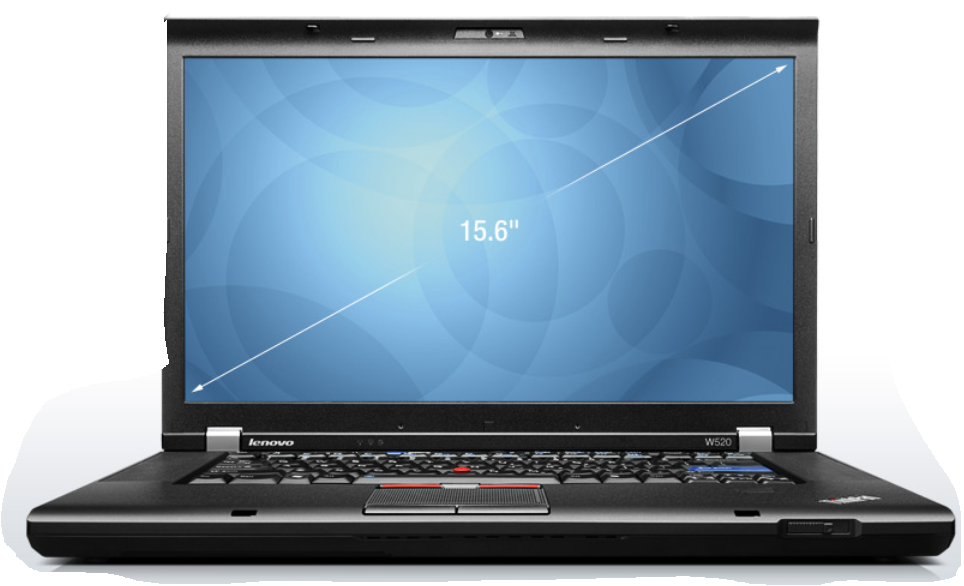
  1. Purchased a Lenovo ThinkPad W520 laptop with Windows 7 and Microsoft Office 2010 preloaded.
  2. Setup the laptop, , , pretty much as simple as taking it out of the box and plugging it in.
  3. Setup e-mail and accessed my wireless router, , , very simple as long as you know the information like passwords, WEP key, etc.
  4. Activated MS Office 2010, , , part of the setup prompts.
  5. Added my wireless printer/copier/fax to the Lenovo laptop and tested printing, , , piece of cake since the Lenovo found the printer automatically.
  6. Copied my personal files from my Dell desktop to a USB backup drive. To give you an idea of how old this desktop was, it took 21 hours (YES, , , 21 HOURS) to copy 46GB of personal files.
  7. Copied my Outlook .pst file to the USB backup drive, , , another 1.5 hours to do this.
  8. Uploaded the personal files to the new Lenovo system, , , a total of 30 minutes, , , WOW, , , already impressed. A key thing I did with this step was to set up an “archive directory” in my C-Drive file structure. Over time your file folders and structure gets a bit convoluted or messy, , , with the new file folders separated from the old files folders, I can simplify my file storage architecture but still retrieve old files when needed. It also allows me to only worry about backing up the newer files created since I now have multiple copies of all the files that were on the Dell system.
  9. Uploaded the Outlook .pst file to the Lenovo, , , 2 or 3 minutes. I also kept this .pst file as a separate Outlook file and now I can access both new email message activity “post conversion” and old email activity “pre-conversion”. Keeping these two files separate allows me to reorganize and simplify new messages but still retrieve the old messages when needed, , , all from the same Outlook screen.
  10. Created a “Mike Window”. This is a user window I use to place icons of all the software programs I use, , , it is always open and makes it easy to launch a new program when I need to.
  11. Loaded the key programs I use onto the Lenovo and added their icons to my “Mike Window”. Click on the image for a better look. At this point, I’ve only added the essential programs I use, , , more will be added as needed.
  12. Added my professional microphone and audio software to the Lenovo.
  13. Added my scanner to the Lenovo.

What is really neat is being able to access both new files or email messages as well as any of the older files or email messages even though I keep them separated, , , see steps 8 and 9.

The conversion took me about 2 days to do it all, but 21 hours was in copying personal files and folders to a USB drive. I also took my time and gave some thought about how I want to operate and how I want to access new and old data.

I’m extremely pleased with the new setup and think it is going to improve my productivity quite a lot.

My business computer upgrade choice

I have been needing to upgrade my office desktop for some time, , , I’m ashamed to tell you how old it is. The problem was everything worked and my philosophy of “If it ain’t broke, , , don’t fix it.”

Please excuse my southern heritage slang, , , “ain’t” is proper English in Tennessee and surrounding states.

The other problem was I dreaded, , , literally DREADED the thought of going through a system conversion. What a pain!

Then it hit me, , , my whole business is on this system , , , I can’t afford for this old server to conk out on me, , , better do something before it is too late. I already knew I had used my Dell desktop much longer than I should have.

What to do, , , time to decide what I need in my office, and what I want.

Here is what I decided from a non-technical point of view:

  • Fast processing speed with multiple programs running simultaneously
  • Large disk capacity
  • Multiple USB ports
  • Good handling of graphics, , , I use lots of graphics in my business
  • Multiple monitor capability, , , a “battle station console” for the challenging work I do
  • Microsoft Office 2010 (now is the time to upgrade)
  • An operating system that works (hated VISTA)
  • My personal data files from my DELL desktop
  • My Outlook file from my DELL desktop
  • Several software products loaded onto my DELL desktop
  • Easy setup and portability

I’ve been thinking through these issues for some time and the conclusion I came up with is that I need to replace my very reliable DELL desktop (which was a race horse when I bought it, but a snail today) with a robust laptop.

I don’t really plan to take this laptop on long trips to Dubai or Africa, but I do plan to take it to our Camp Liberty when we decide to spend a week or two down on the Buffalo River, , , we also call this “MDE West”. I have a satellite dish for Internet connection so I can work just as well down there as I can here in my office. It will be so much better being able to have my entire office with me when we are at the camp.

This means I need a very reliable laptop and one with a reasonably big screen.

My choice – a Lenovo ThinkPad W520.

I just completed the conversion last night and have been using my new “office laptop server” for a couple of days. VERY IMPRESSED !!

In my next post, I’ll outline the steps I took to completely migrate to my new system, , , it was much less hassle than I thought it would be and could not be happier with my setup.

The main reason I went with Lenovo is because I have had a Lenovo X60s for several years. I take it everywhere with me so it has probably logged well over 100,000 miles and has stood up to the travel test admirably. I like the small footprint of the X60s and the light weight for travel.

I find Lenovo laptops to be built sturdy and capable of handling true travel bumps and knocks you go through, , , I have had problems with two other popular brands over the years, , , disk problems and external power connection issues. No issues of any kind with my Lenovo X60s, , , “knock on wood”.

For my office, I need something a bit more robust than the X60s. The only major downside of the X60s is that it came with VISTA (have hated VISTA the whole time, but not enough to replace it) and isn’t powerful enough to be a true desktop replacement.

My initial thoughts of the new Lenovo W520 laptop:

  • Fast, , , especially compared to my Dell desktop
  • Screen is bright, sufficient size, and HD clear
  • Keyboard is one of the best in the industry, although I’ll use a full size wireless keyboard and mouse most of the time
  • 3 USB ports and two are USB 3.0 plus all are easy to get to
  • Multiple monitor capability
  • I’m liking Windows 7
  • Plenty of disk capacity with 500GB plus another 500GB on an external hard drive
  • Setup is easier than what I remember with my Dell desktop simply because of the weight, access to monitor port, etc. There is much to be said about “portability”.
  • Feels like a genuine desktop type of power
  • Did I say it is “FAST”? I spent a little extra money because this is for my office and business, , , felt the extra power and speed was worth the cost. So far, very glad I did, , , if only I could type faster.

I still have a few things to do to get my office computing environment completely where I want it but the “heavy lifting is completed”. Next steps are:

  • Order the docking station and a new 21″ monitor
  • Setup my “battle station console” with three monitors

In my next post, I’ll walk you through the migration steps I took to get fully functional with “what I had” plus the “new environment” I want for our MDE Enterprises office environment.