Category Archives: IT Manager Tips

Helpful articles and tips

Six key risks a CIO must avoid

Challenges are everywhere for a CIO, , , around every corner, creeping up from behind you, , , even right in front of you. These challenges create risk for you and your company, , , risks that can cause tremendous loss of productivity, wasted resources, and frustration.

There are literally dozens of bullets and arrows flying at a CIO every day.

In my travels in managing IT organizations for more than 20 years, I’ve found there are 6 key risks a CIO needs to learn how to avoid. In this article, I’ll identify them for you, and I’ll follow-up with a short post on each risk with insight on how to prevent it in your organization.

The 6 key risks a CIO must avoid include:

  1. IT – Business disconnect – Many studies suggest the over 50% of IT organizations are out of sync with their company’s needs and issues. When this occurs, the company loses significantly in wasted expense and lost productivity. This issue is a key concern of CIO’s and CEO’s alike in surveys every year.
  2. Project failure – Delivering what you say you will do, when you say it will be delivered and within the cost you say it will cost is paramount, , , it is how you achieve credibility. Several studies find each year that the failure rate in IT projects is quite high causing loss of productivity and money in company after company around the world.
  3. Losing people – Losing key staff can cause significant challenges for an IT organization. CIO’s need to be able to keep their best people in order to make progress.
  4. Missing your budget – When the IT department fails to achieve its budget for the year, the CEO and CFO must make it somewhere else. CIO’s need to be very astute about budgeting so they can achieve their financial plan and earn trust from the other executives of the company.
  5. Downtime – Nothing will get a CIO fired faster than an environment with lots of systems or network downtime. Developing a stable infrastructure is key.
  6. Security – Technology plays an important role in creating a secure environment for people in the company and for the hardware and software environment created to support the business.

Read more about each risk and tips to prevent them in the posts that follow.

IT organizations offer tremendous leverage

Do your senior managers understand the leverage your IT operation offers your company?

In most situations, especially in small companies, the answer is unfortunately and sadly, “No!”.

As a CIO, one of your responsibilities is to ensure the senior management team realizes the opportunities available to them in the leverage the IT operation can provide.

The IT organization is the only department in a company that can reduce the cost or improve the productivity of all other departments in the company. No other organization in a company offers this level of leverage.

The sad thing is that far too often senior managers aren’t aware of the potential sitting right under their noses.

CIO’s and IT managers need to do a few things:

  1. Establish a positive track record of delivering projects successfully so IT has credibility and senior managers will listen when you have something to say.
  2. Communicate the successes and business value the IT organization is achieving.
  3. Educate senior managers on the leverage opportunities you discover as you identify the company’s business needs and issues.

Effective IT support is about delivering business value. Do this consistently and you will discover your senior management team is much more interested in the initiatives you recommend and where you want to spend money.

Big trend in outsourcing the Data Center

Have you looked at outsourcing your Data Center?

If not, you may want to.

Large companies like Amazon started the trend of “co-locating” their Data Centers offsite with companies who create giant “Data Center space and support for rent”.

I’m now seeing more and more small to mid-size companies begin moving their Data Center equipment to a co-location. There are many benefits that are worth thinking about:

Space – Moving your Data Center frees up space in your company that may be better utilized for other things.

Data Center environment requirements – A co-location company invests in building, AC, and security to provide a suitable environment for Data Center equipment, , , it’s what they do.

Support resource – You can reduce the number of resources you need to support a co-located Data Center. A co-location provides systems expertise and support that you normally would have had to hire yourself.

Support critical mass – Not only does the co-location provide support resources, an organization like this typically has enough critical mass that vacations, people getting sick, or losing an employee does not affect your company like it would if you staff your own Data Center.

Energy costs – Data Centers have huge energy consumption because of the heat produced by servers and technology equipment. Moving your Data Center offsite can reduce your energy bill.

24 X 7 Backup – Co-Locations guarantee backup support for your virtual Data Center.

Systems upgrade support – Support to help you add, upgrade or eliminate servers as needed to maintain a cost effective environment.

Cost – The biggest reason is probably cost. Outsourcing your Data Center can reduce your cost by 20-70%, , , definitely something worth evaluating.

Focus – Allows you to focus on your core competency and leave much of the infrastructure work to organizations that invest in being able to do a stellar job in this area, , , reduces cost, worry, and stress associated with a traditional Data Center.

If you have input from using a co-location or experience in this area, feel free to comment.

Prepare for your interview

I received a question today from one of my followers who is about to go into an interview next week for an IT manager position. He gave me the qualifications of the job and asked me a question, “How do I prepare for the interview?”

I sent him the information below:

To prepare for an interview, I would do the following:

  1. Learn all you can about the position, the company, and the hiring manager.
  2. Make a list of possible questions your interviewer may have and develop your responses.
  3. Make a list of “selling points” that describe the value you offer a company that hires you. Be sure to focus on “results”, not technical capability.
    1. Past accomplishments
    2. Key successes you have achieved
    3. Experiences you have relative to the position job description
  4. Key things to think about going into an interview:
    1. Managers hire managers who can get things done, , , they look for people who have delivered results.
    2. Important to talk in a business oriented manner, not in technical acronyms, , , unless the interview is for a technical position.
    3. Load up your discussion points with benefits (results, complimentary experiences, , , reasons you are a good choice).
  5. Make a list of key questions you want to learn about the position, company, or the person you will report to.
  6. Here are a couple of resources you may want to review:
    1. ITLever BLOG post – Fast Start for a New IT Manager — https://itlever.com/2010/05/24/new-it-manager-needs-a-fast-start/
    2. 20MITM e-learning session – Fast Start for a New IT Manager — http://www.20minuteitmanager.com/sessions/060602FASTSTART

Invest in your communication skills to excel

IT managers who have great communication skills are rare, and it is the key skill that will set you apart from your peers. I tell every class that if I were a young manager the one thing I would invest in would be my communication skills.

OK, I realize this is probably not what gets you excited. Before you stop reading, consider a few benefits that come with IT managers who become effective communicators.

  1. They get what they ask for – Good communicators know how to discuss the business value of projects and IT initiatives. When you communicate benefits and justify the cost of things, , , senior management buys in.
  2. Effective communicators develop partners – More importantly, they develop partners with their clients (senior managers and department managers). Clients need to know what’s going on with IT support and keeping them up to date creates trust.
  3. Strong communicators develop respect – No one knows what you are doing unless you communicate it. Effective communicators know how to deliver IT successes with facts and numbers that demonstrate how well IT support is working.
  4. Effective communicators motivate their staff – Leadership is dependent upon effective communication. Strong communicators rally their troops when they provide vision and coach the team to succeed.

Your career will take on a whole new path if you develop strong communication skills, , , it is the key trait required to succeed in your management role. Develop all of the following skills and watch your career take off:

  • Presentation
  • Negotiation
  • Writing
  • Listening
  • Coaching

48th IT Manager Institute – Dubai, UAE

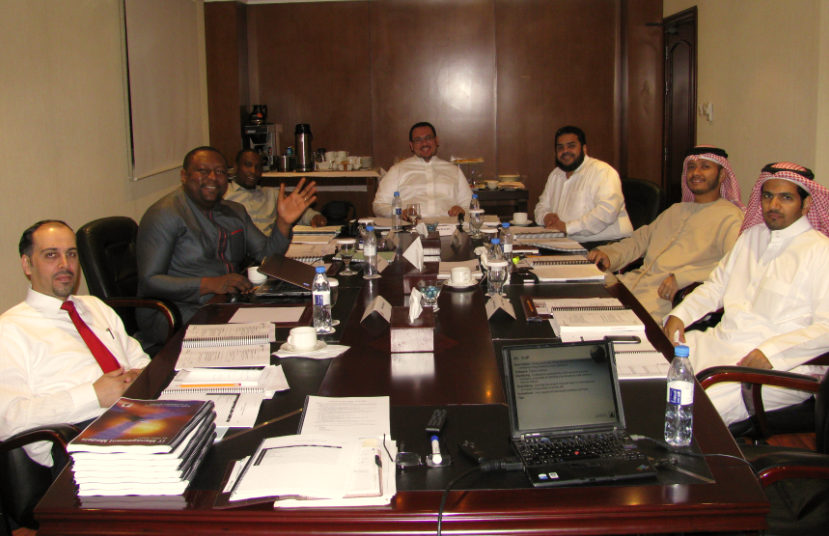
Today wraps up my 48th IT Manager Institute and 5th program in Dubai, UAE.

What a GREAT group this was to work with, , , without question one of my best and most fun group of managers to spend time with. They clicked with one another from the very first day.

And what a wonderful city we are in, , , there is nothing like Dubai in the world.

Last night’s dinner was special. We ate at the Armani Mediterraneo restaurant in the Burj Khalifa, , , tallest building in the world. It is more impressive every time I see it.

Food was great but the cameraderie and bonding with members of the class is what makes our class dinners so special for me. I tell everyone that I get to meet some of the best people in the world and this group stands among the very best.

Today, we finish the presentations, award class certificates, and finish the ITBMC exams. They are all a bit anxious about passing the exam, but I can tell they will do fine. I’ve done this many times and you get a sense for these things based upon class participation, type of questions asked, etc.

My next class is just a couple of weeks away, , , this time I’ll be at home in Columbia, TN. I look forward to the next group and know it will also be a great class.

More photos of this week.

  In the classroom

 Burj Khalifa at night.

The Burj Khalifa is the tallest building in the world at over 828 meters (2,716 feet), , , that’s over half a mile long. This building owns several world records:

World Records

•  Tallest building in the world
•  Tallest free-standing structure in the world
•  Highest number of stories in the world
•  Highest occupied floor in the world
•  Highest outdoor observation deck in the world
•  Elevator with the longest travel distance in the world
•  Tallest service elevator in the world 


Over twice as tall as the Empire State Building


Dinner at the Burj Khalifa

Awesome experience with my Arabian friend

Eisa Al Monsoori from Abu Dhabi  attended my last Dubai class and I was able to get to know him a bit. In our discussions he told me about he and his brother’s passion for raising falcons and training them to hunt. I was very interested in what he had to say.

Since the class, Eisa and I have stayed in touch via email. He is a strong family man like me and has a weekend retreat like we do so we have several things in common.

I made Eisa aware of my trip to Dubai and he offered to spend the day with me to show me his family farm and resort, , , I jumped at the chance to learn more about the local culture and see something outside of Dubai.

Eisa and I spent most of Saturday together. I was able to meet several of his brothers and nephews and a few friends. It was a great day with a few totally new experiences for me, such as:

  • Eating a great feast while sitting on the floor and with my hands from a gigantic platter of rice and lamb. They asked if I would like to “break the head of the lamb”, but I declined not knowing what it actually meant. Hope I didn’t insult anyone, but they all laughed so I’m probably ok.
  • Saw the largest fruit basket I’ve ever seen with exotic fruits from all over the world. I was so full from the meal that I declined most of the fruit. Eisa says that this is normal for them because on the weekends they have 60 or more people at their resort to share time together. The close family bond they have with his 13 brothers and 6 sisters  is quite amazing.
  • The best experience was seeing his falcons. There were six of them housed in a large open room building. The photos below tell it best.

Eisa Al Monsoori with one of his falcons 


It was an awesome experience with a new friend, and I owe Eisa a big debt of gratitude for sharing his day with me.

Business value is the key to IT manager job security

I just finished writing an article for Cutter Consortium’s IT Trends for 2012, , , an annual survey and review they do every year. This will be my fourth year to do this.

Cutter polls their subscribers with an annual Technology Trends Survey and has two people along with their senior editor review the results and write an analysis. They include an academic and an operational IT manager.

In the academic case, it is Dennis A. Adams, Associate Professor of Decision and Information Sciences at the University of Houston.

The operational IT manager perspective is where I come in.

When I started writing these articles it was the beginning of 2009 and much has happened since then. One of the nice things we receive in the survey feedback data is an ability to see how managers answered questions over time, , , in other words, we can see the trend.

In 2009, IT organizations were anticipating layoffs and downsizing. So, when I wrote a newsletter article about “Business value is the key to job security”, it was geared to the downsizing momentum that existed in 2009.

In reviewing the 2012 survey data most IT organizations believe their staffing situation is stable or they are going to be hiring this year. I’ve seen this consistently in many articles and surveys over the past year.

So, why do I rewrite the article when hiring seems to be the trend versus downsizing?

The reason is simple, , , no matter what your situation, business value is absolutely key to your success.

If your organization does not know how to identify and deliver business value, your success is going to be limited.

This article is not intended to make you worry needlessly or to be a negative message.  In fact, the message you should get from the content below is a very positive one.

In today’s business environment, it is more important to have an IT organization that is appreciated and valued by your senior management team than ever, , , and it is ultimately essential for your viability in the company.

It’s never too late to start building a presence where you and your IT organization are appreciated and valued for what you do, , , so if it doesn’t already exist in your company, you need to get started RIGHT NOW !!

First step – understand the importance of business value.

Business managers want and need your IT help, but they do not and will not fully understand technology. There are exceptions to everything, but for the most part they don’t want to understand the technology. They just want to do their jobs and to support the company’s mission, , , and they want you to do your job.

What business managers (senior managers and department managers of your company) do understand is business value.

When you deliver business value, speak in business value terms, and do things that have business value benefits, , , then and only then do you get their attention. You also gain their respect and appreciation for your organization’s hard work because they better understand what it is you are achieving.

However, if you do not connect with your client (again, senior managers and department managers of your company) on a business value level, it is difficult and potentially impossible to gain their respect for what you and your organization do.

They just don’t get it when you deliver technology and talk technology.

It’s about the business. It is not about the technology.

Business value comes in many forms:

A.  Increase revenue  –  Implementing technology that helps the company sell more of its existing products or services or sell new products or services.

B.  Decrease expense  –  Decreasing a departmen’s expenses or avoiding costs by implementing technology.

C.  Improve productivity  –  Improving a department’s employee productivity so they can handle more work with existing employees and avoid hiring more employees or they are able to reduce staff.

D.  Differentiate the company  –  Doing something that gives the company an advantage over its competition by differentiating the company’s offerings.

E.  Improve client satisfaction  –  Retaining a client can be more cost effective than replacing a lost client with a new one. Improving client satisfaction can be valuable to a company.

In a “for-profit” company, there is a common theme in all of these elements. Each of these value propositions help the company become more profitable, , , and profitability is the name of the game in a “for-profit” company.

Even in a “not-for-profit” company increasing revenue, decreasing expense, improving productivity, etc. are important to help the company continue to operate and do the work of it’s mission more effectively.

So, regardless of your situation business value is a key component in delivering IT support.

Your IT organization is the one organization in your company that can positively impact every organization or department in the company.

This is real leverage!

There is probably no other organization in your company that offers this much leverage to the senior management team.

The problem is that your senior managers won’t realize this much leverage is right under their noses if your organization has been delivering technology instead of business value.

Understand that most business managers see the IT managers of the company as technical managers, not business managers. In far too many cases, they don’t think their IT manager or CIO understands business very well.

You must change this perspective they have of you. And, when you do they will appreciate you and your team for what you can do for the company and not see you as a “cost center”, or a manager who likes new toys and spending lots of money.

An IT manager who delivers business value is viewed as a partner, , , a business partner to be valued for the positive contributions he has made in the past  and can make to the company’s prosperity in the future.

Second step is simple:  All IT initiative recommendations must be cost justified and provide tangible and quantifiable business value to the company.

You simply don’t work on things unless you can quantify the business value that will be gained when the project is completed and every recommendation is cost justified and easily understood by the management team.

This means you must be able to frame projects and discuss them in financial terms. Business managers don’t understand routers and switches, programming, and such technical things as you do; but they do understand revenue, expense, productivity and those type of discussions.

Your tendency is to discuss the issues in technical terms and when you do, you lose a business manager’s attention. Learn to discuss your projects in business value and benefits terms and you get their attention.

Plus, they might even understand what you are talking about.

When senior management trusts you such that everything you do provides business value and that you only spend money prudently (like a business owner would do), you will find they will appreciate your IT organization much more than you might imagine, , , and they want you as their partner.

Let me give you an example, I’ve been very fortunate to have worked with some excellent senior management teams. In my career, I’ve had two CEO’s ask me to spend more money when they were cutting costs in other departments. The reason was the same in both situations, , , these CEOs understood the leverage value of an IT organization that delivers business value.

Insightful senior managers know they can get much more cost savings from IT when we do things that reduces expenses or improves productivity in the bigger organizations.

Sure, if they ask me to cut 10% from my budget in the 2nd half of a year, they will get something fairly tangible cost savings, , , but not nearly what they can get if I can implement technology that improves a large organization’s productivity considerably.

Even better, this type of improvement is usually an ongoing benefit, not a one-time benefit.

You have to earn business management’s confidence. To gain the trust of the business managers requires a third step:

Third step – establish a track record of success where you can show:

1.  All your recommendations are cost justified and have tangible business value

2.  You deliver the approved projects successfully

Sounds pretty simple and it really is when you get right down to it, but so many IT organizations fail to do this.

Business managers are looking for partners who help them achieve their goals and objectives.

When you deliver what you say you will do and the results include specific business value benefits that helps a CEO or Department Manager achieve his/her objectives, you simply gain a lot of respect, trust, and value in their eyes.

They wouldn’t think of running the company without you when this partnership exists.

My e-Learning production environment

A few of you have asked about the tools I use to develop e-Learning training sessions, , , so thought I would give you an “inside look” at my home office “studio” and a brief description of the equipment and software I use.

Equipment
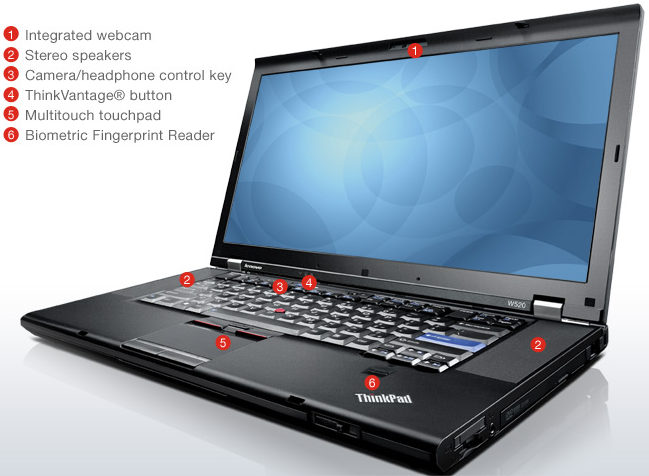
–  My desktop is actually a laptop, a Lenovo W520 ThinkPad. This may be the best thing I’ve done in years, , , awesome. It sits on a Lenovo Mini Dock Plus Series 3 docking station for a power source and extra connectivity ports. Nice to be able to start-up in just a few seconds each day.

–  HP Photosmart C7280 All-in-One printer has been with me for a couple of years, , , works great in wireless mode. Prints excellent color front and back, faxes, copies, and scans plus it uses easy loading ink cartridges. Great 4×6″ photo prints plus it reads virtually every camera card made.

–  My display was a surprise Christmas gift, , , a Samsung 36-inch HD TV/Monitor. I only use it for a display monitor. What’s great about it is being able to throw several windows up on it at the same time to work with. While developing 20MITM e-learning sessions this weekend I saw a nice boost to my productivity plus it is so much easier than going back and forth to different windows on a smaller display. I tried using multiple monitors and although this works fine I didn’t like the desk space required and having to move the cursor across screens, , , just not as easy as having it all on one big screen. Thank you very much Dorine and Eddie, , , I will enjoy this XMAS gift for years to come.


How do you like the shirt I purchased in Dar es Salaam?

Canon LiDe 210 Scanner – Even though the HP All-in-One printer scans, I like this scanner and it only cost me $99.00, , , small footprint, very quiet, extremely easy to operate, and excellent quality scans.

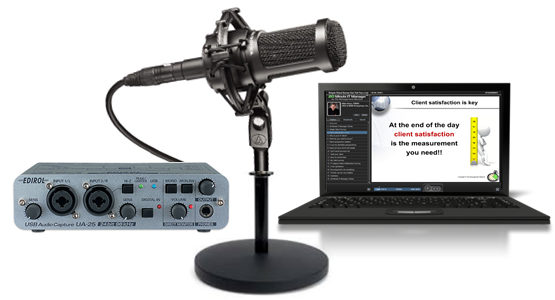
– My audio equipment is professional grade. When Tom Mochal and I decided to develop the 20 Minute IT Manager e-Learning training in 2006, we knew we needed high quality audio equipment so we both invested in the same setup and it has worked extremely well for us. Each of us has an Edirol UA-25 USB Audio Interface System with an Audio Technica AT2020 Studio Microphone. Sound quality of your work is good as it gets with this equipment.

Software
I use a lot of software as we all do, but let’s stay with what we use to produce e-Learning sessions.

PowerPoint 2010 – Best version yet although I’m still trying to get familiar with the new interface. Hard to beat PowerPoint and the use of PNG images to make your presentations “pop”. Love PowerPoint!!

Articulate Presenter ’09 – Installs as a PowerPoint plug-in and creates the presentations we end up with. This is a great tool we have used a great deal. It is very versatile and creates a nice user interface. I liked it so much I built my IT Manager Institute Self Study using these tools.

Sound Forge Audio Studio – This is what we record our PowerPoint slide “voice over” with. Has great editing capability, , , much better than the earlier versions of what was included in PowerPoint. Haven’t tried the audio recording features of PowerPoint 2010 yet and know it’s got to be better, , , a project for another time.

That’s it, , , production is simple and straightforward. Just develop your PowerPoint presentation, record the voice-over for the slides, and publish the content using Articulate Presenter.

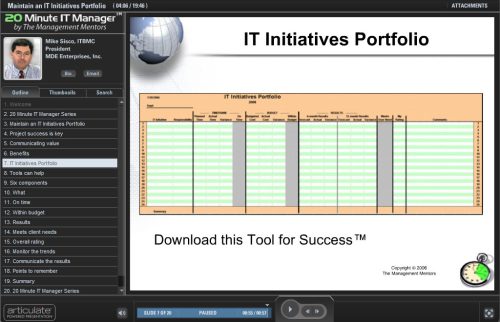
Take a look at a 20 Minute IT Manager session titled, IT Initiatives Portfolio.

I’m reminded of things taking longer than planned

Tom Mochal and I decided to develop new 20 Minute IT Manager e-learning sessions this year. For three years between March-2006 to March-2009, we delivered weekly 20-minute training sessions to our subscriber list, , , 162 sessions in all. See www.20minuteitmanager.com for details.

These sessions are excellent training modules that will be great training resources for years and years to come because they aren’t hinged on any specific technology. They are practical tips and techniques on:

  • IT management
  • Project management
  • People management
  • Leadership
  • Professional development

Well, I started getting prepared to produce new sessions, , , essentially developing PowerPoint presentations, recording the voice-over, and publishing the sessions for upload to our Internet servers.

Sounds simple enough, , , after all, I’ve developed over 100 training sessions using the tools we use, , , Articulate Presenter, , , GREAT TOOLS.

But I forgot one simple thing, , , I upgraded my computer system in October and this will be my first time to use these tools in my new environment.

This one little change made my setup preparation a much bigger deal than I had planned. I thought I would be recording in just a few minutes.

WRONG !!!

First, had to install a new licensed set of software so I downloaded the trial version and tried to register it with my registration key.

“Houston, , , we have a problem!”

Apparently to do this we needed to uninstall the version on my old desktop to free up the license. Unfortunately, this desktop has been put away never to be used again except for dire emergency and the longer we go the bigger the emergency needs to be. Surely we can avoid this “hassle factor”.

When making the system conversion I didn’t worry about this part because I knew I had the registration key needed to activate the software on my new system. Didn’t realize I would actually need to uninstall the software on the old system to free up the license.

A few hours to get the licensed software setup on my new system after contacting their support team, , , they are very good by the way.

OK, ready to go.

Not so fast, , , let’s test a few things before we go too far.

Good thing I did because when I imported an audio file for one of the slides, , , my PowerPoint system freezes, , , locked, , , can’t do anything.

Uh-oh!

Everything else works fine but PowerPoint is locked solid.  “HU^$%#^%&VFF#”

After considerable Google searches I contact Articulate Support once again and they send me recommended solutions to identify and fix problem. I walk through their recommendations and sure enough, they work.

The issue, , , my new Lenovo laptop (which I absolutely love by the way) comes configured with WinDVD and it causes a conflict with Articulate Presenter. The Articulate Support Team was right on top of the situation, , , told you they were good.

I follow the problem resolution steps, do another audio import test and see that we are now in business, , , no lockup when importing audio.

OK, , , ready to go.

Not so fast, what’s your hurry?

Let’s do another simple test, , , let’s create a 3-slide presentation and publish it to see what it looks like just to ensure all is working well. We don’t want to have to do lots of rework down the line after completing an entire presentation, , , right?

My test presentation publishes the 3 slides without a hitch except for one thing.

It does not look like our other 20MITM sessions we have created. It is obvious that I have to set up Articulate Presenter all over again, , , things like:

  • Our custom user interface template
  • Presenter photos and biographies
  • Default attachments we include in every session with new file paths
  • Even the PowerPoint Slide Master has to be updated.

The bottom line:  My 1-hour prep work turned into a 2-day effort due to the lag time back and forth with support, my learning curve, and the extra work I had to do to troubleshoot and get my presentation production environment back to where it was with the old PC.

The good news, , , I’m set up once again and the new production environment is better than ever, , , faster and even easier to use.

Remember the IT Project Golden Rule, , ,

IT projects usually take longer and cost more
than you think they will.