Category Archives: IT Manager Tools

Tools of the trade to help you achieve more success

20 Minute IT Manager training library – new options

Tom Mochal and I just announced three new bundle options  for the 20 Minute IT Manager.

Build your own personal or team training library in minutes with any of the options below:

  • The Ultimate Bundle – $499.00 (162 sessions)  – BEST VALUE
  • Tom Mochal Bundle – $299.00 (80 sessions)
  • Mike Sisco Bundle – $299.00 (82 sessions)
  • IT Management Bundle – $199.00 (54 sessions)  NEW
  • Project Management Bundle – $199.00 (57 sessions)  NEW
  • Leadership, Personal Development, People Management Bundle – $199.00 – (51 sessions)  NEW
  • Single sessions – $9.99 each

HUGE SAVINGS on any of the bundled options.

Every topic is 20 minutes in length or less and great ” lunch and learn” sessions. They will be resources you will reference for years to come.

CLICK HERE to learn more and view the entire topic list.

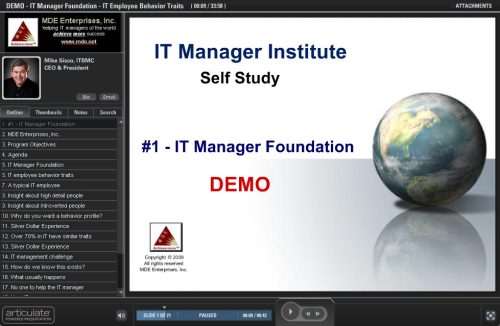
IT employee work behavior – video excerpt from the IT Manager Institute

IT managers need to understand the work behavior tendencies of IT employees? As you have seen in my 4-part post, , , IT employees are amazingly similar in how they approach their work.

Learn more by viewing the online training session below!

I can assure you this information will be an eye opener and it’s something all IT managers need to have an appreciation for. It will give you insight about yourself as well as most of your IT employees.

Click image to view excerpt on IT Employee Work Behavior

The sample training module is part of Session 1 – IT Manager Foundation from my IT Manager Institute Self Study. It is 33 minutes long and worth your time to watch.

CLICK HERE to view the training module.

Tell me your best gadget story

Technology “gadgets” are great.

They boost productivity, make things easier, or are just fun to have. Whether it is a GPS device, a golf range finder, imaging software, iPad app, new headphones, or a Yoda flash drive, , , we like our “toys”.

I want to hear about the gadgets you like the most.

Post a comment to this post and tell me about your favorite gadgets, , , and do not assume everyone knows about it. I can guarantee the simplest thing you have will be new to many of us. Read my story below and you will see why I say this.

—  —  —  —  —  —

New discovery of an old technology
My brother, Mark, is a great guy with lots of knowledge. He has worked on some extremely large projects and traveled to many parts of the world as a result like China,  Scotland, Ireland, and France.

I’m always learning new things from him, , , especially about new technology gadgets, photography, etc. He has a lot of knowledge about many things.

His youngest daughter graduated from high school last Thursday and we went to his house afterward for a little celebration.

As I entered his home, Mark tells me he has this great new gadget he is very excited about.  I’m always interested when I hear this because he finds some truly great things, , , and for him to be excited about it means it will be something truly special.

What shocked me was when he showed me a Logitech Presenter, , , a hand-held device that includes a USB component to plug into your laptop’s USB connection. It allows you to page your PowerPoint presentations forward and backward, , , a wireless presentation clicker.

Neat – yes, , , it just blew me away that he is just discovering this great little gadget. I’ve been using one for 9 years in my IT Manager Institute class. Don’t know what I would do without it. No cords to fool with and allows me to roam all over the room, , ,  even includes a laser pointer. Like I said, it is a great tool if you make presentations.

The point, , , don’t assume others know what you know. I wrote a post about this topic titled, Others may not know what you know, , , you might want to read it.

This incident reinforced with me again just how true this is.  If someone had told me Mark would not know about this little gadget, I would have laughed, , , sure enough, the laugh would have been on me. Only wish I had told him about it years ago, , , and I’m wondering what little gadgets he knows about  but hasn’t thought to tell me.

Mark, if you read this, post a comment and share a couple of your best gadgets.

I hope everyone who reads this post will take two minutes to make a comment and share their gadget story.

Personal Inventory – time for reflection

I was asked to participate in a project with IT Business Edge to create a project guide for a new product offering they are developing.  My focus was to create a project guide for “Creating a Professional Development Plan for Yourself”.

First, a few questions for you:
1.  Do you have a career plan?
2.  Have you defined what you really want in life?
3.  Are you investing in yourself to achieve success?

Hopefully, the answer is “YES” to all of these questions. If not, you will want to take a look at the project guide when it is completed and released. As soon as it is, I will post an announcement on ITLever.

When I started to think about this project, the first thing that came to mind was the need to do a “self-evaluation”. It’s important to know “where you are” and “what you want” before you try to plan anything. If I were to create a professional development plan for myself, I would start with a bit of self-analysis.

Sooooo, , , this is exactly where I started with the project. I developed a simple tool called the Personal Inventory tool.

It is time to take an introspective look at yourself, , , and when you do, it will help you develop a plan for yourself.

CLICK HERE to download the tool.

The tool includes 5 sections. The information you provide will tell you or someone else quite a lot about you and what is important to you.

I.   Goals and objectives
What do you want to achieve in life. It could be anything, , , money, power, position, certain style of living, a happy family, , , it’s an endless list of things, but what is important is for you to identify it for yourself.

II.   Strengths and weaknesses
People do better with their strengths and weaknesses can hold us back. Depending upon your answer in Section I, you may need to do some work to eliminate or minimize certain weaknesses. You also want to take advantage of any strengths you have.

III.  Likes and dislikes
People tend to work harder and with more interest on what they like and avoid their dislikes. Sometimes, you may dislike something only because you aren’t very good at it or don’t know enough about it, , , many of these things can be overcome with knowledge and experience.

IV.   My passion in life
What makes you want to jump out of bed in the morning and rush to work because you love what you do – anything? Find a true passion for something and be able to work with it, , , and it won’t seem like work. Time will fly by because you love what you do. Find it and your career will take care of itself.

V.  How I want to be remembered
Have you ever thought about how you want people to remember you? What will they say about you when your name comes up? Your legacy is important so this part is important to think about.

This Personal Inventory tool is simple like all my tools, but it will give you a practical method to understand what you want in life and begin to develop yourself to make it happen.

IT Project Management: a practical approach

In my last post, I discussed the importance of project management in creating IT credibility. You won’t be credible unless you deliver projects successfully. Period, , , end of story !!!!

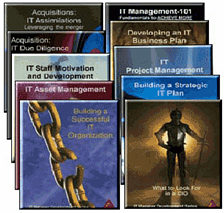
My company mission is to “help IT managers of the world achieve more success”. The very first thing I did in this effort was to write a few books (10 actually) to provide insights and tips on things that actually help you achieve more success as an IT manager.

One of the keys is to deliver projects successfully, , , so naturally, there is a book on project management.

Delivering projects successfully is so important. The book is based upon my experiences in delivering projects successfully, , , both as a young IBMer and later as an IT manager and CIO.

IT Project Management: a practical approach is straightforward and includes the simple process I use and the tools to help you deliver projects successfully. It also includes insights and tips from my experiences that will give you an advantage or edge, , , something we all need.

Short, straightforward, practical, , , and to the point. That’s what we want so that’s how I wrote this one. It is one of my best sellers.

Buy the e-book for $29.95.

Buy the whole series of 10 e-books plus BONUS IT Manager ToolKit (a $175.00 value on its own) for $279.00

$279.00 — Full series + IT Manager ToolKit

Getting IT credible, , , project management is key

In an earlier post, I mentioned, “The most important part of creating IT success is being able to conduct a thorough IT assessment so you can determine what your organization needs to work on.” CLICK HERE to view.

The second most important element required for IT success is that you must become a credible organization.

“Credible”, , , what does “credible” mean?

Credibility only comes when your client trusts you can and will do what you say you will do. Simply put, it means you deliver projects successfully.

You can conduct a great IT assessment and deliver an eloquent strategy that gets lots of acceptance, , , but if you can’t deliver projects successfully, you will not have credibility. Getting credible is absolutely a requirement to become a successful IT manager at any level. 

That’s why project management is so important for an IT organization.

There are three main parts to all of this:

First, you have to define and prioritize the projects. This happens during an IT assessment.

Second, you have to deliver the project, , , this is actually the project management component.

Third, you need to track your projects and demonstrate your success rate in delivering projects on time, within budget, and meeting client expectations.

All three components are very important. If you don’t identify the appropriate projects to work on and prioritize them so they help your company the quickest, clients don’t think you are focused on the right things.

Deliver a project successfully but fail to communicate your success and no one will know about it, , , so it’s important to “bookend” the project work with an appropriate assessment on the front and effective reporting on the back.

See my IT Initiatives Portfolio post and download a simple tool to help you quantify and report your project successes, , , CLICK HERE to view.

There is absolutely no excuse for failing to deliver a project successfully in today’s world. With the methodologies, tools and training in this area you would think that most IT projects are delivered successfully, , , but to our dismay they are not.

Studies show there is a high failure rate with IT projects, , , year after year.

You don’t have to have a PM certification like a PMP to deliver a project successfully, but you do need to know something about project management and it helps to have a few tools. A PM certification doesn’t say you are a successful project manager, , , it says you have knowledge about project management and passed an exam.

I’ve delivered hundreds of projects successfully with some of the simplest tools. The key is knowing what to focus on and doing a few key things that positions you to deliver your project successfully. Do these things well and success is achievable.

In a future post, I’ll give you my “Tips to project management success”.

If you are looking for project management help, I recommend you take a look at two resources:

  1. IT Project Management: a practical approach – I wrote this book to give managers a simple and practical process in project management and it includes the tools I use myself to deliver a project successfully. It’s a quick read and gets right to the point. Learn more.

  2. TenStep, Inc. and Tom Mochal – The company that provides the most in project management in the world is TenStep, Inc. Tom Mochal has created an international force in providing project management tools, training and consulting services.  Check out www.tenstep.com.

Project management is the cornerstone of credibility

It is why you should focus quickly on delivering projects successfully when taking responsibility for a new IT organization. Get credible and IT success is just around the corner.

Acquisition: IT Due Diligence

Conducting a solid IT assessment is the key to IT manager success, , , it is the most important part of managing an IT organization. You can’t be successful if you do not know what you need to work on and what you can do.

One of my most popular books is titled, Acquisition: IT Due Diligence. It provides an IT assessment methodology and all the tools you need to conduct a thorough IT assessment.

In the 1990’s I was the CIO of a company that became an acquisition machine. In 5 1/2 years, we acquired over 35 companies and grew the company from $30 million in revenue to over $700 million.

Prior to joining this company in 1990, I had never heard the term “due diligence”. Believe me, I got a quick dose of it.

Every department head was responsible for assessing, budgeting, developing and executing a transition plan for his or her organization. Mine was the IT organization. When I joined the company, we had no tools or processes to conduct assessments, , ,  so each of us developed what helped us size up our part of the new business in order to budget and develop an appropriate transition plan.

Our typical acquisition took about 60 days to complete once a Letter of Intent was issued to the prospective company owners and agreed upon. The timeline usually worked like this:

  • 1-2 weeks of research and preparation
  • 1-2 weeks of onsite discovery
  • 2-3 weeks of analysis, follow-up and writing due diligence reports

The due diligence process and tools I developed saved me, , , without them, the pace of our company acquisitions would have run right over me.

These tools are now 20 years old and they are the same tools I use to conduct an IT due diligence or assessment today. The reason is because an IT assessment is not really a “technical assessment” as much as it is a business assessment to determine what the IT organization should work on.

To do this, we need to learn the needs and issues of our client that require technology support and the capabilities and capacity of the IT organization, at a high level.

The challenge most IT managers have is that they want to dive deep into the technology detail, , , and learn all they can about the technology. The problem is that you don’t really have the time to do this in the beginning, , , there will be plenty of time later.

What we need to do initially is to identify material issues that have technology support implications and develop a game plan by which to start working on these issues.

I’ve conducted 45 IT assessments to support company acquisitions and dozens of IT assessments as a new CIO, IT manager, and Consultant.

In one situation, we acquired a company headquartered in Texas that was made up of ten companies, all in different cities and each with their own technology platform and operating procedures. The parent company had been acquiring smaller companies but had not assimilated any of them, , , the only things consolidated were Payroll, Accounts Payable, and their accounting functions. It was the equivalent of ten acquisitions, , , my tools allowed me to assess all of these entities in record time.

This due diligence process and tools works for both acquisitions as well as normal IT assessments you need to do such as when you join a new company, annual reviews, or when you are promoted and inherit a new IT organization.

CLICK HERE to learn more.

Escalation procedures

In my last post, I discussed the need to have a “downtime plan”. Part of your downtime plan should include an Escalation Procedure.

As I mentioned in my previous post, I like to assign responsibility of key technology support components to an “Expert”, , , the person I want to empower to own that particular area of support. In the post, we identified e-mail as one of these areas.

Another key area is telecommunications or your Wide Area Network (WAN). When a remote office loses connectivity, your team needs to resolve this issue as quickly as possible, , , your company loses thousands of dollars in lost productivity every hour the remote office is down.

To minimize your downtime and the impact it has, you need an escalation procedure that kicks in as soon as we know an office loses connectivity.

Below is a sample Loss of Connectivity Escalation Procedure:

Problem ownership is clearly defined and specific communications to managers and vendors are spelled out. We have a point person in IT and also in the remote office that has lost connectivity. The point people identify themselves to their manager and make them aware of the problem and advise as to what the status update procedures will be.

In this escalation procedure, we have time limits set up so additional steps are put in motion at 30 minutes, 1 hour, 2 hours, and every hour after until the problem is resolved. 

A big part of your escalation procedure is keeping management informed. When you have a formalized escalation procedure, everyone knows who will be providing status updates and when. Keeping your client in the loop and out of the dark is key.

It is simple and easy to develop an escalation procedure for dozens of support issues you might have and that will need some level of escalation if they occur.  Here are the steps I would use:

1.  Assign “Expert” responsibilities for the technical support areas you deem important.

2.  Have your Experts identify possible situations that need an escalation procedure.

3.  Review and agree on the set of issues needing escalation procedures.

4.  Have your Experts develop a first cut draft of the troubleshooting and escalation steps that should take place.

5.  Review the procedures and fine tune them with your Expert.

6.  Create an Escalation Procedure Binder and add completed procedures as you develop them.

Your escalation procedures do not need to be lengthy or complex, , , in fact, your goal should be to keep them to 1-2 pages and simple.   

If you focus on this and distribute the work to several Experts, you can create a binder of a dozen or more escalation procedures in a week. You may want to distribute them to affected managers of the company and communicate what they are and how to use them; I would certainly share them myself, but it is your call as to whether you want to. 

The key is that you are providing managers with information so they know what will be taking place in the event of a problem, , , i.e., what you are doing to resolve the issue. IT still retains responsibility to resolve the problem.

Escalation procedures worth considering include: 

  • Loss of connectivity
  • Natural disaster situations (snow day, flood, hurricane, etc.)
  • E-mail
  • Mission critical business applications
  • Mission critical servers
  • Internet and Intranet access
  • Phone system outage

Putting escalation procedures in place demonstrates to others that you are organized and thinking proactively, , , strong images for your clients and senior managers to see in their IT organization.

IT manager tools

I’m a big believer in using tools in your work. Over the years, I developed dozens of tools in my IT manager and CIO roles to help me organize, manage and monitor my IT organization, , , in other words,  to do my job. I also developed tools to assist me before I became a manager.

Five key reasons
I think there are five main reasons why you want to use tools in whatever position you currently hold, , , whether it is a senior IT executive position, a project manager, or a programmer.

1.  Improve productivity  – Completing your work faster and more efficiently is a good thing. Simple tools can help you do just that by working smarter and having aides that allow you to complete tasks quicker.

2.  Improve quality  – You will be more consistent and deliver higher quality when you use tools to help you do the job. Things like simple checklists will insure you “dot every ‘i’ and cross every ‘t’ “.

3.  Reduce stress  – Using a tool that’s appropriate for a particular task will remove stress by knowing you are doing everything needed to do the job well. An example of this is that I have a Class Checklist that I use to help me prepare for every class.  It totally eliminates any doubt or uncertainty for me as I prepare for class, , , when everything on the list is checked off, I know I’m ready to go.

4.  Make your job easier  – Probably the biggest benefit in using tools is that it makes the work easier, , , and that is always a good thing. I tell students in my IT Manager Institute class, “I’m lazy!”. In reality, I’m not lazy; but I hate doing redundant work or doing something in two hours that should take 30 minutes.  Tools make a huge difference in this area.

5.  To gain respect  – You might be surprised when someone gives you a nice compliment about how organized you are or how well you are approaching something at work because they notice a tool you are using. I’ve had many of my IT Manager Institute students tell me about impressing a senior manager or colleague by using one of my tools.

The simplest tool can be a big winner
Your tools do not have to be complex or sophisticated. Sometimes, the simplest approach to handling something is the best. Tools work the same way, , , I have many simple tools that senior managers with over 20 years experience thought were great. To me, I had a problem I needed to deal with and the tool I developed helped me deal with it.

One example is that I created a New Employee Orientation Checklist to help me get a newly hired employee off to a fast start. It’s important for the employee, my team, and me to make this happen, , , a simple checklist does the trick. I’ve been surprised at how many managers don’t have something like this, , , in fact, many ask themselves, “Why didn’t I think of this?”

IT Manager ToolKit
I documented my tools and made them available to help other IT managers. Today, thousands of IT managers around the world use them, , , one of the more gratifying things to occur in my business. 

The IT Manager ToolKit contains 102 IT manager tools and templates, , , several of which are available for free in ITLever.

CLICK HERE for a complete list and to learn more.

Summary
Tools can make your life easier and more productive and much less stressful. When you have problems or challenges, I highly recommend you take a close look at the issue and determine if you can develop a simple tool to help you deal with it more effectively.

Approved invoice log

Have you ever received a vendor invoice and start thinking you have already approved it for payment, , , but just can’t remember if you did?

You can’t remember for sure so you go down to Accounts Payable and check with someone to see if they have it, , , it sure looks like the same amount you approved recently.

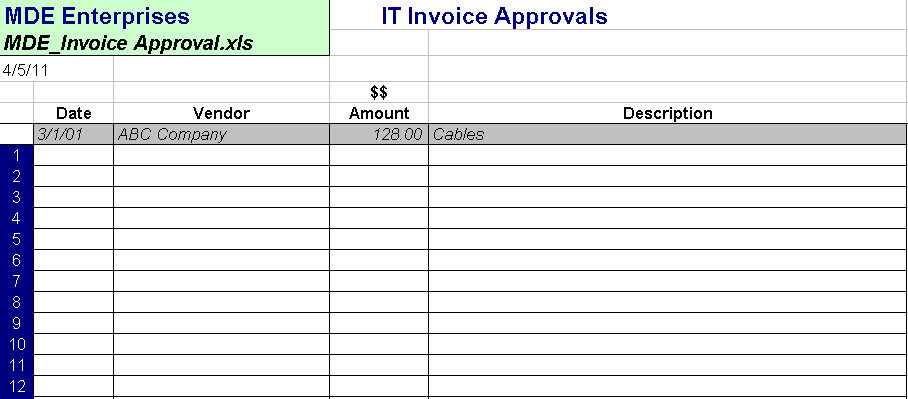
This used to occur to me all the time, , , until I got tired of it and created a simple Invoice Approvals Log. When I approve an invoice, my secretary or I update this log so I can determine quickly if I’ve received a duplicate invoice later on.

Saves time, improves your productivity, , ,  and reduces “hassle factor”.